XML Import: Understanding Web Services
| < Day Day Up > |
| In addition to FileMaker's capability of exporting data via XML, either with or without an XSL stylesheet, FileMaker also has the capability of working with remote XML data sources, often referred to under the umbrella term "Web services." This is a capability that was added in FileMaker version 6 and is a significant addition to FileMaker's XML strengths. Using this capability, you can bring data from a variety of remote data sources directly into FileMaker, as we'll discuss in the sections that follow. FileMaker's XML Import CapabilityThe concept of XML exporting ought to seem fairly straightforward: Take some FileMaker data, pick an XML "grammar" for the export, and optionally apply an XSL stylesheet to transform the XML data as it heads out. But what about the concept of importing XML? What does this mean, and what is it good for? Stated simply, FileMaker can import any XML data that conforms to the FMPXML grammar. FileMaker reads the <METADATA> section of the document to determine the field structure, and reads the individual row and column data to figure out the actual data values that should be imported. To demonstrate this for yourself, find some suitable FileMaker data and export it as XML, using the FMPXMLRESULT grammar, without applying any XSL stylesheet to it. Starting from the same file and table, go back and re-import the file you just exported, treating it as an XML data source ”you'll see that FileMaker correctly reads the field structure and data from the XML document. Or, to test it in a different way, drag the new XML file onto the FileMaker application icon to "open" it. FileMaker should, without intervention from you (except for choosing a file name for the new file), open the XML file, read its structure, and create a new FileMaker file with a new table containing the correct fields, field types, and data values. NOTE One of the things developers have often wanted from FileMaker is a way to save a file's field structure as a text document, then use that text document to move the field structure somewhere else and re-create it. The capability to open an XML document and have it create a new FileMaker file might seem to make that possible, but there are caveats. The XML export doesn't preserve important information about your field structure, such as the definitions of calculation fields and summary fields. In the XML output, these fields are treated simply as their underlying data types, so a calculation that produces a number is treated in the XML metadata as a simple number field, without preserving the calculation's definition. So, FileMaker can import any XML data file that conforms to the FMPXMLRESULT grammar. Additionally, as you might have seen, this XML data stream can come from a local file, or it can come from a file available over HTTP ”in other words, a file from somewhere on the Web. This is where things get interesting, so let's delve further into the concept of a Web service.
NOTE As was the case with using remote stylesheets for XML export, FileMaker is also unable to work with data from an HTTPS data source when importing XML. If the data source from which you want to import is available only over secure HTTP, FileMaker isn't able to import it. Web Services ReviewedWe started this chapter by saying that "Web services" was a term referring to the sharing of data between computers via the Web's HTTP protocol, and that the data was often exchanged in XML format. Imagine you have two computer systems that need to exchange data. One is a large student information system that resides on a mainframe computer. The other is a system that generates complex forms for each student, to conform to governmental guidelines. Periodically, the forms application needs to consult the mainframe application to see whether any new students have been added, so that those students are accounted for in the forms system. There are many ways to make this kind of sharing happen. The mainframe programmer could export a file of new students every night, in some plain text format, and the forms programmers could write routines to grab the file and process it in some way. Or the mainframe could be made accessible via a technology such as ODBC, and the forms application could be configured to make ODBC requests to the mainframe. Another option, though, is to make it possible to send queries to the mainframe via HTTP, and get XML back in response. This is simpler than either of the previous scenarios: It doesn't require any complicated processes like writing and then fetching an actual file, nor does it involve the client-side complexities of ODBC transactions. It uses the widely (almost universally ) available HTTP protocol, and requires only that one side be able to generate a form of XML, and the other side be able to read it. Don't get us wrong ”Web services transactions can still be plenty complicated, but standards such as XML and HTTP make them less complex than they might be otherwise . Refer back to Figure 22.1 for a sketch of a possible Web services transaction. Let's say that, in our example, the forms application was written in FileMaker. And let's assume the mainframe student information system was accessible as a Web service, meaning that you could send a request via HTTP and get back a listing of new students in some XML format (that would likely not conform to the FMPXMLRESULT grammar). To import that data into FileMaker, you could perform an XML import, use the URL of the student information system as the data source, and apply an XSL stylesheet that would transform the "new student XML" into FMPXMLRESULT . The concept is sketched out in Figure 22.7. To retrieve student data from this mainframe, make a request to a URL that's able to produce an XML representation of the student, and then bring that XML back through a stylesheet into FileMaker. Figure 22.7. This is a graphical representation of the process of retrieving data via XML.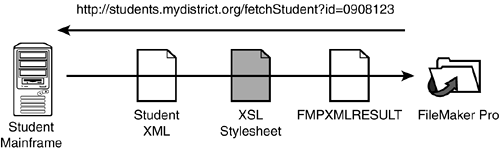 A Stylesheet for XML ImportFor the sake of argument, assume that we have an XML data stream representing new students. (We use the term "data stream" rather than "file" as a reminder that the data need not come from a file, but can also come from a networked data source over HTTP). Listing 22.6 shows what that data might look like. Listing 22.6. Sample XML File Containing Data<?xml version="1.0" encoding="UTF-8"?> <newStudentSet count="4" date="11/1/2003"> <student > <nameFirst>Jonathan</nameFirst> <nameLast>Middlesex</nameLast> <nameMiddle>A</nameMiddle> <address>123 Oak Way</address> <city>Bensenville</city> <state>AK</state> <zip>09080-1001</zip> <county>Hightower</county> <district>Sparta</district> <school>Bensenville Junior High</school> <grade>4</grade> <parents> <parent> <nameFirst>Sharon</nameFirst> <nameLast>Middlesex</nameLast> <relationship>Parent</relationship> </parent> <parent> <nameFirst>Martin</nameFirst> <nameLast>Middlesex</nameLast> <relationship>Parent</relationship> </parent> </parents> </student> </newStudentSet> It's a simple enough structure, consisting of a <newStudentSet> filled with one or more <student> elements, where each <student> has a number of fields associated with it. The only wrinkle has to do with parent information: Clearly a student can have more than one parent, so each student contains a <parents> element with one or more <parent> elements inside it. We'll have to think about what to do with that. That's the XML file that the hypothetical data source can put out. But remember, for FileMaker to import this XML data, it has to be structured in the FMPXMLRESULT format. Such a structure would look like Listing 22.7. Listing 22.7. Data in the Importable FMPXMLRESULT Format<?xml version="1.0" encoding="UTF-8" ?> <FMPXMLRESULT xmlns="http://www.filemaker.com/fmpxmlresult"> <ERRORCODE>0</ERRORCODE> <PRODUCT BUILD="11-05-2003" NAME="FileMaker Pro" VERSION="7.0v1"/> <DATABASE DATEFORMAT="M/d/yyyy" LAYOUT="" NAME="Student.fp7" RECORDS="1" TIMEFORMAT="h:mm:ss a"/> <METADATA> <FIELD EMPTYOK="YES" MAXREPEAT="1" NAME="NameFirst" TYPE="TEXT"/> <FIELD EMPTYOK="YES" MAXREPEAT="1" NAME="NameLast" TYPE="TEXT"/> <FIELD EMPTYOK="YES" MAXREPEAT="1" NAME="NameMiddle" TYPE="TEXT"/> <FIELD EMPTYOK="YES" MAXREPEAT="1" NAME="Address" TYPE="TEXT"/> <FIELD EMPTYOK="YES" MAXREPEAT="1" NAME="City" TYPE="TEXT"/> <FIELD EMPTYOK="YES" MAXREPEAT="1" NAME="State" TYPE="TEXT"/> <FIELD EMPTYOK="YES" MAXREPEAT="1" NAME="Zip" TYPE="TEXT"/> <FIELD EMPTYOK="YES" MAXREPEAT="1" NAME="County" TYPE="TEXT"/> <FIELD EMPTYOK="YES" MAXREPEAT="1" NAME="District" TYPE="TEXT"/> <FIELD EMPTYOK="YES" MAXREPEAT="1" NAME="School" TYPE="TEXT"/> <FIELD EMPTYOK="YES" MAXREPEAT="1" NAME="Parents" TYPE="TEXT"/> </METADATA> <RESULTSET FOUND="1"> <ROW MOD RECORD> <COL><DATA>Jonathan</DATA></COL> <COL><DATA>Middlesex</DATA></COL> <COL><DATA>A</DATA></COL> <COL><DATA>123 Oak Way</DATA></COL> <COL><DATA>Bensenville</DATA></COL> <COL><DATA>AK</DATA></COL> <COL><DATA>09080-1001</DATA></COL> <COL><DATA>Hightower</DATA></COL> <COL><DATA>Sparta</DATA></COL> <COL><DATA>Bensenville Junior High</DATA></COL> <COL><DATA>Sharon Middlesex(Parent), Martin Middlesex (Parent)</DATA></COL> </ROW> </RESULTSET> </FMPXMLRESULT> Web services scattered through the ether are unlikely to emit XML that conforms to the FMPXMLRESULT grammar. So before bringing that data into FileMaker, we need to transform it into FMPXMLRESULT . And the tool for doing that is, of course, an XSL stylesheet. This is exactly the reason FileMaker lets you apply a stylesheet to inbound XML (in other words, on import). Odds are that the XML data source does not produce the FMPXMLRESULT grammar directly, so it's our job to translate the source XML into the form that FileMaker can read. We need an XSL stylesheetto make that transformation. The stylesheet needs to make sure to output all the initial information found in an FMPXMLRESULT file, such as database name, and all the metadata describing the field structure. Then, in the context of a <RESULTSET> , we need to output the actual student data. Listing 22.8 shows what the stylesheet for transforming student data prior to importing it into FileMaker should look like. Listing 22.8. An XSL Stylesheet <?xml version="1.0" encoding="UTF-8" ?> <xsl:stylesheet version="1.0" xmlns:xsl="http://www.w3.org/1999/XSL/Transform"> <xsl:output indent="yes" method="xml"/> <xsl:template match="newStudentSet"> <FMPXMLRESULT xmlns="http://www.filemaker.com/fmpxmlresult"> <ERRORCODE>0</ERRORCODE> <PRODUCT BUILD="11-05-2003" NAME="FileMaker Pro" VERSION="7.0v1"/> <DATABASE DATEFORMAT="M/d/yyyy" LAYOUT="" NAME="Student.fp7" RECORDS="{@count}" We won't spend as much time dissecting this stylesheet as we did with the last one. The mechanics should be pretty easy to discern. After the usual declarations, we declare a template that matches to the source document's <newStudentSet> element. (It's the root element, so there will only be one.) That's the occasion to output all the header-type information particular to the FMPXMLRESULT grammar, including the field structure metadata. We then go on to output a <RESULTSET>...</RESULTSET> tag pair, and do some more work inside of that. Within the resultset tags, we use an <xsl:for-each> to loop over all the <student> elements inside the <newStudentSet> . For each one, we output the corresponding <ROW> element. Each <ROW> , in turn , is a collection of <COL><DATA>...</DATA></COL> tag pairs. We out- put one of these for each inbound field, and insert the correct data into it, using <xsl:value-of> . The only thing at all noteworthy is the treatment of the parent information. The inbound student information is not completely "flat." The nested <parents> element almost implies a new table, in relational database terms. We could choose to handle it that way, and bring the parent information into a separate table, but we chose instead to "flatten" the parent data into a single field. This was more to illustrate a particular technique than because it's actually a good idea to do that. Whether it really is a good idea depends on the application. In any case, the technique here is to loop over the individual <parent> elements, using <xsl:for-each> . For each parent, we output the first name, last name, and the family relationship in parentheses. You might notice that we use the <xsl:text> command liberally, to output the spaces between words and the parentheses around the relationship. The reason for this is that XML treats certain characters , such as white space, specially. White space, in particular, XML ignores. Wrapping it in an <xsl:text> tag ensures that the processor treats it as real white space and outputs it as such. The last wrinkle here is that we want the parent list to be comma separated. So we write a little piece of logic that requests that a comma and its following white space be output, but only if the current <parent> element is not the last one in the group . The check is performed with <xsl:if> . As you can see, the stylesheet isn't too complicated. The hardest part is getting all the FMPXMLRESULT -specific elements and attributes correctly included. TIP It's irritating , if not impossible , to remember all the specifications for the FMPXMLRESULT grammar every time you need to write a new import stylesheet. To save yourself the trouble, first make sure the FileMaker table you're using to receive the data is correctly built and has the right structure. Then add a sample record or two to the table, and export the table as FMPXMLRESULT . The result is exactly what any inbound XML needs to look like (well, the data itself is likely to be different!). You should be able to copy large chunks of this XML output and paste them into your stylesheet to get yourself started. After you've written the stylesheet, you would apply it in the course of the import. If everything goes smoothly, the stylesheet is successfully applied, it emits pure FMPXML , and this is cleanly imported into FileMaker.
You might need to do a bit of work to make sure the fields get lined up correctly on import. The easiest way to assure this is to write your XSL stylesheet in such a way that the field names in the resulting <METADATA> section of the XML are exact matches for your FileMaker field names. If that's the case, you need to specify only that fields should import based on "matching names." If for any reason there's a discrepancy between the field names that are used in the resultant FMPXMLRESULT , and the field names in the target table, you have to specify the import matching by hand.
|

 For more information on ODBC,
  TIMEFORMAT="h:mm:ss a"/> <METADATA> <FIELD EMPTYOK="YES" MAXREPEAT="1" NAME="NameFirst" TYPE="TEXT"/> <FIELD EMPTYOK="YES" MAXREPEAT="1" NAME="NameLast" TYPE="TEXT"/> <FIELD EMPTYOK="YES" MAXREPEAT="1" NAME="NameMiddle" TYPE="TEXT"/> <FIELD EMPTYOK="YES" MAXREPEAT="1" NAME="Address" TYPE="TEXT"/> <FIELD EMPTYOK="YES" MAXREPEAT="1" NAME="City" TYPE="TEXT"/> <FIELD EMPTYOK="YES" MAXREPEAT="1" NAME="State" TYPE="TEXT"/> <FIELD EMPTYOK="YES" MAXREPEAT="1" NAME="Zip" TYPE="TEXT"/> <FIELD EMPTYOK="YES" MAXREPEAT="1" NAME="County" TYPE="TEXT"/> <FIELD EMPTYOK="YES" MAXREPEAT="1" NAME="District" TYPE="TEXT"/> <FIELD EMPTYOK="YES" MAXREPEAT="1" NAME="School" TYPE="TEXT"/> <FIELD EMPTYOK="YES" MAXREPEAT="1" NAME="Grade" TYPE="TEXT"/> <FIELD EMPTYOK="YES" MAXREPEAT="1" NAME="Parents" TYPE="TEXT"/> </METADATA> <RESULTSET FOUND="{@count}"> <xsl:for-each select="student"> <ROW MOD RECORD> <COL><DATA><xsl:value-of select="nameFirst"/></DATA></COL> <COL><DATA><xsl:value-of select="nameLast"/></DATA></COL> <COL><DATA><xsl:value-of select="nameMiddle"/></DATA></COL> <COL><DATA><xsl:value-of select="address"/></DATA></COL> <COL><DATA><xsl:value-of select="city"/></DATA></COL> <COL><DATA><xsl:value-of select="state"/></DATA></COL> <COL><DATA><xsl:value-of select="zip"/></DATA></COL> <COL><DATA><xsl:value-of select="county"/></DATA></COL> <COL><DATA><xsl:value-of select="district"/></DATA></COL> <COL><DATA><xsl:value-of select="school"/></DATA></COL> <COL><DATA><xsl:value-of select="grade"/></DATA></COL> <COL><DATA><xsl:for-each select="parents/parent"> <xsl:value-of select="nameFirst"/> <xsl:text> </xsl:text> <xsl:value-of select="nameLast"/> <xsl:text> (</xsl:text> <xsl:value-of select="relationship"/> <xsl:text>)</xsl:text> <xsl:if test="position() != last()"> <xsl:text>, </xsl:text> </xsl:if> </xsl:for-each></DATA></COL> </ROW> </xsl:for-each> </RESULTSET> </FMPXMLRESULT> </xsl:template> </xsl:stylesheet>
 | < Day Day Up > |
