TIP 105: Working with PDF Comments
| You can add, edit, and delete PDF comments that interchange seamlessly with other GoLive, Acrobat, and Adobe Reader users. PDF comments are a great way to document a process, give feedback, and share ideas right inside the PDF.
Adding CommentsOpen a PDF in GoLive and select the Comment tool Figure 105. Click with the Comment tool and add a note in the Inspector.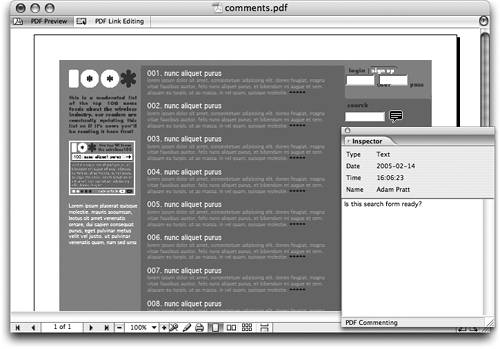 Editing CommentsYou can view just about any kind of PDF comment in GoLive and you can edit Note comments using the Inspector palette. Select the comment in the PDF and edit the note in the Inspector. Notice how the time and date are updated to reflect your changes. Deleting CommentsTo delete a note comment, just select it in GoLive and press the Delete key. If you make a mistake, you can always use the Multiple Undo feature by pressing Command-Z (Mac) or Control-Z (Windows). |
 in the toolbar. Click in the PDF with the Comment tool to create a new comment anywhere in the document. Make sure the comment is selected and write a note in the Inspector palette (
EAN: N/A
Pages: 301