Application Domains and Threads
|
| One aspect of how the isolation provided by an application domain differs from that provided by a process is in the treatment of operating system threads. You must consider two primary differences when designing your application to use domains most effectively. First, threads are not confined to a particular application domain. In the Windows process model, all threads are specific to a process. A given thread cannot begin execution in one process and continue execution in another process. This is not true in the application domain model. Threads are free to wander between domains as necessary. The CLR does the proper checks and data structure adjustments at the domain boundaries to ensure that information associated with the thread that is intended for use only within a single domain doesn't leak into the other domain, thereby affecting its behavior. For example, you can store data on a thread using the Alloc(Named)DataSlot methods on the System.Threading.Thread object. These methods and the related methods to retrieve the data provide a managed implementation of thread local storage (TLS). Whenever a domain boundary is crossed, the CLR ensures the managed TLS is removed from the thread and saved in the application domain data structures so that the thread appears "clean" when it enters the new domain. In contrast, some thread-related state should flow between domains. The primary example of this type of state is the data that describes the call that is being made across domains. This data is held in the CLR's execution context and includes everything from the call stack, to the current Windows token, to synchronization information. For more information on the execution context, see the .NET Framework 2.0 SDK. The fact that threads wander between application domains does not mean, however, that a given domain can have only one thread running in it at a given time. Just as with a Win32 process, several threads can be running in a single application domain simultaneously. The second difference in the way threads are treated in the application domain model is that, unlike when you create a new process, creating a new application domain does not result in the creation of a new thread. When you create a new domain and transfer control into it by calling a method on a type in that domain, execution continues on the same thread on which the domain was created. To see how this works, let's return to the implementation of BoatRaceDomainManager.EnterBoat that we discussed in the previous section. As shown in the following code, the thread on which we're running switches into the new domain when we invoke the InitializeNewBoat method on the domain manager running in that domain.
The high-level relationship between threads and application domains is shown in Figure 5-8. Figure 5-8. The relationship between threads and application domains The .NET Framework provides some static members you can use to obtain the current relationship between threads and application domains running in a process. For example, System. AppDomain.CurrentDomain and System.Threading.Thread.GetDomain both return the application domain in which the thread from the calling domain is executing as shown in the following code snippet: using System; using System.Threading; // Both return the domain in which the current thread is executing. AppDomain currentDomain1 = AppDomain.CurrentDomain(); AppDomain currentDomain2 = Thread.GetDomain(); If you need to obtain the object that represents the current thread running in a domain, use the System.Threading.Thread.CurrentThread method. The System.AppDomain class also has a method called GetCurrentThreadId that returns an identifier for the current thread running in the calling domain. The relationship of this value to the thread identifiers provided in Win32 is undefined and can vary between different versions of the CLR. As a result, it's not safe to assume a direct mapping between these two concepts of thread identification. The CLR Thread PoolIf you're writing a multithreaded managed application, it's much easier to achieve high performance and scalability by using the CLR thread pool instead of creating, managing, and destroying threads yourself. There are a few reasons why this is the case. First, creating and destroying threads are expensive. By reusing the threads in the pool, you're able to minimize drastically the number of times a new thread is created. Second, creating the ideal numbers of threads needed to accomplish a given workload requires a significant amount of tuning to get right. If too many threads are created, time is wasted in excessive context switches between threads. If too few threads are created, the amount of time spent waiting for an available thread can adversely affect performance. The CLR thread pool has been tuned over several years of experience building scalable managed applications. The number of threads in the CLR thread pool is optimized on a case-by-case basis based on the performance characteristics of the hardware on which you're running and the workload in the process. The thread pool injects new threads into the process when it determines that doing so increases the overall throughput of the work items currently queued to the pool. Experience has shown that most applications can achieve better throughput by leveraging the existing thread pool mechanism instead of dealing with thread management themselves. The CLR thread pool is represented by the System.Threading.ThreadPool class. The managed thread pool is similar in spirit and functionality to the thread pool provided by Win32. In fact, if you're familiar with the Win32 thread pool APIs, you'll feel comfortable with the members of the ThreadPool class in no time. There is one managed thread pool per process. Because threads aren't confined to a particular application domain, the thread pool doesn't need to be either. This enables the CLR to optimize work across the entire process for greater overall performance. It's very common for a given thread pool thread to service requests for multiple application domains. Whenever a thread is returned to the pool, its state is reset to avoid unintended leaks between domains. Dispatching requests to the thread pool is easy. System.Threading.ThreadPool includes a member called QueueUserWorkItem that takes a delegate. This delegate is queued to the thread pool and executed when a thread becomes available. Multithread applications that use several application domains often follow a common pattern: first, a request comes in to execute some code. This request varies completely by scenario. For example, in SQL Server the request might result from building a plan to execute a query containing managed code. In the Internet Explorer case, the request might take the form of creating a new instance of a managed control on a Web page. Second, the application determines in which domain the request should be serviced. Depending on how your process is partitioned into multiple application domains, you can choose to execute your new request in an existing domain, or you can choose to create a new one. Next, an instance of the object representing the new request is created in the chosen domain. Finally, a delegate is queued to the thread that calls a method on the object to execute the request. To illustrate this technique, let's return again to our implementation of BoatRaceDomainManager.EnterBoat. This time, let's use the CLR thread pool to initialize our new boat asynchronously: using System; using System.Threading; namespace BoatRaceHostRuntime { // Some code omitted for clarity. // This struct is used to pass request data to the delegate that // will be executed by the thread pool. struct ThreadData { public BoatRaceDomainManager domainManager; public string assemblyFileName; public string boatTypeName; }; public class BoatRaceDomainManager : AppDomainManager, IBoatRaceDomainManager { // This is the method that gets queued to the thread pool. static void RunAsync(Object state) { ThreadData td = (ThreadData)state; // Get the domain manager object out of the thread state // object and call its InitializeNewBoat method. td.domainManager.InitializeNewBoat(td.assemblyFileName, td.boatTypeName); } public Int32 EnterBoat(string assemblyFileName, string boatTypeName) { // Create a new domain in which to load the boat. AppDomain ad = AppDomain.CreateDomain(boatTypeName, null, null); BoatRaceDomainManager adManager = (BoatRaceDomainManager)ad.DomainManager; // Gather the domain manager and the name of the assembly // and type into an object to pass to thread pool. ThreadData threadData = new ThreadData(); threadData.domainManager = adManager; threadData.assemblyFileName = assemblyFileName; threadData.boatTypeName = boatTypeName; // Queue a work item to the thread pool. ThreadPool.QueueUserWorkItem(new WaitCallback(RunAsync), threadData); return ad.Id; } } }In this version of the implementation, we begin by declaring a structure called ThreadData that we'll use to pass the data to the new thread that we'll need to make the call. This data includes the application domain manager for the new domain and the name of the assembly and type containing the implementation of the boat. Next, we need to define a delegate to act as our thread proc. The RunAsync delegate takes a ThreadData structure, pulls out the application domain manager, and calls its InitializeNewBoat method. Now, after we create the new domain for the boat, we get its domain manager as before, but this time instead of calling InitializeNewBoat directly, we save the data needed to make the call into an instance of the ThreadData structure and invoke RunAsync asynchronously by queuing a request to the thread pool using ThreadPool.QueueUserWorkItem. Clearly, there is much more to the CLR thread pool than I've described here. For a more complete description, see the .NET Framework SDK reference material for System.Threading.ThreadPool. |
 type names to the new // domain so the assembly can be loaded. adManager.InitializeNewBoat(assemblyFileName, boatTypeName); return ad.Id; } }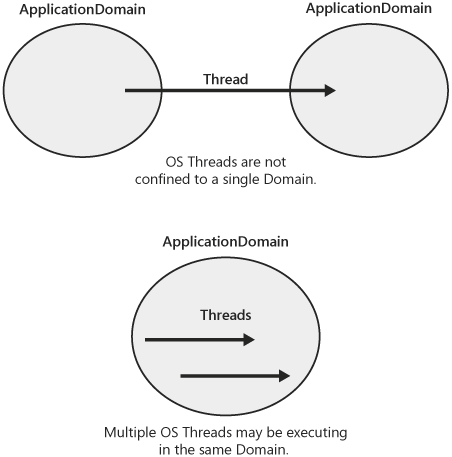
|

EAN: N/A
Pages: 119