Application Domain Structure
|
| Internally, application domains are implemented as a set of data structures and runtime behavior maintained by the CLR. The application domain data structures contain many of the constructs you'd expect after reading the previous section, including a list of assemblies, security policy information, and so on. The elements of the application domain data structure, the fact that memory isolation can be guaranteed through type safety, and the additional checks performed by the CLR for threading-related activities are what enables an application domain to isolate multiple applications in a single process. A graphical view of a CLR process and the corresponding application domain data structures are shown in Figure 5-2. Figure 5-2. The internal structure of a CLR process with multiple application domains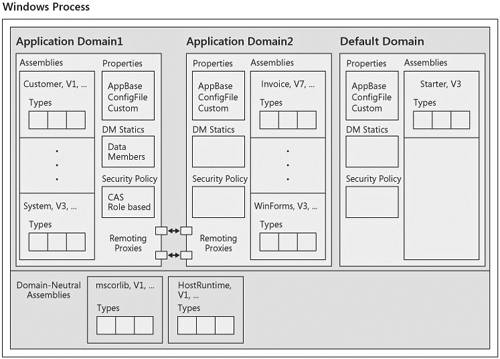 As shown in the figure, each application domain holds several elements related to isolation. These include the following:
These elements of the application domain data structures are described in the following sections. Assembly ListEvery assembly is loaded within the context of an application domain. The CLR maintains a list of the loaded assemblies per domain. This list is used for many purposes, one of which is to enforce the visibility rules for types within an application domain. The assembly list contains both assemblies that are written as part of the application and those that are shipped by Microsoft as part of the .NET Framework platform. Security PolicyAs described, security policy can be customized per domain. This policy includes both CAS policy and policy for role-based authorization checks. Application Domain PropertiesEach application domain has a list of properties associated with it. These properties fall into two general categories: those properties that are natively understood by the CLR and those properties that are provided by the extensible application for its own use. The properties known to the CLR include the base directory in which to search for assemblies and the file containing the configuration data for the domain. Application domains can be customized in numerous ways by setting these properties. The subject of application domain customization is covered in Chapter 6. In addition to the properties known to the CLR, the application domain includes a general-purpose property bag for use by applications. The property bag is a simple name-object pair and can be used to store anything you need for quick access from any assembly within the domain. Statics for Domain-Neutral AssembliesWhen an assembly is loaded domain neutral, it logically is loaded into every application domain. I say logically because the assembly is physically loaded only once, yet the CLR maintains enough internal data to make it appear to each domain that it contains the assembly. For example, in Figure 5-2, both mscorlib and the assembly called HostRuntime are available to all three domains in the process. So, Application Domain1 really contains the Customer, System, mscorlib, and HostRuntime assemblies. A critical part of the data that is maintained in each domain for a domain-neutral assembly is a copy of each static data member or field defined in the assembly. As described earlier, this must be done to prevent static data from accidentally leaking between domains. When code in a particular domain accesses a static data member contained in a domain-neutral assembly, the CLR determines in which application domain the referencing code is running and maps that access to the appropriate copy of the static. Proxies for Remote CallsAll communication between application domains must go through well-known channels. In the CLR these channels are remoting proxies. The CLR maintains a proxy for every object that the application hands out of the domain. Calls coming into the domain are fed through proxies as well. These proxies are an essential part of the domain boundary, both to regulate access and to make sure that application domains are unloaded cleanly. After a domain is unloaded, the proxy maintained by the CLR has enough information to know that the object is it referring to has disappeared. As a result, an exception is thrown back to the caller. The Default Application DomainI've said that every assembly must be loaded into an application domain. However, it's likely that you've created at least one managed application in which you didn't think about application domains at all. In fact, the vast majority of programs are written this way. To handle this most common scenario, the CLR creates a default application domain every time a process is started. Unless you take specific steps to load an assembly into an application domain you've created yourself, all assemblies end up in the default domain. For example, when you run a managed executable from the command line, the assembly containing the entry point is loaded by the CLR into the default domain. Furthermore, all assemblies statically referenced by that executable are loaded into the default domain as well. The default domain is also used in COM interop scenarios. By default, all managed assemblies that are loaded into a process through COM are loaded into the default domain as well. The default application domain is very handy in a wide variety of scenarios. However, you should be aware of a key limitation if you are writing an extensible application: the default domain cannot be unloaded from the process before the process is shut down. This can be a hindrance if your architecture requires you to unload application domains during the process lifetime. For this reason, most extensible applications don't use the default domain to run add-ins. If they did, there'd be no way to ever unload it. Note
The AppDomainViewer ToolIt's relatively easy to build a tool to help visualize the relationship among processes, application domains, and assemblies on a running system. The AppDomainViewer tool (appdomainviewer.exe) included with this book shows this relationship in a graphical tree structure. AppDomainViewer is an executable that, when started, enumerates all the processes on the system that are currently running managed code. For each process, AppDomainViewer first enumerates the application domains within the process and then enumerates the assemblies loaded into each application domain. Figure 5-3 shows the AppDomainViewer running on a machine that runs Microsoft Visual Studio 2005 and a number of purely managed executables. Figure 5-3. The AppDomainViewer tool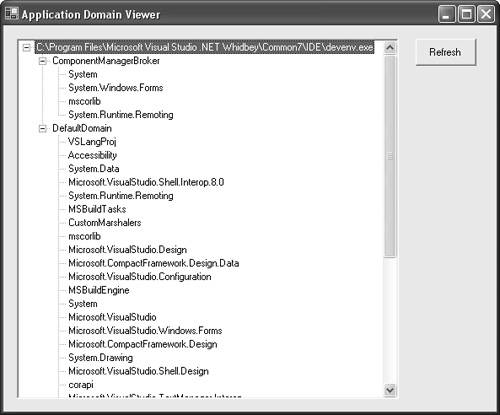 If you expand the tree view, the first level contains the application domains in the process. Notice that every process has at least one application domain. This is the default domain. When an application domain is created, it is assigned a friendly textual name. This is the name displayed in the user interface of AppDomainViewer. In most cases, the name of the default domain is simply Default Domain; however, applications can change this. I discuss how this is done in Chapter 6. Expanding an application domain in the tree view shows the set of all assemblies loaded into that domain. Looking at the assemblies under each application domain gives me a good chance to expand on the concept of domain-neutral code touched on briefly earlier. Recall that domain-neutral assemblies are loaded once in the process and their code is shared across all application domains to reduce the overall working set of the process. However, from the programmer's point of view, these assemblies appear in every application domain (recall this is part of application domain isolation). In Figure 5-3, the assemblies mscorlib, System, and so on are loaded domain neutral. Even though these assemblies are loaded only once, they show up under every applicationdomain in the tree view. I cover domain-neutral code in more detail in Chapter 9. The AppDomainViewer uses the CLR debugging interfaces to get application domain and assembly information out of running processes. It might not occur to you to use the debugging interfaces for this purpose, but it's the only technique the CLR provides for inspecting processes other than the one in which you are running. Most of the functionality provided by the debugging interfaces is aimed at debugging, of course, but a set of interfaces referred to as the publishing interfaces can be used to look inside other processes. The interfaces (ICorPublish, ICorPublishProcess, ICorPublishAppDomain, and a few others) are all unmanaged COM interfaces. However, the .NET Framework 2.0 software development kit (SDK) includes a set of managed wrappers around these interfaces. The AppDomainViewer is written in managed code and accesses the CLR debugging system through these managed wrappers as shown in Figure 5-4. Figure 5-4. AppDomainViewer architecture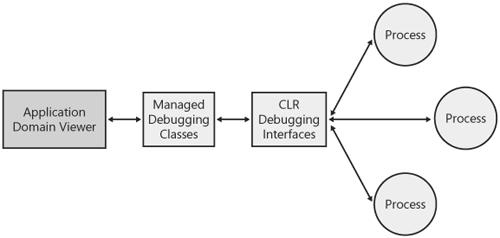 Listing 5-1 shows the source for the AppDomainViewer. I've omitted some of the boilerplate Microsoft Windows Forms code for clarity. The sample is generally straightforward, but there is one twist worth discussing. As described, the CLR debugging interfaces are COM interfaces. The underlying objects that implement these interfaces must run in a multithreaded apartment (MTA). However, the Windows Forms code used to display the user interface must run in a single-threaded apartment. To get around these conflicting requirements, I start an MTA thread whenever I need to call the debugging interfaces, then use the Windows Forms control method Begin.Invoke to marshal the data back to the user interface thread. You can examine this in the code for the RefreshTreeView method and look to see where it's called. Listing 5-1. AppDomainViewer.csusing System; using System.IO; using System.Drawing; using System.Collections; using System.ComponentModel; using System.Windows.Forms; using System.Data; using System.Threading; // Include the namespaces for the managed wrappers around // the CLR debugging interfaces. using Microsoft.Debugging.MdbgEngine; using Microsoft.Debugging.CorPublish; using Microsoft.Debugging.CorDebug; namespace AppDomainViewer { public class ADView : System.Windows.Forms.Form { // Windows Forms control definitions omitted... // The background thread used to call the debugging interfaces private Thread m_corPubThread; // The list of tree nodes to display in the UI. This list gets populated // in RefreshTreeView. private ArrayList m_rootNodes = new ArrayList(); // More Windows Forms setup code omitted... [STAThread] static void Main() { Application.Run(new ADView()); } private void ADView_Load(object sender, System.EventArgs e) { // Populate the tree view when the application starts. RefreshTreeView(); } private void btnRefresh_Click(object sender, System.EventArgs e) { // Populate the tree view whenever the Refresh Button is clicked. RefreshTreeView(); } private void RefreshTreeView() { // The CLR debugging interfaces must be called from an MTA thread, but // we're currently in an STA. Start a new MTA thread from which to call // the debugging interfaces. m_corPubThread = new Thread(new ThreadStart(ThreadProc)); m_corPubThread.IsBackground = true; m_corPubThread.ApartmentState = ApartmentState.MTA; m_corPubThread.Start(); } public void ThreadProc() { try { MethodInvoker mi = new MethodInvoker(this.UpdateProgress); // Create new instances of the managed debugging objects. CorPublish cp = new CorPublish(); MDbgEngine dbg = new MDbgEngine(); m_rootNodes.Clear(); // Enumerate the processes on the machine that are running // managed code. foreach(CorPublishProcess cpp in cp.EnumProcesses()) { // Skip this processdon't display information about the // AppDomainViewer itself. if(System.Diagnostics.Process.GetCurrentProcess().Id!= cpp.ProcessId) { // Create a node in the tree for the process. TreeNode procNode = new TreeNode(cpp.DisplayName); // Enumerate the domains within the process. foreach(CorPublishAppDomain cpad in cpp.EnumAppDomains()) { // Create a node for the domain. TreeNode domainNode = new TreeNode(cpad.Name); // We must actually attach to the process // to see information about the assemblies. dbg.Attach(cpp.ProcessId); try { // The debugging interfaces (at least for this task) are // centered on modules rather than assemblies. // So we enumerate the modules and find out which // assemblies they belong to. In the general case, // assemblies can contain multiple modules. // This code is simpler, however. It assumes one // module per assembly, which might yield incorrect // results in some cases. foreach(MDbgModule m in dbg.Processes.Active.Modules) { CorAssembly ca = m.CorModule.Assembly; // Make sure we include only assemblies in this // domain. if (ca.AppDomain.Id == cpad.ID) { // Add a node for the assembly under the // domain node. domainNode.Nodes.Add(new TreeNode( Path.GetFileNameWithoutExtension(ca.Name))); } } } finally { // Detach from the process and move on to the next one. dbg.Processes.Active.Detach().WaitOne(); } // Add the domain node under the process node. procNode.Nodes.Add(domainNode); } m_rootNodes.Add(procNode); } } // "Notify" the tree view control back on the UI thread that new // data is available. this.BeginInvoke(mi); } //Thrown when the thread is interrupted by the main thread- // exiting the loop catch (ThreadInterruptedException) { //Simply exit.... } catch (Exception) { } } // This method is called from the MTA thread when new data is // available. private void UpdateProgress() { // Clear the tree, enumerate through the nodes of the array, // and add them to the tree. Each of the top-level nodes represents // a process, with nested nodes for domains and assemblies. // m_rootNodes is constructed in RefreshTreeView. treeView.Nodes.Clear(); foreach(TreeNode node in m_rootNodes) { treeView.Nodes.Add(node); } } } } |

|

EAN: N/A
Pages: 119