Aligning Strings with LSet and RSet
Use the LSet and RSet statements to left-justify and right-justify strings into the space taken by another string. This is useful, for example, to create column headings that are left or right justified with leading or trailing spaces. The RSet and LSet functions use the same syntax.
LSet string_1 = expression RSet string_1 = expression
The string on the left-hand side can contain any data as long as it is the length that you want. The right-hand side must evaluate to a string; that string will be displayed in the space defined by the length of the left-hand string. Unlike the behavior for many functions in OOo Basic, the expression is not automatically converted to a string.
Dim s As String 'String variable to contain the result s = String(10, "*") 'The result is 10 characters wide RSet s = CStr(1.23) 'The number is not automatically converted to a string Print & s '$ 1.23
The important thing about the string on the left is its length-the width of the field in which the value of interest will be displayed. The easiest way to get a string of a specified length is to use the String function. The character that you use is not important because all of the extra characters in the final result are replaced with spaces.
Dim s As String 'String variable to contain the result s = String(10, "X") 'The result is 10 characters wide LSet s = CStr(1.23) 'The number is not automatically converted to a string Print s & "%" '1.23 %
If the string on the left is shorter than the string expression on the right, the expression is truncated to fit. Both LSet and RSet chop characters from the end of the expression to make it fit within the defined string length.
Dim s As String 'String variable to contain the result s = String(4, "X") 'The result will be four characters wide LSet s = CStr(21.23)'Truncated on the right Print "$" s & "%" '.2% RSet s = CStr(21.23)'Truncated on the right Print "$" s & "%" '.2%
The code in Listing 5 demonstrates the behavior of the LSet and RSet commands. The results are displayed in Figure 2 .
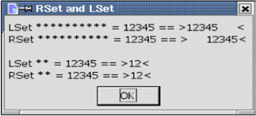
Figure 2: RSet and LSet justify strings.
 |
Sub ExampleLSetAndRSet Dim s As String Dim sVar As String Dim sTmp As String sTmp = "12345" sVar = String(10,"*") LSet sVar = sTmp s = "LSet " & String(10, "*") & " = " & STmp &_ " == >" & sVar & "<" & CHR$(10) sVar = String(10,"*") RSet sVar = sTmp s = s & "RSet " & String(10, "*") & " = " & STmp &_ " == >" & sVar & "<" & CHR$(10) & CHR$(10) sVar = String(2,"*") LSet sVar = sTmp s = s & "LSet " & String(2, "*") & " = " & STmp &_ " == >" & sVar & "<" & CHR$(10) sVar = String(2,"*") RSet sVar = sTmp s = s & "RSet " & String(2, "*") & " = " & STmp &_ " == >" & sVar & "<" & CHR$(10) MsgBox s, 0, "RSet and LSet" End Sub
| |
| Compatibility | In Visual Basic, LSet allows you to overlay data from one user -defined type with data from another. This takes all the bytes from one data structure and overlays them on top of one another, ignoring the underlying structure. In OOo Basic, LSet only manipulates strings. |

EAN: 2147483647
Pages: 203