UML 2.0 in a Nutshell
Authors: Pilone D. Pitman N.
Published year: 2005
Pages: 22-23/132
Buy this book on amazon.com >>

2.1. Classes

A class represents a group of things that have common state and behavior. You can think of a class as a blueprint for an object in an object-oriented system. In UML speak, a class is a kind of classifier . For example, Volkswagen, Toyota, and Ford are all cars , so you can represent them using a class named Car . Each specific type of car is an instance of that class, or an object . A class may represent a tangible and concrete concept, such as an invoice; it may be abstract, such as a document or a vehicle (as opposed to an invoice, or a motorcycle greater than 1000 cc), or it may represent an intangible concept such as a high-risk investment strategy.

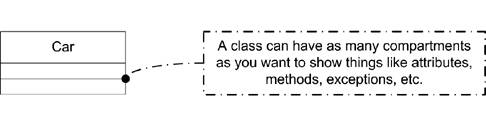
You represent a class with a rectangular box divided into compartments . A compartment is simply an area in the rectangle to write information. The first compartment holds the name of the class, the second holds attributes (see "Attributes"), and the third is used for operations (see "Operations"). You can hide any compartment of the class if that increases the readability of your diagram. When reading a diagram, you can make no assumptions about a missing compartment; it doesn't mean it is empty. You may add compartments to a class to show additional information, such as exceptions or events, though this is outside of the typical notation.

UML suggests that the class name:

  • Start with a capital letter

  • Be centered in the top compartment

  • Be written in a boldface font

  • Be written in italics if the class is abstract (see "Abstract Classes")

Figure 2-1 shows a simple class.

Figure 2-1. Simple class representation
2.1.1. Objects

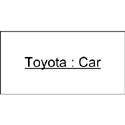
An object is an instance of a class. For example, you may have several instances of a class named Car : one two-door red car, one four-door blue car, and one hatchback green car. Each instance of Car is an object and may be given its own name, though it is common to see unnamed, or anonymous, objects on object diagrams. Typically you show the name of the object followed by a colon followed by its type (i.e., class). You show that this is an instance of a class by underlining the name and type. Figure 2-2 shows an instance of a class Car named Toyota . Note that in this figure, we have hidden the empty compartments.

Figure 2-2. An instance of Car


2.2. Attributes

Details of a class (the color of a car, the number of sides in a shape, etc.) are represented as attributes . Attributes can be simple primitive types (integers, floating-point numbers , etc.) or relationships to other, complex objects (see "Relationships").

An attribute can be shown using two different notations: inlined or relationships between classes. In addition, notation is available to show such things as multiplicity, uniqueness, and ordering. This section introduces both notations, and then describes the details of the attribute specification.

2.2.1. Inlined Attributes

You can list a class's attributes right in rectangle notation; these are typically called inlined attributes . There is no semantic difference between inlined attributes and attributes by relationship; it's simply a matter of how much detail you want to present (or, in the case of primitives like integers, how much detail you can present).

To represent an attribute within the body of a class, place the attribute in the second compartment of the class. UML refers to inlined attributes as attribute notation . Inlined attributes use the following notation:


visibility


/


name


:


type


multiplicity


=


default


{


property strings and constraints


}
 
visibility ::= {+-#~}
 
multiplicity ::= [


lower


..


upper


]

Figure 2-3 lists several attributes, demonstrating various aspects of attribute notation.

Figure 2-3. Example attributes

The syntax elements are:


visibility

Indicates the visibility of the attribute. Use the following symbols: +, -, #, or ~ for public , private , protected , or package , respectively (see "Visibility" in Chapter 3).


/

Indicates the attribute is derived . A derived attribute is simply one that can be computed from other attributes of the class. See "Derived Attributes."


name

Is a noun or short phrase naming the attribute. Typically the first letter is lowercase, and the first letter of each subsequent word is capitalized.


type

Is the type of the attribute as another classifier, typically a class, interface, or built-in type like int .


multiplicity

Specifies how many instances of the attribute's type are referenced by this attribute. Can be absent (meaning multiplicity of 1), a single integer, or a range of values specified between square brackets separated by "..". Use * as the upperbound to represent the upper limit or * on its own to mean zero or more. See "Multiplicity."


default

Is the default value of the attribute.


property strings

Is a collection of properties, or tags, that can be attached to attributes. These are typically context-specific and denote such things as ordering or uniqueness. They are surrounded by and separated by commas. See "Properties."


constraints

Are one or more restrictions placed on an attribute. They may be natural language or use a formal grammar such as the OCL. See "Constraints."

2.2.2. Attributes by Relationship

You may also represent attributes using the relationship notation. The relationship notation results in a larger class diagram, but it can provide greater detail for complex attribute types. The relationship notation also conveys exactly how the attribute is contained within a class (see "Relationships" for information on the types of relationships). For example, if you are modeling a Car , you can show that a car contains an Engine much more clearly using relationships than you can just by listing an attribute in the Car 's rectangle. However, showing the Car 's name by relationship is probably overkill because it is likely just a string.

To represent an attribute using relationships you use one of the association relationships between the class containing the attribute and the class that represents the attribute, as shown in Figure 2-4, which shows that the relationship between a car and its engine has a multiplicity of 1; a car has one engine.

Figure 2-4. Attribute using relationship notation

Yes, yes, as my editor pointed out, some cars like the Toyota Prius have two engines. Work with me here.


Relationship notation supports the same syntax as inlined notation, though the layout is slightly different. The attribute's visibility and name are placed near the relationship line. Don't use square brackets for multiplicity, but do place the multiplicity specification near the attribute's classifier.

Like multiplicity, you can place constraints on attributes (see "Constraints"). In relationship notation, you write constraints near the attribute's classifier along the relationship line. UML allows relationship notation to also express constraints between attributes, as shown in Figure 2-5.

Figure 2-5. Relationship notation using constraints

In Figure 2-5, the standard UML constraint xor shows that only automaticTransmission or manualTransmission can be set at any given time (exclusive or). You need to express this constraint in a note if the inlined attribute notation was used.

2.2.3. Derived Attributes

The derived notation, which is the leading forward slash ( / ), can be used as an indicator to the implementer that the attribute may not be strictly necessary. For example, let's say you modeled a bank account with a simple class named Account . This class stores the current balance as a floating-point number named balance . To keep track of whether this account is overdrawn, you add a boolean named overdrawn . Whether the account is overdrawn is really based on whether the balance is positive, not the boolean you added. You can indicate this to the developer by showing that overdrawn is a derived attribute, with its state based on balance . Figure 2-6 shows how balance and overdrawn can be represented using a note to convey the relationship.

Figure 2-6. Derived attribute

The UML specification notes that a derived attribute is typically readOnly , meaning a user may not modify the value. However, if a user is permitted to modify the value, the class is expected to update the source of the derived information appropriately.

2.2.4. Attribute Multiplicity

The multiplicity of an attribute specifies how many instances of the attribute's type are created when the owning class is instantiated . For example, our Car class will likely have four wheels, so the multiplicity of the wheel attribute is 4. If no multiplicity is specified, 1 is implied . Multiplicity can be a single integer, a list of integers separated by commas, or a range of values. When specifying a range of values, an infinite upper bound can be represented as an * ; if no lower bound is specified, an * means zero or more. The multiplicity value is shown between square brackets as a single integer or as two integers separated by two dots ( .. ). Figure 2-7 shows the various ways to represent an attribute's multiplicity.

Figure 2-7. Multiplicity examples

2.2.4.1. Ordering

An attribute with a multiplicity greater than 1 can be specified to be ordered . If the attribute is ordered, the elements must be stored sequentially. For example, you can specify that a list of names be stored alphabetically by marking the list as ordered. Exactly what it means for attributes to be stored sequentially typically depends on the attribute type. By default, attributes are not ordered. To mark an attribute as ordered, specify the property ordered after the attribute in braces, as shown in Figure 2-8.

Figure 2-8. Ordered multiplicity

2.2.4.2. Uniqueness

In addition to being ordered, an attribute with multiplicity greater than 1 may be required to be unique . If an attribute is required to be unique, each element of this attribute must be unique. By default, attributes with multiplicity greater than 1 are unique , meaning there can be no duplicates in the elements this attribute holds. For example, if a class held a list of voters and each person was allowed to vote only once, each element in the list would be unique. To make an attribute unique, place the keyword unique after the attribute in braces, as shown in Figure 2-9. To allow an attribute to hold duplicates of an object, simply use the property not unique .

Figure 2-9. Unique multiplicity

2.2.4.3. Collection types

The UML specification specifies a set of mappings from the various ordered and uniqueness properties to UML collection types. Table 2-1 shows the mappings from attribute properties to the UML collection type. Note that the collection types shown in Table 2-1 are UML mappings and may not map directly to classes in a target language.

Table 2-1. Collection types for attributes

Order

Uniqueness

Associated collection type

False

False

Bag

True

True

OrderedSet

False

True

Set

True

False

Sequence


For example, to show that a bank's clients should be represented using an OrderedSet , you can model the clients attribute as shown in Figure 2-10.

Figure 2-10. Example attribute stored in an OrderedSet

2.2.5. Attribute Properties

In addition to the properties associated with multiplicity, an attribute may have a number of properties set to convey additional information to the reader of the diagram. The common properties defined by UML are:


readOnly

Specifies that the attribute may not be modified once the initial value is set. This typically maps to a constant in a development language. UML doesn't specify when the initial value must be set, though if you specify the default value for an attribute it is considered the initial value and may not be changed.


union

Specifies that the attribute type is a union of the possible values for this attribute. Frequently this is used with the derived property to indicate that an attribute is a derived union of another set of attributes.


subsets <attribute-name>

Specifies that this attribute type is a subset of all the valid values for the given attribute. This isn't a common property, but if used, it is typically associated with subclasses of an attribute type.


redefines <attribute-name>

Specifies that this attribute acts as an alias for the given attribute. Though uncommon, this attribute can be used to show that a subclass has an attribute that is an alias for a superclass's attribute.


composite

Specifies that this attribute is part of a whole-part relationship with the classifier. See "Relationships" for more information on composition.

2.2.6. Constraints

Constraints represent restrictions placed on an element. They may be natural language or use a formal grammar such as the OCL; however, they must evaluate to a boolean expression. You typically show constraints between curly braces ( ) after the element they restrict, though they may be placed in a note and linked to the element using a dashed line.

You can name a constraint by specifying the name followed by a colon ( : ) before the boolean expression. This is frequently used to identify constraints on an operation (see "Operation Constraints").

Figure 2-11 shows several constraints on attributes and operations.

Figure 2-11. Examples of inlined and note constraints

2.2.7. Static Attributes

Static attributes are attributes of the class rather than of an instance of the class. For example, you can initialize constant values for a class and share them between all instances of the class. You represent static attributes by underlining their specification in both inlined and relationship-based presentations, as shown in Figure 2-12.

Figure 2-12. Static attribute


UML 2.0 in a Nutshell
Authors: Pilone D. Pitman N.
Published year: 2005
Pages: 22-23/132
Buy this book on amazon.com >>

Similar books on Amazon