Flylib.com

Books Software


Hack 17. Warn Before Opening PDF Links

 < Day Day Up > 

Hack 17. Warn Before Opening PDF Links

Make your browser double-check that you really want to open that monstrous PDF .

How many times has this happened to you? You're searching for something, or just browsing, and click on a promising -looking link. Suddenly, your browser slows to a crawl, and you see the dreaded "Adobe Acrobat Reader" splash screen. Oh no, you've just opened a PDF link, and your browser is launching the helper application from hell.

This hack saves you the trouble, by popping up a dialog box when you click on a PDF file to ask you if you're sure you want to continue. If you cancel, you're left on the original page and can continue browsing in peace .

This hack is derived from a Firefox extension called TargetAlert, which offers more features and customization options. Download it at http://bolinfest.com/targetalert/.


2.6.1. The Code

This user script runs on all pages. It iterates through the document.links collection, looking for links pointing to URLs ending in .pdf . For each link, it attaches an onclick handler that calls the window.confirm function to ask you if you really want to open the PDF document.

Save the following user script as pdfwarn.user.js :

// ==UserScript==

	// @name          PDF Warn

	// @namespace     http://www.sencer.de/

	// @description   Ask before opening PDF links

	// @include       *

	// ==/UserScript==


	// based on code by Sencer Yurdagl and Michael Bolin

	// and included here with their gracious permission

	// http://www.sencer.de/code/greasemonkey/pdfwarn.user.js


	for (var i = document.links.length - 1; i >= 0; i--) {

		var elmLink = document.links[i];

		if (elmLink.href && elmLink.href.match(/^[^\?]*pdf$/i)) {

			var sFilename = elmLink.href.match(/[^\/]+pdf$/i); 

			elmLink.addEventListener('click', function(event) {

				if (!window.confirm('Are you sure you want to ' + 

						'open the PDF file "' + 

						sFilename + '"?')) {


						event.stopPropagation();

						event.preventDefault();

				}

			}, true);

		}

	}

2.6.2. Running the Hack

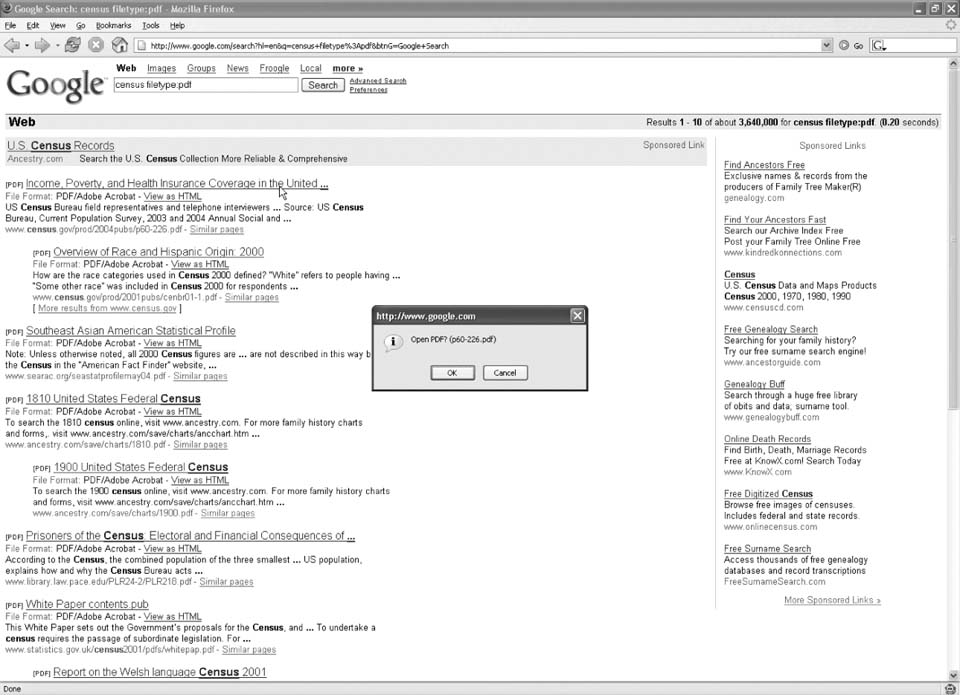
After installing the user script (Tools Install This User Script), go to http://www.google.com and search for census filetype:pdf . At the time of this writing, the first search result is a link to a PDF file titled "Income, Poverty, and Health Insurance Coverage in the United States." Click the link, and Firefox will pop up a warning dialog asking you to confirm opening the PDF, as shown in Figure 2-9.

Figure 2-9. PDF confirmation dialog

If you click OK, the link will open, Firefox will launch the Adobe Acrobat plug-in, and you will see the PDF without further interruption. If you click Cancel, you'll stay on the search results page, where you can click "View as HTML" to see Google's version of the PDF file converted to HTML.

 < Day Day Up > 
 < Day Day Up > 

Hack 18. Avoid the Slashdot Effect

Add web cache links to Slashdot articles .

Reading Slashdot is one of my guilty pleasures. It is a guilty pleasure that I share with tens of thousands of other tech geeks . People who have been linked from a Slashdot article report that Slashdot sends as many as 100,000 visitors to their site within 24 hours. Many sites cannot handle this amount of traffic. In fact, the situation of having your server crash after being linked from Slashdot is known as the Slashdot effect .

Read more about the Slashdot effect at http://en.wikipedia.org/wiki/Slashdot_effect.


This hack tries to mitigate the Slashdot effect by adding links to Slashdot articles that point to various global web caching systems. Instead of visiting the linked site, you can view the same page through a third-party proxy. If the Slashdot effect has already taken hold, the linked page might still be available in one of these caches.

2.7.1. The Code

This user script runs on all Slashdot pages, including the home page. The script adds a number of CSS rules to the page to style the links we're about to add. Then, it constructs three new links—one to Coral Cache, one to MirrorDot, and one to the Google Cache—and adds them after each external link in the Slashdot article.

Save the following user script as slashdotcache.user.js :

// ==UserScript==

	// @name        Slashdot Cache

	// @namespace   http://www.cs.uni-magdeburg.de/~vlaube/Projekte/

	GreaseMonkey/

	// @description Adds links to web caches on Slashdot

	// @include     http://slashdot.tld/*

	// @include     http://*.slashdot.tld/*

	// ==/UserScript==


	// based on code by Valentin Laube

	// and included here with his gracious permission


	var coralcacheicon = 'data:image/png;base64,iVBORw0KGgoAAAANSUhEUgAAAA'+ 

	'oAAAAKCAYAAACNMs%2B9AAAAgUlEQVQY042O0QnCQBQEZy0sFiEkVVxa8GxAuLOLgD3cV'+ 

	'RKwAytYf05JkGgGFt7H8nZkG10UgBNwZE0F7j77JiIJGPlNFhGzgwOQd%2FQytrEJdjtb'+ 

	'rs%2FORAqRZBvZBrQxby2nv5iHniqokquUgM%2FH8Hadh57HNG05rlMgFXDL0vE%2FL%2'+ 

	'BEXVN83HSenAAAAAElFTkSuQmCC'; 


	var mirrordoticon = 'data:image/png;base64,iVBORw0KGgoAAAANSUhEUgAAAAo'+ 

	'AAAAKCAYAAACNMs%2B9AAAAbklEQVQY05WQMRKEMAwDNzzqUobWv%2BBedvcK3EKZV4km'+ 

	'BiYFE9RYI3mssZIkRjD1Qnbfsvv2uJjdF6AApfELkpDEZ12XmHcefpJEiyrAF%2Fi1G8H'+ 

	'3ajZPjOJVdPfMGV3N%2FuGlvseopprNdz2NFn4AFndcO4mmiYkAAAAASUVORK5CYII%3D'; 

	var googleicon = 'data:image/png;base64,iVBORw0KGgoAAAANSUhEUgAAAAoAAA'+ 

	'AKCAIAAAACUFjqAAAAiklEQVQY02MUjfmmFxPFgAuIxnz7jwNcU9BngSjae%2FbDxJUPj'+ 

	'1z%2BxMDAYKPLlx8u72wswMDAwASRnrjyIQMDw%2BoW3XfbbfPD5SFchOGCHof2nHmPaT'+ 

	'gTpmuEPA8LeR6GsKHSNrp8E1c%2B3Hv2A8QKG10%2BiDjUaRD7Qmsuw51GlMcYnXcE4Aq'+ 

	'SyRn3Abz4culPbiCuAAAAAElFTkSuQmCC'; 

	var backgroundimage = 'data:image/png;base64,iVBORw0KGgoAAAANSUhEUgAAA'+ 

	'DEAAAAOCAYAAACGsPRkAAAAHXRFWHRDb21tZW50AENyZWF0ZWQgd2l0aCBUaGUgR0lNUO'+ 

	'9kJW4AAAC7SURBVEjH7daxDYMwEEbhh11cAxKSKYEV0qeKMgETZBbPkgmYIEqVPisAJZa'+ 

	'QTOPCUprQZYAY8Sb4P11zGcD9dT0BFuhIpx6wt%2FPjnX0BTxEpjako8uLv1%2FvV49xM'+ 

	'CGEBLgqwIlI2dZsEAKDIC5q6RURKwCqgM6ZCa01Kaa0xpgLo1CZLsW23YgcdiANxIH4g%'+ 

	'2FOqTHL%2FtVkDv3EyMMSlAjBHnZoBeATaEsIzTkMxF%2FOoZp2F7O2y2hwfwA3URQvMn'+ 

	'dliTAAAAAElFTkSuQmCC';


	function addGlobalStyle(css) { 

		var head, style; 

		head = document.getElementsByTagName('head')[0]; 

		if (!head) { return; } 

		style = document.createElement('style'); 

		style.type = 'text/css'; 

		style.innerHTML = css; 

		head.appendChild(style);

	}


	addGlobalStyle('' +

	'a.coralcacheicon, a.mirrordoticon, a.googleicon { \n' +

	' padding-left: 15px; background: center no-repeat; \n' +

	'} \n' +

	'a.coralcacheicon { \n' +

	' background-image: url(' +coralcacheicon + '); \n' +

	'} \n' +

	'a.mirrordoticon { \n' +

	' background-image: url(' + mirrordoticon + '); \n' +

	'} \n' +

	'a.googleicon { \n' +

	' background-image: url(' + googleicon + '); \n' +

	'} \n' +

	'a.coralcacheicon:hover, a.mirrordoticon:hover, ' +

	'a.googleicon:hover { \n' +

	' opacity: 0.5; \n' +

	'} \n' +

	'div.backgroundimage { \n' +

	'  display:inline; \n' +

	'  white-space: nowrap; \n' +

	'  padding:3px; \n' +

	'  background:url(' +  backgroundimage + ') center no-repeat; \n' +

	'}');


	var link, anchor, background;

	for (var i=0; i<document.links.length; i++) {


	link = document.links[i];


	// filter relative links

	if(link.getAttribute('href').substring(0,7) != 'http://') {

		continue;

	}


	// filter all other links    

	if(link.parentNode.nodeName.toLowerCase() != 'i' &&       

       (link.parentNode.nodeName.toLowerCase() != 'font'  

	   link.parentNode.color != '#000000'  link.parentNode.size == '2') 

&&

	   (!link.nextSibling  !link.nextSibling.nodeValue 

	   link.nextSibling.nodeValue.charAt(1) != '[')) {

	   continue;


	}


	// add background

	background = document.createElement('div');

	background.className = 'backgroundimage';

	link.parentNode.insertBefore(background, link.nextSibling);


	//add mirrordot link

	anchor = document.createElement('a');

	anchor.href = 'http://www.mirrordot.com/find-mirror.html?' + link.href;

	anchor.title = 'MirrorDot - Solving the Slashdot Effect';

	anchor.className = 'mirrordoticon';

	background.appendChild(anchor);


	//add coral cache link

	anchor = document.createElement('a');

	anchor.href = link.href;

	anchor.host += '.nyud.net:8090';

	anchor.title = 'Coral - The NYU Distribution Network';

	anchor.className = 'coralcacheicon';

	background.appendChild(anchor);


	//add google cache link

	anchor = document.createElement('a');

	anchor.href = 'http://www.google.com/search?q=cache:' + link.href;

	anchor.title = 'Google Cache';

	anchor.className = 'googleicon';

	background.appendChild(anchor);


	// add a space so it wraps nicely 

	link.parentNode.insertBefore(document.createTextNode(' '), 

		link.nextSibling);

}

2.7.2. Running the Hack

After installing the user script (Tools Install This User Script), go to http://slashdot.org. In the summary of each article, you will see a set of small icons next to each link, as shown in Figure 2-10.

Figure 2-10. Slashdot cache links

The first icon points to the MirrorDot cache for the linked page, the second icon points to the Coral Cache version of the link, and the third points to the Google Cache version. If the linked page is unavailable because of the Slashdot effect, you can click any of the cache links to attempt to view the link. For example, the MirrorDot link takes you to a page on MirrorDot (http://www.mirrordot.com) that looks like Figure 2-11.

The Coral Cache system works on demand : the page is not cached until someone requests it. MirrorDot works by polling Slashdot frequently to find new links before the Slashdot effect takes the linked site down. Google Cache works in conjunction with Google's standard web crawlers, so brand-new pages might not be available in the Google Cache if Google had not indexed them before they appeared on Slashdot.

Figure 2-11. MirrorDot cache of Slashdotted link

 < Day Day Up >