Hack80.Build Your Own Web Measurement Application: Technographic Data
Hack 80. Build Your Own Web Measurement Application: Technographic Data
One of the more interesting things that web measurement applications are able to do is help you understand the geographic distribution of your visitors. In this hack, we leverage a freely available geo-targeting database and add IP-based visitor geography reporting to the build your own application. In this hack, we show how to extend our example program to report the number of visitors from each country [Hack #78]. This is often known as geo-location, geo-targeting, or geographic segmentation. The way it works is that certain companies sell large databases mapping numerical IP addresses to countries, or even to regions and cities. The databases can never be 100% accurate because the way ISPs route data through their internal networks is unpredictable. But, at least at the country level, they give a reasonably good idea. 5.14.1. Installing IP::Country and Geography::CountriesOne advantage of using Perl is that when you want to do something like this, someone's probably already done it for you and built it into a Perl module. In this case, we'll use MaxMind's Geo::IP module. MaxMind's basic country database is free, although they do sell more accurate and more detailed databases. To download and install the Geo::IP module, you need to follow the instructions at http://www.maxmind.com/app/perl. Under Unix or Linux, you have to download and install the GeoIP C library and the Geo::IP Perl modules from that page. Under Windows, provided you have Perl and the Perl Package Manager (PPM) installed, all you need to do is issue the following command from your Perl directory: ppm install http://theoryx5.uwinnipeg.ca/ppms/Geo-IP.ppd When you're prompted to fetch and install the GeoIP.dat database, make sure you say "yes" to both questions you're asked; otherwise, the database won't be properly installed (Figure 5-19). 5.14.2. The CodeWe have to extend our Session class to report the country of the session. With the Geo::IP module installed, this is easy. Append the following code snippet to the Session class in the Session.pm file: package Session; … use Geo::IP; my $geoip = new Geo::IP; Figure 5-19. Installation of MaxMind's Geo-IP module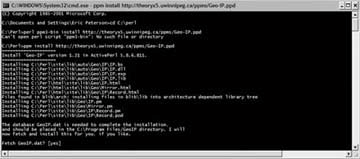 sub Country { my $self = shift; return $geoip->country_name_by_addr($self->[0]->{host}); } We also have to extend our Data class to save and report this data. Append the following code snippet into the appropriate points in the Data class in the Data.pm file: package Data; … sub new { return bless { … countries => {}, }; } sub AddSession { … my $country = $sess->Country(); if (!$country) { $country = "Unknown"; } ++$self->{countries}->{$country}; } sub WriteReport { … $self->WriteHash('Countries', 'countries'); } And that's it. The module handles all the work for us. 5.14.3. Running the CodeThis time, when you execute the perl readlog.pl page.log command (see [Hack #53] for details about running the script), you'll be treated to a report showing where your visitors were coming from geographically (Figure 5-20). Figure 5-20. The "Countries" report Next up is a focus on collecting data relevant to online retailers for your own analysis. Dr. Stephen Turner and Eric T. Peterson |


EAN: 2147483647
Pages: 157