Flylib.com

Books Software


Recipe 2.9 Using WebLogic Builder to Deploy a Web Application


Recipe 2.9 Using WebLogic Builder to Deploy a Web Application

Problem

You want to use WebLogic Builder to deploy a web application.

Solution

WebLogic Builder installs with the WebLogic 7.0 Server, so you can launch the Builder application and use its graphical tools to deploy the web application.

Discussion

WebLogic Builder is a graphical tool that installs with WebLogic Server 7. It can be used to edit deployment descriptor files such as web.xml and weblogic.xml , as well as for deploying web applications to a server. Using WebLogic Builder, you can open up, edit, and deploy web applications that exist as either WAR files or in exploded directory format.

Exploded directory format is a web-application directory structure as it would appear in your filesystem, but that is not in archived or in WAR form. To be deployed on WebLogic as a web application, the root directory must contain the WEB-INF/web.xml deployment descriptor and any other properly structured application components , such as a the WEB-INF/classes directory containing your servlets (including any package- related directories).


You can launch WebLogic Builder on Windows from either the "Start" menu or the command line. The start script for Builder is at: <BEA_HOME>/weblogic700/server/bin/startWLBuilder.cmd (or startWLBuilder.sh on Unix). <BEA_HOME> is the directory where WebLogic Server 7.0 is installed.

It is easy to open up and edit the deployment descriptor for a web application in WebLogic Builder. Go to the File Open menu and navigate to the WAR file or root directory for the application.

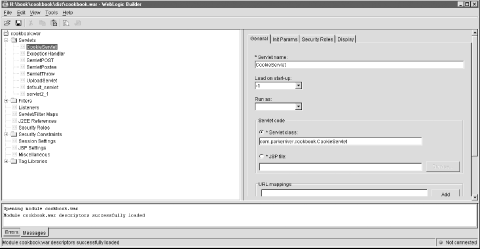
The result is the window depicted in Figure 2-12. The navigation tree in the upper-left window lets you configure web resources (such as servlets) and deployment descriptor elements (such as security constraints), then save the changes to web.xml .

Figure 2-12. Opening a WAR file in WebLogic Builder
figs/jsjc_0212.gif

You can add or delete elements for servlets, servlet mappings, and filters, for instance. The changes are persisted to the deployment descriptor if you make and save changes to the application from within WebLogic Builder. You can then optionally connect to the server from the "Tools" menu, and deploy the application.

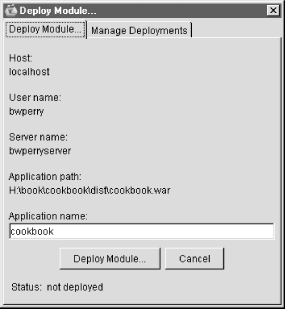
The "Deploy Module" window indicates whether the application is already deployed. Figure 2-13 shows this window. If you have already deployed the application, you can still make deployment-descriptor changes in Builder, then deploy the application again from the "Tools" menu. WebLogic Builder specifically undeploys the application, then redeploys it with the changes that you included in web.xml .

Figure 2-13. WebLogic Builder's Deploy Module window
figs/jsjc_0213.gif

WebLogic Builder does not show any JSP files that may be part of the web application. It will show any servlet mappings that are associated with JSP files.

See Also

Recipe 2.3, Recipe 2.7, Recipe 2.8, and Recipe 2.10; WebLogic's Server 7.0 programmer documentation: http://e-docs.bea.com/wls/docs70/programming.html; the local WebLogic Builder Help documentation: <BEA_HOME>\weblogic700\server\builder\index.html .


Recipe 2.10 Using the weblogic.DeployerCommand-Line Tool

Problem

You want to use the command line to deploy a web application on WebLogic Server 7.0.

Solution

Use the Java-based weblogic.Deployer command-line utility, which is installed with WebLogic Server 7.0.

Discussion

For developers or administrators who need to use the command line or shell scripts for deploying and redeploying web applications, WebLogic Server 7.0 provides the Java-based Deployer utility. This utility accomplishes the same tasks as using the graphical interface of the WebLogic Administration Console to deploy or redeploy a web application. First, this recipe describes how to deploy and redeploy a web application on the command line using the Deployer utility. Then the recipe provides an example of a Windows batch file that invokes the Deployer utility.

The Deployer utility can initiate other tasks, such as redeploying individual web components in a web application. The online documentation for the Deployer utility can be found at http://e-docs.bea.com/wls/docs70/programming/deploying.html#1094693.


The Deployer utility is a Java-based program that requires the following JAR file on your classpath before the program can run: <BEA_HOME>\server\lib\weblogic.jar . "><BEA_HOME> represents the directory where WebLogic Server 7.0 was installed. The following command-line script on a Windows NT 4.0 machine redeploys the cookbook.war web application on a server named bwpserver :

java -cp k:\bea\weblogic700\server\lib\weblogic.jar;
    %CLASSPATH% weblogic.Deployer 
    -adminurl http://localhost:7001 
    -user bwperry -name cookbook -source .\dist\cookbook.war 
    -targets bwpserver -activate

This command-line invocation deploys the web application represented by the archive file cookbook.war , so the application is now available to receive requests with the context path /cookbook . When run on the command line, the program prompts the user for a password if you have not included it in the script with the -password option. The -source option specifies the location of the WAR file or web-application directory. The -targets option specifies one or more servers on which to deploy the web application. The final command for deploying the application is -activate .

This command-line invocation deactivates (makes unavailable) an existing web application on the server bwpserver . It prompts for the user password first, unless you add the -password option to the command line:

java -cp k:\bea\weblogic700\server\lib\weblogic.jar;
    %CLASSPATH% weblogic.Deployer 
    -adminurl http://localhost:7001 
    -user bwperry -name cookbook 
    -targets bwpserver -deactivate

The -cp option specifies the classpath to use for running the Deployer Java utility, and must include the weblogic.jar JAR file. The -adminurl switch specifies the administration server (the default value is http://localhost:7001 , so it does not have to be included here). The -name option specifies the name of the application to be deactivated, and the -targets option names the server where the application is running. The following command-line invocation redeploys the same "cookbook" application:

java -cp k:\bea\weblogic700\server\lib\weblogic.jar;
    %CLASSPATH% weblogic.Deployer
     -user bwperry -name cookbook -activate

This time, the -adminurl and -targets options were omitted. The default values for these switches are http://localhost:7001 and all current targets (if the developer is redeploying an existing application), respectively. If the application is being deployed for the first time, the default target for the -targets option is the administration server.

It is easier to run shell commands from a batch file, because there is less typing for complicated command-line programs and the shell scripts can be permanently saved. Example 2-7 is the first example rewritten as a batch file on Windows NT 4.0.

Example 2-7. Deploying an application
@echo off
set WL_HOME=K:\bea\weblogic700

set BEA_CLASSPATH=%WL_HOME%\server\lib\weblogic.jar;%CLASSPATH%

java -cp %BEA_CLASSPATH% weblogic.Deployer -adminurl http://localhost:7001 -user bwperry
-name cookbook -source .\dist\cookbook.war -targets bwpserver -activate

This batch file sets two environment variables : WL_HOME and BEA_CLASSPATH . These are used to make sure that the classpath includes the weblogic.jar file, which contains the Deployer utility. If the script was saved as deploy.bat , this is how it would be run on the command line:

H:\book\cookbook>deploy

The resulting console output looks like this.

Enter a password for the user "bwperry":bwpserver_1968
Operation started, waiting for notifications...
....
#TaskID Action          Status  Target          Type    Application     Source
15      Activate        Success bwpserver       Server  cookbook        H:\book\
cookbook\.\dist\cook

See Also

Recipe 2.3 and Recipe 2.5; Recipe 2.7-Recipe 2.9; WebLogic's Server 7.0 programmer documentation: http://e-docs.bea.com/wls/docs70/programming.html.