17.1. HTTP Request and Response Classes
| < Day Day Up > |
| HTTP specifications[1] concisely define messages as "requests from client to server and responses from server to client." At its most elemental level, the role of ASP.NET is to enable server-based applications to handle HTTP messages. The primary way it does this is through HTTPRequest and HttpResponse classes. The request class contains the HTTP values sent by a client during a Web request; the response class contains the values returned to the client.
HttpRequest ObjectAn HttpRequest object is available to a Web application via the Page.Request or Context.Request property. The object's properties represent the way that .NET chooses to expose the content to an underlying HTTP request message. Consequently, the best way to understand HttpRequest is to examine the layout of the message it represents. HTTP Request Message StructureFigure 17-1 represents the general structure of the HTTP request message as defined by the HTTP/1.1 specifications. Figure 17-1. Structure of a request message
Unless you are writing a browser, it is not necessary to understand the full details of the standard. However, a general understanding is useful to a developer who needs to extract information from the HttpRequest object. A few observations:
Viewing the Request MessageFor debugging or simply out of curiosity you may want to view the raw contents of the HTTP request. A simple way to do this is to use the SaveAs method of the HttpRequest class to write the request to a file where it can be viewed with a text editor. The method, as shown here, takes two parameters: the name of the output file and a bool type switch that indicates whether HTTP headers are to be included in the output. this.Request.SaveAs("c:\\myrequest.txt",true); Posting a form containing two text boxes to the Web server generates this sample output. Of most interest are the browser description, referring Web page, and text box content values. POST /ideas/panel.aspx HTTP/1.1 Cache-Control: no-cache Connection: Keep-Alive Content-Length: 158 Content-Type: application/x-www-form-urlencoded Accept: image/gif, image/x-xbitmap, image/jpeg, */* Accept-Encoding: gzip, deflate Accept-Language: en-us Cookie: ASP.NET_SessionId=uszrfs45z4f20y45v0wyyp45 Host: localhost Referer: http://localhost/ideas/panel.aspx User-Agent: Mozilla/4.0 (compatible; MSIE 6.0; Windows NT 5.0; .NET CLR 1.0.3705; .NET CLR 1.1.4322; .NET CLR 2.0.40607) __VIEWSTATE=%2FwEPDwULLTEwODExMTgwOTAPZBYCA ... &txtFirstName=joanna&txtLastName=larson&btnSubmit=Submit HttpRequest Class StructureTable 17-1 summarizes selected properties of the HttpRequest class. Where applicable, it includes the underlying header and message field on which its content is based.
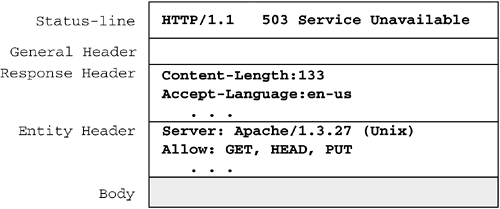
The built-in features of ASP.NET reduce the amount of direct interaction required between an application and the HttpRequest object. For example, we saw in Section 16.2, "Web Forms Controls," that ASP.NET Web controls generate code that is automatically tailored to the client's browser eliminating the need for the application code to implement logic to identify the browser. There are, however, some cases where an application must access the object fields directly. Logging Web statistics is one; another is working with cookies. Cookies are used to store information on the computer of a client that has cookies enabled on his browser. The browser is responsible for passing the cookie value as part of the request and handling any cookies returned from the server. The Cookies attribute references the collection of cookies returned by the browser. The following code loops through the collection displaying the name, value, and expiration date of cookies in the collection. // Read cookies returned by browser foreach(string cookieName in Request.Cookies.AllKeys){ HttpCookie cookie = Request.Cookies[cookieName]; Response.Write(cookie.Name+" = "+cookie.Value +"<br>Expires: "+cookie.Expires); } The only cookie in this collection is the ID used by ASP.NET to identify sessions. ASP.NET's use of cookies is discussed further in the next section. .NET_SessionId = avsqkn5501m3u2a41e3o4z55 Expires: 1/1/0001 12:00:00 AM HttpResponse ObjectThe HttpResponse class contains properties that encapsulate the information returned in a response message. It also provides methods that construct the response and send it to the requestor. As we did with the Request object, let's begin by taking a quick look at the underlying HTTP response message represented by the Response object (see Figure 17-2). Figure 17-2. Structure of a response message
HTTP Response Message StructureThe server responds with a status line that includes the message's protocol version, a success or error code, and a textual description of the error code. This is followed by the general header and the response header that provides information about the server. The entity header provides metainformation about the body contents or the resource requested. Viewing an HTTP Response MessageASP.NET provides the HttpWebRequest and HttpWebResponse classes for working with HTTP requests and responses, respectively. They are discussed in detail later in the chapter, but let's take a preliminary look at how they can be used to display portions of a response message. Listing 17-1 contains a simple application that sends a request to a user-entered URL, receives the response, and extracts the status code and server description. Run the program from the command line by typing in the program name and domain name you want to contact:
Listing 17-1. Getting Status and Server Information from a Response Message //File: showserver.cs using System; using System.Net; class WebClient { // To run, type in: showserver <domain name> public static void Main(string[] args) { HttpWebRequest request; HttpWebResponse response; if(args.Length>0) { string url="http://"+args[0]; // Create a request to the URL request = (HttpWebRequest) WebRequest.Create(url); try { response = (HttpWebResponse) request.GetResponse(); Console.WriteLine("Web Host: "+response.Server); Console.WriteLine("Response Status: "+ response.StatusCode); } catch ( Exception ex) { Console.Write(ex.Message); } } else { Console.Write("You must enter a domain name."); } } } HttpResponse Class PropertiesTable 17-2 lists selected properties of the HttpResponse class. Some of those excluded exist only for ASP compatibility and have been deprecated by newer properties.
Particularly noteworthy is the Cache property, which can greatly affect how pages are displayed to a browser. It is used to define a caching policy that dictates if and how long pages are cached. We'll look at this property in Section 17.5, "Caching." An example that displayed the contents of a cookie was presented in the discussion of the HttpRequest class. Let's extend that example by demonstrating how the response object is used to create and return a cookie to the client. // Create a cookie HttpCookie myCookie = new HttpCookie("userid","007"); // Cookie will live for 10 minutes // Timespan(days, hours, minutes, seconds) myCookie.Expires = DateTime.Now.Add(new TimeSpan(0,0,10,0)); // Add to collection Response.Cookies.Add(myCookie); // Later... Read specific cookie myCookie = Request.Cookies["userid"]; if(myCookie !=null) Response.Write("userid: "+myCookie.Value); Using HttpResponse MethodsThe Response.Write method, which we have used in numerous examples to emit output into the response stream, is the most commonly used method. Other useful methods include the following:
A simple, but useful, example (see Listing 17-2) illustrates how these methods can be used to download a file. The client request for this page includes a query string with the name of a requested file. The page locates the file (or returns an error message) and uses WriteFile to send it to the user. The AppendHeader, ClearContent, and End methods prepare and manage the response stream. Listing 17-2. Using HttpResponse to Download a File //File: requestfile.aspx <%@ Page Language="C#" %> <script Language="C#" runat="Server"> private void Page_Load(object sender, EventArgs e) { //http://localserver/ideas/requestfile.aspx?file=notes.txt string fileRequest = Request.QueryString["file"]; if(fileRequest!=null) { // File is store in directory of application string path = Server.MapPath(fileRequest); System.IO.FileInfo fi = new System.IO.FileInfo(path); if (fi.Exists) { Response.ClearContent(); // Clear the response stream // Add a header to indicate attachment type Response.AppendHeader("Content-Disposition", "attachment;filename="+fi.Name); Response.AppendHeader("Content-Length", fi.Length.ToString()); // Use octet-stream to indicate unknown media type Response.ContentType="application/octet-stream"; // Write file to output stream Response.WriteFile(fi.FullName); Response.End(); // Flush buffer output to the client } else { Response.Write(path+" does not exist."); } } else { Response.Write("No Download file was specified."); } } </script> |

| < Day Day Up > |
