#50. Working with Books Books are a collection of InDesign documents that can share styles and colors between them. Breaking up a long document into shorter ones managed through a book offers many benefits. It keeps the file sizes to a minimum, and if for some horrible reason a document becomes corrupt, you potentially lose only a handful of pages instead of your entire document. Using books also makes sense if you're working within a team, allowing you to divvy up the work across documents. Be sure to take advantage of Version Cue in situations like these so you and your team members don't accidentally overwrite each other's work. You can also use books to collect documents of different page orientations or sizes into one set. Converting Documents to Books If your document is fast approaching 20 pages, you may want to consider breaking it up and organizing it as a book. You first need to have manageable pieces to work with. Decide on ideal break points throughout the document such as sections, chapters, or its page signature setup (usually 8, 16, or 32 pages). Then make a number of copies of the document and selectively delete the other pages in each copy based on these break points. For example, in the first copy, delete all except Chapter One, in the second copy, delete all but Chapter Two, and so on. |
Here's how to create a book from individual documents and start working with it: 1. | Choose File > New > Book and then decide on a location and name for your book file. The saved book shows up as a palette in InDesign but behaves like a document. If you close it, you must choose File > Open to reopen it.
| 2. | Add your documents to the book by dragging them into the Book palette from the Finder (Mac) or File Explorer (Windows). You can also click the Add Documents button  on the Book palette. on the Book palette.
| 3. | Rearrange your documents in the Book palette by dragging them up or down as you would layers in the Layers palette. The order of the documents determines the page number sequence (Figure 50a).
Figure 50a. The Book palette shows all the associated documents and their page numbers. Rearrange the documents to change their order in the book and page numbering. 
| 4. | Save the changes to your book by clicking the Save Book button  on the Book palette. on the Book palette.
| 5. | Open documents within the book by double-clicking their name in the Book palette. You should always open booked documents through the Book palette, especially when working collaboratively. This ensures that the documents remain synchronized with the book and its pagination.
| 6. | Print or output an entire book or just certain documents within it. If you want to print or output the entire book, be sure none of the documents are selected by clicking in the gray area below the document names. If you want to print or output certain documents in the book, you first need to select them. Then with either no documents selected or certain ones selected, go to the Book palette menu and choose one of the options listed: Preflight, Package for GoLive or Print, Export to PDF, or Print (Figure 50b).
Figure 50b. You can print or output a book just as you would a document. The Book palette menu lists all the options available to you. 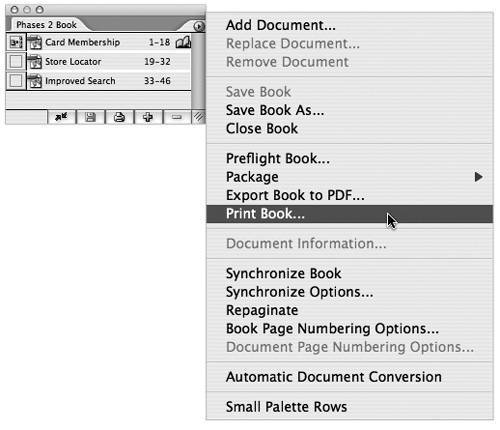
|
Synchronizing Styles Across Books By default the first document in a book is designated as the style source. This means that the document will be used to synchronize the styles and swatches throughout the book. You can choose another document as the source by clicking the empty box to the left of its name in the Book palette. The style source icon  will then switch to this document. Click the Synchronize button will then switch to this document. Click the Synchronize button  to sync your styles and swatches across all the documents in the book. to sync your styles and swatches across all the documents in the book. |
|
