Recipe 15.4. Displaying Exception InformationProblem
An error has occurred, and you want to
Solution
The captured exception object includes all the details concerning the error, with some
The following code generates the error message in Figure 15-1 when run within Visual Studio: Try Throw New System.Exception( ) Catch ex As System.Exception MsgBox(ex.ToString( )) End Try Figure 15-1. A basic error message
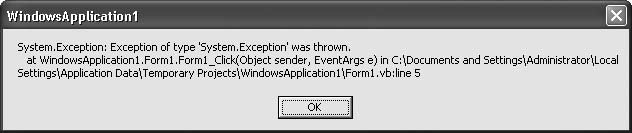
DiscussionIf you encounter an exception in a block of code where you know errors are likely, you can sometimes compensate for the error through alternate logic without ever informing the user of the problem. In those cases where you cannot continue normally because of the error, your program can inform the user of the situation. Beyond the basic ToString() output, you can handcraft the details of the exception into a form that better communicates the problem to the user. The System.Exception object includes the following useful properties:
Other exception objects further derived from System.Exception may include additional properties with more detailed information. By concatenating the various properties of the captured exception object, you should be able to effectively communicate the problem to the user or store the details in an error log for later analysis. |
Recipe 15.5. Creating New Exception TypesProblemNone of the exception objects supplied with .NET really meets the needs of the error you need to generate. SolutionBuild your own exception object by deriving a new class from System.Exception or another class already derived from it. DiscussionThe following class extends the standard Exception object by adding a place for a SQL statement used in a database query: Public Class ExceptionWithSQL Inherits System.Exception Public SQLStatement As String Public Sub New(ByVal message As String, _ ByVal sqlText As String, _ ByVal innerException As System.Exception) ' ----- Store the details of this exception. MyBase.New(message, innerException) SQLStatement = sqlText End Sub End Class Many business applications that interact with a database use a central procedure to process SQL statements in a consistent manner. While this procedure may have its own error handler, the calling code also wants to know when an error occurred with the SQL statement that it provided. The following ProcessSQL method represents just such a common procedure. If an error occurs in the supplied SQL statement, it uses the ExceptionWithSQL class to communicate the problem: Public Sub ProcessSQL(ByVal sqlText As String) Try ' ----- Add ADO.NET-specific code here. Catch ex As System.Exception ' ----- Convert this to a SQL error. Throw New WindowsApplication1.ExceptionWithSQL( _ "A SQL error occurred.", sqlText, ex) ' ----- The calling procedure will receive the ' modified error. End Try End Sub
Since the calling code may issue several different SQL statements within a common
try
block, having the
Dim sqlText As String
Try
sqlText = "DELETE FROM Table1 WHERE RecordType = 5"
ProcessSQL(sqlText)
sqlText = "DELETE FROM Table2 WHERE RecordType = 5"
ProcessSQL(sqlText)
Catch ex As WindowsApplication1.ExceptionWithSQL
MsgBox("The following SQL statement caused an error:" & _
vbCrLf & ex.SQLStatement)
End Try
You can also create a new ExceptionWithSQL object for any reason on your own and THRow it, even if no underlying database error occurred. With custom errors, the choice of when to use them is yours. Before .NET, errors in Visual Basic were identified solely by a number, many defined for common use by Microsoft Windows. For instance, error number 7 represents the "Out-of-memory" error condition. In .NET, all errors are defined by specific classes derived from System.Exception . For example, out-of-memory errors are thrown as instances of System.OutOfMemoryException . You can derive your own exceptions for use in your application code. You will often derive such custom errors directly from System.Exception , but if another derived exception class contains features you don't want to rewrite from scratch, you can derive from that class instead. The various .NET exceptions derived from System.Exception can also be used directly. For instance, you can throw a System.DivideByZeroException even if you don't actually perform an invalid division, but your code has a zero-value denominator ready to use: Public Function CheckAndDivide(ByVal numerator As Decimal, _ ByVal denominator As Decimal) As Decimal ' ----- Divide numbers, but check for divide-by-zero first. If (denominator = 0@) Then Throw New System.DivideByZeroException( ) Else Return numerator / denominator End If End Function |