Recipe 5.38. Getting a Count of Regular Expression MatchesProblemYou want a quick count of the number of matches a regular expression finds in a string. SolutionSample code folder: Chapter 05\RegexCountMatch Use the Count property of the Matches() method of the Regex object. DiscussionThe following example code shows how to use regular expressions to count words in a string, as defined by the pattern \ w+ :
Imports System.Text.RegularExpressions
' …Later, in a method…
Dim quote As String = "The important thing is not to " & _
"stop questioning. --Albert Einstein"
Dim parser As New Regex("\w+")
Dim totalMatches As Integer = parser.Matches(quote).Count
MsgBox(quote & vbNewLine & "Number words: " & _
totalMatches.ToString)
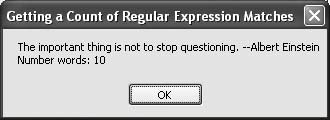
This example returns a count of the number of matches, not a collection of matches. Figure 5-43 shows the results as displayed by the message box. Figure 5-43. Using the Regex object to count words in a string
This technique can be useful for many other types of regular expression searches, too. For example, the regular expression shown in Recipe 5.37 can be used to quickly determine the number of
See AlsoRecipes 5.13 and 5.37 discuss regular expression processing in additional detail. |
Recipe 5.39. Getting the Nth Regular Expression MatchProblemYou want to get the n th match of a regular expression search within a string. SolutionSample code folder: Chapter 05\RegexMatchN Use the Regex object to return a MatchCollection based on the regular expression. The n th match is accessed by indexing item n 1 in the collection. Discussion
The following code finds all
Imports System.Text.RegularExpressions ' …Later, in a method… Dim source As String = "This 7. string -0.02 " & _ "contains 003.141600 several 0.9 numbers" Dim parser As New Regex( _ "[-+]?([0-9]*\.)?[0-9]+([eE][-+]?[0-9]+)?") Dim sourceMatches As MatchCollection = _ parser.Matches(source) Dim result As Double = CDbl(sourceMatches(2).Value) MsgBox(source & vbNewLine & "The 3rd number: " & _ result.ToString()) Figure 5-44 shows the third number found in the string. Figure 5-44. Using a regular expression to find the nth match in a string
See AlsoRecipe 5.37 discusses the specific regular expression pattern used in this recipe. |
Recipe 5.40. Compiling Regular Expressions for SpeedProblemYou want to compile a regular expression to maximize runtime speed. SolutionSample code folder: Chapter 05\RegexDLL There are two steps to this solution, best described by working through an example. The first step is to run the code to create the compiled DLL file, and the second is to use the new compiled regular expression in one or more applications. Discussion
First, run the following code one time only to compile and create a DLL file containing a regular expression, in this case using a pattern designed to find all
Imports System.Text.RegularExpressions
' …Later, in a method…
Dim numPattern As String = _
"[-+]?([0-9]*\.)?[0-9]+([eE][-+]?[0-9]+)?"
Dim wordPattern As String = "\w+"
Dim whichNamespace As String = "NumbersRegex"
Dim isPublic As Boolean = True
Dim compNumbers As New RegexCompilationInfo(numPattern, _
RegexOptions.Compiled, "RgxNumbers", _
whichNamespace, isPublic)
Dim compWords As New RegexCompilationInfo(wordPattern, _
RegexOptions.Compiled, "RgxWords", whichNamespace, _
isPublic)
Dim compAll( ) As RegexCompilationInfo = _
{compNumbers, compWords}
Dim whichAssembly As New _
System.Reflection.AssemblyName("RgxNumbersWords")
Regex.CompileToAssembly(compAll, whichAssembly)
This code creates a new file named RgxNumbersWords.dll that contains the compiled regular expression. The file is created in the same folder in which the executable program is located. To use the new DLL in an application, you need to add a reference to it. Right-click on References in the Solution Explorer, click the Browse tab, find the DLL file in the folder where the application's EXE file is located, and select it to add the reference. Figure 5-45 shows the new reference in the Solution Explorer. Figure 5-45. The DLL file named RgxNumbersWords added to the References list in the Solution Explorer
You also need to import the namespace defined in this DLL into your application. Either add an
Imports
command at the top of your source code or, in the Project Properties window, select the References tab, and place a checkmark
Figure 5-46. Importing a namespace via the Project Properties window
Once the new DLL is referenced and its object's namespace has been imported, you can use the compiled regular expression in an application. The following code uses the new RgxNumbers regular expression to count the numbers in a string: Imports System.Text.RegularExpressions ' …Later, in a method… Dim source As String = _ "Making a Pi (3.1415926) is easy as One 1 Two 2 Three 3" Dim parser As New RgxNumbers Dim totalMatches As Integer = parser.Matches(source).Count MsgBox(source & vbNewLine & "Number count: " & _ totalMatches.ToString()) Figure 5-47 shows the result of running this code to determine how many numbers are in the sample string. Figure 5-47. Quickly counting numbers in a string using the compiled regular expression
See AlsoRecipe 5.37 also discusses regular expression processing. |