DV-Our Starting Point
| < Day Day Up > |
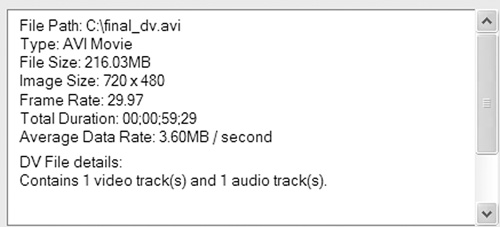
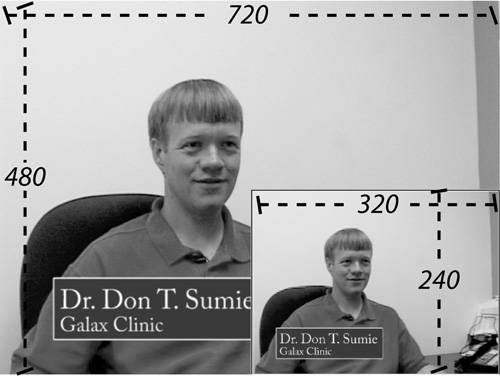
DV Our Starting PointAll video you watch on your computer is digital, but not all digital video is DV. Specifically, unlike analog camcorders, DV camcorders convert information captured thought the lens as digital data. The compression technology (or codec) used is the DV codec; a standard technology mutually adapted by the camera and computer communities. You don't have to do anything special to make the camera capture the video in DV format, it just does, and the computers that download the files from the camera know this and handle the format automatically. If all you're doing is capturing video, editing on the computer and sending the video back to the camera or creating DVDs, most of the workflow and file details covered here are also handled automatically, and this chapter provides information you really don't need to get your work done. On the other hand, if you'll be compressing your video into formats like Windows Media, RealVideo or QuickTime, you need to understand the basics covered in this section. I'll cover some specifics about compression in About Compression, the next major section. Although DV stands for digital video, it's a specific digital video format. There are many digital video codecs, but only one is properly called DV. Figure 4.2 shows the file information window from a video editor the DV file in this example is in AVI format, which stands for Audio/Video Interleaved, and means the file is stored in Microsoft's "Video for Windows" format. Briefly, a file format is essentially a specification for how information is stored in that file. If a file conforms to a particular standard, any application that also conforms to that standard can open and edit the file. Thus any Video-for-Windows-compatible video editor can edit any AVI file, just as any QuickTime-compatible video editor can edit any MOV file, the standard for Mac users. Figure 4.2. DV file details from the information screen of a video editor. Formats and CodecsNote the distinction between format and compression technology, or codec (which stands for compression/decompression) The specifications for audio/video compression technologies also include information on how to decompress video compressed in that format. Codecs are technologies that compress video during capture or for delivery. For example, as mentioned above, DV is a codec. When you capture digital video from a camcorder on the Mac, you capture into MOV format, but the compression technology is still DV. When you capture DV video on a Windows computer, you capture into AVI format. The key point here is that format and compression technology are not the same thing. A QuickTime file can be compressed with a DV codec, the Sorenson codec, the MPEG-4 codec, and several legacy codecs such as Cinepak and Indeo. The same goes for the Video for Windows format. Often when you're producing a file for final distribution, you'll make separate decisions about what format you use to output the file and what codec you use to compress the file. So, it's critical to realize that they are not identical concepts. In Figure 4.2, the next parameter after Type is File Size. Though the example file is only about 1 minute long (total duration, 00:00:59.29), the captured file is 216MB in size. Size isn't an issue for DV cameras, which use tapes that can store up to 120 minutes of video. Since 120 minutes of digital video takes up 26GB on your hard drive, the size of your digital video is more of an issue during editing, though not a show stopper given that 200GB disk drives now cost less than $250. That said, if you tried to send that same video file to a remote viewer over a modem, it would take roughly forever. While DV is great for capturing great quality with your camcorder, you'll need to choose a more compact codec than the one built into your camcorder to deliver the final edited video to your viewers. The next parameter is Image Size, often called resolution, which is the width and height of the pixels in each frame of the video. All digital video files consist of pixels; digital video files are always 720 pixels across and 480 pixels high (720x480), which is the size of the larger image in Figure 4.3. Sometimes you'll render video at 720x480 resolution, most notably when producing for DVD or computer-based playback. However, if you're producing a streaming file for viewing over the Internet, you'll render the file at a smaller resolution, such as 320x240, also called quarter-screen video (see inset, Figure 4.3). Figure 4.3. Full-screen (720x480) and quarter-screen (320x240) video. The next parameter in the file information screen is Frame Rate, listed as 29.97 frames per second (fps); this means that during normal playback, 29.97 frames display each second. This frame rate is compliant with NTSC, the broadcast standard for video transmitted over North American televisions. When producing for DVD or hard-disk playback, you'll render your video files at this frame rate. However, when producing video for the internet, you'll reduce the frame rate to around 15fps or below. When you render at 15fps, the editor will exclude (or drop) every other frame in the video from the rendered file. During playback, over the same one-second period, the viewer will see 15 frames, not 29.97, which can look a bit choppy during high-action sequences, but is undetectable for most talking-head videos. The next parameter, Total Duration, is 59 seconds, 29 frames, just a hair under one full minute. As in Figure 4.3, duration is always displayed in hours:minutes:second.frames. Finally, there's Data Rate, which defines the amount of data associated with each second of video. As you can see, the data rate for digital video is 3.6 megabytes per second (MB/sec). So, what are the key takeaways?
About CompressionFor practical purposes, all digital video files are compressed; otherwise you would not be able to fit them on your hard disk or play them on your computer. Even DV video is compressed, though much less so than most other compressed formats. You're probably familiar with a range of compression technologies, including MPEG, RealVideo, Sorenson, and Windows Media Video. Note that RealVideo and Windows Media are also formats with their own file extension, .RM for RealMedia, .WMV for Windows Media Video. MPEG is also a format, and MPEG-1 and -2 files use an .MPG or similar extension, though MPEG-4 is a broader technology that plays under multiple formats, including MPEG, QuickTime, and Windows Media. Sorenson is a pure codec that encodes into the QuickTime format. All video compression technologies are "lossy," which means they encode by throwing away the original pixel-related information and using complex algorithms to store a facsimile of the original file. Compression works in a number of ways; the simplest example is a talking-head video with an unchanging background. In the original, uncompressed video, that background requires as many bits of information in each frame as other parts of the frame where there's movement. A compression algorithm will store information describing the background once, and then eliminate this redundant information in subsequent frames, which is very efficient. In higher-motion videos, such as football games or action movies, there is very little redundancy between frames, making these videos much harder to compress. With all lossy technologies, the more you compress, the more you lose, and the more degraded the quality of the video. Conversely, all things being equal, the higher the data rate, the higher the video quality. Produce a 500Kbps file with any codec, and it will probably look pretty good. Use the same codec to compress the same source video at 10Kbps, and it will probably look pretty awful. This doesn't mean that the technology is in any way faulty; it's just a fact of life about compression. What are the key takeaways?
Now let's tackle the most important concept in digital video distribution. It's All About the BandwidthAt a high level, bandwidth defines the ability of a system or subsystem to transfer data. For example, a 56.6Kbps modem has a bandwidth of 56.6Kbps, and can transfer up to 56.6 kilobits per second from the Internet into your computer. Most of the time, access to fast and consistent bandwidth isn't an issue. For example, when checking your email or surfing the Web, a delay of a second or two here and there can go unnoticed. However, video is a real-time event with a synchronized audiovisual stream. Once playback starts, if the computer can't access the video stream fast enough, the video slows, stops, or sometimes drops quality. For example, if you connect to the Internet via a 56.6Kbps modem, and start playing a 300Kbps stream from ESPN or CNN, the video will quickly stop playing. Why? Because the data rate of the video file exceeds the bandwidth capacity of your modem. The data stream is bigger than the pipe. Our job as video producers is to produce video files, especially when producing streaming video with a data rate smaller than the bandwidth capacity of the viewers who will watch them. Keep one thought in mind as you walk down this video production road: the quality of the video you produce is directly related to the bandwidth of the medium used to distribute it. DVD players have a very high bandwidth, so DVD-Video looks great. However, if you're required to stream video to folks connecting to the Internet at 56Kbps or below, the video will look substantially worse. This disparity in quality, of course, has nothing to do with your skills as a video producer; rather, it's all about the bandwidth. It's a simple enough concept just make sure the person who's judging the quality of your work, be it spouse, boss, parent, or child, understands it as well. And under no circumstances, commit to the quality of video you can deliver until you know which medium you'll use to distribute it. About Bits and BytesBandwidth and data rate play a vital role in the quality of your video, so let's take a closer look at how they are measured. The bit-byte breakdown is shown in Table 4.1.
When I first started working with video, the most important bandwidth measure was the data transfer speed of a CD-ROM, which started at 150 kilobytes per second, a so-called "1X" drive. Today, CD-ROMs can retrieve and transfer data at 48X and higher, or 7.2 megabytes of information per second, which makes the 1X drive seem glacial. However, as shown in Table 4.1, many video producers are surprised to learn that the bandwidth of a single-speed CD-ROM drive (150 KB/s) is almost as fast as a T1 line (192.5 KB/s) that costs hundreds of dollars a month. Briefly, to convert bits to bytes, you divide by 8, so the 1540 kilobits per second throughput of T-1 converts to 192.5 kilobytes per second. Conversely, to get from bytes to bits, you multiply by 8, which is how a single speed CD-ROM converts from 150 kilobytes per second to 1200 kilobits per second. With a 56K modem, admittedly slow, but still a very pervasive method of connecting to the Internet, you have a throughput of only 7 kilobytes per second, roughly 1/20th the transfer speed of a long obsolete single speed CD-ROM drive. That's pretty sobering. Even a relatively fast DSL connection of 512 kilobits per second translates to only 64 kilobytes per second, about two-thirds the speed of a 1X CD-ROM. If you're wondering why video streaming over the Internet generally looks so bad, that's your answer. Before we delve too deeply into bandwidth and data rate speeds, it's important to note that over the years, most encoding tools have evolved from talking in bytes per second to bits per second. In this book, I'll use Kbps and Mbps to connote kilobits and megabits per second, and KB/sec and MB/sec to connote kilobytes and megabytes per second. Most production tools have transitioned over from bytes to bits, so when I mention a data rate or bandwidth capacity, it will generally be in bits, not bytes. Choosing Your Delivery CodecI've said that DV is the optimal acquisition codec, I'm sure you're wondering about the best delivery codec. I'll briefly touch on the rules I follow here, and discuss them more thoroughly in Chapter 7 when we actually render some video:
For a comprehensive quality comparison of Windows Media, Real, MPEG-2, Sorenson (the technology used for QuickTime movie trailers), and MPEG-4, check out www.emedialive.com/Articles/PrintArticle.aspx?ArticleID=8422. |
| < Day Day Up > |

EAN: 2147483647
Pages: 110