| Got a PC? Copy music from your CD collection to your computer using RealOne Player, and then sync songs directly from RealOne Player to your handheld. Got a Mac? Use music software such as iTunes to copy music, and then drag MP3 files to the Send To Handheld droplet and sync. Real Life Music 
Marta listens to music on her handheld on the train, commuting to and from work. At home, she transfers a CD or two of music at a time from her computer to a 128 MB SD card, giving her more than enough music for the 80-minute commute. At work, she recharges her handheld. That way, she makes sure there's plenty of battery power for her to hum along all the way home. |
RealOne help Get help with RealOne Mobile Player at www.RealOne.com or through the Help menu of RealOne Player. |
Transfer songs from a CD 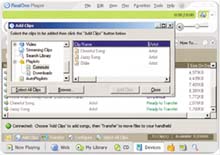
Windows Use RealOne Player to transfer songs you copied from a CD. In your handheld's RealOne Mobile Player, tap Menu > Options > Help for details. Sync. 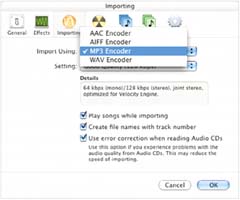
Mac Use iTunes or other music software to create MP3 files. Drag them to the Send To Handheld icon, and sync them to your expansion card. |
Transfer songs from your computer 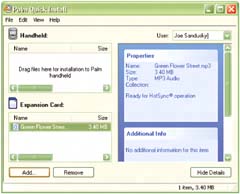
If you already have MP3s on your computer, just drop them in QuickInstall (Windows) or Send To Handheld (Mac). Sync to transfer music to your expansion card. |
iTunes and your handheld You can use iTunes to create MP3 files from CDs that you own, but at this time, songs from the iTunes Music Store will not transfer to your handheld. They are protected files that play only on computers with iTunes or on iPods. |
What's bit rate? Kilobits per second (kbps), or bit rate, is the measure of MP3 quality. CDs are recorded at about 1400 kbps. For handhelds, 128 kbps MP3 files are just fine, 96 kbps is comparable to FM broadcasts, and 64 kbps is like an AM broadcast. |
CDs or downloads? As you probably know, music buyers have a lot of options these days. It's up to you whether to download music directly from an online service or to buy CDs and copy files. The latter option does give you the benefit of album artwork and a CD for archiving. |
"I'm a Little Teapot" Nothing calms a noisy or impatient child like music. Keep an expansion card handy that's loaded with your kid's favorite songs. It's perfect for long trips in the car or airplane. |
Fit more songs Squeeze more songs onto an expansion card by compressing them. RealOne Player and iTunes both use a default rate of 128 kbps. In Preferences, change that to 64 kbps and you can fit twice as many songs. The music won't sound as great, but you can listen to more of it. |
Charge in your car The palmOne™ Mobility Kit allows you to power your handheld indefinitely with the cigarette lighter. To learn more about it (and other accessories), see page 140. You can also play your songs in your car by using a cassette or FM adapter available at just about any electronics store plugged into your handheld's headphone jack. |
Get more help Check out the Multimedia Handbook on www.palmOne.com/support/tungstene for details about how to get songs onto your handheld from your computer. |
|
