10.3 Session State
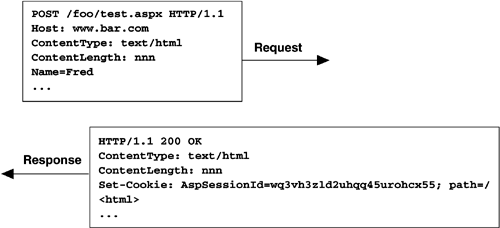
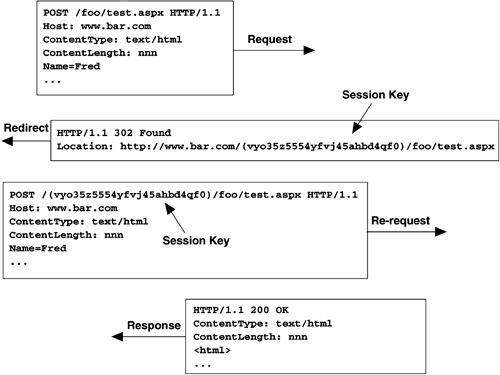
| Maintaining state on behalf of each client is often necessary in Web applications, whether it is used to keep track of items in a shopping cart or to note viewing preferences for a particular user . ASP.NET provides three ways of maintaining client-specific state: session state, cookie state, and view state. Each technique has its advantages and disadvantages. Session state is the most flexible and, in general, the most efficient. ASP.NET has enhanced session state to address some of the problems associated with it in previous versions of ASP, including the abilities to host session state out of process (or in a database) and to track session state without using cookies. Session state is maintained on behalf of each client within an ASP.NET application. When a new client begins to interact with the application, a new session ID (or session key) is generated and associated with all subsequent requests from that same client (either using a cookie or via URL mangling). By default, the session state is maintained in the same process and AppDomain as your application, so you can store any data type necessary in session state. If you elect to house session state in another process or in a database, however, there are restrictions on what can be stored, as we will discuss shortly. Session state is maintained in an instance of the HttpSessionState class and is accessible through the Session property of both the Page and HttpContext classes. When a request comes in to an application, the Session properties of the Page and HttpContext class used to service that request are initialized to the current instance of HttpSessionState that is associated with that particular client. Listing 10-3 shows the primary methods and properties of the HttpSessionState class, along with the property accessors in both the Page and HttpContext classes. Listing 10-3 HttpSessionState Class public sealed class HttpSessionState : ICollection, IEnumerable { // properties public int CodePage {get; set;} public int Count {get;} public bool IsCookieless {get;} public bool IsNewSession {get;} public bool IsReadOnly {get;} public KeysCollection Keys {get;} public int LCID {get; set;} public SessionStateMode Mode {get;} public string SessionID {get;} public HttpStaticObjectsCollection StaticObjects {get;} public int Timeout {get; set;} // indexers public object this[string] {get; set;} public object this[int] {get; set;} // methods public void Abandon(); public void Add(string name, object value); public void Clear(); public void Remove(string name); public void RemoveAll(); public void RemoveAt(int index); //... } public class Page : TemplateControl, IHttpHandler { public virtual HttpSessionState Session {get;} //... } public sealed class HttpContext : IServiceProvider { public HttpSessionState Session {get;} //... } Because the HttpSessionState class supports string and ordinal-based indexers, it can be populated and accessed using the standard array access notation that most developers are familiar with from traditional ASP. There are some new properties, however, including flags for whether the session key is being maintained with cookies or with mangled URLs ( IsCookieless ) and whether the session state is read-only ( IsReadOnly ). Also note that although the CodePage property is accessible through session state, this is for backward compatibility only. The proper way to access the response's encoding is through Response.ContentEncoding.CodePage . For an example of using session state, let's consider an implementation of the classic shopping cart for a Web application. As a user navigates among the pages of an application, she selects items to be retained in a shopping cart for future purchase. When the user is done shopping, she can navigate to a checkout page, review the items she has collected in her cart, and purchase them. This requires the Web application to retain a collection of items the user has chosen across request boundaries, which is exactly what session state provides. Listing 10-4 shows the definition of a class called Item . Instances of this class are used to represent the selected items in our shopping cart. Listing 10-4 Item Class public class Item { private string _description; private int _cost; public Item(string description, int cost) { _description = description; _cost = cost; } public string Description { get { return _description; } set { _description = value; } } public int Cost { get { return _cost; } set { _cost = value; } } } To store Item instances on behalf of the client, we initialize a new ArrayList in session state and populate the ArrayList with items as the client selects them. If you need to perform one-time initialization of data in session state, the Session_Start event in the Application class is the place to do so. Listing 10-5 shows a sample handler for the Session_Start event in our application object, which in our case is creating a new ArrayList and adding it to the session state property bag indexed by the keyword "Cart" . Listing 10-5 Initializing Session State Objects // in global.asax public class Global : System.Web.HttpApplication { protected void Session_Start(Object sender, EventArgs e) { // Initialize shopping cart Session["Cart"] = new ArrayList(); } } A sample page that uses the shopping cart is shown in Listings 10-6 and 10-7. In this page, two handlers are defined: one for purchasing a pencil and another for purchasing a pen. To keep things simple, the items and their costs have been hard-coded, but in a real application this information would normally come from a database lookup. When the user elects to add an item to her cart, the AddItem method is called. This allocates a new instance of the Item class and initializes it with the description and cost of the item to be purchased. That new item is then added to the ArrayList maintained by the Session object, indexed by the string "Cart" . Listings 10-8 and 10-9 show a sample page that displays all the items in the current client's cart along with a cumulative total cost. Listing 10-6 Session State Shopping Page Example<! File: Purchase.aspx > <%@ Page language="c#" Codebehind="Purchase.aspx.cs" Inherits="PurchasePage" %> <HTML> <body> <form runat="server"> <p>Items for purchase:</p> <asp:LinkButton id=_buyPencil runat="server" onclick="BuyPencil_Click"> Pencil ()</asp:LinkButton> <asp:LinkButton id=_buyPen runat="server" onclick="BuyPen_Click"> Pen ()</asp:LinkButton> <a href="purchase.aspx">Purchase</a> </form> </body> </HTML> Listing 10-7 Session State Shopping Page Example ”Code-Behind // File: Purchase.aspx.cs public class PurchasePage : Page { private void AddItem(string desc, int cost) { ArrayList cart = (ArrayList)Session["Cart"]; cart.Add(new Item(desc, cost)); } // handler for button to buy a pencil private void BuyPencil_Click(object sender, EventArgs e) { // add pencil () to shopping cart AddItem("pencil", 1); } // handler for button to buy a pen private void BuyPen_Cick(object sender, EventArgs e) { // add pen () to shopping cart AddItem("pen", 2); } } Listing 10-8 Session State Checkout Page Example<! File: Checkout.aspx > <%@ Page language="c#" Codebehind="Checkout.aspx.cs" Inherits="CheckoutPage" %> <HTML> <body> <form runat="server"> <asp:Button id=Buy runat="server" Text="Buy"/> <a href="purchase.aspx">Continue shopping</a> </form> </body> </HTML> Listing 10-9 Session State Checkout Page Example ”Code-Behind // File: Checkout.aspx.cs public class CheckOutPage : Page { private void Page_Load(object sender, System.EventArgs e) { // Print out contents of cart with total cost // of all items tallied int totalCost = 0; ArrayList cart = (ArrayList)Session["Cart"]; foreach (Item item in cart) { totalCost += item.Cost; Response.Output.Write("<p>Item: {0}, Cost: </p>", item.Description, item.Cost); } Response.Write("<hr/>"); Response.Output.Write("<p>Total cost: The key features to note about session state are that it keeps state on behalf of a particular client across page boundaries in an application, and that the state is retained in memory on the server in the default session state configuration. 10.3.1 Session Key ManagementTo associate session state with a particular client, it is necessary to identify an incoming request as having been issued by a given client. A mechanism for identifying a client is not built into the essentially connectionless HTTP protocol, so client tracking must be managed explicitly. In traditional ASP, this was always done by setting a client-side cookie with a session key on the first client request. This technique is still supported in ASP.NET (in fact, it is the default technique) and is demonstrated in Figure 10-1. Figure 10-1. Session Key Maintained with Cookies Because session keys are used to track clients and maintain potentially sensitive information on their behalf, they must not only be unique, they must also be next to impossible to guess. This has been a problem in the past when programmers used Globally Unique Identifiers (GUIDs) as session keys. Because the original algorithm for generating GUIDs was deterministic, if you knew one of the GUIDs generated by a server machine, you could guess subsequent GUIDs and thus access the session state associated with another client. Although GUIDs are no longer generated this way, ASP.NET takes the precaution of generating its own session keys by using the cryptographic service provider and its own encoding algorithm. Listing 10-10 shows some pseudocode demonstrating the technique used by ASP.NET for creating session keys. Listing 10-10 Session Key Generation in ASP.NET// Generate 15-byte random number using the crypto provider RNGCryptoServiceProvider rng = new RNGCryptoServiceProvider(); byte[] key = new byte[15]; rng.GetBytes(key); // Encode the random number into a 24-character string // (SessionId is a private class - not accessible) string sessionKey = SessionId.Encode(key); Using cookies to track session state can be problematic . Clients can disable cookie support in their browsers, and some browsers do not support cookies. As an alternative to using cookies, ASP.NET also supports a technique called URL mangling to track session keys without using client-side cookies. This technique works by intercepting the initial request made by a client, inserting the session key into the URL, and redirecting the client to the original page requested . When this page receives the request, it extracts the encoded session key from the request URL and initializes the current session state pointer to the correct block of memory. This technique is demonstrated in Figure 10-2. This technique works even with clients that have disabled cookie support in their browsers. On any subsequent navigation, either via anchor tags or explicit programmatic redirections, ASP.NET will alter the target URL to embed the session key as well. This implicit URL mangling works only for relative URLs, however, so care must be taken with all links in an application using cookieless session key management to avoid absolute URLs. Figure 10-2. Session Key Maintained with URL Mangling Controlling whether cookies or URL mangling is used to manage your session keys (along with several other session state “ related features) is performed through the sessionState element in your application's web.config file. Table 10-2 lists the various configuration settings available for the sessionState element of web.config . Listing 10-11 shows a sample web.config file that enables cookieless session key management for an application. Table 10-2. sessionState Attributes
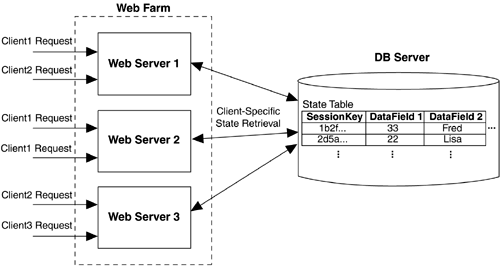
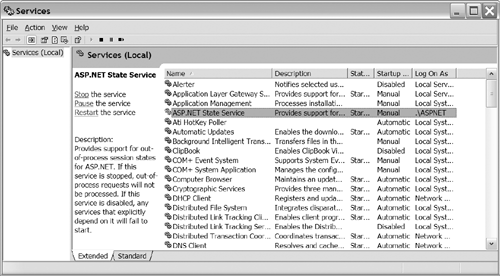
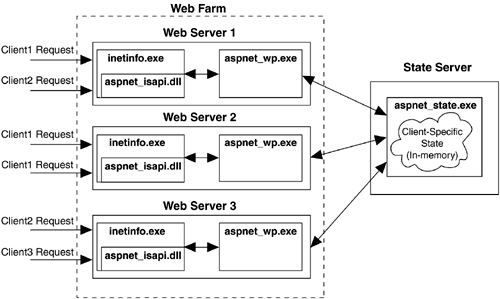
Listing 10-11 Sample web.config File Enabling Cookieless Session Key Management<configuration> <system.web> <sessionState cookieless="true" /> </system.web> </configuration> The choice of whether to use cookie-based or mangled URL “based session key management must be made at the application level. It is not possible to specify that the application should use cookie-based management if the client supports cookies, and otherwise default to mangled URL “based management. The trade-offs to consider when making this decision include efficiency, universal client support, and dealing with relative URLs. Cookies are more efficient because they avoid the redirection necessary to perform the URL mangling, although only one redirection per session will occur with URL mangling. Mangled URLs work with clients that don't have cookies enabled (or that don't support them). The mangled URL technique requires that your application avoid absolute URLs so that the mangling can take place properly. Finally, URL mangling also prevents easy bookmarking and thus may be an inconvenience for your users. 10.3.2 Storing Session State out of ProcessIn addition to requiring cookies to track session state, traditional ASP only supported the notion of in-process session state. Confining session state to a single process means that any application that relies on session state must always be serviced by the same process on the same machine. This precludes the possibility of deploying the application in a Web farm environment, where multiple machines are used to service requests independently, potentially from the same client. It also prevents the application from working correctly on a single machine with multiple host processes, sometimes referred to as a Web garden. If session state is tied to the lifetime of the Web server process, it is also susceptible to disappearing if that process goes down for some reason. To build traditional ASP applications that scale to Web farms and/or maintain persistent client-specific state, developers must avoid session state altogether and rely on other techniques for tracking client-specific state. The most common approach is maintaining client-specific state in a database running on a network-accessible server. To distinguish one client's state from another, the table (or tables) used to store state is indexed by the session key, as shown in Figure 10-3. Figure 10-3. Maintaining Client-Specific State in a Web Farm Deployment ASP.NET introduces the ability to store session state out of process, without resorting to a custom database implementation. The sessionState element in an ASP.NET application's web.config file controls where session state is stored (see Table 10-2). The default location is in-process, as it was in traditional ASP. If the mode attribute is set to StateServer or SqlServer , however, ASP.NET manages the details of saving and restoring session state to another process (running as a service) or to an SQL Server database installation. This is appealing because it is possible to build ASP.NET applications that access session state in the normal way, and then by switching the sessionState mode in a configuration file, that same application can be deployed safely in a Web farm environment. Whenever out-of-process session state is specified, it is also important to realize that anything placed into session state is serialized and passed out of the ASP.NET worker process. Thus, any type that is stored in session state must be serializable for this to work properly. In our earlier session state example, we stored instances of a locally defined Item class, which, if left in its existing form, would fail any attempts at serialization. The ArrayList class we used to store the instances of the Item class does support serialization, but since our class does not, the serialization will fail. To correct this, we would need to add serialization support to our class. Listing 10-12 shows the Item class correctly annotated to support serialization, which is now compatible with storage in out-of-process session state. Listing 10-12 Adding Serialization Support to a Class [Serializable] public class Item { private string _description; private int _cost; // ... } For session state to be transparently housed out of process, ASP.NET must assume that a page has all of its session state loaded before the page is loaded, and then flushed back to the out-of-process state container when the page completes its processing. This is inefficient when a page may not need this level of state access (although it is somewhat configurable, as we will see), so there is still a valid case to be made for implementing your own custom client-specific state management system, even with ASP.NET. The first option for maintaining session state out of process is to use the StateServer mode for session state. Session state is then housed in a running process that is distinct from the ASP.NET worker process. The StateServer mode depends on the ASP.NET State Service to be up and running (this service is installed when you install the .NET runtime). By default the service listens over port 42424, although you can change that on a per-machine basis by changing the value of the HKLM\System\CurrentControlSet\Services\aspnet_state\Parameters\Port key in the registry. Figure 10-4 shows the ASP.NET State Service in the local machine services viewer. Figure 10-4. The ASP.NET State Service The State Service can run either on the same machine as the Web application or on a dedicated server machine. Using the State Service option is useful when you want out-of-process session state management but do not want to have to install SQL Server on the machine hosting the state. Listing 10-13 shows an example web.config file that changes session state to live on server 192.168.1.103 over port 42424, and Figure 10-5 illustrates the role of the state server in a Web farm deployment scenario. Listing 10-13 web.config File Using State Server<configuration> <system.web> <sessionState mode="StateServer" stateConnectionString="192.168.1.103:42424" /> </system.web> </configuration> Figure 10.5. Using a State Server in a Web Farm Deployment The last option for storing session state outside the server process is to keep it in an SQL Server database. ASP.NET supports this through the SQLServer mode in the sessionState configuration element. Before using this mode, you must run the InstallSqlState.sql script on the database server where session state will be stored. This script is found in the main Microsoft.NET directory. [15] The primary purpose of this script is to create a table that can store client-specific state indexed by session ID in the tempdb of that SQL Server installation. Listing 10-14 shows the CREATE statement used to create the table for storing this state. The ASP state table is created in the tempdb database, which is not a fully logged database, thus increasing the speed of access to the data. In addition to storing the state indexed by the session ID, this table keeps track of expiration times and provides a locking mechanism for exclusive acquisition of session state. The installation script also adds a job to clean out all expired session state daily.
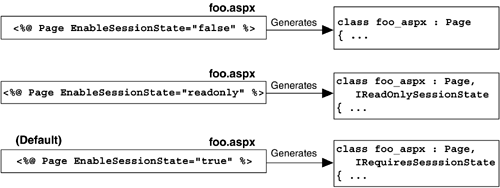
Listing 10-14 ASPStateTempSession TableCREATE TABLE tempdb..ASPStateTempSessions (SessionId CHAR(32) NOT NULL PRIMARY KEY, Created DATETIME NOT NULL DEFAULT GETDATE(), Expires DATETIME NOT NULL, LockDate DATETIME NOT NULL, LockCookie INT NOT NULL, Timeout INT NOT NULL, Locked BIT NOT NULL, SessionItemShort VARBINARY(7000) NULL, SessionItemLong IMAGE NULL,) Listing 10-15 shows a sample web.config file that has configured session state to live in an SQL Server database on server 192.168.1.103. Notice that the sqlConnectionString attribute specifies a data source, a user ID, and a password but does not explicitly reference a database, because ASP.NET assumes that the database used will be tempdb. Listing 10-15 web.config File Using SQL Server<configuration> <system.web> <sessionState mode="SQLServer" sqlConnectionString= "data source=192.168.1.103;user id=sa;password=" /> </system.web> </configuration> Both the state server and the SQL Server session state options store the state as a byte stream ”in internal data structures in memory for the state server, and in a VARBINARY field (or an IMAGE field if larger than 7KB) for SQL Server. While this is space-efficient, it also means that it cannot be modified except by bringing it into the request process. This is in contrast to a custom client-specific state implementation, where you could build stored procedures to update session key “indexed data in addition to other data when performing updates. For example, consider our shopping cart implementation shown earlier. If, when the user added an item to his cart, we wanted to update an inventory table for that item as well, we could write a single stored procedure that added the item to his cart in a table indexed by his session key, and then updated the inventory table for that item in one round-trip to the database. Using the ASP.NET SQL Server session state feature would require two additional round-trips to the database to accomplish the same task: one to retrieve the session state as the page was loaded and one to flush the session state when the page was finished rendering. This leads us to another important consideration when using ASP.NET's out-of-process session state feature: how to describe precisely the way each of the pages in your application will use session state. By default, ASP.NET assumes that every page requires session state to be loaded during page initialization and to be flushed after the page has finished rendering. When you are using out-of-process session state, this means two round-trips to the state server (or database server) for each page rendering. You can potentially eliminate many of these round-trips by more carefully designing how each page in your application uses session state. The session manager then determines when session state must be retrieved and stored by querying the current handler's session state requirements. There are three options for a page (or other handler) with respect to session state. It can express the need to view session state, to view and modify session state, or no session state dependency at all. When writing ASP.NET pages, you express this preference through the EnableSessionState attribute of the Page directive. This attribute defaults to true , which means that session state will be retrieved and saved with each request handled by that page. If you know that a page will only read from session state and not modify it, you can save a round-trip by setting EnableSessionState to readonly . Furthermore, if you know that a page will never use session state, you can set EnableSessionState to false . Internally, this flag determines which of the tagging interfaces your Page class will derive from (if any). These tagging interfaces are queried by the session manager to determine how to manage session state on behalf of a given page. Figure 10-6 shows the various values of EnableSessionState and their effect on your Page -derived class. Figure 10-6. Indicating Session State Serialization Requirements in Pages |

EAN: 2147483647
Pages: 94