6.3 Validation Controls
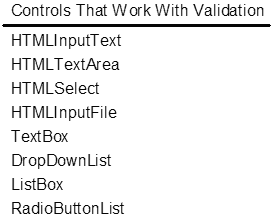
| ASP.NET provides six built-in validation controls. These controls provide four types of validation, as well as a way to summarize errors and a way to construct your own validation algorithms. The BaseValidator class is used as the base class for all the validation controls, providing a single generic implementation of many of the validation capabilities. Listing 6-4 shows a partial definition of the class. Note that it implements the IValidator interface and derives from Label . By deriving from the Label control, the BaseValidator class inherits the span-rendering capabilities of that class, which is convenient because all validation controls render as span elements. In addition, the BaseValidator class defines the ErrorMessage property used by the ValidationSummary control to display the collection of error messages for a form. It also defines the ForeColor property, which lets you change the color of the validation text (it defaults to red). The Enabled property of the BaseValidator class is a convenient way to disable individual validation controls. Listing 6-4 The BaseValidator Class public abstract class BaseValidator : Label, IValidator { protected BaseValidator(); // Properties public static PropertyDescriptor GetValidationProperty(object component) {} public ValidatorDisplay Display {get; set; } public bool Enabled {override get; override set; } public string ErrorMessage {get; set; } public Color ForeColor {override get; override set; } public bool IsValid {get; set; } // Methods public void Validate(); protected void CheckControlValidationProperty(string name, string propertyName); protected abstract bool EvaluateIsValid(); protected string GetControlRenderID(string name); protected string GetControlValidationValue(string name); protected void RegisterValidatorCommonScript(); protected void RegisterValidatorDeclaration(); //... } For a control to be validated with the validation controls, it must have the ValidationPropertyAttribute attribute set to the field that is to be validated. Validation controls apply only to controls that can define a single field that is to be validated, so controls such as grids cannot be used with validation controls. In addition, for the client-side validation to work for a control, its value attribute must evaluate to the field that is to be validated, because the validation functions operate under this assumption. Figure 6-6 shows a list of all the controls that can be validated in ASP.NET. Figure 6-6. Controls That Can Be Used with Validation Controls Six validation controls are available in ASP.NET. The RequiredFieldValidator , as we have seen already, is used to verify that a field is not left empty. The ValidationSummary control is used to display a summary of all the error messages on a given form and optionally to display a client-side message box. The CompareValidator control is used for comparing the value of one field to the value of another field (or a constant). The RangeValidator control is used to verify that a field value falls within a given range. The RegularExpressionValidator control is used to verify the contents of a field against a regular expression, and finally the CustomValidator control is used for executing your own validation algorithms. It is important to note that for all these controls except the RequiredFieldValidator , an empty field is considered valid. Thus, it is common to combine the RequiredFieldValidator control with other validation controls to enforce both population and some other form of validation. Table 6-1 shows the properties of each of the six validation controls and their associated values. Table 6-1. Validation Controls and Their Properties
The ValidationSummary control culls all the ErrorMessage s of each validation control on a page and displays them in a bullet list, a plain list, or a single paragraph format. Listing 6-5 shows the ValidationSummary control and its additional properties. The HeaderText property defines the title string for the summary of error messages. The ShowMessageBox property causes a message box with the summary of errors to appear when the user tries to submit a form that has validation errors. The ShowSummary property turns the summary on or off (you may want to turn it off if you elect to use the ShowMessageBox property). Finally, the DisplayMode property selects which of the three types of display you would like the summary to appear as. Listing 6-5 shows an example of using the ValidationSummary control, along with two RequiredFieldValidator controls to validate the text inputs. Listing 6-5 ValidationSummary Control Example<! File: ValidationSummary.aspx > <html><body> <form runat=server> <table cellspacing=0 cellpadding=2 border=0> <tr><td><table cellspacing=0 cellpadding=1 border=0> <tr><td align=right><b>Name:</b></td> <td><asp:TextBox id="cname" runat=server/></td> <td><asp:RequiredFieldValidator id="cnameValidator" ControlToValidate="cname" Display="Static" ErrorMessage="Name must be filled in." InitialValue="" runat=server>* </asp:RequiredFieldValidator> </td></tr> <tr><td align=right><b>Phone:</b></td> <td><asp:TextBox id="phone" runat=server/></td> <td><asp:RequiredFieldValidator id="phoneValidator" ControlToValidate="phone" Display="Static" ErrorMessage="Phone must be filled in." InitialValue="" runat=server>* </asp:RequiredFieldValidator> </td></tr> <tr><td></td> <td><input value="Enter" type=submit /></td> </tr></table><td> <asp:ValidationSummary id="valSum" runat=server HeaderText="Please correct the following errors:" ShowMessageBox="True"/></td></tr> </table> </form> </body></html> Listing 6-6 shows the CompareValidator control and its additional properties. The Operator property defines what comparison operation to perform, and the Type property specifies the type of the two values to compare. Either the ValueToCompare or the ControlToCompare property contains the value (or reference to a field containing the value) to compare with the target input. Listing 6-6 shows an example of using the CompareValidator control to verify that the user is over 21 years of age. Listing 6-6 CompareValidator Control Example<! File: CompareValidator.aspx > <%@ Page %> <html> <body> <h1>Compare Validator Example</h1> <form runat="server"> Age: <asp:TextBox id="_age" runat=server/> <asp:CompareValidator id="ageValidator" ControlToValidate="_age" ValueToCompare="21" Type="Integer" Operator="GreaterThan" runat=server> You must be over 21! </asp:CompareValidator> <br/> <input value="Enter" type=submit /> </form> </body> </html> Listing 6-7 shows the RegularExpressionValidator control with its one additional property: ValidationExpression . With this control, you can specify any JavaScript regular expression to validate a field. Listing 6-7 shows an example of validating a zip code to ensure that it is of the correct format. Table 6-2 shows some of the more common regular expression characters and their meaning. Listing 6-7 RegularExpressionValidator Control Example <! File: RegularExpressionValidator.aspx > <%@ Page %> <html> <body> <h1>Regular Expression Validator Example</h1> <form runat="server"> Zipcode:<asp:TextBox id="_zipcode" runat=server/><asp:RegularExpressionValidator ControlToValidate="_zipcode" Display="static" ErrorMessage="Zip code must be of the form 11111-1111" InitialValue="" width="100%" runat=server ValidationExpression="\d{5}(-\d{4})?">** </asp:RegularExpressionValidator> <br/> <input value="Enter" type=submit /> </form> </body> </html> Table 6-2. Some Regular Expression Characters and Their Meaning
The CustomValidator control lets you define your own validation function to perform whatever arbitrary validation you would like on a field. In keeping with the other validation controls, you can provide both a client-side validation routine (in JavaScript) and a server-side validation routine. Listing 6-8 shows an example of using a CustomValidator control to verify that a number is divisible by three. Note that two script sections are defined ”one client script and one server script ”each containing a validation function that performs the same check on the incoming data. The client-side validation function is specified in the ClientValidationFunction property of the control, and the server-side validation function is specified as the event handler for the ServerValidate event by assigning the function name to the OnServerValidate property of the control. Note that the form of the validation function is always the same: bool ValFunc(object source, object args); . The object parameter is the validator element, and the args parameter is an object containing two properties, Value and IsValid . Listing 6-8 CustomValidator Control Example <! File: CustomValidator.aspx > <%@ Page Language="C#" %> <script language=javascript> <! function ValModThreeClient(source, args) { if (args.value % 3) args.IsValid=false; else args.IsValid=true; } > </script> <script language="C#" runat=server> void ValModThreeServer(object source, ServerValidateEventArgs e) { e.IsValid = false; try { int num = Convert.ToInt32(e.Value); if (num % 3 == 0) e.IsValid = true; } catch (Exception) {} } </script> <html> <body> <h1>Custom Validator Example</h1> <form runat="server"> Number: <asp:TextBox id="_num" runat=server/> <asp:CustomValidator id="numValidator" ControlToValidate="_num" Display="static" InitialValue="" ClientValidationFunction = "ValModThreeClient" OnServerValidate = "ValModThreeServer" width="100%" ErrorMessage="Please enter a value divisible by three" runat=server/> <br/> <input value="Enter" type=submit /> </form> </body> </html> |

EAN: 2147483647
Pages: 94
- ERP Systems Impact on Organizations
- The Second Wave ERP Market: An Australian Viewpoint
- Enterprise Application Integration: New Solutions for a Solved Problem or a Challenging Research Field?
- The Effects of an Enterprise Resource Planning System (ERP) Implementation on Job Characteristics – A Study using the Hackman and Oldham Job Characteristics Model
- Context Management of ERP Processes in Virtual Communities