| In earlier sections of this chapter, we saw how to create and layer movie clip instances and external .swf files in the Flash Player. We must be able to refer to that content in order to effectively control it with ActionScript. We refer to instances and main movies under four general circumstances, when we want to: -
Get or set a property of a clip or a movie -
Create or invoke a method of a clip or a movie -
Apply some function to a clip or a movie -
Manipulate a clip or movie as data for example, by storing it in a variable or passing it as an argument to a function While the circumstances under which we refer to clip instances and movies are fairly simple, the tools we have for making references are many and varied. We'll spend the rest of this section exploring ActionScript's instance- and movie-referencing tools. 13.5.1 Using Instance Names Earlier, we saw that movie clips are referred to by their instance names. For example: trace(someVariable); // Refer to a variable trace(someClip_mc); // Refer to a movie clip In order to refer to an instance directly (as shown in the preceding trace( ) example), the instance must reside on the timeline to which our code is attached. For example, if we have an instance named clouds_mc placed on the main timeline of a document, we can refer to clouds_mc from code attached to the main timeline, as follows: // Set a property of the instance clouds_mc._alpha = 60; // Invoke a method on the instance clouds_mc.play(); // Place the instance in an array of other related instances var background = [clouds_mc, sky_mc, mountains_mc]; If the instance we want to reference does not reside on the same timeline as our code, we must use a more elaborate syntax, as described later in this section under Section 13.5.3. 13.5.2 Referring to the Current Instance or Movie We don't always have to use an instance's name when referring to a clip. Code attached to a frame in an instance's timeline can refer to that instance's properties and methods directly, without any instance name. For example, to set the _alpha property of a clip named cloud_mc, we can place the following code on a frame in the cloud_mc timeline: _alpha = 60; Similarly, to invoke the play( ) method on cloud_mc from a frame in the cloud_mc timeline, we can simply use: play( ); This technique can be used on any timeline, including timelines of main movies. For example, the following two statements are synonymous if attached to a frame on the main timeline of a Flash document. The first refers to the main movie implicitly, whereas the second refers to the main movie explicitly via the global _root property: gotoAndStop(20); _root.gotoAndStop(20); However, not all methods can be used with an implicit reference to a movie clip. Any movie clip method that has the same name as a corresponding global function, such as duplicateMovieClip( ) or unloadMovie( ), must be invoked with an explicit instance reference. Hence, when in doubt, use an explicit reference. We'll have more to say about method and global function conflicts later in in this chapter under Section 13.7. Note that it's always safest to use explicit references to variables or movie clips rather than using implicit references. Implicit references are ambiguous, often causing unexpected results and confusing other developers reading your code. 13.5.2.1 Self-references with the this keyword When we want to refer explicitly to the current instance from a frame in its timeline or from one of its event handlers, we can use the this keyword. For example, the following statements are synonymous when attached to a frame in the timeline of our cloud_mc instance: _alpha = 60; // Implicit reference to the current timeline this._alpha = 60; // Explicit reference to the current timeline There are three reasons to use this to refer to a clip even when we could legitimately refer to the clip's properties and methods directly. -
First, explicit references are easier for other developers to read, because they make the intention of a statement unambiguous. -
Second, when used without an explicit instance reference, certain movie clip methods are mistaken for global functions by the interpreter. If we omit the this reference, the interpreter thinks we're trying to invoke the analogous global function and complains that we're missing the target movie clip parameter. To work around the problem, we use this, as follows: this.duplicateMovieClip("newClouds_mc", 0); // Invoke a method on an instance // If we omit the this reference, we get an error duplicateMovieClip("newClouds_mc", 0); // Oops! -
Third, using this, we can conveniently pass a reference to the current timeline to functions that operate on movie clips: // Here's a function that manipulates clips function moveClipTo (theClip, x, y) { theClip._x = x; theClip._y = y; } // Now let's invoke it on the current timeline moveClipTo(this, 150, 125);  | New and experienced object-oriented programmers alike, take note: the meaning of this inside a method is a reference not to the current timeline but to the object through which the method was invoked. If an object's method needs to refer to a specific movie clip, a reference to that clip should be passed to the method as a parameter. See Chapter 12 for details on using the this keyword inside methods. | | 13.5.3 Referring to Nested Instances As we discussed in the introduction to this chapter, movie clip instances are often nested inside of one another. That is, a clip's canvas can contain an instance of another clip, which can itself contain instances of other clips. For example, a game's spaceship clip can contain an instance of a blinkingLights clip or a burningFuel clip. Or a character's face clip can include separate eyes, nose, and mouth clips. Earlier, we saw briefly how we can navigate up or down from any point in the hierarchy of clip instances, much like you navigate up and down a series of subdirectories on your hard drive. Let's examine this in more detail and see some more examples. Let's first consider how to refer to a clip instance that is nested inside of the current instance. | When a clip is placed on the timeline of another clip, it becomes a property of that clip, and we can access it as we would access any object property (with the dot operator). | | For example, suppose we place clipB on the canvas of clipA. To access clipB from a frame in clipA's timeline, we use a direct reference to clipB: clipB._x = 30; We could also use an explicit reference, as in: this.clipB._x = 30; Now suppose clipB contains another instance, clipC. To refer to clipC from a frame in clipA's timeline, we access clipC as a property of clipB, like this: clipB.clipC.play(); clipB.clipC._x = 20; Beautiful, ain't it? And the system is infinitely extensible. Because every clip instance placed on another clip's timeline becomes a property of its host clip, we can traverse the hierarchy by separating the instances with the dot operator, like so: clipA.clipB.clipC.clipD.gotoAndStop(5); Now that we've seen how to navigate down the instance hierarchy, let's see how we navigate up the hierarchy to refer to the instance or movie that contains the current instance. As we saw earlier, every instance has a built-in _parent property that refers to the clip or main movie containing it. We use the _parent property like so: theClip._ parent where theClip is a reference to a movie clip instance. Recalling our recent example with clipA on the main timeline, clipB inside clipA, and clipC inside clipB, let's see how to use _parent and dot notation to refer to the various clips in the hierarchy. Assume that the following code is placed on a frame of the timeline of clipB: _parent // A reference to clipA this // An explicit relative reference to clipB (the current clip) this._parent // An explicit relative reference to clipA // Sweet Sheila, I love this stuff! Let's try some more... _parent._parent // A reference to clipA's parent (clipB's grandparent), // which is the main timeline in this case Note that although it is legal to do so, it is unnecessarily roundabout to traverse down the hierarchy using a reference to the clipC property of clipB only to traverse back up the hierarchy using _parent. These roundabout references are unnecessary but do show the flexibility of dot notation: clipC._parent // A roundabout reference to clipB // (the current timeline) clipC._parent._parent._parent // A roundabout reference to the main timeline | Notice how we use the dot operator to descend the clip hierarchy and use the _parent property to ascend it. | | If this is new to you, you should probably build the clipA, clipB, clipC hierarchy in Flash and test the code in our example. Proper instance referencing is one of the fundamental skills of a good ActionScript programmer. Note that the hierarchy of clips is like a family tree. Unlike a typical family tree of a sexually reproducing species, in which each offspring has two parents, our clip family tree expands asexually. That is, each household is headed by a single parent who can adopt any number of children. Any clip (i.e., any node in the tree) can have one and only one parent (the clip that contains it) but can have multiple children (the clips that it contains). Of course, each clip's parent can in turn have a single parent, which means that each clip can have only one grandparent (not the four grandparents humans typically have). Figure 13-5 shows a sample clip hierarchy. 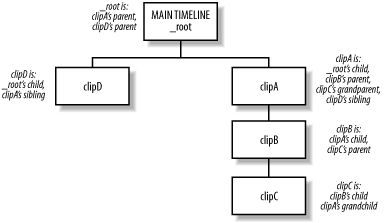 No matter how far you go down the family tree, if you go back up the same number of steps you will always end up in the same place you started. It is therefore pointless to go down the hierarchy only to come back up. However, it is not pointless to go up the hierarchy and then follow a different path back down. For example, suppose that our example main timeline also contains clipD, which makes clipD a "sibling" of clipA because both have the main timeline as their _parent. In this case, you can refer to clipD from a script attached to clipB as follows: _parent._parent.clipD // This refers to clipD, a child of the main // timeline (clipA's _parent) and therefore // a sibling of clipA Note that the main timeline does not have a _parent property (main movies are the top of any clip hierarchy and cannot be contained by another timeline); references to _root._parent yield undefined. 13.5.4 Referring to Main Movies with _root and _leveln Now that we've seen how to navigate up and down the clip hierarchy relative to the current clip, let's explore other ways to navigate along absolute pathways and even among other documents stored in other levels of the Player's document stack. In earlier chapters, we saw how these techniques applied to variables and functions; here we'll see how they can be used to control movie clips. 13.5.4.1 Referencing the current level's main movie using _root When an instance is deeply nested in a clip hierarchy, we can repeatedly use the _parent property to ascend the hierarchy until we reach the main movie timeline. But in order to ease the labor of referring to the main timeline from deeply nested clips, we can also use the built-in global property _root, which is a shortcut reference to the main movie timeline. For example, here we play the main movie: _root.play(); The _root property is said to be an absolute reference to a known point in the clip hierarchy because unlike the _parent and this properties, which are relative to the current clip, the _root property refers to the main timeline of the current level, no matter which clip within the hierarchy references it (see the exception in the next warning). These are all equivalent (except from scripts attached to the main timeline, where _parent is not valid): _parent._root this._root _root Therefore, you can use _root when you don't know where a given clip is nested within the hierarchy. For example, consider the following hierarchy in which circle is a child of the main movie timeline and square is a child of circle: main timeline circle square Now consider this script attached to a frame in both circle and square: _parent._x += 10 // Move this clip's parent clip 10 pixels to the right When this code is executed from within circle, it causes the main movie to move 10 pixels to the right. When it is executed from within square, it causes circle (not the main movie) to move 10 pixels to the right. In order for the script to move the main movie 10 pixels regardless of where the script is executed from, the script can be rewritten as: _root._x += 10 // Move the main movie 10 pixels to the right Furthermore, the _parent property is not valid from within the main timeline; the version of the script using _root is valid even when used in a frame of the main timeline. The _root property can be combined with ordinary instance references to descend a nested-clip hierarchy: _root.clipA.clipB.play( ); References that start with _root refer to the same, known, starting point from anywhere in a document. There's no guessing required.  | When a .swf file is loaded into a movie clip instance, _root refers no longer to that .swf file's main timeline but to the main timeline of the movie into which the .swf was loaded! | | If you know your movie will be loaded into a movie clip, you should not use _root to refer to the main timeline. Instead, define a global reference to the main timeline by placing the following code on your movie's main timeline: _global.myAppMain = this; where myApp is the name of your application and Main is used, by convention, to denote the main timeline. Then use myAppMain in place of _root. 13.5.4.2 Referencing other documents in the Player using _leveln If we have loaded multiple .swf files into the document stack of the Flash Player using loadMovie( ), we can refer to the main movie timelines of the various documents using the built-in series of global properties _level0 through _leveln, where n represents the level of the document we want to reference. Therefore, _level0 represents the document in the lowest level of the document stack (documents in higher levels will be rendered in the foreground). Unless a movie has been loaded into _level0 via loadMovie( ), _level0 is occupied by the movie that was initially loaded when the Player started. Here is an example that plays the main movie timeline of the document in level 3 of the Player's document stack: _level3.play(); Like the _root property, the _leveln property can be combined with ordinary instance references via the dot operator: _level1.clipA.stop(); As with references to _root, references to _leveln properties are called absolute references because they lead to the same destination from any point in a document. Note that _leveln and _root are not synonymous. The _root property is always the current document's main timeline, regardless of the level on which the current document resides, whereas the _leveln property is a reference to the main timeline of a specific document level. For example, suppose we place the code _root.play( ) in myMovie.swf. When we load myMovie.swf onto level 5, our code plays _level5's main movie timeline. In contrast, if we place the code _level2.play( ) in myMovie.swf and load myMovie.swf into level 5, our code plays _level2's main movie timeline, not _level5's. Of course, from within level 2, _root and _level2 are equivalent. 13.5.5 Authoring Instance References with Insert Target Path When the instance structure of a movie gets very complicated, composing references to movie clips and main movies can be laborious. We may not always recall the exact hierarchy of a series of clips and, hence, may end up frequently selecting and editing clips in the authoring tool just to determine their nested structure. The Actions panel's Insert Target Path tool generates clip references visually, relieving the burden of creating them manually. The Insert Target Path button is shown in Figure 13-6. 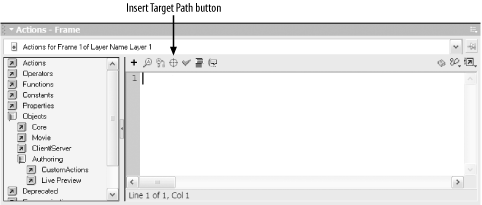 To use Insert Target Path, follow these steps: -
Position the cursor in your code where you want a clip reference to be inserted. -
Click the Insert Target Path button, shown in Figure 13-6. -
In the Insert Target Path dialog box, select the clip to which you want to refer. -
Choose whether to insert an absolute reference, which begins with _root, or a relative reference, which expresses the reference to the target clip in relation to the clip that contains your code (this). -
If you are exporting to Flash 4 format, choose the Slashes Notation button for Flash 4 compatibility. (The Dot Notation button, selected by default, composes references that won't work in Flash 4). The Insert Target Path tool cannot generate relative references that ascend a hierarchy of clips. That is, the tool cannot be used to refer to a clip that contains the current clip (unless you want to begin the path from _root and proceed downward). To create references that ascend the clip hierarchy, we must either use absolute references starting with _root (which therefore become descending references) or manually enter the appropriate relative references in our code using the _parent property. 13.5.6 Dynamic References to Clip Objects Normally, we know the name of the specific instance or movie we are manipulating, but there are times when we'd like to control a clip whose name we don't know. We may, for example, want to scale down a whole group of clips using a loop or create a button that refers to a different clip each time it is clicked. To handle these situations, we must create our clip references dynamically at runtime. 13.5.6.1 Using the array-element access operator As we saw in Chapter 5 and Chapter 12, the properties of an object can be retrieved via the dot operator or through the array-element access operator, [ ]. For example, the following two statements are equivalent: someObject.myProperty = 10; someObject["myProperty"] = 10; The array-element access operator has one important feature that the dot operator does not; it lets us (indeed requires us to) refer to a property using a string expression rather than an identifier. For example, here's a string concatenation expression that acts as a valid reference to the property propertyX: someObject["prop" + "ertyX"]; We can apply the same technique to create our instance and movie references dynamically. We already saw that clip instances are stored as properties of their parent clips. Earlier, we used the dot operator to refer to those instance properties. For example, from the main timeline we can refer to clipB which is nested inside of another instance, clipA as follows: clipA.clipB; // Refer to clipB inside clipA clipA.clipB.stop(); // Invoke a method on clipB Because instances are properties, we can also legitimately refer to them with the [ ] operator, as in: clipA["clipB"]; // Refer to clipB inside clipA clipA["clipB"].stop(); // Invoke a method on clipB Notice that when we use the [ ] operator to refer to clipB, we provide the name of clipB as a string, not an identifier. That string reference can be any valid string-yielding expression. For example, here's a reference to clipB that involves a string concatenation: var clipCount = "B"; clipA["clip" + clipCount]; // Refer to clipB inside clipA clipA["clip" + clipCount].stop(); // Invoke a method on clipB We can create clip references dynamically to refer to a series of sequentially named clips: // Here's a loop that stops clip1, clip2, clip3, and clip4 for (var i = 1; i <= 4; i++) { _root["clip" + i].stop( ); } Now that's powerful! 13.5.6.2 Storing references to clips in data containers We began this chapter by saying that though movie clips are technically their own datatype, they are treated as objects in ActionScript. Hence, we can store a reference to a movie clip instance in a variable, an array element, or an object property. Recall our earlier example of a nested instance hierarchy (clipC nested inside clipB nested inside clipA) placed on the main timeline of a document. If we store these various clips in data containers, we can control them dynamically using the containers instead of explicit references to the clips. Example 13-2, which shows code that is placed on a frame in the main timeline, uses data containers to store and control instances. Example 13-2. Storing clip references in variables and arrays var x = clipA.clipB; // Store a reference to clipB in the variable x x.play(); // Play clipB // Now let's store our clips in the elements of an array var theClips = [clipA, clipA.clipB, clipA.clipB.clipC]; theClips[0].play(); // Play clipA theClips[1]._x = 200; // Place clipB 200 pixels from clipA's registration point // Stop all the clips in our array using a loop for (var i = 0; i < myClips.length; i++) { myClips[i].stop(); } By storing clip references in data containers, we can manipulate the clips (such as playing, rotating, or stopping them) without knowing or affecting the document's clip hierarchy. Storing clip references in variables also make our code more legible. You can use a shorter, simpler variable name instead of a lengthy absolute or relative path through the movie clip hierarchy. 13.5.6.3 Using for-in to access movie clips In Chapter 8, we saw how to enumerate an object's properties using a for-in loop. Recall that a for-in loop's iterator variable automatically cycles through all the properties of the object, so that the loop is executed once for each property: for (var prop in someObject) { trace("the value of someObject." + prop + " is " + someObject[prop]); } Example 13-3 shows how to use a for-in loop to enumerate all the clips that reside on a given timeline. Example 13-3. Finding movie clips on a timeline for (var property in someClip) { // Check if the current property of someClip is a movie clip if (typeof someClip[property] = = "movieclip") { trace("Found instance: " + someClip[property]._name); // Now do something to the clip someClip[property]._x = 300; someClip[property].play( ); } } The for-in loop gives us convenient access to the clips contained by a specific clip instance or main movie. Using for-in, we can control any clip on any timeline, whether or not we know the clip's name and whether the clip was created manually or programmatically. Example 13-4 shows a recursive version of Example 13-3. It finds all the clip instances on a timeline, plus the clip instances on all nested timelines. Example 13-4. Finding all movie clips on a timeline recursively function findClips (theClip, indentSpaces) { // Use spaces to indent the child clips on each successive tier var indent = " "; for (var i = 0; i < indentSpaces; i++) { indent += " "; } for (var property in theClip) { // Check if the current property of theClip is a movie clip if (typeof theClip[property] = = "movieclip") { trace(indent + theClip[property]._name); // Check if this clip is parent to any other clips findClips(theClip[property], indentSpaces + 4); } } } findClips(_root, 0); // Find all clip instances descended from main timeline For more information on recursion, see Section 9.9 in Chapter 9. 13.5.6.4 The _name property As we saw earlier in this chapter under Section 13.3.3, every instance's name is stored as a string in the built-in property _name. We can use that property, as we saw in Example 13-1, to determine the name of the current clip or the name of some other clip in an instance hierarchy: this._name; // The current instance's name _parent._name // The name of the clip that contains the current clip The _name property comes in handy when we want to perform conditional operations on clips according to their identities. For example, here we duplicate the seedClip clip when it loads: onClipEvent (load) { if (this._name = = "seedClip") { this.duplicateMovieClip("clipCopy", 0); } } By checking explicitly for the seedClip name, we prevent infinite recursion without our conditional statement, the load handler of each duplicated clip would cause the clip to duplicate itself. 13.5.6.5 The _target property Every movie clip instance has a built-in _target property, which is a string that specifies the clip's absolute path using the deprecated Flash 4 "slash" notation. For example, if clipB is placed inside clipA, and clipA is placed on the main timeline, the _target property of these clips is as follows: _root._target // Contains: "/" _root.clipA._target // Contains: "/clipA" _root.clipA.clipB._target // Contains: "/clipA/clipB" 13.5.6.6 The targetPath( ) function The targetPath( ) function returns a string that contains the clip's absolute reference path, expressed using dot notation. The targetPath( ) function is the modern, object-oriented equivalent of _target. It takes the form: targetPath(theClip) where theClip is the identifier of the clip whose absolute reference we wish to retrieve. Here are some examples, using our familiar example hierarchy: targetPath(_root); // Contains: "_level0" targetPath(_root.clipA); // Contains: "_level0.clipA" targetPath(_root.clipA.clipB); // Contains: "_level0.clipA.clipB" The targetPath( ) function gives us the complete path to a clip, whereas the _name property gives us only the name of the clip. (This is analogous to having a complete file path versus just the filename.) So, we can use targetPath( ) to compose code that controls clips based not only on their name but also on their location. For example, we might create a generic navigational button that, by examining its targetPath( ), sets its own color to match the section of content within which it resides. See the example under the Selection object in the ActionScript Language Reference for a demonstration of targetPath( ) in action. |