Flylib.com

Books Software


Hack61.Communicate Using Skype, Even When Bandwidth Is Low


Hack 61. Communicate Using Skype, Even When Bandwidth Is Low

Even when bandwidth is too low for voice communication, that doesn't mean you can't communicate with other Skype users .

Works with: Pocket PC version of Skype.

Many devices that can run Windows Mobile 2003, but don't meet Skype's minimum requirements (see Table P-1 in the Preface) or don't have a Wireless Fidelity (WiFi) connection, can still use Skype.

General Packet Radio Service (GPRS) and Enhanced Data rates for Global Evolution (EDGE) are two mobile phone technologies that allow mobile phones to connect to the Internet, but at data rates insufficient to support Skype's voice-call features. Even so, when your device lacks the processing power and/or Internet connection bandwidth for voice, you can still use Skype chat.

6.3.1. Hacking the Hack

It is even possible to make Skype voice calls from a GPRS-3G phone, such as the Nokia 6630, Nokia 6680, Nokia 6681, or Nokia 6682. How, you ask? Well, if you strip out all the encryption/decryption and other overhead from a regular Skype call, even GPRS has just enough bandwidth to support a voice call, though the quality of that call may depend a lot on the quality and speed of your GPRS Internet connection.

To make this work you will need to use a Skype add-on (for instance, the Useful GPRS-3G Skype add-on software, which you can get for $22 from http://www.useful-apps.com/new_page_21.htm) that runs on both your mobile phone and your home PC. The add-on client that runs on your mobile phone will relay your voice from your mobile phone to your home PC, where a second component of the Skype add-on is running and feeds your voice into Skype, which then relays the call to its destination in the usual Skype way.

To make Skype voice calls, even over GPRS, follow these steps using the Useful GPRS-3G Skype add-on software:

  1. Before you leave home, make sure Skype and the PC-based component of the add-on are running.

  2. From your mobile phone, connect to the Internet using GPRS.

  3. Start the mobile phone component of the add-on.

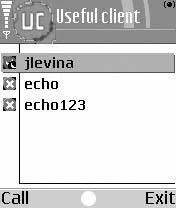
  4. Input a number to call (SkypeOut) or the name of a Skype contact into the mobile phone add-on, and then click Call (see Figure 6-3).

Your call should be routed to its destination, with the first leg of the call being relayed between your mobile phone and your home PC by the add-on over GPRS, and thence from your home PC to its final destination by Skype.

Figure 6-3. By using Skype add-on software, even devices that lack the Internet connection bandwidth for a regular Skype call can still make voice calls using Skype


Hack 62. Give Your Mobile Phone an International Dial-In Number

Use SkypeIn and call forwarding to give your mobile phone one or more international dial-in telephone numbers .

Works with: Windows version of Skype.

Giving your mobile phone one or more international dial-in numbers has a number of advantages, not the least of which is a reduced call rate for callers who are in the same country as your dial-in number, and the fact that you can have an international presence at a distance.

This hack uses three Skype services: SkypeIn, SkypeOut, and call forwarding. By giving a Skype account one or more SkypeIn numbers, you can use Skype call forwarding and SkypeOut to automatically forward to your mobile phone all calls that come in to these dial-in numbers (see Figure 6-4).

Figure 6-4. Routing calls to your mobile phone through Skype effectively gives your mobile phone multiple dial-in phone numbers

To give your mobile phone one or more international dial-in numbers, follow these steps:

  1. Set up a Skype account just for this purposesay, my_mobile .

  2. Sign up my_mobile for SkypeIn and SkypeOut. Choose your SkypeIn number for the country of your choice; for example, +442075551212 would be a phone number for London. SkypeIn is available for many countries , and even regions of those countries; see http://www.skype.com/ for a complete list.

  3. Set up my_mobile so that incoming calls to your international SkypeIn number are automatically forwarded to your mobile phone (select Skype Tools Options … Call Forwarding & Voicemail). For this exercise, well assume your mobile phone number is +12035551212 (see Figure 6-5).

  4. Log off of my_mobile . Call forwarding for this hack works best when the my_mobile Skype account is logged off.

Figure 6-5. Setting up call forwarding to your mobile phone

Now, any calls to your international SkypeIn number will be forwarded to your mobile file automatically.

Unfortunately, all of this is not free, and you must decide for yourself whether the benefits of having an international dial-in number for your mobile phone outweigh the costs (see Table 6-3).

Table 6-3. Cost of adding an international dial-in number to your mobile phone (an example)

Cost component

Cost

Number of minutes of talk time per year

1,200

Per-minute SkypeOut-to-mobile call rate

$0.03

Cost of SkypeOut calls to mobile

$36

SkypeIn annual subscription ( 30 per year)

$37.50

Total annual cost

$73.50


6.4.1. See Also

  • "Make Cheap Long-Distance or International Calls from Your Mobile Phone" [Hack #60]