Deploying and Undeploying Applications with the ASC

| | ||
| | ||
| | ||
Deploying basic Servlet and JSP applications to 10g AS with the ASC is relatively easy. The GUI does a very nice job of automating this process with a deployment wizard. All that's needed by the deployer (administrator) is the application, typically in the form of an EAR file.
The sample application we'll be deploying is the JSP demos. These and other demos can be downloaded from Oracle Technology Network (OTN) at http://otn.oracle.com/tech/java/oc4j/demos/904/index.html .
Once they're downloaded, simply unzip them into a directory. A Readme file exists in the doc directory and the EAR file exists in the dist directory.
Deploying the prepackaged EAR file to the mid- tier instance is simple with the ASC, as shown in the following section.
Deployment Steps
Deploying applications packaged in EAR files is made simple using the ASC utility and the step-by-step deployment wizard. The following procedure shows you the steps necessary for a deployment:
-
By clicking the webdev OC4J link, the OC4J webdev home page appears. Clicking Applications takes you to the Deployed Applications page where you'll see that no applications are currently deployed. Since the application is an EAR file, click the Deploy EAR File button, as shown in Figure 18-5.
-
The Deploy Application page is brought up next . You must specify the location of the ojspdemos.ear file (located on your PC, not the mid-tier server), the name of the application ( ojspdemos ) you're deploying, and the parent application ( default ) if any (you aren't sharing EJBs so this isn't applicable ). Fill in the information as shown in Figure 18-6 and click Continue.
-
The next page asks for the URL mapping for the application. In this case, the wizard has found the /ojspdemos and /ojspdemos/jstl mappings within the EAR file and used them as a default, as shown in Figure 18-7. Click Continue to move to the next screen.
-
Next, you'll need to add the resource reference mappings for the Java Naming and Directory Interface (JNDI) and container-managed persistence (CMP) beans. This is where you would associate resource references to the JNDI locations and CMP entity beans to a data source. Neither is applicable here so accept the defaults and click next as shown in Figure 18-8.
-
The wizard next asks you for a user manager, which will be used for security and any class initialization parameters. The most secure is the Java Authorization (JAZN) XML User Manager, which is Oracle's version of Java Authentification and Authorization Service (JAAS). However, this requires you to set up before deployment as does the Custom User Manager. Accept the default of XML User Manager and click next as shown in Figure 18-9.
-
The final page provides an opportunity to review the basic settings prior to deployment. Specifically, it lists the EAR file to be deployed, which OC4J instance it's being deployed to, and the URL mapped with the application. You can see these in Figure 18-10. Click Deploy to deploy the application. Notice that OHS will be restarted in this process to pick up the new URL mappings.
-
After a few minutes, a confirmation screen will appear stating that the application has been deployed successfully. If problems occurred, the errors would also be listed and you would need to debug based on those. It's sometimes necessary to cleanly shut down the container and then attempt to deploy if errors occur. If a redeployment is occurring, sometimes completely removing the old application and performing a new deployment of the same application will help.
To access the application, enter the URL of the instance with the URL binding provided on the second configuration page. For example, the URL would be http:// hostname.domain : port /ojspdemos because you specified ojspdemos in Figure 18-7.
The resulting application deployment is shown in Figure 18-11.
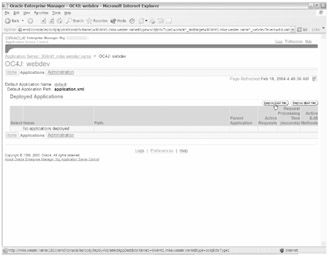
Figure 18-5: Click the Deploy EAR File button
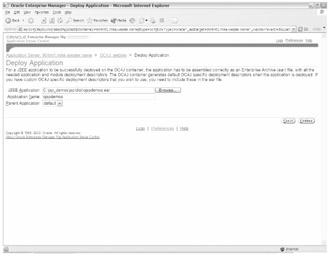
Figure 18-6: Deploy Application page
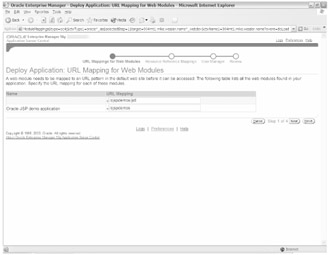
Figure 18-7: Deploy Application URL Mapping for Web Modules page
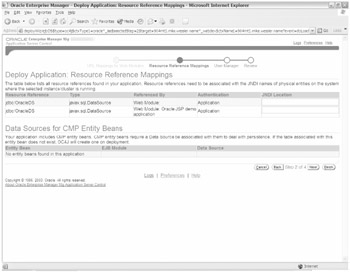
Figure 18-8: Deploy Application Resource Reference Mappings page
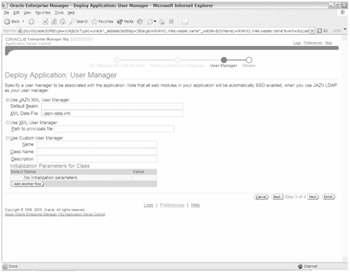
Figure 18-9: Deploy Application User Manager page
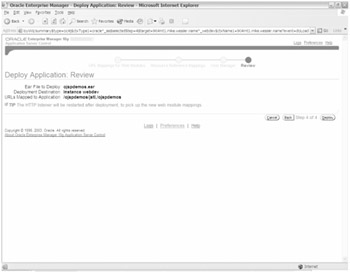
Figure 18-10: Deploy Application Review page
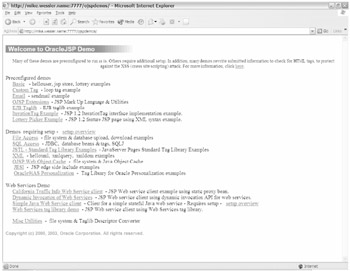
Figure 18-11: OracleJSP Demo web page
From this demo page, you can validate your J2EE environment and test out the demos to get a feel for JSP applications. Some of the demos show access to an Oracle database and others use web services to get real-time information.
The next page after the deployment is the Deployed Applications page, where you can see that the ojspdemos application has been deployed. From this page you can redeploy or undeploy (remove) the application as well as edit the application configuration by selecting the Edit button.
Redeployment Steps
To redeploy an application with a new EAR file, click the Redeploy button. Then you're prompted for the location of the EAR file as shown in Figure 18-12.
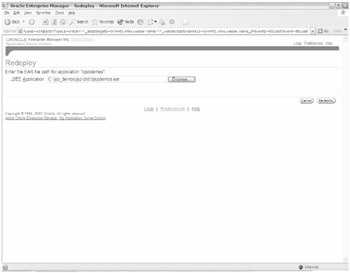
Figure 18-12: Redeploy ojspdemos
Enter the path to the EAR file and then click Redeploy. After a minute the application will be redeployed and a confirmation page will appear.
Undeployment Steps
To undeploy (remove) the application, simply click the Undeploy button, as shown in Figure 18-13.
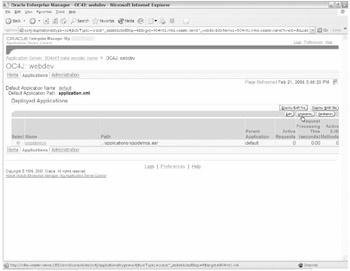
Figure 18-13: Undeploy ojspdemos
A confirmation page will appear and then the application will be removed from within 10g AS and from the file system.
In the preceding steps, you deployed and undeployed a simple, preconfigured JSP application. In most cases the developers will provide the preconfigured EAR file to the administrator to deploy to production. In cases like this, no modification is necessary after the deployment and the ASC utility will prove to be easy to use.
| | ||
| | ||
| | ||

EAN: 2147483647
Pages: 150