A Visual Guide to Layout Managers
| < Day Day Up > |
| Several AWT and Swing classes provide layout managers for general use:
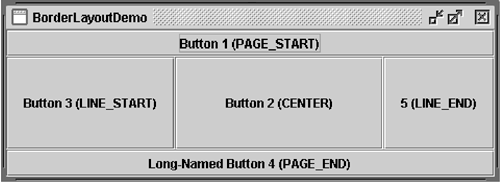
This section shows example GUIs that use these layout managers and tells you where to find the how-to section for each one. You can run each example using Java Web Start by following the instructions in the how-to sections. BorderLayoutEvery content pane is initialized to use BorderLayout . [1] BorderLayout places components in up to five areas: top, bottom, left, right, and center. All extra space is placed in the center area (see Figure 1). For further details, see How to Use BorderLayout (page 459) in Chapter 8.
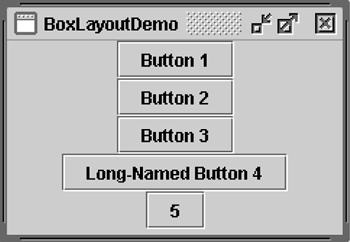
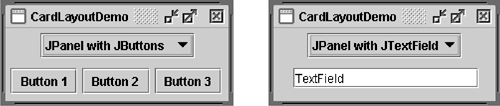
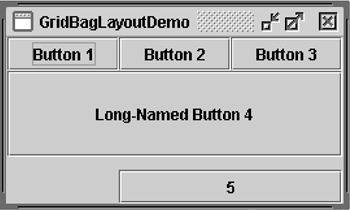
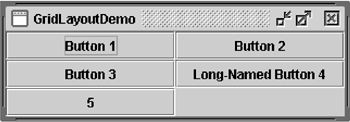
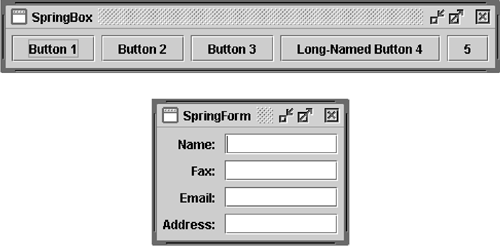
Figure 1. BorderLayoutDemo is an example that uses BorderLayout . BoxLayoutThe BoxLayout class puts components in a single row or column (see Figure 2). It respects the components' requested maximum sizes and also lets you align components. For further details, see How to Use BoxLayout (page 462) in Chapter 8. Figure 2. BoxLayoutDemo is an example that uses BoxLayout . CardLayoutThe CardLayout class lets you implement an area that contains different components at different times (see Figure 3). CardLayout is often controlled by a combo box, the state of which determines which panel ( group of components) CardLayout displays. An alternative to CardLayout is a tabbed pane, which provides similar functionality but with a predefined GUI. For further details, see How to Use CardLayout (page 476) in Chapter 8. Figure 3. C ardLayoutDemo is an example that uses CardLayout . FlowLayoutFlowLayout is the default layout manager for every JPanel (see Figure 4). It simply lays out components in a single row, starting a new row if its container isn't sufficiently wide. Both panels in CardLayoutDemo , shown in Figure 3, use FlowLayout . For further details, see How to Use FlowLayout (page 479) in Chapter 8. Figure 4. F lowLayoutDemo is an example that uses FlowLayout . GridBagLayoutGridBagLayout is a sophisticated, flexible layout manager. It aligns components by placing them within a grid of cells , allowing some components to span more than one cell (see Figure 5). The rows in the grid can have different heights, and the columns can have different widths. For further details, see How to Use GridBagLayout (page 481) in Chapter 8. Figure 5. GridBagLayoutDemo is an example that uses GridBagLayout . GridLayoutGridLayout simply makes components equal in size and displays them in the requested number of rows and columns (see Figure 6). For further details, see How to Use GridLayout (page 490) in Chapter 8. Figure 6. GridLayoutDemo is an example that uses GridLayout . SpringLayoutSpringLayout is a flexible layout manager designed for GUI builders (see Figure 7). It lets you specify precise relationships between the edges of components under its control. For example, you might define the left edge of one component as a certain distance (which can be dynamically calculated) from the right edge of a second component. For further details, see How to Use SpringLayout (page 492) in Chapter 8. Figure 7. Both SpringBox and SpringForm are examples that use SpringLayout . |

| < Day Day Up > |

EAN: 2147483647
Pages: 171