Flylib.com

Books Software


Structure of a Stylesheet

 
xslt for dummies
Chapter 3 - Transforming with Style (Stylesheets, That Is)
XSLT For Dummies
by Richard Wagner
Hungry Minds 2002
  

Structure of a Stylesheet

An XSLT stylesheet has a well-defined structure. Perhaps the easiest way to make sense of this structure is to compare it to something you are familiar with already, such as an ordinary document.

A document is made up of one or more paragraphs. A paragraph is a division of a document that contains one or more sentences that express a unified thought. However, not all sentences in a well-crafted paragraph are created equal. Traditionally, the first sentence holds a unique responsibility to lead the rest of the sentences by introducing a new subject or idea. The rest of the paragraph then expands upon this idea.

When you look at an XSLT stylesheet, youll find a comparable structure. At the top level is a stylesheet , which acts as the overall container for XSLT code, much like a document serves as a container for all the sentences inside it. Whereas a paragraph is the primary component of a document, a template rule is the basic building block of a stylesheet. And, like the first sentence in a paragraph, the match pattern defines where the template rule is going. Figure 3-1 highlights these layers of a stylesheet.
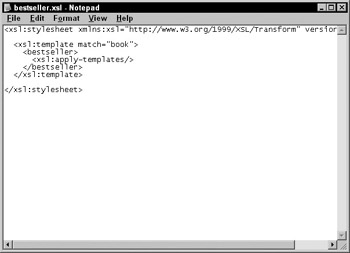

Figure 3-1: Structure of an XSLT stylesheet.

Taking this analogy a step further, there are some elements in a document that arent paragraphs per se. In a normal business letter, for example, the return address, date, greeting, and signature are all distinct, required elements but do not fit the definition of a paragraph. In the same way, an XSLT stylesheet has additional elements, such as xsl:output , that are valid to use but do not fit inside template rules.


2000-2002    Feedback
 
xslt for dummies
Chapter 3 - Transforming with Style (Stylesheets, That Is)
XSLT For Dummies
by Richard Wagner
Hungry Minds 2002
  

Constructing Your XSLT Stylesheet

As you read in Chapter 1, an XSLT stylesheet is a well- formed XML document. By convention, it has an .xsl file extension.

xsl:stylesheet element

The xsl:stylesheet element serves as the topmost element (or document element) of an XSLT stylesheet. The shell of any XSLT stylesheet consists of:

<xsl:stylesheet
xmlns:xsl="http://www.w3.org/1999/XSL/Transform"
version="1.0">

<!-- XLST code goes here-->

</xsl:stylesheet>

As you can see in the preceding snippet, an xsl:stylesheet element must have two parts defined:

  • Namespace: In the preceding code, the XSLT namespace is defined as xmlns:xsl="http://www.w3.org/1999/XSL/Transform" (Dont worry about what a namespace is just yet; youll find out about namespaces later in this chapter.)

  • Version: The version attribute defined providing the version of XSLT used, which is currently 1.0.

This information tells the XSLT processor how to process the stylesheet.

Alternatively, you can also use the xsl:transform element, which is synonymous to xsl:stylesheet :

<xsl:transform
xmlns:xsl="http://www.w3.org/1999/XSL/Transform"
version="1.0">

<!-- XLST code goes here-->

</xsl:transform>

 Tip   Although both xsl:stylesheet and xsl:transform are valid, xsl:stylesheet is by far the most commonly used of the two elements. I use xsl:stylesheet throughout this book.

Top-level elements

An xsl:stylesheet element contains all the XSLT code that appears in the stylesheet. By and large, the basic building block of the stylesheet is the template rule, defined by using the xsl:template , but you can actually add 11 additional XSLT elements directly inside the xsl:stylesheet element. These elements are called top-level elements and are shown in Table 3-1.

Table 3-1: Top-level XSLT Elements

Element

Definition

xsl:template

Defines a template rule.

xsl:output

Specifies the output format for the result document.

xsl:variable

Defines a variable.

xsl:param

Defines a parameter, which is a special kind of variable.

xsl:import

Loads an external stylesheet.

xsl:include

Loads an external stylesheet as part of the current stylesheet.

xsl: preserve-space

Preserves whitespace in the result document.

xsl: strip-space

Removes whitespace in the result document.

xsl:key

Defines a key that can be used to link together XML elements.

xsl:decimal-format

Defines the decimal format to use when converting numbers to strings.

xsl: namespace-alias

Maps a namespace to another namespace.

xsl:attribute-set

Defines a named set of attributes for use in the result document.

The following code snippet shows an XSLT stylesheet with some of these top-level elements defined:

<xsl:stylesheet xmlns:xsl="http://www.w3.org/1999/XSL/Transform"
version="1.0">
<xsl:output method="html"/>
<xsl:preserve-space elements="chapters"/>
<xsl:template match="book">
<p><xsl:apply-templates/></p>
</xsl:template>
<xsl:include href="moretemplates.xsl"/>
</xsl:stylesheet>

Generally, you can put the top-level elements in any sequence you wish. The XSLT processor processes these elements the same way regardless of order. For example, if I move the elements around, the code generates the same results as the original:

<xsl:stylesheet
xmlns:xsl="http://www.w3.org/1999/XSL/Transform"
version="1.0">
<xsl:include href="moretemplates.xsl"/>
<xsl:template match="book">
<p><xsl:apply-templates/></p>
</xsl:template>
<xsl:preserve-space elements="chapters"/>
<xsl:output method="html"/>
</xsl:stylesheet>

However, there are a couple of exceptions to this rule, which tend to occur only in advanced situations. Specifically, when you use the xsl:import element, it must be the first top-level element defined under xsl:stylesheet . Also, in some error checking routines, element placement can become critical.

Comments

A comment is text included in your stylesheet for behind-the-scenes use that the XSLT processor ignores during the transformation. In stylesheets, people typically use comments to label a template rule or other part of the code describing its functionality. Just like in HTML, a comment is any text surrounded by a <!-- prefix and --> suffix. For example, the heavily commented XSLT stylesheet shown here produces the same results as the preceding example:

<xsl:stylesheet
xmlns:xsl="http://www.w3.org/1999/XSL/Transform"
version="1.0">

<!-- Developed by: R. Wagner -->
<!-- Last modified: 04/22 -->

<!-- This stylesheet will output an HTML document using
several
template rules, one defined in this file and the
others from
moretemplates.xsl -->

<!-- Output document to HTML format -->

<xsl:output method="html"/>

<!-- Preserve space for chapters elements -->
<xsl:preserve-space elements="chapters"/>

<!--- For each book element, surround its content with
HTML paragraph tags -->
<xsl:template match="book">
<p><xsl:apply-templates/></p>
</xsl:template>

<!-- Include more template rules, which
are stored in a separate file -->
<include href="moretemplates.xsl"/>

</xsl:stylesheet>

When I say the processor ignores any comment, I mean it. You can even insult the processor with <!-- Hey processor, youre a loser! --> and this still doesnt impact its performance. Now thats service.

 Tip   Use comments freely . As you can see by the preceding examples, comments make XSLT code much more readable than without it. This is especially true if you are trying to read a stylesheet someone else wrote.


2000-2002    Feedback