Creating a photo album in photoshop elements for windows
Authors: Ulrich K.
Published year: 2005
Pages: 6-10/110
Buy this book on amazon.com >>

what you'll create


how this book works


the next step

This Visual QuickProject Guide gets you started using a variety of tools in Photoshop Elements, but the real focus is on creating photo albums. That means giving short shrift to many of Elements' organizing and editing features. For more in-depth coverage, you might consider adding another book to your library: Photoshop Elements for Windows & Macintosh: Visual QuickStart Guide.

The Visual QuickStart Guide teaches you step-by-step how to use Elements to enhance your photos, improving their quality and heightening their impact. Like all of the books in Peachpit's Visual QuickStart Guide series, it also works as a reference guide when you just need to learn (or remember) the steps for completing a task.


Chapter 1. getting ready

You've been shooting like mad with your new digital camera, or spending every spare minute scanning old family snapshots. Now you'd like to show off your work and preserve it in a special photo album. You're about to embark on an album-creation project using Adobe Photoshop Elements 3.0 for Windows.

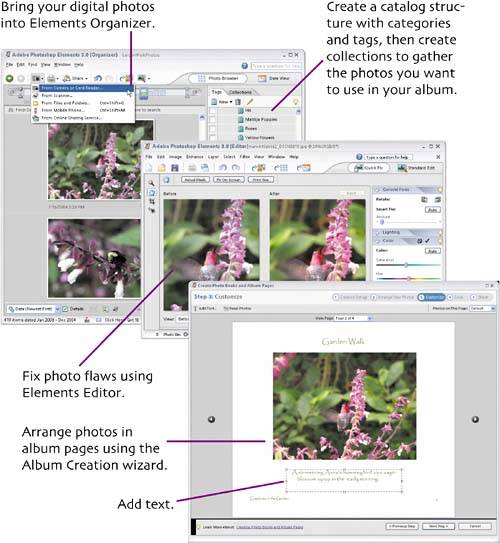
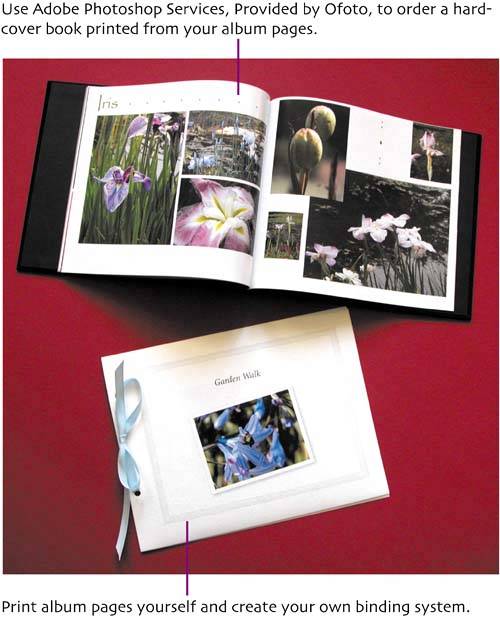
You'll import photos into Elements Organizer; retouch them in Elements Editor; then, using Organizer's Album Creation wizard, arrange them in neat layouts with text. You'll create album pages that can be printed as individual 8.5-by-11-inch pages, using high-quality photo paper, on your own printer. You are free to bind these into an album however you like. For a simple album, punch three holes in each page and put the pages into a three-ring binder from your local Five and Dime. For something a bit fancier, punch just two holes and thread the pages with ribbon or cord. Check local art-supply, crafts, or office-products stores and you'll find many styles of binders, portfolios, and cover materials.

The most luxurious album option is to create layouts for 10.25-by-9-inch pages. Using Adobe Photoshop Services, provided by Ofoto you can order a photobook. Ofoto, a Kodak subsidiary, professionally prints your album pages and binds them into a hardcover book.


general preparations

To install Photoshop Elements 3.0 you need

A PC with at least an 800MHz Intel Pentium III or 4 processor (or one that's compatible) and a CD-ROM drive.

Microsoft Windows XP Professional or Home Edition with Service Pack 1; Windows 2000 with Service Pack 4 or later.

At least 256MB of RAM (Adobe recommends 512MB) and 800MB of free space on your hard-drive.

A color monitor and video card capable of handling 16-bit color or greater. (Set your monitor resolution to 1024 by 768 or greater when using Elements.)

Calibrate Your Monitor

How do you know that the beautiful colors you see on screen will be the same beautiful colors when you print your photos or album pages or send them out to be printed professionally? Well the truth is, the printed versions will never give you the luminous bright colors you see on your computer monitor. But you can do something to help ensure that your delicate pink rose doesn't come out fire-engine red, and the bright baskets of pollen on a bumblebee's legs are orange not greeny gray. The way to do this is to use color management and to calibrate your monitor. We'll use a simple color-management technique in creating album pages, but monitor calibration is beyond the scope of this book. When you install Elements you also install Adobe Gamma software. The Elements Help feature describes how to use this software to calibrate a CRT monitor. You can also purchase special tools and software specifically for calibrating your monitor. These can get fairly pricey, however, and require devoted attention to achieve the most consistent results.

To run the Adobe Gamma application, use the Windows Start menu to open the Control Panel window. Choose the category named Appearance and Themes. Adobe Gamma is listed with the Control Panel icons. Click the Adobe Gamma icon to start the calibration process.

Creating a photo album in photoshop elements for windows
Authors: Ulrich K.
Published year: 2005
Pages: 6-10/110
Buy this book on amazon.com >>