|
PHP for the World Wide Web (Visual QuickStart Guide) Authors: Ullman L. Published year: 2001 Pages: 10-11/116 |
| I l @ ve RuBoard |
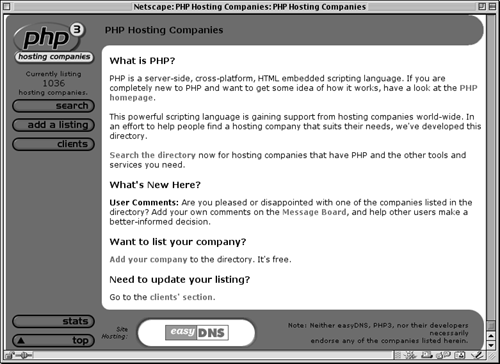
What You'll NeedThe most important requirement for working with PHP ”since it is a server-side scripting language ”is access to a PHP-enabled server. Considering PHP's popularity, it is most likely that your ISP (Internet Service Provider) or Web host has this option available to you on their servers. To be sure, you will need to contact them to see what technology they support. As of this writing, over one thousand ISPs and Web hosts provide PHP support (Figure i.5). Figure i.5. Through PHP's home page (Figure i.1) or directly you can access http://hosts.php.net, a site where you can search through the ISP's who offer PHP on their servers.
The other option you have is to install PHP on your own server ”commonly just a machine running Windows NT or Linux, with the necessary Web server application installed. (For example, Apache is a free Web serving application for Unix and NT systems, or you could use Personal Web Sharing with Windows.) Brief information on installing PHP is available in Appendix A, Installation and Configuration. If you are up to the task of using your own PHP-installed server, you can take some consolation in knowing that PHP is available for free from the PHP Web site (www.php.net) and comes in easy-to-install packages. The second requirement is almost a given ”that you have some sort of text editor on your computer. NotePad, WordPad, SimpleText, and similar freeware applications are all sufficient for your purposes, while BBEdit, WordPerfect, Word, and other commercial applications offer more features that you may appreciate. If you are accustomed to using a graphical interface (also referred to as WYSIWYG ”What You See Is What You Get) editors like Dreamweaver or GoLive, you can consult your manual to see how to program within that application. Third, you will need some method of getting the scripts you write in your text editor to the server. If you are working directly on your own server, you can simply save the scripts to the appropriate directory. However, if you are using a remote server with your ISP or Web host, you will need an FTP (File Transfer Protocol) program to send the script to the server. Another option is to telnet to the remote server and use an editor such as Vi or Pico to write your scripts directly on that machine. From you this book only assumes a basic knowledge of HTML, although the more comfortable you are handling raw HTML code without the aid of a Web creation application such as Dreamweaver, GoLive, FrontPage, or PageMill, the easier the transition to using PHP will be. Every programmer will eventually turn to an HTML reference at some time or another, regardless of how much he or she knows , so I would encourage you to keep a good HTML book by your side. One such introduction to HTML coding is Elizabeth Castro's HTML for the World Wide Web: Visual QuickStart Guide , also by Peachpit Press. Previous programming experience is certainly not required, although it may expedite your learning, as you will quickly see numerous similarities between, for example, Perl and PHP or JavaScript and PHP. |
| I l @ ve RuBoard |
| I l @ ve RuBoard |
About This BookIn this book I have attempted to convey both the fundamentals of programming with PHP and some of the more advanced features you may end up using, without going into overwhelming detail. I have used the following conventions to do so: The step-by-step instructions will indicate what coding you are to add to your scripts and where. The specific text you should type will be printed in a unique type style to separate it from the main body text. Example:
<?php print ("Hello, World!"); ?>
The PHP code will also be written out as its own complete script as I go and will be numbered by line for reference (Script i.1). You should not insert these numbers yourself, as it will render your work inoperable. I recommend using a text editor that automatically displays the line numbers for you, as this will help when debugging your work (see Chapter 15, Debugging ). Script i.1. Better text editors will automatically put in line numbers for you as you work. You should never put these in yourself!
In these blocks I will also highlight in red the particular parts being discussed in the step-by-step instruction section to draw attention to new or relevant material. Likewise, where appropriate, sections of the browser window will be marked (Figure i.6). One last view you will see in this book is that of the HTML source itself (Figure i.7), accessed in Netscape Navigator through the View > Page Source menu or in Internet Explorer through View > Source. The difference is insignificant between these two particular figures, but understand that Figure i.7 displays the text the browser receives and Figure i.6 demonstrates how the browser interprets that text. Using PHP, we will create the text that is sent to the browser. Figure i.6. This is the view you will see of the browser window. It will not make any difference whether you use Netscape Navigator or Internet Explorer (or something else) on Macintosh, Windows, Linux, or any other operating system for the purposes in this book.
Figure i.7. By selecting "Page Source" from the View menu in Netscape or "Source" from the View menu in Internet Explorer, you can see the HTML that the browser received. In this case, it only received the text "Hello, World!"
Since the column in this book is narrower than the common text editor screen, sometimes lines of PHP code printed here have to be broken up where they would not otherwise break in your editor. A small gray arrow indicates when this kind of break occurs. For example: <HTML><HEAD><TITLE>First PHP Script You should continue to use one line in your scripts, or else you will encounter errors when executing. (The gray arrow is not used in scripts that are numbered.) While demonstrating new features and techniques, I will do my best to explain the why's and how's of them as I go. Hopefully between reading about and using a function you will clearly comprehend it. Should something remain confusing, though, this book contains a number of references where you can find answers to whatever questions you may have (see Appendix C, PHP Resources). Because of the nature of how PHP works, please also understand that there are essentially three views of every script: the PHP code itself; the code that gets sent to the browser (mostly HTML); and what the browser displays to the end user . I will show as much of these three views as possible, depending upon space constraints, with priority given to the PHP itself. |
| I l @ ve RuBoard |
|
PHP for the World Wide Web (Visual QuickStart Guide) Authors: Ullman L. Published year: 2001 Pages: 10-11/116 |