Basic Techniques in Securing Web Services
| The basic procedures to be considered to secure Web services are shown in Table 10-1. Table 10-1. Basic Procedures to Secure Web Services
Secure ConnectionThe three most widely used and available techniques for the secure connection are
FIREWALLSA firewall protects a private network from intruders outside the network. A firewall acts as a barrier for information moving into and out of the LAN/WAN. We can provide varied restrictions to different clients based on origin or identity by employing firewalls such as the Microsoft Internet Security and Acceleration (ISA) server. The use of a firewall method is constructive if you can identify which computers should access your Web service. Then, you can implement Internet Protocol Security (IPSec) or firewall rules to restrict access to computers of known IP addresses. But in real time, you may not know the IP address of all the computers. Moreover, any unauthorized user may access the resource by using an IP spoofing technique. IP spoofing is a technique by which an invader simulates the IP of an authorized user and can access the resource. However, a correctly configured firewall is not vulnerable to this. A Web service is a programmable entity that provides a particular element of functionality, such as application logic, and is accessible to any number of potentially incongruent systems through the use of common data formats and protocols, such as XML and HTTP. In Web services the traffic flows through port 80 and port 443 similar to standard Web site traffic with the help of HTTP. One of the shortcomings in the security of Web services is in the use of HTTP. Of course, HTTP protocol is simple, and, by using it along with XML, we can effortlessly make the application logic accessible to various dissimilar systems and communicate with other applications. But the problem is that HTTP penetrates through the enterprise security firewalls and makes attack and invasion easy to accomplish from outside. Even though firewalls play a vital role in controlling malicious attacks, they cannot examine the SOAP contents to completely prevent the malicious attack from outside. Moreover, firewalls are intended only for network-level security, not for application-level security. SSL AND HTTPSSSL has been commonly established on the World Wide Web for authenticated and encrypted communication between clients and servers. At present, SSL along with the Transport Layer Security (TLS) [1] is widely used for securing online transactions. SSL offers confidentiality, data integrity, and authentication (server and client authentication). SSL is already employed by many enterprises to guard data across the Internet. SSL protocol was developed by Netscape, and it is a common technique used to secure the TCP/IP communication between HTTP requesters (Web browsers) and HTTP servers (Web servers). SSL employs public key cryptography [2] for Internet security. HTTPS secures communication by transmitting HTTP request and response over an SSL connection.
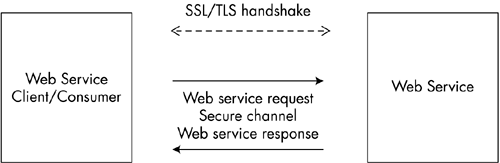
SSL provides some degree of protection to Web services. It secures the channel in which the transmission of data between the client and server occurs. In SSL the data is encrypted by the client/sender and then sent to the server. The data received is decrypted by the server/recipient and confirmed as being from a truthful sender. SSL provides a secure, reliable connection between authenticated endpoints. The secure channel is initiated with an exchange of messages through an SSL/TLS handshake. The handshake allows the server to authenticate itself to the client, and optionally the client to authenticate itself to the server. Usually, in business SSL sessions, only the server is authenticated. Then, the successive message is encrypted and digitally signed to assure its confidentiality and integrity. Figure 10-1 shows the transmission of data between the Web service client and a Web service over a secure channel. Figure 10-1. Transmission of data between a Web service client and Web service over a secure channel. The limitation of SSL is its low performance. SSL uses certificates and credentials, which drastically slow the overall performance compared to the performance of HTTP. SSL accelerators sometimes can improve the overall performance. Another difficulty in using SSL is that it provides only point-to-point (transport-level) security. That means it provides complete security only between two authenticated entities. If there are more than two entities, and each entity is capable of examining and modifying the data, then SSL doesn't provide end-to-end security. SSL secures communication only at the transport level, not at the message level. Therefore, data is secure only while traveling over the wire. If it reaches the message level, then the data is not secure. But in Web services data normally is passed through various entities before reaching its final destination. For example, suppose entity A wants to communicate with entity B over a secure channel. If there is an intermediate entity C, say, a gateway, then to route the data to entity B, the gateway may need to know the data. In this scenario SSL doesn't provide end-to-end security. Hence, there is a possibility of data corruption or attack in entity C at the message level while the data is transmitted between entity A and entity B. Therefore, for Web services, SSL can be used only in an environment where data does not route through intermediate application nodes and has no multiple hops. That is, we can use SSL in a tightly coupled Microsoft Windows operating system environment. NEED FOR END-TO-END SECURITYSSL/TLS provides security features such as data integrity and data confidentiality, and facilitates point-to-point secure sessions. Similar to SSL/TLS, IPSec [3] is also widely employed for the secure sessions.
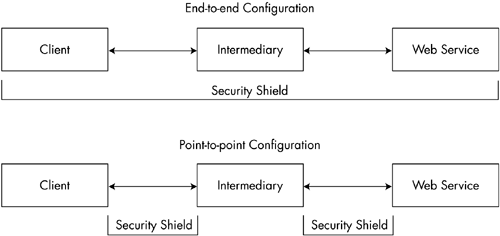
Current Web service application topologies comprise a wide range of systems, such as mobile devices, gateways, proxies, load balancers, demilitarized zones (DMZs), and outsourced data centers. Web services have a globally distributed, complex, multidomain and heterogeneous environment, so the SOAP messages must be routed to one or more intermediaries before reaching the final destination, or receiver. The problem is that if the data transmission occurs between the intermediaries beyond the transport layer, then both the data integrity and other security information maybe lost. We need an end-to-end message-level security, and not just point-to-point security, as provided by SSL/TLS. Therefore, for a complete Web service security architecture, we have to incorporate both transport-layer and application-layer end-to-end message-level security mechanisms. Figure 10-2 illustrates the point-to-point and end-to-end configuration. Figure 10-2. Point-to-point and end-to-end configuration. CONFIGURING SSL IN WINDOWS 2000To secure XML Web services with SSL in Windows 2000, the following steps have to be done:
VIRTUAL PRIVATE NETWORK
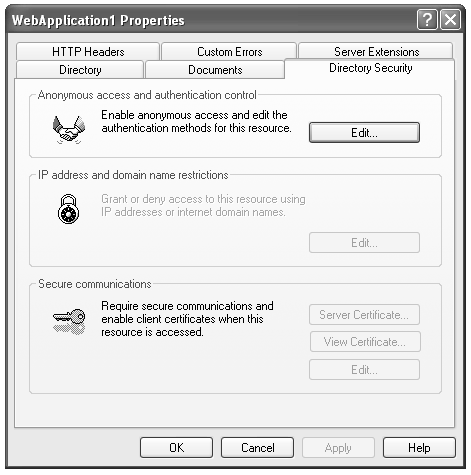
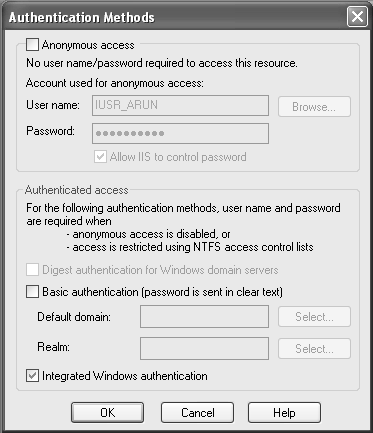
Authentication and AuthorizationAuthentication is the process of confirming the identity of a client user/application before permitting the user/application to access a resource. For example, users who request the resources have to submit some set of credentials, such as user ID and password. In return, the user receives a security token from the server. In the Web services world, the security token may be in the form of a cookie placed on the user's browser, a session ID stored on the server, and so on. The simplest method to implement an authentication mechanism for a Web service is to use the authentication features of the HTTP. Authentication Mechanisms for HTTPMicrosoft IIS version 5.0 supports several authentication mechanisms for HTTP, such as Basic, Digest, Windows Integrated, and Client certificate. BASICIn Basic authentication, the user is prompted for a login ID and password. If the user provides a valid Windows account, a connection is established. The main drawback in basic authentication is that Web browsers transmit the collected information in an unencrypted plaintext form to the Web server. By observing communications between networks, one can easily interrupt and decipher these passwords by using publicly available tools. We therefore recommend using HTTPS (i.e., Basic over SSL). DIGESTDigest authentication is similar to Basic authentication. The only difference is that it entails a different way of transmitting the authentication credentials. In this method hashing is employed to transmit authentication credentials to the server in a secure manner. One cannot decrypt or decipher the original text from the hash or message digest. A message digest is a unique value derived from the message content. However, this method is not supported in many platforms other than Microsoft Windows. Internet Explorer 5.0 and later browsers support Digest authentication, but other browsers, such as Netscape Navigator, do not support Digest authentication natively. INTEGRATED WINDOWS AUTHENTICATIONThis Integrated Windows authentication method is suitable for intranet scenarios. The user's credentials are transmitted to the server using NT LAN Manager (NTLM), NT Challenge/Response (NTCR), or Kerberos. [4] The problem in using Integrated Windows authentication is that it does not work over HTTP proxy connections or other firewalls. IIS authorizes access to the Web service if the credentials submitted by the user match a valid user account. In Integrated Windows authentication it does not initially ask users for a username and password. The current Windows user information on the client computer is utilized for the Integrated Windows authentication. The browser asks the user for a Windows user account if, and only if, there is an occurrence of failure to identify the user during the initial authentication exchange. Figure 10-3 shows the Internet Services Manager settings. To configure this method, check the Integrated Windows authentication box in the Internet Services Manager dialog box, as shown in Figure 10-4.
Figure 10-3. Internet Services Manager settings. Figure 10-4. Internet Services Manager settings for Integrated Windows authentication. CLIENT CERTIFICATESIn this method, to access the service, clients have to get a client certificate from a mutually trusted third-party organization. Then, certificates are mapped to user accounts, which are used by IIS for authorizing access to the Web service. Client certificates are electronic documents that contain identifying information such as the user data and the organization that issued the certificate. Another alternative to IIS authentication schemes is the use of a custom mechanism, such as transmitting client credentials through a SOAP header.  |

EAN: 2147483647
Pages: 126