Hack 78 Send a Paper Text Message
| < Day Day Up > |
| Who says that technology has taken the personality out of our communication? Use your camera phone to send messages in your own handwriting . Regular text messaging with Short Messaging Service (SMS) lacks an element of personality. ASCII letters just don't possess the individual flair that handwritten notes convey . That personality was certainly part of the charm of passing notes in class as a child, in addition to the element of risk. Today's camera phones don't pose much risk, but they can help you recapture the charm of handwritten notes. Say you're waiting for a plane in an airport and want to let your girlfriend know that you're thinking about her. You could send the following SMS text message: "Wish you were in the next seat! Miss you..." She would certainly appreciate that. But if you used the camera phone to take a picture of a handwritten note, as shown in Figure 7-9, you'd put a big smile on her face. Figure 7-9. A picture note in your own handwriting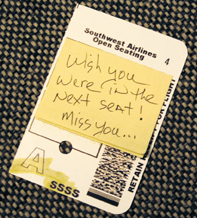 The technique is quite easy. First, use your camera phone to take a picture of the handwritten note. Most camera phones give you the option of saving or sending right there on the spot. Find and click the Send button. You'll be prompted to address and, optionally , provide a subject for your note, as shown in Figure 7-10. Enter the destination phone number or select your friend from your contacts, hit the Send button, and your "handwritten" note is on its way. Figure 7-10. Sending the MMS picture note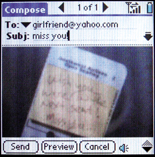 Once you start thinking about the possibilities of paper text messaging, you might even go so far as to keep a little pad of Post-it notes in your briefcase just for this purpose. |


| < Day Day Up > |

EAN: 2147483647
Pages: 161