What Is .NET?
| Since Microsoft first announced and released .NET, people have been trying to figure out what exactly this new 'thing' is. According to the marketing that Microsoft was pushing, it would revolutionize computing as we know it. That's an awfully big promise to keep, and it's still too early to tell if it really will accomplish its goals. However, it is well on its way to doing so. When people talk about .NET, you can never be sure which "component" of .NET they're talking about. No other "product" or "idea" released by Microsoft has taken on so many different forms. There are products, services, and even concepts that are tagged with the .NET moniker, so it's hard to figure out what exactly .NET is. When .NET is discussed in this book, it will be in reference to the new development languages and runtime available with the .NET Framework SDK (which is included on the accompanying CD). This SDK includes the .NET Runtime, which contains everything you need to run applications written for the .NET environment. You can think of the .NET Runtime as consisting of several components. The components of the CLR reside in the Global Assembly Cache (GAC). The compilers for the Microsoft .NET languages are also included (C#, VB .NET, VJ#, and so on). You can see the GAC in Figure 1.1. Figure 1.1. The Global Assembly Cache.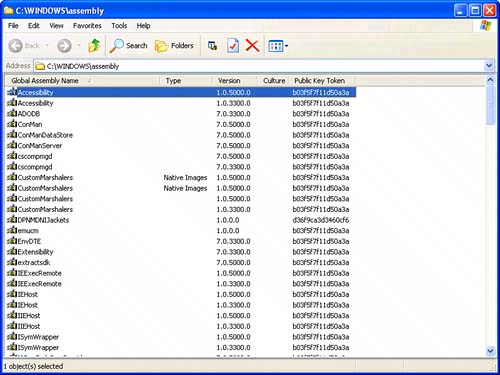 One of the most common misconceptions people have about running .NET code is that the code being executed is "interpreted," much like Java byte code or the old visual basic runtimes are. The truth is that code written for .NET is compiled natively before it is ever executed. When a .NET application is compiled, it is compiled into an intermediary language (IL). This IL is actually what is stored in the executable or library that has been created. This IL will be compiled into native code at one of two points. At the installation time of the code, a process called ngen (short for native generation) can be performed. This compiles the IL directly into native code, and stores the compiled native code in a special place in the GACthe native assembly cache. Assuming the code wasn't compiled at installation time, it must be compiled before the first execution. During startup of the application, a special feature of the .NET Runtime called the JIT (Just In Time) compiler performs the compilation in the background. You can imagine that in the latter case, the startup time of your application could be negatively affected because of this compilation happening behind the scenes. If startup time is important to your application (which it should be if you're writing games), it would be wise to ensure that your installation includes the ngen step. However, some optimizations can't be made during this step that can be made if the code is compiled via the JIT, so if the startup time isn't important, feel free to let the .NET Runtime do what it was designed to do. |

EAN: 2147483647
Pages: 191