Document Conventions
Microsoft® Windows® 2000 Scripting Guide

« Previous | Next »
The following art symbols and text conventions are used throughout this book.
Scripting Diagram Symbols
Use the following table of symbols as a resource for understanding the scripting graphics included in this book.
| Symbol | Meaning |
|---|---|
 | Object |
 | Method |
 | Property |
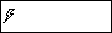 | Event |
 | Collection object |
 | Item property of a collection object |
Reader Alert Conventions
Reader alerts are used throughout this book to notify you of both supplementary and essential information. The following table explains the meaning of each alert.
| Reader Alert | Meaning | |
|---|---|---|
 | Tip | Alerts you to supplementary information that is not essential to the completion of the task at hand. |
 | Note | Alerts you to supplementary information. |
 | Important | Alerts you to supplementary information that is essential to the completion of a task. |
 | Caution | Alerts you to possible data loss, breaches of security, or other more serious problems. |
 | Warning | Alerts you that failure to take or avoid a specific action might result in physical harm to you or to the hardware. |
Command-line Style Conventions
The following style conventions are used in documenting scripting and command-line tasks throughout this book.
| Element | Meaning |
|---|---|
| bold font | Characters that you type exactly as shown, including commands and parameters. User interface elements are also bold. |
| Italic font | Variables for which you supply a specific value. For example, Filename.ext can refer to any valid file name. |
| Code samples. |
Command | Command that is typed at the command prompt. |
Syntax | Syntax of script elements. |
Output | Output from running a script. |
 Send us your feedback Send us your feedback | « Previous | Next » |

Microsoft Windows 2000 Scripting Guide(c) Automating System Administration 2003
ISBN: N/A
EAN: N/A
EAN: N/A
Year: 2004
Pages: 635
Pages: 635