Tool 118: Nominal Prioritization
| AKA | N/A |
| Classification | Evaluating/Selecting (ES) |
Tool description
The nominal prioritization tool is an easy and quick method for a team to team-prioritize from a list of items, proposed actions, or various options. It can also be used to team-select a particular problem or opportunity from a previously brainstormed list.
Typical application
-
To prioritize from a list of brainstormed items or options.
-
To involve all team participants in the selection process of the preferred choices.
-
To determine a "next-step" approach in a team problem-solving effort.
Problem-solving phase
| → | Select and define problem or opportunity |
| Identify and analyze causes or potential change | |
| → | Develop and plan possible solutions or change |
| Implement and evaluate solution or change | |
| Measure and report solution or change results | |
| → | Recognize and reward team efforts |
Typically used by
| Research/statistics | |
| Creativity/innovation | |
| Engineering | |
| Project management | |
| 4 | Manufacturing |
| Marketing/sales | |
| 3 | Administration/documentation |
| 2 | Servicing/support |
| Customer/quality metrics | |
| 1 | Change management |
 |
before
-
Brainstorming
-
Brainwriting Pool
-
Crawford Slip Method
-
Double Reversal
-
Importance Weighting
after
-
Consensus Decision Making
-
Starbursting
-
Different Point of View
-
Run-It-By
-
Criteria Filtering
|
Notes and key points
-
Optional approach: A team facilitator may provide participants the opportunity to present and explain why they considered certain items as their second and third selections.
Step-by-step procedure
-
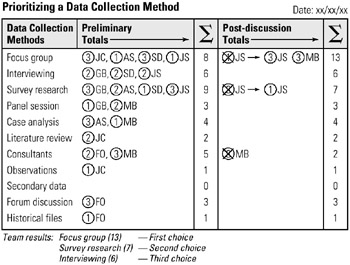
STEP 1 The team facilitator displays a flip chart with a list of items or options. See example Prioritizing a Data Collection Method.
-
STEP 2 Team participants are asked to review the entire list and select the top three choices.
-
STEP 3 Every participant moves to the flip chart and marks the top or most important choice by writing a 3, marks the second choice a 2, and the third choice a 1. All marked choices also require the participants' initials for possible future reference. This concludes the preliminary selection process.
-
STEP 4 The team facilitator totals up the scores of all selected items and ranks the top three choices. The highest scored item is, therefore, also what the team considers the most important item.
-
STEP 5 In the next step, participants give a rationale for selecting their most important choice. This discussion should be limited to 2-3 minutes per participant.
-
STEP 6 Once all participants have a chance to explain why a particular change was made, participants are now given the opportunity to change their selections.
-
STEP 7 Lastly, the facilitator retotals, if needed, all selections, and lists the final top three choices on a flip chart and dates the chart.
Example of tool application

EAN: 2147483647
Pages: 326