Flylib.com

Books Software


Tool 85: Functional Map


Tool 85: Functional Map

AKA 

Cross-Functional Matrix

Classification 

Analyzing/Trending (AT)

Tool description

A functional map is a multipurpose tool that can illustrate many organizational issues such as capability, performance, competitive behavior, costs and profits, market share, and others. It is often used to display important relationships, time trends, interactions, and SWOT analysis factors: strengths, weaknesses, opportunities, and threats.

Typical application

  • To determine what actions need to be taken.

  • To communicate important issues and factors to management.

  • To plot performance variables .

Problem-solving phase

Select and define problem or opportunity

Identify and analyze causes or potential change

Develop and plan possible solutions or change


Implement and evaluate solution or change


Measure and report solution or change results


Recognize and reward team efforts

Typically used by


Research/statistics


Creativity/innovation

2

Engineering

1

Project management


Manufacturing

3

Marketing/sales


Administration/documentation

4

Servicing/support


Customer/quality metrics


Change management

start sidebar
links to other tools

before

  • Data collection strategy

  • Benchmarking

  • Matrix data analysis

  • Comparison Matrix

  • Matrix Diagram

after

  • Cost-benefit analysis

  • Balance sheet

  • Action plan

  • Basili Data Collection Method

  • Measurement Matrix

end sidebar

Notes and key points

  • Applications for functional maps:

    • Product development

    • Market share

    • Competition/gap analysis

    • Technology/innovation

    • Research and development

    • Products and service

    • Performance characteristics

    • Customer behavior

Step-by-step procedure

  • STEP 1 The first action item for team participants is to collect background data relevant to the topic to be displayed on a functional map. Benchmarking, case analyses, trade journals, and other sources should be reviewed for this purpose.

  • STEP 2 Once the appropriate data has been collected, the team decides on the forms of functional maps to be used. See notes and key points for some considerations.

  • STEP 3 Two or three sets of variables are used to develop the maps. See example Product Price/Performance Comparison.

  • STEP 4 Completed maps are verified by the team and appropriate experts in the field. Revisions are made and all maps are dated.

Example of tool application
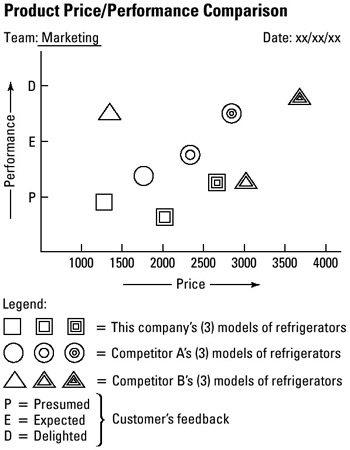
click to expand


Tool 86: Futures Wheel

AKA 

Futuring, Action and Consequences Diagram

Classification 

Analyzing/Trending (AT)

Tool description

The futures wheel is a tool used to forecast or predict trends in possible reactions to or associated consequences for an initial event, idea, or action taken. The consideration here is that every initial event may have several first-order consequences, they in turn may have second-order consequences, and so continue until a very detailed level of breakdown is achieved.

Typical application

  • To identify possible reactions or consequences for proposed problem-solving or process-improvement ideas.

  • To assess possible future impact on people or processes.

  • To check that every issue has been considered prior to implementing an action plan.

  • To avoid unpleasant surprises before future actions are taken.

Problem-solving phase


Select and define problem or opportunity

Identify and analyze causes or potential change

Develop and plan possible solutions or change

Implement and evaluate solution or change


Measure and report solution or change results


Recognize and reward team efforts

Typically used by


Research/statistics

1

Creativity/innovation


Engineering

4

Project management


Manufacturing

3

Marketing/sales

5

Administration/documentation


Servicing/support


Customer/quality metrics

2

Change management

start sidebar
links to other tools

before

  • Reverse brainstorming

  • Brainstorming

  • Double Reversal

  • Organization readiness chart

  • Trend Analysis

after

  • Action plan

  • Mind Flow

  • Rating Matrix

  • Force field analysis (FFA)

  • Process analysis

end sidebar

Notes and key points

Futures wheel symbolics:

click to expand

Step-by-step procedure

  • STEP 1 The team assembles around a whiteboard or two, side-by-side standing easels with flip charts .

  • STEP 2 An event, idea, trend, or action is recorded inside a large circle, which is the initial event or step. See example Support a Work Ethic of TQM.

  • STEP 3 The team now brainstorms possible first-order (1) consequences to the inital events. Circles are drawn and connected to the center circle.

  • STEP 4 Next, circles are drawn for the second-order (2) consequences, connected with parallel lines to signify second order as seen in the example.

  • STEP 5 The team completes this futures wheel and records all consequences.

  • STEP 6 Finally, the team discusses the completed futures wheel and identifies all precautionary or preliminary action items that need attention before implementation to reduce the risk of unpleasant surprises.

  • STEP 7 The futures wheel is checked and dated.

Example of tool application

click to expand