Flylib.com

Books Software


Put Your Mac to Sleep and Wake It Up


Put Your Mac to Sleep and Wake It Up

Macintosh computers are designed so that when you’ve finished working with them temporarily, you can put them to sleep. This puts your Mac into a low-power consumption mode rather than shutting it down completely. There are several advantages to this:

  • You don’t need to quit your applications, though you should save your files in case you have a problem such as a power cut.

  • You don’t need to restart your computer and relaunch your applications the next time you want to use it.

  • Your Mac starts up very quickly when you reawaken it; this takes just seconds.
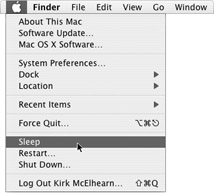
    click to expand

So, if you have finished working but plan to come back to your Mac soon, click the Apple Menu and select Sleep.

Your Mac will go to sleep immediately. Some Mac models have a light on their power button (it’s on the front of some portables) that fades on and off, looking like your Mac is breathing peacefully.

You can also put your Mac to sleep by pressing its Power button. On some models, such as iMacs, this puts the Mac to sleep immediately; on others you must click Sleep in the dialog that displays, or press the S key on your keyboard.

To wake your Mac, just press any key on the keyboard. It takes a few seconds, and you’ll see your screen light up as your Mac awakens, exactly in the same state as it was when you put it to sleep.


Shut Down and Restart Your Mac

When you’ve finished working on your Mac and want to shut it down for the day, select the Apple Menu, and then choose Shut Down. This displays a dialog asking you to confirm that you really want to shut it down. If you don’t reply in 120 seconds, it will shut down anyway.

When you shut down your Mac, you don’t need to quit your applications. If you haven’t saved your open documents, your applications will ask you to do so, but it’s always a good idea to save them first.

Caution 

Your Mac won’t restart or shut down until you have saved all your open documents. Don’t shut down your Mac and walk away unless you’re sure everything has been saved, or it will wait for you to save your documents, and never shut down until you do so.

Another way to shut down your Mac is to press its Power button, and then press RETURN or ENTER .

You can also restart your Mac by selecting the Menu Restart. This shuts down your Mac and starts it up again right away. The only reason you’ll want to do this is after installing software, which sometimes tells you to restart, or if you’re having problems with the operating system. Restarting can clear up some problems because it fully clears your Mac’s memory. Sometimes, after your Mac has been running for a long time— especially if you put it to sleep and don’t restart it often—it can get sluggish , as its virtual memory files increase in size .

I’d recommend that you put your Mac to sleep during the day, when you’re away from your desk or not working on it, and that you shut it down at night to prevent such problems.

start sidebar
Voices from the Community

Community colleges have classes for post-middle-aged women like me, Can Be Your Friends ,” they’re called. ears, and my partners .

I’ve owned seven Macintosh Newton). These days, I own a G4 PowerBook, which I call my “Joujou” (which means “toy” in French), and a Handspring Prism. I’m main working tool.

But it’s st completely deaf, I write long e- mails (or much more than that. Since dash off short messages—20 a day to my daughter ) to clients , friends, and family. Unfortunately, my brother’s not into from my 90-year-old mother-in-law, a world-class e-mailer herself.

Joujou follows me everywhere I go at home. I did a lot of research into Ethernet cables, and then tied a piece of rope to our router and took measurements to be sure to reach the upper bedrooms and the outside swing.

Joujou comes with us on vacations as well—we recently discovered the joys of free Internet access in hotel rooms. And my Prism goes everywhere with me. Shopping lists, books and CD databases, phone numbers , prescription info , hurry up with those Wi-Fi hot spots!

My husband is as computer-mad as I am. I admire his Photoshop pictures; he listens to my Digital Performer songs. He’s your reminders to him (and to myself ) and access his iCal calendar to know when to go pick him up at the train station.

The one “old-fashioned” thing I haven’t I love to read, and, while I usually have a book on the PDA, for when I go to the carwash or have to wait in line, it’s not the same

A musician and a teacher in life-before-deafness, Hlne Dion is the owner of Communication Cinq sur cinq Inc., a small translation agency in the province of Qubec, Canada. Computers and languages run in the family; she is the mother of another freelance translator and of a software developer now working on a translation memory application for Macintosh.

end sidebar