Resize a Table
If you find that your table dimensions don’t suit your purpose, you can resize the table from Print Layout view or Web Layout view. For example, you may want to resize a table to make it longer and narrower.
-
Click
 to display the document in Print Layout view.
 -
Move the mouse
 over the table.
 A handle (
 ) appears in the lower right corner of the table.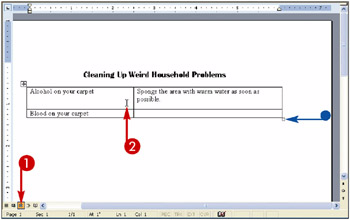
-
Move the mouse
over the handle ( changes to  ).
). -
Drag the table up to make it smaller or down to make it larger (
changes to  ).
). 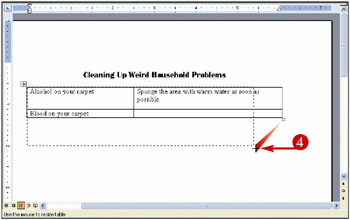
Note You can also drag to the left or right as you drag up or down.
A dashed line represents the size of the table.

Teach Yourself VISUALLY Word 2003
ISBN: 0764539973
EAN: 2147483647
EAN: 2147483647
Year: 2004
Pages: 175
Pages: 175
Authors: Ruth Maran
- Chapter I e-Search: A Conceptual Framework of Online Consumer Behavior
- Chapter VI Web Site Quality and Usability in E-Commerce
- Chapter VII Objective and Perceived Complexity and Their Impacts on Internet Communication
- Chapter VIII Personalization Systems and Their Deployment as Web Site Interface Design Decisions
- Chapter XIII Shopping Agent Web Sites: A Comparative Shopping Environment