Flylib.com

Books Software


1.6 The Swing Set Demo


1.6 The Swing Set Demo

If you're in a hurry to see all the components Swing has to offer, be sure to check out the Swing Set demonstration. The demonstration is extremely easy to set up. If you have the 1.3 or 1.4 SDK, the demonstration is included. If you have 1.2, you must first download and extract the demo classes and add them to your classpath. Then follow these steps:

  1. Change the directory to the demo/jfc/SwingSet2 directory. (For the 1.2 release, the directory is demo/jfc/SwingSet .)

  2. Run the SwingSet2 (or SwingSet for 1.2) jar file:

    
    % java -jar SwingSet2.jar


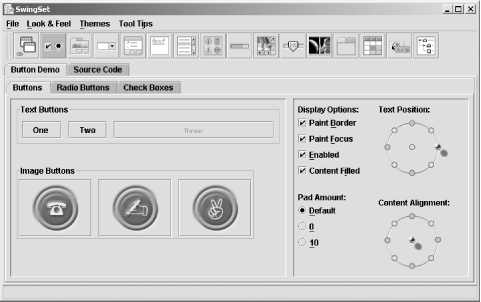
You should immediately see a splash screen indicating that the Swing Set demo is loading. When it finishes, a window appears, similar to the one in Figure 1-9.

Figure 1-9. The Swing Set demo
figs/swng2.0109.gif

This demo contains a series of tabs that demonstrate almost all of the components in the Swing libraries. Be sure to check out the internal frames demo and the Metal L&F. In addition, some of the Swing creators have added "Easter eggs" throughout the Swing Set demo. See if you can find some!


1.7 Reading This Book

We're well aware that most readers don't read the Preface. You have our permission to skip it, provided that you look at the Conventions section. That section is particularly important because in this book we experiment with a few new techniques for explaining the Swing classes. As we said earlier, everything in Swing is a JavaBean. This means that much of an object's behavior is controlled by a set of properties, which are manipulated by accessor methods . For example, the property color is accessed by the getColor( ) (to find out the color) and setColor( ) (to change the color) methods. If a property has a boolean value, the get method is often replaced by an is method; for example, the visible property would have the isVisible( ) and setVisible( ) methods.

We found the idea of properties very powerful in helping us understand Swing. Therefore, rather than listing all of a class's accessor methods, we decided to present a table for each class, listing the class's properties and showing the property's data type, which accessor methods are present, whether the property is "bound" (i.e., changing the property generates a PropertyChangeEvent ), when it was introduced (1.2 is the default; 1.3 and 1.4 are marked where appropriate), and the property's default value. This approach certainly saves paper (you didn't really want a 2,000-page book, did you?) and should make it easier to understand what a component does and how it is structured. Furthermore, if you're not already in the habit of thinking in terms of the JavaBeans architecture, you should get in the habit. It's a very powerful tool for understanding component design.

The conventions we use in the property tables — plus some other conventions that we use in class diagrams — are explained in the Preface. So you may ignore the rest of the Preface as long as you familiarize yourself with the conventions we're using.

The next chapter helps AWT developers get a jump on Swing by presenting a simple application; those without AWT experience may just want to skim the chapter. In Chapter 3, we continue our discussion by presenting some of the fundamental classes of Swing and discribing how you can use the features inherent in each of these classes to shorten your overall development time. Don't stop now—the best is yet to come!