Section VI.5. Event Propagation
VI.5. Event PropagationIn some DHTML applications, it is not efficient to have target elements process events. For example, if you have a page that allows users to select and drag elements around the page, it is quite possible that one set of centralized functions can handle that operation for all elements. Rather than bind events to each of those elements, it is more economical to have the mouse-related events go directly to an object or element that has scope over all the draggable elements. In other words, one event and event handler function can do the job of a dozen. For this kind of treatment to work, events must be able to propagate through the hierarchy of objects or nodes in the document. IE 5 and later and the W3C event models share some, but not all, event propagation schemes. For the most typical applications, you can easily equalize the small differences in implementation details and syntax you use to override the natural flow. W3C DOM event propagation can be summarized thus: in response to a user or system action, an event starts at the outermost container and follows the most direct route ("trickles down") through the node container hierarchy to the intended target; after it reaches its target, the event reverses course and "bubbles upward" through the same node hierarchy back to the top, from which it disappears. The trickle-down portion of the journey is called the capture phase, while the return trip is called the bubbling phase. The IE propagation model consists only of the bubbling phase. While IE 5 and later has an event feature related to capture (described later in this chapter), its operation is not along the lines of the W3C capture phase of propagation. To better understand W3C DOM event propagation, consider the following skeletal structure of an HTML document (head element omitted for demonstration purposes): <html> <body> <form> <div > <input type="text"> </div> <div > <input type="text"> </div> </form> </body> </html> As the user types a character into the txt2 text input field, a keypress event begins its journey at an outermost container in Mozilla (and others), works its way through containers on its way to the text box (where IE's event starts), and then goes back to the outermost container. In bubble mode, the precise top-level container varies with browser. For Mozilla and Safari, the window object is the master container for event propagation purposes; Opera skips to the window before its final trigger at the document; IE bubbles no further beyond the document node. To help you visualize propagation sequences, Figure VI-1 depicts the keypress event propagation sequence through the objects of this document for four different browser types. Figure VI-1. Sample event propagation sequences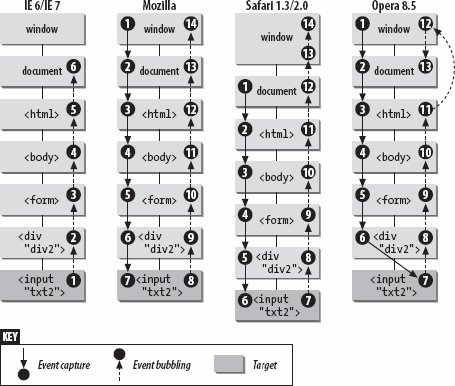 You can assign an event for any and all of the nodes in the hierarchy to process the event. In W3C DOM browsers, you can assign different event handler functions to the same node, but for different propagation modes, if you like. Event bubbling isn't as archaic as it sounds. In fact, it's quite flexible if you're careful to avoid conflicts that may occur at higher containment levels. VI.5.1. Event BubblingEvent bubbling is the default propagation path for most events starting in IE 4 and W3C DOM browsers. Some system-fired events work only in their target elements. For example, if you have a load event listener assigned to a few img elements and the body element, you probably don't want an img element's load event to bubble up to the window object, firing each time an image's src property changes. Event bubbling is often vital in scripting events for elements that display body text. The node-centric W3C DOM allows ordinary text nodes to be event listeners. Therefore, if you assign a mouse-related event to a text container, the target node of the event will be the text node within that container. By default the event bubbles outward to the container where the event can be easily processed, but the event object's properties point to the text node, not the container. This is different from the IE event model, in which only elements are targets of events. To equalize this possibility in processing an event, your scripts must take the possibility of a text node target into account. Here is one cross-browser way to make sure that your function locates a reference to the element surrounding the text (or, as a last resort, the document node): function myFunction(evt) { evt = (evt) ? evt : ((event) ? event : null); if (evt) { var elem = (evt.target) ? evt.target : ((evt.srcElement) ? evt.srcElement : null); if (elem) { elem = (elem.nodeType == 1 || elem.nodeType == 9) ? elem : elem.parentNode; // ok, now we're ready to work with the element/document } } }
Most events triggered by user action with the mouse and keyboard bubble upward through the hierarchy from the target element. Conflicts can arise, however. For example: you assign a mousedown event for several images so they can swap .jpg files while the mouse is being held down. But you also define a mousedown event for the body element to act as a single handler to assist in dragging several positioned div elements around the page. To prevent the img element mousedown events from bubbling up through the hierarchy, you can explicitly instruct an event not to bubble beyond a specific element. The cross-browser way of canceling event bubbling (starting in IE 4 and Mozilla) involves the Boolean cancelBubble property of the event object, adjusted within the event function. Although this property is not a member of the W3C DOM event object, Mozilla, Safari, and Opera implement it as a compatibility convenience. The default value for this property is false, meaning that event bubbling takes place. But if you set this property to true, the event does not bubble past the current event. Set the cancelBubble property to true in a script statement executing in the current event's function. Thus, if you assign an event as an element property, the bubble cancelation can take place in the function invoked by the event: function myFunction(evt) { evt = (evt) ? evt : ((event) ? event : null); if (evt) { // include next statement anywhere in this block evt.cancelBubble = true; } } Only one event bubbles at any given instant, so this statement knows to cancel the right one. It also means that you can let an event bubble part of the way through the element hierarchy, but stop it at any desired element, so as not to interfere with other elements higher up the chain. VI.5.2. W3C Event CaptureAlthough event bubbling is the default mechanism in modern browsers, a propagating event in modern W3C DOM browsers starts its life by trickling down to the target. If you place an event listener for the event's type at a higher level, however, it will ignore the event as it trickles down unless event capture for that element and that event type is turned on. To engage event capture, use the same addEventListener( ) method that the W3C event model prefers for event binding. The third parameter is a Boolean value that controls event capture. When you set the parameter to true, the element invokes the listener function during capture phase; after that function completes its task, the event continues its journey toward to the target element. Therefore, it is perfectly "legal" to add two separate event listeners to an element for the same event type. In capture phase, one listener function runs; in bubbling phase, another listener function runs. Using the same three parameters, you can eliminate the event listener for the desired propagation phase with the removeEventListener( ) method. Thus, you could temporarily engage capture-phase processing and remove it without disturbing bubbling-phase event processing for the same element and event type. At any point along W3C event propagation, you can prevent the event from going any further by invoking the event object's stopPropagation( ) method in a statement inside the listener function. An event handler function that invokes this method when an event is being processed in capture mode prevents all further propagation of the event, preventing the event from reaching its target or bubbling up thereafter.
The W3C root event object (and therefore event objects of all types) implements a handful of other properties that may be helpful while processing events within the two-way propagation model. Table VI-4 lists these properties, for which IE (through Version 7 on Windows) provides no analogues. A shared event listener function might use these (and other properties) to build code branches that execute when the desired combination of conditions exist (e.g., when the target's class name is "foo" and the event is being processed from a container of several elements of the same class).
VI.5.3. IE/Windows Event CaptureMicrosoft's view of event capture is quite different from the W3C view. IE 5 and later event capture operates only with mouse events. In fact, when you invoke an element object's setCapture( ) method, you instruct the browser to direct all mouse events on the page to that element rather than to their targets. Events bubble up from the capturing element, unless canceled. This event mechanism is intended primarily for temporary activation within a page. For example, the body element can contain an oncontextmenu event handler that waits for a Windows user to click the right (nondominant) mouse button. You can take this opportunity not only to block the display of the browser's own context menu (by setting event.returnValue to false), but also to display your own menu composed of DHTML positioned elements. While the custom menu is visible, you want all mouse events to head for the menu so that nothing else on the page is accessible via the mouse until either a choice is made from the menu or the right mouse button is clicked again. Either action hides the custom context menu and invokes releaseCapture( ) to allow mouse events to reach their normal targets again. It's not uncommon for IE/Windows to implement proprietary DOM features that allow web applications to mimic operating-system-specific behaviors. In an intranet development environment targeting IE/Windows only, this tactic makes perfect sense. But such tight integration reduces the likelihood that these features will become part of an operating-system-agnostic W3C recommendation. It also makes it more difficult for Microsoft to implement some W3C recommendations that conflict with existing mechanisms. |


EAN: 2147483647
Pages: 120