Recipe 4.1. Uninstalling
Recipe 4.1. Uninstalling "Unremovable" ComponentsProblemYou have standard utilities on your PC, such as WordPad or Windows Messenger, that you want to uninstall because you never use them and you want to free up disk space. You can't remove them using the Control Panel's normal Add or Remove Programs applet because the utilities don't show up in the applet. SolutionUsing a graphical user interfaceTo remove built-in utilities and components, you normally choose Control Panel Figure 4-1. The Windows Component Wizard only lets you remove certain applications and utilities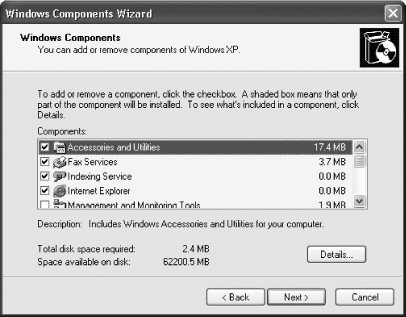 But a number of Windows utilities and components, such as Windows Messenger and WordPad, don't show in the Windows Component Wizard, so there's no apparent way to uninstall them. But you can, in fact, remove these components. To do it, you'll have to make the components show up in the Windows Component Wizard. Then you can remove them as you can any other file. To force them to show up in the Windows Component Wizard, you edit the Setup Information file that controls what appears in the Windows Component Wizard:
DiscussionYou can use this same technique in reverse to hide components you don't want to be accidentally uninstalled. Simply put the word HIDE in the proper place in the entry that you don't want to show up in the Windows Component Wizard. That way, the entry can't be accidentally deleted. For example, if you wanted to hide the uninstall entry for the fax utility, you'd edit its entry by changing: Fax=fxsocm.dll,FaxOcmSetupProc,fxsocm.inf,,7 to: Fax=fxsocm.dll,FaxOcmSetupProc,fxsocm.inf,HIDE,7 Also, you may run into a few problems when trying to remove "uninstallable" components. On some systems, you won't be able to remove Windows Messenger Windows Messenger won't show up on the Windows Component Wizard even after you edit the sysoc.inf file. And some components, such as Terminal Server, will show up in the wizard if you edit the sysoc.inf file, but the wizard still won't let you uninstall them. See AlsoRecipe 4.2 for information about how to remove applications that leave bits of themselves behind even after uninstallation |
 Add or Remove Programs

EAN: 2147483647
Pages: 408
- ERP Systems Impact on Organizations
- The Second Wave ERP Market: An Australian Viewpoint
- Enterprise Application Integration: New Solutions for a Solved Problem or a Challenging Research Field?
- The Effects of an Enterprise Resource Planning System (ERP) Implementation on Job Characteristics – A Study using the Hackman and Oldham Job Characteristics Model
- Development of Interactive Web Sites to Enhance Police/Community Relations