Templates and Velocity
Overview
| Important |
This is a reminder that all source code and support for this book can now be found at http://www.apress.com, even though references within the chapters may point to http://www.wrox.com. |
So far we've seen how the use of development frameworks and judicious use of design patterns can help to separate the concerns of our web applications. For the most part with concentrated on the main core of our application, and how to separate our application logic. Although not necessarily as important as the business logic, we can take this process one step further and separate our application's Java code from our presentation through the use of templates. So in this chapter, we will describe the problems that template engines can solve, and how to use one such template engine, Velocity.
We'll be covering:
- The syntax and directives for the Velocity Templating Language
- Using Velocity with Java
- Using Velocity in web applications
We are going to design and implement an RSS (Really Simple Syndication, or RDF Syndication Source) content feed for JavaEdge that works with Struts using Velocity, and demonstrate the use of the Velocity tag library for JSP.
Separating Presentation from Java Code
The Concern Slush antipattern occurs in applications when the business logic, application content, data access, look-and-feel, and navigation are all put together in a hard-to-maintain slush. An example of this would be a giant servlet that contains methods that make JDBC calls, intermingle the results with HTML markup, and then create JavaScript validation routines. It becomes even worse when many of these servlets for different parts of the application (search, shopping cart, order verification, etc.) are written by different developers.
| Important |
One of the problems is that servlets and JSP make it easy for developers to mix anything they want into the presentation layer because it's just Java code. |
One of the solutions to avoid this antipattern is to investigate alternative presentation layer technologies that let Java developers restrict the objects available in the user interface code. This can lead to a productive working relationship between an HTML designer, who knows some template language concepts, and a Java developer who doesn't have to worry about look-and-feel or client-side scripting.
One of the possible solutions is the Jakarta Apache Group's Velocity. Velocity is a combination of a template processing engine and a template language that is designed to work with other web application frameworks in place of JSP. You can also use Velocity for general-purpose template tasks, such as generating e-mail, static HTML files, or legacy data-integration files. Using Velocity to generate HTML or XML from an application is very easy. Velocity can be used inside a JSP page with the Velocity tag library, which we will discuss in the section on JSP and Velocity.
Using Velocity to create templates for your application is similar to using XML as a data transfer format. In either case, you don't need to write your own parser. It provides a well-defined template language and a clean Java API for working with these templates.
Velocity cleanly separates presentation and Java code, as it is impossible to write Java code directly into a Velocity template. There isn't a Velocity equivalent of a JSP scriptlet. Velocity supports a limited number of Velocity Template Language (VTL) constructs that are needed for layout purposes. Java objects from your application can be merged with a Velocity template to produce HTML, XML, Java code, or any other text.
The Java developer can create new objects, such as a User, and pass them to the template. The HTML designer can use the properties on the User object inside a Velocity template, by putting variable references into the HTML. Velocity will replace these references with the properties in the specific User object that is passed into the template. This object and any other data or helper objects are passed to the template inside a container, known as a context in Velocity.
Another problem that frequently occurs is the desire to use a template to create text, HTML, or XML content by merging data with a file that contains all of the necessary mark-up and layout. This could be used to generate static content for a web site from tables in a database, or to generate e-mails with personalized content. It's easy to start off writing a simple Java application that reads in a text file, substitutes data for a few special tags provided to the application, and then writes its output to another file or set of files. Unfortunately, these applications have a tendency to grow, and eventually the special tags become a language of their own. Rather than trying to re-implement the if statement or a collection iterator inside your code, it's better to look for a third-party solution to solve the pain.
One solution would be to use XSLT, if your input data is XML and your output is XML or well- structured HTML. XSLT has a steep learning curve and it's much easier to teach Velocity to web designers. Some of your developers also may not be familiar with declarative programming, especially if they worked with HTML and JavaScript as user interface developers.
We'll demonstrate using Velocity as a template language. We're going to create a Really Simple Syndication (RSS) 2.0 feed for our JavaEdge application. This is going to allow other web sites to pick up our headlines and display them. This is a standard for news sites, bloggers, and web communities. We're going to emphasize on how to use Velocity as a templating tool, rather than focusing on the details of content syndication.
| Note |
For more details on content syndication and RSS 2.0, visit Dave Winer's Userland site: http://backend.userland.com/rss |
Velocity
In this section, we're going to discuss how to use Velocity and primarily the Velocity language and API.
We're going to cover:
- What Velocity does, and how the engine works
- Using Velocity's context
- Using the Velocity GUI to run Velocity code outside the servlet container for debugging
- The syntax and keywords of the Velocity Template Language (VTL)
- Using Velocity from JSP, with the Velocity tag library.
- Creating an RSS 2.0 feed with Velocity for the JavaEdge application
The Velocity web site can be found at http://jakarta.apache.org/velocity.
How Velocity Works
Velocity is a processing engine that is fed a context, which contains name-value pairs of variable names and Java objects, and a template that usually contains HTML or XML interspersed with Velocity markup. The context is merged with the template to create output, which is then displayed to the end user or written to a file. The template contains variable references and Velocity Template Language (VTL) directives. The context contains a map of variable names to Java objects.
When the template is evaluated, each Java object represented by a Velocity variable is pulled out of the context. The VTL directives in the template are processed in order. We will discuss the directives in the section called The Velocity Templating Language.
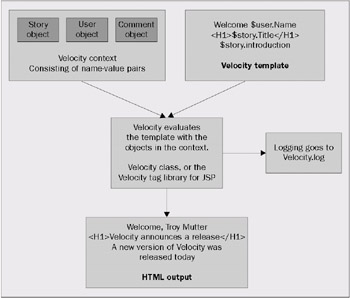
Variables can be put into the context by our Java application, just like a Map. Variables can also be put into the context when the template is evaluated with the #set() VTL directive. We'll discuss how to use the context in more detail in the next section.
Since variables in Velocity reference Java objects, it's possible to access properties or methods on these objects. Velocity uses reflection to determine which methods are available in the objects in the context. If the variable is just a reference to the object itself, the Velocity engine will call the toString() method in the object and render it to the output. This all happens behind the scenes, and you don't need to do anything special if the variable is not an instance of a String object. The names for the Java objects in the context are assigned when the Java application adds the object to the context, and are referenced in the Velocity template with a prefix of a dollar sign ($).
Here is an example of a Velocity template:
<a href="$link.create(">View Profile</a>
<a href="$link.create(">Add User</a>
<a href="$link.create(">Login</a>
Hello $user.FirstName
As you can see, the HTML contains additional markup that Velocity parses out. In this example, there are Java objects identified as $link and $user in the context. The template designer can call the public methods in these classes to get dynamic data back.
Running the Velocity Examples
To run the examples that we have used here to demonstrate Velocity, you may use an easy-to-use GUI tool called VeloGUI.
| Note |
VeloGUI was written by Franck Arnulfo, and is available at: http://www.pipoware.com/velogui/ |
The Velocity GUI can run as a Java Web Start application, or it can be downloaded to your local file system as a standalone application. It is perfect for checking Velocity syntax.
Downloading and installing VeloGUI using Sun's Java Web Start:
Here is a screenshot of the VeloGUI application in action:
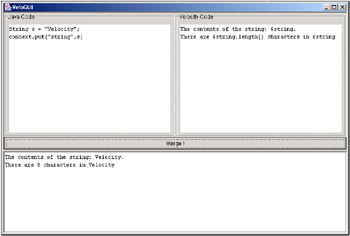
If you put your Java code in the first pane, your Velocity template in the second pane, and click the Merge! Button, the lower pane will display the results.
Velocity Context and Templates
The context is used as a container for objects from your Java application code that are used by Velocity templates. When Velocity evaluates a template, it will try to resolve the variable references in the template with objects in the context. Your application is responsible for putting these objects into the context. Only Java objects can be put into the context. Primitives need to be wrapped in an object (such as Integer or Long) before being placed into the context.
Context is the interface and VelocityContext is the concrete implementation of the interface. The Context can be used like a Hashtable, in fact the VelocityContext uses a HashMap object internally for storage. The two key methods are:
- public Object put(String key, Object value)
- public Object get(String key)
Null values are not accepted for key or value. An existing item will be replaced if the put() method is called with the same key. The get() method will return null if an item with the specified key was not found, or if the key was null. The put() method will return the Object that was placed into the context. If the key or the value was null, the put() method will return null.
Velocity handles Collections, Enumerations, Iterators, and Arrays as special cases – these are discussed in more detail in the section called Collections.
Using VelocityContext Objects
Instances of the VelocityContext class can be created by using the default constructor with no arguments. Alternatively, constructors exist for using an existing collection object that implements the Map interface or an existing context object or both. Using an existing context object is called context chaining. Use context chaining when you want to associate a context from code that you didn't write; it can be easier than extending a class and modifying the internals of its methods.
Context chaining can also be useful for creating a thread-safe context. For this, create a new VelocityContext object by passing the shared context into the constructor. Don't share VelocityContext objects between threads because the context may get modified by the Velocity engine as it executes macros or loops.
Creating Velocity Templates
The standard file extension for Velocity templates is .vm. Numerous add-ons exist for editing Velocity templates inside text editors. One of the authors of this book has contributed a Velocity syntax highlighting definition for the Windows shareware editor TextPad (http://www.textpad.com/). As of the writing of this book, no support exists for WYSIWYG creation of Velocity templates that goes above and beyond HTML.
Using Template Objects
The Template object represents a Velocity template. Use the getTemplate() method in the Velocity class to get an instance of the Template class:
public static Template getTemplate(String fileName)
There is another signature of getTemplate() that sets the character encoding of the template to one of the standard Java character sets. This works just like any other use of Java encodings:
public static Template getTemplate(String fileName, String encoding)
Some of the possible encodings are:
- UTF-8
- UTF-16
- US-ASCII
- ISO-8859-1
The default encoding is ISO-8859-1.
Using Methods on Objects in the Context
Any public method on an object in the reference (which is in the context) can be called. Any objects returned by those methods can have their public methods accessed. Velocity will render any objects to strings to display them. For example, consider the following Java code:
 String s = "Velocity";
 context.put("string", s);
If we have the following Velocity template:
 The contents of the string: $string.
 There are $string.length() characters in $string
It will result in this output:
 The contents of the string: Velocity.
 There are 8 characters in Velocity
If the method returns a primitive instead of an object, it is wrapped in the corresponding object by the Velocity engine.
Consider the following Java code:
 Vector v = new Vector();
 context.put("vector", v);
The Velocity template only contains one line:
What class is this? $vector.size().class
Calling the size() method in a Vector will return an int. Velocity doesn't know how to use primitives, so it's wrapped in an Integer object.
What class is this? class java.lang.Integer
Using get(), set(), and is() Method Shortcuts for Properties
Velocity uses shortcuts for accessing properties in objects in the context. JavaBeans use getter and setter methods for reading and modifying internal fields in the object. These fields usually have either private or protected scope and are inaccessible to outside objects without using the provided methods. Velocity provides a quick syntax for accessing these fields if the available getter method doesn't take any arguments. In Velocity, the following two lines are equivalent to each other:
 $user.getEmail()

 $user.Email
Velocity also supports the use of names that are not case-sensitive for properties. Velocity will first try to use the $user.getEmail() method, if it exists. If it doesn't exist, the runtime engine will attempt to run the $user.getemail() method. If neither of the above methods exist, Velocity treats the $user object as an implementation of the Map interface. The get() method is called with the property name as the key. Both of the following lines are equivalent, if there are no getEmail() or getemail() methods:
 $user.get("Email")

 $user.Email
One important point to remember is that the Velocity engine is smart enough to figure out that if a key doesn't exist in the object, nothing will be rendered, and the statement will be rendered as text. An example of this would be to create a HashMap object that contains a single key-value pair and then place it into the context. Here is a snippet of Java code that creates a HashMap:
 Map capitals = new HashMap();
 capitals.put("France", "Paris");
 context.put("capitals", capitals);
The Velocity template would look as shown below:
 The capital of France is $capitals.get("France")

 The capital of France is $capitals.France

 The capital of France is $capitals.france
The result is:
- The capital of France is Paris
- The capital of France is Paris
- The capital of France is $capitals.france
When Velocity treats a property as a key in a Map, it is case-sensitive.
The last method to be tried by Velocity, when it sees a property, is the isXXX() method. Velocity treats the property as a boolean. A simple example of this is an empty Vector class and the isEmpty() method:
 Vector vector = new Vector();
 context.put("vector", vector);
The Velocity template would be as shown below:
 Is the vector empty? $vector.isEmpty()

 Is the vector still empty? $vector.Empty

 Is the vector really empty? $vector.empty
and the output will be:
 Is the vector empty? true

 Is the vector still empty? true

 Is the vector really empty? true
Velocity can also use a shortcut to set the value of a property in an object or the value of a key in a collection; this is very similar to how Velocity handles getter methods. We'll demonstrate this using a HashMap:
 Map movies = new HashMap();
 movies.put("Favorite", "Thomas Crown Affair");
 context.put("movies", movies);
Velocity template:
 My favorite movie is: $movies.Favorite

 Now I changed my mind
 #set ($movies.Favorite = "Vertigo")

 I've got to go get the $movies.Favorite DVD.
Results:
 My favorite movie is: Thomas Crown Affair

 Now I changed my mind

 I've got to go get the Vertigo DVD.
The Velocity Templating Language (VTL)
As we've already seen, Velocity uses its own syntax in templates so that the template content is completely separated from any additional code. In this section, we are going to go through the main syntax of the Velocity Templating Language (VTL).
Variables and the #set Directive
The Velocity Templating Language has very simple rules for variables. Velocity will replace a variable reference in a template with the String representation of an object. If the object referenced by a variable is not a String object, Velocity calls its toString() method to render output. This is the default behavior; however, you can override the toString() method in the way that you want to show the output.
Variable naming is similar to other programming languages. Names must start with a letter (upper case or lower case), but the following characters can be letters, numeric digits, underscores ("_"), or hyphens ("-"). The variable is then referenced by prefixing a dollar sign ($) to the name.
To assign a value to a variable, we need to use one of Velocity's directives. Every directive is prefixed with the hash symbol (#). Several directives are defined inside Velocity and others can be defined using macros, as we'll see in the section called Velocity Macros. The directive that we're going to use is #set. The #set directive works in the same way as a Java variable assignment.
Here is an extremely simple Velocity template:
 #set ($dog = "Gossamer")

 The dog is named $dog.
and the results of this Velocity template are:
The dog is named Gossamer.
Quiet Reference Notation
Normally, Velocity will display a variable reference in the results, even if the variable doesn't exist in the context. This is because the reference could just be included in the original text. Here is a quick demonstration of this:
Velocity template:
$pizza will not do anything special
Result:
$pizza will not do anything special
If we use Velocity's quiet reference notation, the template engine will not display the reference if it doesn't exist. Add an exclamation point (!) between the dollar sign and the beginning of the variable name to enable this feature.
Velocity template:
$!pizza will hide itself
Result:
will hide itself
String Concatenation
Velocity can be easily used to add two or more strings to create a new string in a Velocity variable. The references to the variables should just be placed inside the quotes on the right-hand side of the equals sign, as shown in the following example:
 #set ($city = "Austin")
 #set ($state = "Texas")

 #set ($address = "$city, $state")
 This is the address: $address
This is the resulting output:
This is the address: Austin, Texas
Velocity can use a slightly more complicated notation, known as the formal reference. This is useful for avoiding ambiguity in variable names. For example, if we had $tunafish, the variable referenced could actually be $tuna with fish attached on the end but Velocity would only look for a variable called $tunafish. For the formal reference, variables are described with this syntax: ${variable_name}. We'll have to use a somewhat unlikely example to demonstrate this:
 #set ($city = "Austin")
 #set ($state = "Texas")

 #set ($myAddress = "${city}isin$state")
 This is the weird address: $myAddress
This results in:
This is the weird address: AustinisinTexas
Without the {} around city the result would have been as follows:
This is the weird address: $cityisinTexas
One of the most common mistakes made by new Velocity users, is to use Java-style string concatenation inside a Velocity template, such as this:
 ##Incorrect use of string concatentation with Velocity
 #set ($name = $firstName + $lastName)
The only use of the + operator is for Velocity arithmetic operations.
| Important |
To concatenate Strings in Velocity, use this syntax: #set ($something ="$string1$string2") |
Comments
Velocity uses a double hash (##) for line comments and the #* … *# pair for the block of multi-line comments. Here is a quick example demonstrating their use:
Velocity template:
 ## A line comment
 Some text in the template
 #* A two-line
 block comment *#
Results:
Some text in the template
Escaping Rules
The backslash () is used to escape special Velocity characters inside templates, such as $, #, and . For variable references, this is needed only when the variable is already defined. Keep in mind that Velocity escaping behaves differently when variables are defined and when they aren't. Here is an example that prints out the text $string, instead of the declared variable reference $string:
 #set ($string = "something")
 $string
 $string
The results:
 something
 $string
If $string wasn't declared as a variable reference, the results would look like this:
 $string
 $string
One interesting quirk is involved in printing the comment tag (##) in a template. Velocity appears incapable of using escapes to print out this combination, so the author came up with a solution:
Velocity template:
 #set ($hash = "#")
 $hash$hash
Results:
##
Collections
Velocity can handle several different types of collections:
- Collection
- Map
- Iterator
- Enumeration
- Arrays of objects
In each case, Velocity uses an instance of Iterator internally with the #foreach directive discussed in the section called #foreach…#end. For collections and maps, Velocity gets the iterator directly from the object. For arrays and enumerations, Velocity internally wraps the array or enumeration in an object that implements the Iterator interface. If an object that implements the Iterator or Enumeration interfaces is placed in the context directly, it is used and is not capable of being reset to the first element when it reaches the end. Velocity will only be able to use that object once per template with the #foreach directive. This problem does not arise with Collection, Map, or arrays. Velocity will just retrieve a new iterator if needed. Velocity will place a warning into the log file when it finds an Iterator or Enumeration used in a #foreach statement. It's the best practice to use a Collection, Map, or array instead, if possible.
Control Flow Directives
Velocity contains only two flow directives: #if…#else…#elseif…#end and #foreach…#end. This makes Velocity a very simple programming language.
#if #else #elseif #end
The #if directive is similar to the if statement in any other language. The #if directive may be followed with #elseif or #else to create a list of conditions that could be true. The #end directive must be used to close the #if directive. The #if directives can be nested inside other #if directives. Velocity also supports the logical (or Boolean) operators – AND (&&), OR (||), and NOT (!).
To evaluate the conditions on an #if or #elseif directive, Velocity uses three rules:
- The value must be true for a Boolean object (boolean primitives are automatically converted because Velocity only deals with objects, not primitives)
- If the referenced variable doesn't exist in the context at all, Velocity evaluates the condition as false. If the object referenced by the variable isn't null, the condition is true. Remember that variables in the context can't be null.
- The strings true and false are evaluated as-is. This is useful for passing arguments into macros, which we'll discuss in the section called Velocity Macros.
Here is an example demonstrating this functionality:
 #set ($pages = 5)

 #if ($pages == 0)
 There are no pages to display.
 #elseif ($pages = 1)
 This the only page.
 #else
 There are $pages pages that can be shown.
 #end
and here is the output of this Velocity template:
There are 5 pages that can be shown.
Here is a more advanced example, to demonstrate the use of #if…#else to determine if an object is in the context. We check if the variable $novalue is in the context, but it's not. We add the variable $something to the context and check if it exists. It does exist, so we will see its value in the output. We also evaluate the word true as a condition:
 #if ($novalue)
 No value - we won't see this
 #else
 The novalue variable doesn't exist
 #end

 #set ($something = "something")
 #if ($something)
 $something
 #end

 #if (true)
 This statement is true.
 #else
 This statement is false.
 #end
The results from evaluating this template:
 The novalue variable doesn't exist

 something

 This statement is true.
Here is an example demonstrating the logical operators. The $notavariable variable doesn't exist in the context, and will be evaluated as false:
 #if (!true)
 This statement is true.
 #else
 This statement is false.
 #end

 #if (true && $notavariable)
 This statement is true.
 #else
 This statement is false.
 #end

 #if (true || $notavariable)
 This statement is true.
 #else
 This statement is false.
 #end
The output for our Boolean operator example template:
- This statement is false.
- This statement is false.
- This statement is true.
#foreach #end
The Velocity #foreach directive is used for looping the contents of a Collection, Iterator, Array, or Enumeration. It's used for grabbing each object in the list and doing some changes to it. If you need to know where you are in the list, Velocity provides a built-in variable that gives the loop counter. This variable is named $velocityCount by default, although the identifier can be configured in Velocity's velocity.properties file. It's really recommended not to change this because other people who use your template will not know what your counter variable is. The other configurable option is to determine whether Velocity's loop counter starts at zero or one. The counter defaults to one. An example that uses the #foreach directive and the $velocityCount variable is pretty straightforward:
 Vector numbers = new Vector();
 numbers.add("one");
 numbers.add("two");
 numbers.add("three");
 numbers.add("four");
 context.put("numbers", numbers)
The Velocity template:
 #foreach ($number in $numbers)
 The number is $number
 The velocity count is $velocityCount
 #end
Results:
 The number is one
 The velocity count is 1
 The number is two
 The velocity count is 2
 The number is three
 The velocity count is 3
 The number is four
 The velocity count is 4
It's also very easy to loop the contents of a Hashtable or HashMap. Get the set of keys from the hash table's keyset() method, loop it, and output each value as it appears by calling the get() method in the Hashtable with the key.
Velocity Macros
Velocity's macros are known as Velocimacros and they are essential for both maintainability and good UI design. Pieces of the UI can be broken out into reusable chunks that can take parameters. These macros can then be stored in a global library template file. This allows UI elements to be shared between templates, across the application. Here's an example of a UI element macro, inline in a Velocity template:
 #macro (button src url alt)
 <a href="$url"></a>

 #end
 #set ($image = "shoppingcart.jpg")
 #button($image "/cart.vm" "Our shopping cart")
The results:
<a href="/cart.vm"></a>
Suppose that you had used this macro to build buttons all over your templates and then your web designers, your customers, or your business analysts, came back to you and told you that all images had to be served up from another server in another department, or all links needed to have JavaScript messages in the status bar. It's easy to change something like this by using macros.
We defined the macro by using the #macro directive, which takes at least one argument. The first argument is the name of the macro, which is button in this case. The following arguments become the parameters to the Velocimacro. You can have zero parameters to a Velocimacro. When you call a Velocimacro, you have to use all of its parameters; there can't be any optional parameters. Arrays, Booleans, boolean literals (true or false), Strings, and Objects can all be passed in as arguments. For more on the boolean arguments, refer the section called #if…#end.
We could also move our button macro out to a library, where it could be used across templates. Velocity's macro template libraries are defined in the Velocity properties file:
velocimacro.library = GlobalMacros.vm
We could either add our button macro to that file, or we could create our own macro template file. The GlobalMacros.vm file doesn't exist, so we'd have to create it. The velocimacro.library property can contain a whole list of macro template files, separated by commas:
velocimacro.library = MacroLibrary1.vm,MacroLibrary2.vm
There are several other macro properties that can be set and they are defined in the excellent Velocity user guide that is available on the web site and also with the distribution. They concern scope, allowing inline macros, allowing inline macros to have the same name as global macros, and whether or not to reload the macro library when it changes.
| Important |
One catch of the global macro library is that if the property velocimacro.library.autoreload is not set to true, you will have to restart your application server when you change a global library to see the changes. You may need to have different values for this setting for production servers and developer's machines. |
External Templates or Files
Velocity templates can load external templates or files, just like most page-oriented languages you may already be familiar with. The files or templates are found using the Velocity resource loader. To use them, there are two directives:
- #parse: for Velocity templates
- #include: for everything else, including plain text, HTML, and XML
The #parse directive takes a single argument, which is the template to be loaded. Like other Velocity directives, this can be a string literal or a Velocity variable:
 #set($fileName = "page.vm")
 #parse($fileName)
The #include directive is useful for loading pieces of HTML or text into another template. These are relative to the resource loader paths specified in the Velocity configuration file. If you aren't using a configuration file, it's relative to the working directory for the application. The directive also takes either a string literal or a variable. Velocity doesn't process the content it loads with the #include directive in its engine:
 #set($htmlScrap = "sidebar.html")
 #include($htmlScrap)
If the file that you are loading with the #include directive doesn't exist, Velocity will throw a ResourceNotFoundException when the template is evaluated.
Arithmetic
Velocity contains the standard arithmetic operators: +, −, *, /, and %. But the engine can only make use of integers for arithmetic operations. Any floating-point calculations will have to be done in your Java code, for example, calculating the sales tax on items in a shopping cart (which anyway belongs to the business logic). Velocity will throw an error when trying to parse a floating-point number assigned to a variable. When Velocity tries to divide two integers, it will only return the integer portion of the result. Here are some examples of Velocity's arithmetic code:
 #set ($two = 2)
 #set ($three = 3)
 #set ($five = $two + $three)
 3 + 2 = $five

 #set ($answer = 8 - 4)
 $answer

 #set ($four = 17 / 4)
 17/4 is $four in Velocity because it only uses integers

 #set ($remainder = 17 % 4)
 The remainder is $remainder
Results:
 3 + 2 = 5

 4

 17/4 is 4 in Velocity because it only uses integers

 The remainder is 1
Velocity isn't designed for heavy math, so be careful of the calculations that you put into a template. It can be too easy to break the Model-View-Controller paradigm. Getting back to our above sales tax example, it sounds relatively easy to just calculate the tax in the presentation layer – get the total, multiply by the sales tax percentage, and display the tax as a line item. But what happens when your simple algorithm needs to be expanded? For example, in the state of Pennsylvania, sales tax isn't charged on clothes. The original neat code grows into a manifestation of the Concern Slush antipattern.
We would recommend using Velocity's arithmetic for very simple calculations – we have used it in two places:
- Modifying adjacent HTML elements with JavaScript and DHTML. If you use a dynamic effect like a rollover, you may need to change neighboring HTML elements to set a color or a background image. This is a simple addition or subtraction.
- Modifying the backgrounds of every other table row. By using the Velocity counter, $velocityCount, and the modulus operator (%) to determine whether the counter is odd or even, you can alternate the backgrounds of table rows. This makes the list easier to read.
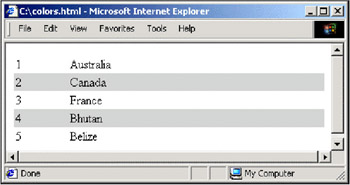
Here's a Velocity template that demonstrates the different-colored alternating rows:
 #set( $countries = ["Australia", "Canada", "France", "Bhutan", "Belize"] )


 #foreach ($country in $countries)

 #if (($velocityCount % 2) > 0)

 #else

 #end


 #end
| $velocityCount | $country |
Here is the HTML output:
| 1 | Australia |
| 2 | Canada |
| 3 | France |
| 4 | Bhutan |
| 5 | Belize |
and here is how it looks in a browser:
Using the Velocity Engine from Java
We are going to discuss how to evaluate Velocity templates from inside a Java application. There are several different ways of doing this. We will start with the most general case, applicable to all Java applications. It uses the org.apache.velocity.app.Velocity class to evaluate a Velocity template.
Web applications can use Velocity as a presentation layer. We'll using the Velocity tag library for JSP to evaluate Velocity Template Language (VTL) embedded in a JSP page. The tag library handles all of the template processing and evaluation.
Processing the Template
The Velocity Java API makes it extremely simple to process a template. Here is the template we are going to use:
The shape is $shape
If the template is dynamically generated, the template can either be a String or be accessible with a Reader. Velocity supplies two evaluate() methods in the Velocity class with different signatures to process dynamic templates:
- boolean evaluate (Context context, Writer writer, String logTag, Reader reader)
- boolean evaluate (Context context, Writer writer, String logTag, String instring)
| Note |
The logTag is what Velocity uses to mark entries in the log with the module that the entries came from. |
Here is an example log entry that uses the same log tag as the example below: SimpleVelocity:
 2003-01-27 04:11:48,858 - #parse(): cannot find template '../simple.txt', called
 from template SimpleVelocity at (1, 21)
Both methods return true if they succeed, false if there was an error. Errors will go to the Velocity log, which will be in the current working directory. The logger can be configured to output to another location using one of the built-in logging subsystems. For more information on logging with Velocity, refer the Velocity Developer's Guide that comes with the Velocity distribution.
The simple Velocity evaluation class:
 //Java imports
 import java.io.*;

 //Velocity imports
 import org.apache.velocity.VelocityContext;
 import org.apache.velocity.app.Velocity;
 import org.apache.velocity.context.Context;
 import org.apache.velocity.exception.MethodInvocationException;
 import org.apache.velocity.exception.ParseErrorException;

 public class SimpleVelocityEvaluate {

 public static void main(String args[]) {
 //create a writer that goes to the console.
 StringWriter writer = new StringWriter();

 try {
 //Initialize Velocity
 Velocity.init();

 } catch (Exception e) {
 System.out.println("Error initializing Velocity");
 e.printStackTrace();
 return;
 }

 //Our velocity context
 Context context = new VelocityContext();

 //Put something in the context
 context.put("shape", "circle");

 //Define our template
 String template = "The shape is $shape";

 try {
 Velocity.evaluate(context, writer, "SimpleVelocity", template);
 System.out.println("success: " + writer.toString());

 } catch (IOException ioe) {
 System.out.println("IO error with Velocity");
 ioe.printStackTrace();

 } catch (MethodInvocationException mie) {
 System.out.println("Method Invoke error with Velocity");
 mie.printStackTrace();

 } catch (ParseErrorException pe) {
 System.out.println("Parsing error with Velocity");
 pe.printStackTrace();
 }
 }
}
After our simple example is executed from the command line, we will get a single line of output:
success: The shape is circle
This example demonstrated how to use Velocity at a very basic level, by merging a context with a very simple template created out of a String object. Next, we're going to discuss how Velocity is configured for loading templates from a file system or a classpath.
Resource Loaders
Velocity uses resource loaders to find templates to process. More than one resource loader can be configured in the Velocity.properties configuration file to be used with Velocity, and Velocity will search through them in order.
Here are two example resource loaders:
 resource.loader = file
 file.resource.loader.description = Velocity File Resource Loader
 file.resource.loader.class =
 org.apache.velocity.runtime.resource.loader.FileResourceLoader
 file.resource.loader.path = /templates/
 file.resource.loader.cache = false
 file.resource.loader.modificationCheckInterval = 2

 resource.loader = classpath
 classpath.resource.loader.description = Velocity Classpath Resource Loader
 classpath.resource.loader.class =
 org.apache.velocity.runtime.resource.loader.ClasspathResourceLoader
The first resource loader is a file resource loader. It's also named file. The description is just that, a description for developers who are interested. The class should be set to one of Velocity's built-in loader classes, or to a class that subclasses org.apache.velocity.runtime.resource.loader.ResourceLoader.
Available loaders that come with Velocity are:
- ClasspathResourceLoader: for loading resources from a classpath
- DataSourceResourceLoader: for templates in a data source such as MySQL or Oracle
- FileResourceLoader: for templates on the local file system
- JarResourceLoader: for templates in a JAR file
- URLResourceLoader: for templates which are available from a URL.
The second resource loader is a classpath loader. It doesn't require any configuration beyond its name and class. Put your templates into a directory, a JAR file, or a ZIP file and make sure that it is in the classpath for your application. Velocity will read the resources right out of the classpath.
The two more useful resource loaders are the ones listed in the example, file and classpath. The JAR resource loader can be used if your templates are trapped in a JAR file and the data source resource loader will load templates out of a database that has id, template, and timestamp columns. Use your application server to define the data source. You'll have to rebuild Velocity to use this loader, so refer to the Velocity Developer's Guide for more details. There is also a URL loader for a more universal approach to retrieve resources.
The file loader needs a path to look for templates in. This is relative to the web app's root directory. The file loader can be set to cache templates. We recommend that you set this to false during development. Velocity will then read the templates off the disk every time you ask for them, which means no waiting time or restarts to debug templates. Set the cache to true when your application goes into production or testing. The modificationCheckInterval tells Velocity how often to check for a new template (in seconds).
JSP and Velocity
JSP can be used with Velocity through the Velocity tag library. If Velocity syntax matches your project needs better than JSP scriptlets or the expression language, it's a simple task to integrate Velocity with your existing JSP-based application. The Velocity tag library doesn't depend on Struts or any other MVC frameworks to work.
There is only one tag for Velocity – the contents of the tag are parsed as a Velocity template. The Velocity context contains the beans in the page, request, session, and application scopes. Velocity provides two different methods for accessing beans from the scope. The default method is to allow access to any bean in each scope. You should try to avoid namespace conflict with the names of beans. But if you do have the same name for beans in different scopes, Velocity searches the scopes in the following order:
- Page
- Request
- Session
- Application
This presents a problem if you have a bean named user in the request scope, but you actually want to access the user bean in the application scope. The tag library provides a built-in Velocity object in the context called the $scopeTool, which can retrieve objects out of a given scope. If you would like to keep access to your beans restricted by scope, you can set the strictaccess attribute on the velocity tag to true, which disables the default access to any bean in any scope. All bean access will have to go through the scope tool.
There currently isn't a way to use JSP tags directly inside a Velocity template. The best practice for using JSP tags with Velocity is to factor out the logic code from the tag into a simple bean that can be added to Velocity's context for use. Another solution would be to write an object that wraps the existing Java methods of your tag into a cleaner API for use with Velocity.
Creating the JavaEdge RSS Feed with Velocity
We have several requirements for this piece of the JavaEdge application:
- Create an RSS feed that reflects the last stories to be added to JavaEdge
- Include all of the stories on the JavaEdge home page
- Use Velocity to create the solution, so we can demonstrate this clever tool
- Follow the RSS 2.0 specification
The first piece of the design puzzle is to determine how we are going to create the RSS feed. Other web sites will need a permanent URL on our JavaEdge application that we can give them to pull our content headlines from.
Here are some possible designs for this problem:
- Create a static file on the file system and update it every time a story is added by a user.
- Create a static file on the file system and update it at fixed intervals by a scheduler.
- Use a Struts action on URLs that contain the path /news.rss, and dynamically generate the RSS file every time the web site is hit.
- Use the same design as above, except the RSS file will be cached for a fixed interval, such as 10 minutes.
- Create another servlet and make it solely responsible for handling RSS requests. This servlet could handle any requests for a path with /news.rss.
The first design seems like the easiest solution, but we could end up with a jumbled application architecture if we add code to create an RSS file into the post story Struts actions. In addition, if we create an interface for editing or deleting posted stories we will have to include code in these new actions to handle the RSS file creation. Also, we could run into a thread safety problem if we aren't careful when more than one person posts a story to JavaEdge.
The second design could hook into the Struts plug-in system to run as a scheduled process. We use this approach in the chapter on Lucene to run the search engine indexer. It would be nice to have "late- breaking" news immediately show up on our RSS feed, so we won't use this solution. This design would be more appropriate for a high-traffic site like Slashdot because the RSS creation process wouldn't run on every RSS request.
The third design is the one that we will use for our web site. By building everything into Struts, we keep the application architecture simple. At the same time, we can create actions and templates specifically for RSS. We'll need to choose a URL for the RSS file. Generally, this URL is simple because it will have to be copied into other applications. We will use the following URL: http://localhost:8080/JavaEdge/execute/news.rss.
The fourth design is too complicated for our site; it is similar to the second design, in that it is more appropriate for a high-traffic web application.
The last design, the independent servlet, is worth looking into. This would free us from any Struts requirements we might have on making our functionality into an action. We could generate the RSS from a template directly inside the servlet. We'd like to leave the option open to leverage Struts better in the future, so we'll stick with our Struts-based design.
The next part of the puzzle is to decide which parts of the RSS specification to implement. There are many optional elements and attributes we could include in our RSS file. We'll create an example RSS file that will demonstrate the elements and attributes we intend to use. By referencing the RSS specification, you can determine which fields should be added to our solution to fit your requirements.
The root element of the RSS file is going to be the element. The element has a element. The element contains all of the metadata for our JavaEdge content feed, along with all of the news items we are publishing:
The title will be used by the web site that consumes the RSS file. The link should point back to our JavaEdge installation:
JavaEdge: Late Breaking Headlines
http://localhost:8080/JavaEdge/execute/
Our description element could end up being used – we picked one that will stand out in the crowd. The language element is optional; refer the RSS 2.0 documentation for more information. The next element, docs, points to the RSS specification from Dave Winer at Userland. The generator should be the name of our application, and it's an optional element:
 The hard-hitting Java journalism you demand.
 en-us
 http://backend.userland.com/rss

 Wrox JavaEdge Application (Struts and Velocity)
After the above metadata, we get to the news headlines that we syndicate out. Each headline is wrapped in an item element. The title is used to generate a link from the consuming link, and we provide a URL to our site that will point to the story. We will need to generate the storyId, but we'll leave the rest of the URL in the template, so we can use whatever URL we want the external world to know. The description will be the story introduction from the JavaEdge database. We'll need to expose a publication date so others can determine how new our content is:
 JSTL tutorial availablehttp://localhost:8080/JavaEdge/execute
 /storyDetailSetup?storyId=17
 We are pleased to announce that our editors have created
 a JSTL tutorial and made it available for everyone to
 use.
 Wed, 1 Jan 2003 12:04:31 GMT


 Latest release of Turbinehttp://localhost:8080/JavaEdge/execute
 /storyDetailSetup?storyId=18
 The Turbine developers have released another great
 version of their Turbine framework, and it is now up for download
 on Jakarta Apache

 Wed, 8 Jan 2003 12:04:31 GMT
That's all that is required for the sample RSS file.
The last design decision is how to make sure the RSS file only contains valid XML. Velocity ships with a tool called Anakia, which is used for transforming XML into other formats using Velocity. It was originally conceived of as a documentation-generation tool. Anakia comes with a simple class called org.apache.velocity.anakia.Escape, which only has one method, getText(String st). This method escapes character data for safe use in XML or HTML, by replacing four special characters (<, >, ", &) with their XML entities.
Installing Velocity and the Tag Library
The Velocity distribution can be downloaded from its home page at http://jakarta.apache.org/velocity. Download the binary archive for the latest released version (currently Velocity-1.3.1-rc2), and unzip it to a handy directory. Velocity comes with two pre-built JAR files for easy deployment. The smaller JAR file only contains classes in the org.apache.velocity package and sub-packages. The larger file contains all of the classes that Velocity depends on. These are from the Jakarta Apache ORO, Commons, and Avalon LogKit projects. If you don't already have these libraries in your project, you can use the JAR that contains the dependencies for simplicity. If you want to keep the use of Java libraries granular, the needed JAR files are all contained in the build/lib subdirectory of the Velocity installation.
The Velocity tag library can be downloaded from the Wrox web site: http://wrox.com/books/1861007817.htm. The Velocity home page also points to the tag library. If you get the tag library source code out of CVS and build it yourself, be sure that you are using a compatible version of Velocity, as the source code is always being updated.
Implementing the RSS Feed
There are three steps that we need to take to implement the RSS feed:
- Add our action to struts-config.xml
- Create a setup action for RSS
- Create a JSP that uses Velocity to generate the XML for the RSS
The template is contained inside the opening and closing tags of the Velocity tag. When the JSP page is executed, the Velocity tag creates a context out of the objects in the page, request, session, and applications scopes and then evaluates the template with the context. The output of the merge is displayed in the JSP page.
Configure struts-config.xml
We need to add an action to struts-config.xml. As the URL for our RSS file is going to be http://localhost:8080/JavaEdge/execute/news.rss, the action is mapped to the /news.rss path. This action is simple; it only calls an Action class (RSSSetupAction) that puts the necessary data into the request scope. If that is successful, it calls a JSP page (rss.jsp):
 ...


 ...
RSSSetupAction.java
This Action class puts all of the needed data and utility classes into the request scope. These objects are going into the request scope so they can be used to build up the RSS page. Any objects in the page, request, session, or application scopes become accessible to our Velocity template through the context. We need the collection of story objects from the home page in the request scope, so we borrowed some code from the home page setup action to do this. All the heavy lifting is done by the story DAO, which we discussed in Chapter 5. We also move the description into the action, to be put into the context and pulled out by the template. We did this just to demonstrate how we could change the description or any of the other fields on the fly.
We also add an object to the request scope to handle escaping XML entities, so that our RSS file is always valid XML. This is a utility object, and we can just use the methods from it in the Velocity template.
We decided to match the date format used in the RSS 2.0 documentation, which required a date format class. We used the SimpleDateFormat class to set up a formatter object that would give us the output we needed. The date format object we created was also put into the request scope:
 package com.wrox.javaedge.struts.rss;
 import org.apache.struts.action.Action;
 import org.apache.struts.action.ActionMapping;
 import org.apache.struts.action.ActionForm;
 import org.apache.struts.action.ActionForward;
 import org.apache.log4j.Logger;
 import org.apache.velocity.anakia.Escape;

 import javax.servlet.http.HttpServletRequest;
 import javax.servlet.http.HttpServletResponse;

 import com.wrox.javaedge.story.dao.*;
 import com.wrox.javaedge.common.*;
 import java.util.*;
 import java.text.SimpleDateFormat;
We are going to extend the Action class and override the perform() method to add several objects to the request scope. The Velocity tag will pull these objects out of the request scope and put them into the Velocity context for the template we will discuss in the section called rss.jsp:
 /*
 * Retrieves the top stories from JavaEdge and puts them in the session for
 * the RSS to use.
 */
 public class RSSSetupAction extends Action {

 private static Logger logger = Logger.getLogger(RSSSetupAction.class);

 /*
 * The perform() method comes from the base Struts Action class. We
 * override this method and put the logic to carry out the user's
 * request in the overridden method
 * @param mapping An ActionMapping class that will be used by the
 * Action class to tell the ActionServlet where to send the end-user.
 *
 * @param form The ActionForm class that will contain any data submitted
 * by the end-user via a form.
 * @param request A standard Servlet HttpServletRequest class.
 * @param response A standard Servlet HttpServletResponse class.
 * @return An ActionForward class that will be returned to the
 * ActionServlet indicating where the user is to go next.
 */
 public ActionForward perform(ActionMapping mapping,
 ActionForm form,
 HttpServletRequest request,
 HttpServletResponse response) {
 try {
We are going to get the Story Data Access Object. Our RSS feed will use the same stories we show on the home page, and we can reuse the findTopStory() method that we already built for the home page in Chapter 3:
 /*
 * Creating a Story Data Access Object and using it to retrieve
 * the top stories.
 */
 StoryDAO storyDAO = new StoryDAO();
 Collection topStories = storyDAO.findTopStory();
The top stories from the DAO are going to go into the request, so we can access them from the Velocity template in the page we are going to show the user:
 /*
 * Putting the collection containing all of the stories into
 * the request.
 */
 request.setAttribute("topStories", topStories);
We'll also put a hard-coded description into the request scope. This is here to demonstrate how easy it is to get a string into a Velocity template from a Struts action:
 /*
 * Put the description into the request.
 */
 request.setAttribute("description",
 "The hard-hitting Java journalism you demand.");
We're going to use an XML entity escaping object, called Escape, from Velocity to ensure that we have valid XML inside the RSS feed. This helper object can go right into the request scope:
 /**
 * Put the escape object into the context
 * to escape XML entities.
 */
 request.setAttribute("escape", new Escape());
We will include a date formatter in the request scope for the RSS 2.0 feed. Much like the above XML escaper, it is a helper object:
 /**
 * Create a date format to match the RSS 2.0 dates
 * Ex. Sun, 19 May 2002 15:21:36 GMT
 * http://backend.userland.com/rss
 */
 String pattern = "EEE, dd MMM yyyy HH:mm:ss z";
 SimpleDateFormat dateFormat = new SimpleDateFormat(pattern);

 /**
 * Stick the date format into the request
 */
 request.setAttribute("dateFormat",dateFormat);
If we had a problem retrieving the top stories out of the Story data access object, we catch the exception, log it as an error, and then return a forward for the main application error page. Otherwise, we return a forward that will take us to the rss.jsp file. These mappings were set up in the strutsconfig.xml configuration file:
 } catch(DataAccessException e) {
 logger.error("Data access exception",e);
 return (mapping.findForward("system.error"));
 }

 return (mapping.findForward("rss.success"));
 }
 }
rss.jsp
We'll walk through the JSP page we need to make the RSS file. This is the declaration for the Velocity tag library:
<%@ taglib uri="/WEB-INF/veltag.tld" prefix="vel" %>
We're going to enclose our entire Velocity template in between the Velocity JSP tag. The Velocity context will contain all of the beans in the page, request, session, and application scopes. The template will be merged with the context, and the output will be put into the JSP page just like any other JSP tag. We could have set the strictaccess attribute to true, and then any objects we needed out of the JSP scopes would have to be retrieved with the Velocity scope tool first. There are different methods for each scope, so there won't be a naming clash problem:
This is the declaration for RSS version 2.0:
There is only one channel for each RSS file:
This is the title and link others are going to use when they create links to JavaEdge:
JavaEdge: Late Breaking Headlines
http://localhost:8080/JavaEdge/execute/
We'll use Velocity's #if…#end directive to only add a description element if one exists. We are checking to make sure the description has been placed into the context:
#if ($description)
Here, we're building an RSS element. We're using the Escape utility class to make sure the description text is valid XML. If either the escape or the description objects don't exist in the context, we won't display the Velocity code. We accomplish this by using $! for our Velocity references:
$!escape.getText($!description)
End the #if directive, and put in elements for the language (English), and the location of the RSS documentation (Userland):
 #end
 en-us
 http://backend.userland.com/rss
We're showing off our JavaEdge application here, so that when people use our RSS, they can see that it was generated using our application:
Wrox JavaEdge Application (Struts and Velocity)
The #foreach…#end directive is useful for getting each single value out of a collection or array, and then doing some work with it. The collection is $topStories, and the single value is $story:
#foreach ($story in $topStories)
The element corresponds to a content piece, or a news story:
For the title, we're going to use the same escape tool as for the description above. We're going to access the storyTitle property on the $story reference, which is actually a StoryVO object. Velocity has shortcuts for getters and setters on beans, so we can access it with just the property name:
$!escape.getText($!story.storyTitle)
The
element contains a URL that points back to the story. We set the story ID dynamically from the story object:
http://localhost:8080/JavaEdge/execute /storyDetailSetup?storyId=$!story.storyId
The story introduction becomes the RSS description. The code is similar to the above
element.
 #if ($story.storyIntro)
 $!escape.getText($!story.storyIntro)
 #end
Here we add the publication date for RSS. The story submission dates don't have times, only dates, so this will always read 12:00 for the time. The date formatter we built in the object is used to format the submission date, if the date exists on the story object:
 #if ($story.submissionDate)
 $!dateFormat.format($!story.submissionDate)
 #end
Close out all the XML tags and the #foreach…#end directive:
#end
Output: News.rss
We can test our RSS functionality by opening the URL http://localhost:8080/JavaEdge/execute/news.rss in our web browser. Here is the news.rss file that is generated by our project:
 JavaEdge: Late Breaking Headlineshttp://localhost:8080/JavaEdge/execute/
 The hard-hitting Java journalism you demand.
 en-us
 http://backend.userland.com/rss

 Wrox JavaEdge Application (Struts and Velocity)

 This is a story title jcchttp://localhost:8080/JavaEdge/execute
 /storyDetailSetup?storyId=17
 This is a unit test story intro.

 This is a story title jcchttp://localhost:8080/JavaEdge/execute
 /storyDetailSetup?storyId=16
 This is a unit test story intro.

 This is a story title jcchttp://localhost:8080/JavaEdge/execute
 /storyDetailSetup?storyId=15
 This is a unit test story intro.

 This is a story title jcchttp://localhost:8080/JavaEdge/execute
 /storyDetailSetup?storyId=14
 This is a unit test story intro.

 storyTitlehttp://localhost:8080/JavaEdge/execute
 /storyDetailSetup?storyId=4
 storyIntro
 Thu, 16 Jan 2003 00:00:00 CST

 J2EE vrs. .NEThttp://localhost:8080/JavaEdge/execute
 /storyDetailSetup?storyId=3
 Found an interesting article comparing J2EE vrs.
 Microsofts .NET
 Thu, 16 Jan 2003 00:00:00 CST

 New Book Released: Open Source for Beginnershttp://localhost:8080/JavaEdge/execute
 /storyDetailSetup?storyId=2
 New book available on Open Source Development.
 A must have for beginners.
 Thu, 16 Jan 2003 00:00:00 CST

 Knoppix Linux Rockshttp://localhost:8080/JavaEdge/execute
 /storyDetailSetup?storyId=1
 I ran across a great linux distribution. It's called
 Knoppix. Completely boots off a CD. Check it out at:
 http://www.knoppix.org/
 Thu, 16 Jan 2003 00:00:00 CST
Summary
In this chapter, we've discussed how to use Velocity inside a Struts web application as a presentation layer. We've also shown how to use Velocity from any Java application as a template processing engine. We discussed the Velocity Template Language (VTL) in detail and gave examples for most VTL directives. We also covered Velocity macros, iterators, and logical operators along with the VTL syntax.
We discussed Velocity contexts, and how to get data in and out of the context. We showed how to use the Velocity object to merge a template with the context. Resource loaders are used to find templates and text or HTML that is included in a template.
We've demonstrated using the Velocity tag library with JSP inside our JavaEdge application to create an RSS 2.0 feed. We built a Struts action to populate the request scope with objects and data. We used those objects in the Velocity template that was embedded between opening and closing Velocity tags in the JSP.
Introduction
- The Challenges of Web Application Development
- Creating a Struts-based MVC Application
- Form Presentation and Validation with Struts
- Managing Business Logic with Struts
- Building a Data Access Tier with ObjectRelationalBridge
- Templates and Velocity
- Creating a Search Engine with Lucene
- Building the JavaEdge Application with Ant and Anthill

EAN: 2147483647
Pages: 83
