Creating Timers
One thing that all the controls you used in Hour 7, "Working with Traditional Controls," have in common is that the user can interact with them. However, not all controls have this capability ”or restriction, depending on how you look at it. Some controls are designed for use only by the developer. One such control is the Open File Dialog control you used in your Picture Viewer application in Hour 1, "A C# Programming Tour." Another control that is invisible at runtime is the Timer control. The Timer control's sole purpose is to trigger an event at a specified interval of time.
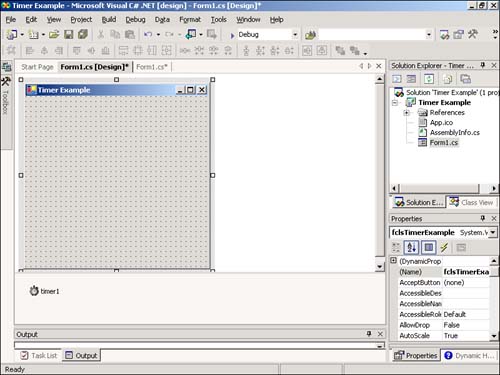
Create a new Windows Application titled Timer Example. Change the name of the default form to fclsTimerExample and then set its Text property to Timer Example. Next, be sure to set the Main() entry point of the project to fclsTimerExample or the project won't run. Add a new Timer control to your form by double-clicking the Timer item in the toolbox. Because the Timer control is invisible at runtime, it's added to the gray area at the bottom of the screen rather than placed on the form (see Figure 8.1). Set the properties of the Timer control as follows :
Figure 8.1. Invisible-at-runtime controls are shown at the bottom of the designer, not on the form.
| Property | Value |
|---|---|
| Name | tmrClock |
| Enabled | True |
| Interval | 1000 |
You probably noticed that there are very few properties for the Timer control, compared to the other controls with which you've worked. The key property of the Timer control is the Interval property. The Interval property determines how often the Timer control fires its Tick event. The Interval is specified in milliseconds, so a setting of 1,000 is equal to 1 second. The best way to understand how the timer works is to use it. Using the Timer and a Label control, you're now going to create a simple clock. The way the clock will work is that the timer will fire its Tick event once every second (because you'll set the Interval = 1000 milliseconds ), and within the Tick event, the label's Text property will be updated with the current system time.
Add a new label to the form and set its properties as follows:
| Property | Value |
|---|---|
| Name | lblClock |
| BorderStyle | FixedSingle |
| Location | 96,120 |
| Size | 100,23 |
| Text | (make blank) |
| TextAlign | MiddleCenter |
Next, double-click the Timer control to access its Tick event. When a timer is first enabled, it starts counting, in milliseconds, from 0. When the amount of time specified in the Interval property passes , the Tick event fires and the timer starts counting from 0 again. This continues until the timer is disabled (that is, when its Enabled property is set to False). Because you've set the Enabled property of the timer to True at design time, it will start counting as soon as the form on which it is placed is loaded. Enter the following statement in the Tick event:
DateTime dtCurrentTime = DateTime.Now; lblClock.Text = dtCurrentTime.ToLongTimeString();
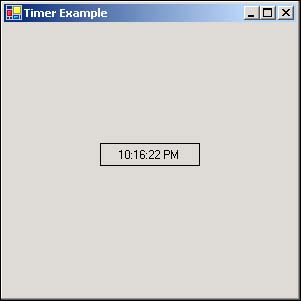
The .NET Framework provides date/time functionality in the System namespace. The Now property of the DateTime class returns the current time. Using the ToLongTimeString method returns a string with a time format of hh:mm:ss. Using this class, property, and method, we set the Text property of the label to the current time of day, and it does this once a second. Press F5 to run the project now and you'll see the Label control acting as a clock, updating the time every second (see Figure 8.2).
Figure 8.2. Timers make it easy to execute at specified intervals.
Stop the running project now and save your work. Timers are powerful, but you must take care not to overuse them. For a timer to work, Windows must be aware of the timer and must constantly compare the current internal clock to the interval of the timer. It does all this so that it can notify the timer at the appropriate time to execute its Tick event. In other words, timers take system resources. This isn't a problem for an application that uses a few timers, but I wouldn't overload an application with a dozen timers unless I had no other choice.
| Top |

EAN: 2147483647
Pages: 253