| You can extract a subset of the data from a SELECT statement by adding a WHERE clause. For example, if you want to retrieve data only on a certain set of members in the travel club, rather than all the members, you specify the criteria for that set by adding a WHERE clause to your SELECT statement. In the following task, you'll select the first_name and last_name fields from the members table and then filter that data by selecting only those members whose id is less than a certain number. You'll then filter the data by selecting only those members whose id is within a certain range of numbers. Last, you'll add an IS NULL clause to a WHERE clause to check for missing data in the flight_time field in the flightprefs table. To filter data using SQL: 1. | Do one of the following:
- To start the MySQL Monitor in Windows, follow Steps 1 through 4 of "To create a database using MySQL in Windows," earlier in this chapter.
- To start MySQL in a Terminal window on a Mac, follow Steps 1 through 8 of "To create a database using MySQL on a Mac," earlier in this chapter.
| 2. | At the mysql prompt, type use travelclub; and press Enter (Windows) or Return (Mac) to choose the travelclub database.
The next step is to select the last_name and first_name fields in the members table, and then filter that data by selecting only those whose id value is less than 30000.
| 3. | At the prompt, type SELECT last_name, first_name FROM members WHERE id < 30000; and press Enter (Windows) or Return (Mac).
The two rows and columns that meet these criteria (last_name, first_name, and id < 30000) appear (Figure 5.17).
Figure 5.17. Filtering a selection with the Less Than (<) operator. 
Next, you'll select the last_name and first_name fields in the members table, and then filter that data by selecting only those whose id value is between 20000 and 40000.
| 4. | At the prompt, type SELECT last_name, first_name FROM members WHERE id BETWEEN 20000 AND 40000; and press Enter (Windows) or Return (Mac).
The two rows and columns that meet these criteria (last_name, first_name, and id between 20000 and 40000) appear (Figure 5.18).
Figure 5.18. Filtering a selection with the BETWEEN keyword. 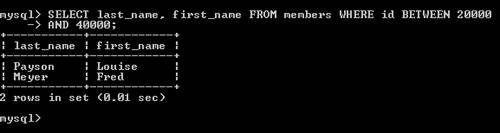
In the next step, you'll select the id field from the flightprefs table and then filter that data so that you can identify any records that don't have a value for flight_time.
| 5. | At the prompt, type SELECT id FROM flightprefs WHERE flight_time IS NULL; and press Enter (Windows) or Return (Mac) to check for missing data.
The result is an empty set, which means that all the records in the flightprefs table include a value for the flight_time field, so there is no missing data in this field (Figure 5.19).
Figure 5.19. Checking for missing data with the IS NULL clause. 
| 6. | At the prompt, do one of the following:
- If you're running Windows, type exit and press Enter to close the MySQL Monitor.
- If you're on a Mac, type exit and press Return to stop MySQL, type exit and press Return to log out, and then quit Terminal and close the Terminal window.
|
 Tip Tip
|
