|
Fundamentals of SVG Programming. Concepts to Source Code Authors: Campesato O. Published year: 2003 Pages: 137-139/362 |
Consider the text string rendered in Figure 8.9
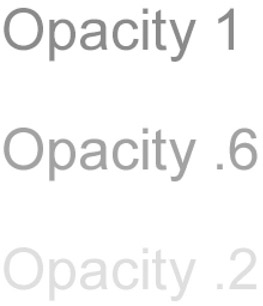
Figure 8.9:
Text strings with different opacity values.
The SVG document in Listing 8.9 demonstrates how to use the SVG text element with different opacity values when displaying text strings.
Listing 8.9 opacityText1.svg
|
|
<?xml version="1.0" encoding="iso-8859-1"?> <!DOCTYPE svg PUBLIC "-//W3C//DTD SVG 20001102//EN" "http://www.w3.org/TR/2000/CR-SVG-20001102/DTD/svg-20001102.dtd"> <svg width="100%" height="100%"> <g transform="translate(50,100)"> <text id="horizontalText" x="0" y="0" fill="red" font-size="48"> Opacity 1 </text> <text id="horizontalText" x="0" y="100" fill="red" font-size="48" opacity=".6"> Opacity .6 </text> <text id="horizontalText" x="0" y="200" fill="red" font- size ="48" opacity=".2"> Opacity .2 </text> </g> </svg>
|
|
The SVG code in Listing 8.9 renders three horizontal text strings, all of which have a font size of 48 and a fill value of red. The three values of the opacity attribute are 1 (which is the default value), .6, and .2. The smaller the value of the opacity attribute, the fainter the rendered text string. Thus, the string with opacity .2 is fainter than the one with opacity .6, which in turn is fainter than the string with opacity 1. You can specify lower values for the opacity attribute in situations where you are overlaying multiple text strings with various SVG functions (e.g., rotate, skew, etc.) in conjunction with animation and you want to create specific artistic effects.
Consider the two text strings rendered in Figure 8.10.
Figure 8.10:
A text string with a blur filter.
The SVG document in Listing 8.10 demonstrates how to use the SVG elements text and blur in order to render a text string with a blur filter.
Listing 8.10 blurFilterText1.svg
|
|
<?xml version="1.0" encoding="iso-8859-1"?> <!DOCTYPE svg PUBLIC "-//W3C//DTD SVG 20001102//EN" "http://www.w3.org/TR/2000/CR-SVG-20001102/DTD/svg-20001102.dtd"> <svg width="100%" height="100%"> <defs> <filter id="blurFilter1" filterUnits="objectBoundingBox" x="0" y="0" width="100%" height="100%"> <feGaussianBlur stdDeviation="4"/> </filter> </defs> <g transform="translate(50,100)"> <text id="normalText" x="0" y="0" fill="red" stroke="black" stroke-width="4" font-size="72"> Normal Text </text> <text id="horizontalText" x="0" y="100" filter="url(#blurFilter1)" fill="red" stroke="black" stroke-width="4" font- size ="72"> Blurred Text </text> </g> </svg>
|
|
The SVG code in Listing 8.10 renders two horizontal text strings, both of which have a font-size of 72 and a fill value of red. The upper horizontal text string has a black border with a thickness of four pixels, while the lower horizontal text string references an element with a filter value of blurFilter1 . This filter is defined in the SVG defs element and is a filter of type feGaussianBlur .
Consider the text string rendered in Figure 8.11.
Figure 8.11:
Text following a specified path.
The SVG document in Listing 8.11 demonstrates how to use the SVG textPath element and the SVG text element in order to display a text string that follows a path.
Listing 8.11 textOnQBezierPath1.svg
|
|
<?xml version="1.0" encoding="iso-8859-1"?> <!DOCTYPE svg PUBLIC "-//W3C//DTD SVG 20001102//EN" "http://www.w3.org/TR/2000/CR-SVG-20001102/DTD/svg-20001102.dtd"> <svg width="100%" height="100%"> <defs> <path id="pathDefinition" d="m0,0 Q100,0 200,200 T300,200 z"/> </defs> <g transform="translate(100,100)"> <text id="textStyle" fill="red" stroke="blue" stroke-width="2" font- size ="24"> <textPath xlink:href="#pathDefinition"> Sample Text that follows a path specified by a Quadratic
Bezier curve </textPath> </text> </g> </svg>
|
|
The SVG code in Listing 8.11 contains the SVG textPath element that contains a horizontal text string which has a font size of 24 and a fill value of red. The SVG textPath element text refers to an id with value pathDefinition , which is defined as a quadratic Bezier curve by means of the SVG path element inside the SVG defs element. (Got it?)
|
Fundamentals of SVG Programming. Concepts to Source Code Authors: Campesato O. Published year: 2003 Pages: 137-139/362 |