Arrays
In many ways, the discussion of arrays is tied closely to variables. An array is a variable that contains multiple values. The number of values that the variable will hold must be decided and declared in advance. You are also going to learn how to reference values inside the array.
As I was writing this, my technical editor asked me, “What about dynamic arrays?” Well, as you will learn, the concept of a dynamic array is a slight falsehood. You still need to declare, in advance, the number of values it will hold. The only difference is that you declare them before the array is used, during the runtime of the program (as opposed to when you are writing the code).
You are also going to learn how to allocate memory properly so that your array does not take up too much room.
Components of an Array
Each value in the array is called an element. Since an array variable has multiple elements in it, you need a way to pick them out or reference them individually. You can do that by using a number called an index. Most of the time, the first element of an array is index number 0.
If you could look behind the scenes of an array of names, using variable name strName, it might look something like this:
strName (0) “John Smith” (1) “Jane Doe” (2) “Rosemary Brown” (3) “Anita LaScala” (4) “Bob Gray”
Notice that even though the index numbers only go up to 4, this is a five-element array. Again, the first element usually begins at 0. (Note that as we progress through this chapter, we will see some exceptions.)
If you wanted to select Anita LaScala’s name out of the array for printing, you would use
Print strName(3)
Anita is in index position 3. However, just to confuse things a bit, it is the fourth element of the array. This is the source of many a problem in programming and, a little later on in the chapter, we will examine a way of possibly correcting for that.
VBA gives us two flavors of arrays:
-
Static array The number of elements in the array, called the length of the array, is decided in advance and remains fixed.
-
Dynamic array The length of the array is variable and not decided in advance.
Static Arrays
A static array has a predetermined length and does not change. Since this is the simplest of the arrays, we will start here.
Declaring a static array is similar to declaring a variable, with one small exception:
Dim intMyScores(10) As Integer
You have to be careful how you view this. You are probably thinking that we just declared an array of 10 elements. However, what we really did was declare an array of 11 elements, with the first element being 0, and the last element being index number 10 (sometimes called the upper bound). See the difference?
The lower bound, or lowest index number, of this array is 0.
You need to do this in order to properly allocate the memory necessary to hold the array.
If you wanted to, you could declare multiple arrays in a procedure as follows:
Dim strName(6) As String, intMyScores(10) As Integer
By default, the first index value is 0, strings are initialized as empty, and integers are initialized at 0.
Let’s set up an example. In this procedure, you are going to create two For…Next loops. The first one will allow you to populate the array, and the second will print the contents of the array back to you. Here is the code:
Sub arrayTest() Dim i As Integer Dim intMyScores(10) As Integer For i = 0 To 10 intMyScores(i) = InputBox("Enter number " & i, "Static Array Test") Next For i = 0 To 10 Debug.Print "For array element " & i & " the number is " & _ intMyScores(i) Next End Sub Programmers like to use the lowercase i as the variable representing the index of the array. It is just a programming convention. Here we are asking it to serve double duty: it is the counter variable of the For…Next loop, and it is also the representation of the array’s index. Notice that you always refer to an array variable by the variable’s name followed by the element number, or index, in parentheses. In the example, we are using the loop variable of i to help us populate our array.
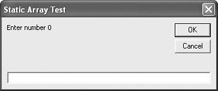
As a nice little extra, notice that I have a concatenation for the prompt in the input box. This will help you keep track of what element you are entering.
Your input box should look something like this:
After you enter the elements, the second For loop takes over and should give you the printout in the Immediate window:
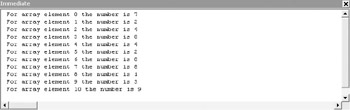
With a static array, you declare the size of the array right in the code. In other words, it is done during design time.
There is one little problem with the preceding code example. You could somehow end up declaring an incorrect lower or upper bound. This could result in a runtime error. VBA helps you out a bit with two built-in functions: LBound(array name) and UBound(array name). This returns the bounds of the array.
You could change the syntax of the For loop in the previous code as follows:
For i = LBound(intMyScores) To UBound(intMyScores) intMScores(i) = InputBox("Enter number " & i, "Static Array Test") Next
Dynamic Arrays
Many programmers consider the concept of a dynamic array in VBA a slight programming fiction. Essentially, it is still a static array, but you do not declare the size until the program is running. So the only issue is when the size is being declared.
You start off by declaring an empty array. For example:
Dim intMyScores() As Integer
Then you use a keyword, ReDim, to redeclare the size of the array while the program is running and it is known what the size will be.
Let’s redo our previous example to demonstrate a dynamic array:
Sub arrayTest() Dim i As Integer Dim intMyScores() As Integer Dim intArraySize As Integer intArraySize = InputBox("How many scores are you entering?", "Array Size") ReDim intMyScores(intArraySize) For i = 1 To intArraySize intMyScores(i) = InputBox("Enter number " & i, "Static Array Test") Next For i = 0 To intArraySize Debug.Print "For array element " & i & " the number is " & _ intMyScores(i) Next End Sub You will notice that we first declare intMyScores as an empty array. Then, as shown, we use the ReDim keyword to redefine it as a static array, with the upper bound being controlled by intArraySize, which is entered by the user.
From there on, we just use intArraySize to control the loops.
If you work through this example, you will see a contradiction. If you enter 5 as the number of scores that you want to input, you end up inputting 6 because the index starts at 0. This is a frequent mistake of beginning programmers.
With just a little bit of recoding, you can reassign the first element as 1 instead of 0. This would help keep things a bit more coordinated. Take a look at the following code:
Sub arrayTest() Dim i As Integer Dim intMyScores() As Integer Dim intArraySize As Integer intArraySize = InputBox("How many scores are you entering?", "Array Size") ReDim intMyScores(1 To intArraySize) For i = 1 To intArraySize intMyScores(i) = InputBox("Enter number " & i, "Static Array Test") Next For i = 1 To intArraySize Debug.Print "For array element " & i & " the number is " & intMyScores(i) Next End Sub If you run this in the Immediate window, you should see the result shown here:
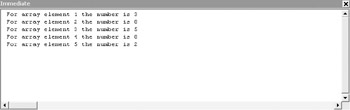
Just as intArray is the upper bound of our array, the 1 is now the lower bound of the array. We then have the two For…Next loops starting at 1. (Remember, there is no element 0 now.)
There is another technique for starting the array at index position 1. In the general declarations section, you could type either Option Base 0 or Option Base 1. This will set the default lower bound of the arrays in the module. The only two options are 0 and 1.
Out of Bounds
What happens if you make a programming error and end up trying to access more elements in the array than you declared using either Dim or ReDim?
VBA will not catch this until the program is actually running, not during the coding. This sort of error is called a runtime error. If that happens, you will get a message like this:
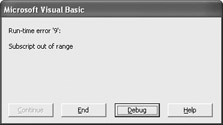
If you click Debug, it will show you where the program thinks the offending line of code is.
Be very careful! The line it brings you to is the point at which the code “crashed.” However, many times the crash happens due to things going bad earlier in the program. For instance, you may have set a variable to a wrong size or reference; or perhaps Dim or ReDim declared a wrong value. Finding the problem may require a bit of detective work on your part.
Making the Array Smaller
What happens if you declare an upper bound of 10, but only put four elements in the array?
Remember, the 10 declares the position of the last element of your array. However, unlike trying to use more elements, there is no rule that states you have to use all of the positions. Only using four elements would not cause a problem of any sort. But there is a potential problem in the background.
As a beginner, this is not a huge concern, but a major issue in software design is resource control. A computer has a finite memory capacity. When you declare that your array will have 10 elements, VBA puts a reserve on memory. This means that the rest of the memory is sitting there unused. This is a tremendous waste of resources.
Your first impulse may be to use ReDim to change the size declaration. This causes, however, another rather serious problem. When we used ReDim in the earlier example, the array still had no elements. If you use ReDim with a populated array, it will wipe it out and start anew. Odds are that is not the most desirable solution.
VBA helps us out by combining ReDim with a second keyword as follows:
ReDim Preserve intMyScores(4)
The Preserve keyword reallocates the memory and retains the elements intact.
Erasing Arrays
You will sometimes have situations in which you want to keep the array declared, but erase the elements within it. You can easily do that with the keyword Erase, as shown here:
Erase intMyScores
This clears the contents but keeps the declaration.
Depending on the type of array, different things may happen. If it is a numeric array, the elements are set to 0. However, the elements of a string array are set to “ ”. This is an empty string. If it is a Boolean array, each element is set to False.
IsArray
How do you know if a variable is an array? VBA provides a handy little function to test a variable. Let’s take a look at the following code.
Sub arrayTest() Dim intScores1 As Integer Dim intScores2(4) As Integer Debug.Print "Is intScores1 an array: " & IsArray(intScores1) Debug.Print "Is intScores2 an array: " & IsArray(intScores2) End Sub
This code returns the results shown here:
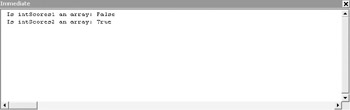
You can see that IsArray is a Boolean function. It returns a value of either True or False. In the first case above, the result is false because we did not declare it as an array. In the second case, it is true because we did.

EAN: 2147483647
Pages: 214