Class Diagrams for AlienTiles
Isometric TilesIsometric tiles are the basis of many real-time strategy (RTS) games, war games, and simulations (e.g., Civilization II, Age of Empires, and SimCity variants), though the tiling of the game surface is usually hidden. Isometric tiles give an artificial sense of depth as if the player's viewpoint is somewhere up in the sky, looking down over the playing area. Of course, this view is artificial since no perspective effects are applied; the tiles in the row "nearest" the viewer are the same size and shape as the tiles in the most "distant" row at the top of the screen. This is where the term isometric comes from: an isometric projection is a 3D projection that doesn't correct for distance. The illusion that each row of tiles is further back inside the game is supported by the z-ordering of things (sprites, objects) drawn in the rows. An object on a row nearer the front is drawn after those on rows further back, hiding anything behind it. This is the case in Figure 13-1, where the black and white column partially hides the alien standing two rows behind it. There are various ways of labeling the x-axis and y-axis of a isometric tile map. I'll use the standard staggered-map approach illustrated in Figure 13-2. Figure 13-2. A staggered isometric tile map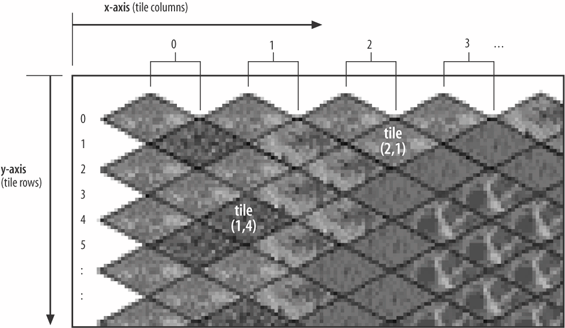 Odd and even rows are offset from each other, which means that the tile coordinates can be a little tricky to work out as a sprite moves between rows. AlienTiles uses tile coordinates to position sprites and other objects on the surface. However, the surface isn't made from tiles; instead, it's a single medium size GIF (216 KB), as shown in Figure 13-3. Figure 13-3. The surface.gif image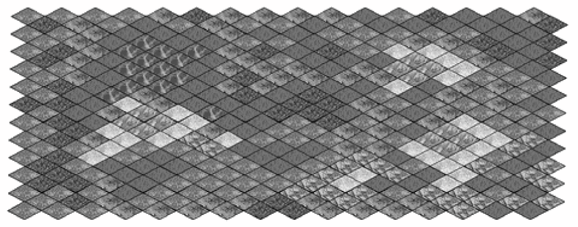 Most isometric games construct the surface from individual tiles, which allows the floor space to be rendered incrementally and to change dynamically over time. The drawback is the increased complexity (and time) in drawing the tiles to the screen. Drawing the individual tiles in back-to-front row order is necessary, with each diamond represented by a rectangular GIF with transparent corners. The coding problems are like the difficulties detailed in Chapter 12, with positioning bricks correctly on screen as the JumpingSprite moved around. And do you want to go through all of that again? Often, the surface will be a composite of several layers of tile of different sizes. For example, there may be several large green tiles for the terrain, partially covered over with smaller grass, dirt, and sand tiles to create variety. Fringe tiles are employed to break up the regularity of the edges between two large areas, such as the land and the sea. The graphic on a fringe tile represents the edge (or fringe) of one kind of tile, and the start of another. MovementAlienTiles offers four directions for a sprite to follow: northeast, southeast, southwest, and northwest, as illustrated by Figure 13-4. The user interface maps these directions to the four corners of the numbers keypad: to the keys 9, 3, 1, and 7. Pressing one of these keys makes the sprite move one step to the corresponding adjacent tile. An obvious extension is to offer north, east, south, and west movement. Figure 13-4. Directions of movement for a sprite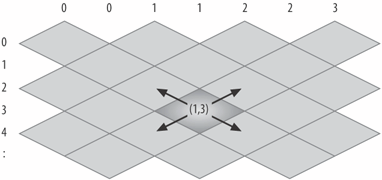 The range of directions is dictated by the tile shape, to a large extent, and diamonds aren't the only possibility. For instance, a number of strategy games use hexagons to form a Hex map (Figure 13-5), which allows six compass directions out of a tile. Figure 13-5. A hex map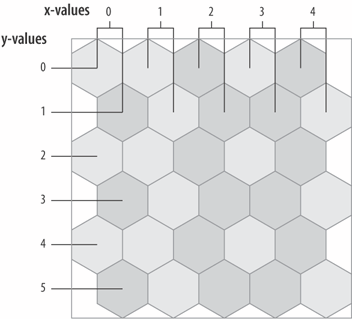 Movement around an isometric tile surface is often based on single steps between tiles. It's not possible for a sprite to move about inside a tile; the sprite can only stand still on a tile or make a single step to an adjacent tile. In AlienTiles, a key press causes a single step, and the user must hold down the key to make the sprite sprint across several tiles. A key press triggers a method call to update the sprite's position, which is updated onscreen at 40 FPS.
Though I talk about a player moving around the surface, the truth is that the user's sprite doesn't move at all. Instead, the surface moves in the opposite direction, together with the other objects and sprites. For instance, when the player moves to the northeast, the user's sprite stays still but the ground underneath it shifts to the southwest.
As with a side-scroller, this approach keeps the user's sprite center stage at all times. In commercial games, a player's sprite does sometimes move to the edge of the screen, usually as a prelude to entering a new game level. Placing a Sprite/ObjectCare must be taken with object placement so the illusion of an object standing on top a tile is maintained. Figure 13-6 shows that the positioning of a sprite's top-left corner, so planting its "feet" on the tile's surface can be a little hard to calculate: Figure 13-6. Placing a sprite onto a tile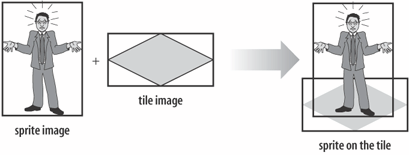 The sprite can occupy screen space above the tile but should not overlap the bottom left and right edges of the diamond. If it does, the image will seem to be partly in the next row, weakening the row ordering effect. I'll implement this placement rule in my code later. The Tile Map SurfaceThe AlienTiles surface contains no-go areas that the sprites cannot enter. These include the ocean around the edges of the tiled surface, a lake, a pond, and four red squares (all visible in Figure 13-1). The no-go areas are defined in a configuration file read in by AlienTiles at start-up. The game surface has two kinds of objects resting on it: blocks and pickups. A block fully occupies a tile, preventing a sprite from moving onto it. The block image can be anything; I employ various columns and geometric shapes. A player can remove a pickup from the surface when it's standing on the same tile by pressing 2 on the numeric keypad. Blocks and pickups are harder to implement than no-go areas since they occupy space on the game surface. This means that a sprite can move behind one and be partially hidden. Pickups pose more problems than blocks since they can be removed from a tile. More sophisticated games have a much greater variety of surface objects. Two common types are walls and portals (doors). A wall between two tiles prevents a sprite from moving between the tiles. A portal is often used as a way of moving between tile maps, for example when moving to the next game level or entering a building with its own floor plan. The AliensAlienTiles offers two types of aliens: those that actively chase after the player (AlienAStarSprite objects) and those that congregate around the pickup that the player is heading toward (AlienQuadSprite objects).
In general, alien design opens the door to intelligent behavior code, often based on Artificial Intelligence (AI) techniques. Surprisingly though, quite believable sprite behavior can often be hacked together with the use of a few random numbers and conventional loops and branches, and AlienQuadSprite is an illustration. |


EAN: 2147483647
Pages: 340