Flylib.com

Books Software


Recipe 3.6. Adding Background Images


Recipe 3.6. Adding Background Images

Problem

You need to place stationary or tiled images as backgrounds for certain page elements or an entire web page.

Solution

Use the CSS properties background-image, background-position, background-attachment , and background-repeat to specify how you want the background to be displayed.

Background styles can be assigned to the <body> tag in a CSS stylesheet to display an image once in a fixed position:

body
	{
	    background-image: url(http://flylib.com/books/2/2/1/html/2/images/backgrounds/penguins.jpg);
	    background-position: 0px 0px;
	    background-attachment: fixed;
	    background-repeat: no-repeat;
	    background-color: white;
	    margin: 0px;
	}

Or you can assign a CSS ID to other page elements, such as table cells or <div> 's, to display a repeating, tiled image across the item's background:

#topnav
	{
	    background-image: url(http://flylib.com/books/2/2/1/html/2/images/backgrounds/topnav.jpg);
	    background-repeat: repeat-x;
	}

Discussion

Background images can add an extra dimension to your design, but they also can create usability problems for your visitors . A strong, busy background can make the text that appears over it hard to read. To maintain a balance between design and readability, use an image editor to fade or otherwise restrain the impact of a photo to be used as background, while strengthening the text to appear over it with extra font weight, size , and line height.

Figure 3-6 shows a web page that uses both background techniques described in the Solution. The main background (the penguins) is one large image given a fixed position at the upper left corner of the page by the stylesheet.

Figure 3-6. Different backgrounds can be displayed in different areas of the page
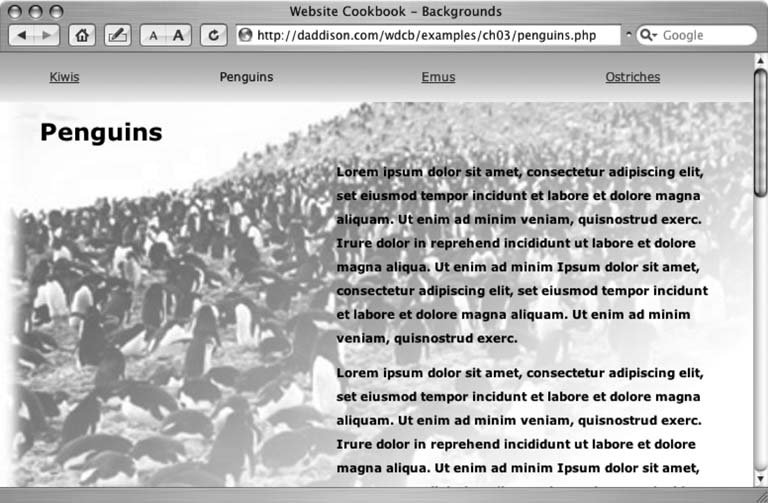
Using the CSS rule background-attachment: fixed the image will not move even as the visitor scrolls down the page, as shown in Figure 3-7.

Fixed position backgrounds do not stay put in Netscape Navigator Version 4 and they never will. They also can behave poorly in older versions of Internet Explorer for Windows, but there is a JavaScript-based fix for IE. Check the link in the "See Also" section in this Recipe for more information.


For the background of the navigation bar ( #topnav ), I created a 1x50 pixel JPEG with a top-to-bottom, teal-to-white gradient. By default, CSS background images will repeat both horizontally and vertically. Because the row of links on my page runs along the top of the page, I used the background-repeat property to replicate the image only across the horizontal, x axis of the page. To repeat the background vertically but not horizontally, use background-repeat: repeat-y .

Figure 3-7. Fixed background images stay put, even as the user scrolls down the page

See Also

Andrew Clover has written a JavaScript that fixes Internet Explorer's non-compliant rendering of fixed position background images. Download it at http://doxdesk.com/software/js/fixed.html.


Recipe 3.7. Creating Breadcrumb Links

Problem

You need to help users navigate your site by putting a chain of links, or breadcrumb, that matches your site structure.

Solution

Use a PHP script to generate the links on-the-fly from the directory names on your web site (see Figure 3-8).

Discussion

Breadcrumb links make a nifty addition to your site's navigation. Although they shouldn't replace a site's primary or secondary navigation, they give visitors an additional tool to use when browsing a deep site.

Figure 3-8. Breadcrumb navigation shows a trail of links that mirrors a site's structure

Using the names of your web site directories, this PHP script creates links to the main pages in every directory above the current page.

<?
	$full_path = substr(getenv("REQUEST_URI"),1);
	$full_path = trim($full_path,"\/");
	$bc = split("\/", $full_path);

First, the script defines the variable $full_path as the names of the directories and the file that are part of the current page's URL (leaving out the http:// and the domain name ) and trims the leading and trailing slashes from the string.

Using the split() function, the script turns the string value of $full_path ( products/industrial/widgets/a111.php ) into a four-value arraythree directory names and a filename.

Next, the script will take a closer look at the filename (or lack thereof) of the URL that has been requested .

if (strstr(

end($bc

), "index")) {
	 $j=2;
	} else {
	 $j=1;
	}

The if condition tests the last value of the directories and filename array, end($bc) . If it contains the text index , then the script assigns the value 2 to the temporary variable $j , which will play a role in the for loop that builds the links.

for ($i=0;$i<(sizeof($bc)-$j);$i++) {

The loop starts at the first element in the array, but the number of array elements it turns into links depends on the value of $j . We never want the script to create a link to the last value of the array.

That value is either the current filename ( a111.php ) or a directory name, meaning the visitor has requested the main page in a directory with a URL that ends with a trailing slash and no filename. When the visitor does request index.php , then a $j value of 2 stops the loop two values short of the end of the array $bc , because we don't want self-referencing links to index.php or the directory that contains it in the bread-crumb.

Now that we know how many of the elements in the path array we need to deal with, the script can begin to construct the links, which will be compiled in the variable $bc_path .

$bc_start = strpos($full_path,$bc[$i]);
	 $bc_length = $bc_start+strlen($bc[$i]);
	 $bc_link = substr($full_path,0,$bc_length);
	 $bc_text = ucfirst($bc[$i]);
	 $bc_path .= " > <a href=".$bc_link."/>".$bc_text."</a>";
	}

For each element in the array $bc[$i] the script calculates its starting ( $bc_start ) and ending ( $bc_length ) character positions in $full_path . For widgets , this would be 21 and 27 . Then the substr( ) function extracts the link $bc_link from the start of $full_path to the end of the current value of $bc[$i] . The ucfirst() function gives the link text $bc_text first-letter capitalization, and then its value is concatenated with the link code in $bc_path and printed on the web page.

echo "<p><a href=\"/\">Home</a> ".$bc_path."</p>";
	?>

See Also

Recipe 2.3