Making Connections
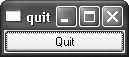
The next example illustrates how to respond to user actions. The application consists of a button that the user can click to quit. The source code is very similar to Hello, except that we are using a QPushButton instead of a QLabel as our main widget, and we are connecting a user action (clicking a button) to a piece of code.
This application's source code is on the CD in the file exampleschap01quitquit.cpp.
Figure 1.3. The Quit application
 1 #include
 2 #include

 3 int main(int argc, char *argv[])
 4 {
 5 QApplication app(argc, argv);
 6 QPushButton *button = new QPushButton("Quit", 0);
 7 QObject::connect(button, SIGNAL(clicked()),
 8 &app, SLOT(quit()));
 9 app.setMainWidget(button);
10 button->show();
11 return app.exec();
12 }
Qt's widgets emit signals to indicate that a user action or a change of state has occurred.[*] For instance, QPushButton emits a clicked() signal when the user clicks the button. A signal can be connected to a function (called a slot in that context), so that when the signal is emitted, the slot is automatically executed. In our example, we connect the button's clicked() signal to the QApplication object's quit() slot. The SIGNAL() and SLOT() macros are part of the syntax; they are explained in more detail in the next chapter.
[*] Qt signals are unrelated to Unix signals. In this book, we are only concerned with Qt signals.
We will now build the application. We assume that you have created a directory called quit containing quit.cpp. Run qmake in the quit directory to generate the project file, then run it again to generate a makefile:
qmake -project
qmake quit.pro
Now build the application, and run it. If you click Quit, or press Space (which presses the button), the application will terminate.
The next example demonstrates how to use signals and slots to synchronize two widgets. The application asks for the user's age, which the user can enter by manipulating either a spin box or a slider.
Figure 1.4. The Age application
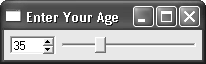
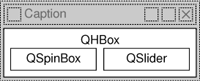
The application consists of three widgets: a QSpinBox, a QSlider, and a QHBox (horizontal layout box). The QHBox is the application's main widget. The QSpinBox and the QSlider are rendered inside the QHBox; they are children of the QHBox.
Figure 1.5. The Age application's widgets
 1 #include
 2 #include
 3 #include
 4 #include

 5 int main(int argc, char *argv[])
 6 {
 7 QApplication app(argc, argv);

 8 QHBox *hbox = new QHBox(0);
 9 hbox->setCaption("Enter Your Age");
10 hbox->setMargin(6);
11 hbox->setSpacing(6);

12 QSpinBox *spinBox = new QSpinBox(hbox);
13 QSlider *slider = new QSlider(Qt::Horizontal, hbox);
14 spinBox->setRange(0, 130);
15 slider->setRange(0, 130);

16 QObject::connect(spinBox, SIGNAL(valueChanged(int)),
17 slider, SLOT(setValue(int)));
18 QObject::connect(slider, SIGNAL(valueChanged(int)),
19 spinBox, SLOT(setValue(int)));
20 spinBox->setValue(35);

21 app.setMainWidget(hbox);
22 hbox->show();

23 return app.exec();
24 }
Lines 8 to 11 set up the QHBox.[*] We call setCaption() to set the text displayed in the window's title bar. Then we put some space (6 pixels) around and in between the child widgets.
[*] If you get a compiler error on the QHBox constructor, it means that you are using an older version of Qt. Make sure that you are using Qt 3.2.0 or a later Qt 3 release.
Lines 12 and 13 create a QSpinBox and a QSlider with the QHBox as the parent.
Even though we didn't set the position or size of any widget explicitly, the QSpinBox and QSlider appear nicely laid out side by side inside the QHBox. This is because QHBox automatically assigns reasonable positions and sizes to its children based on their needs. Qt provides many classes like QHBox to free us from the chore of hard-coding screen positions in our applications.
Lines 14 and 15 set the valid range for the spin box and the slider. (We can safely assume that the user is at most 130 years old.) The two connect() calls shown in lines 16 to 19 ensure that the spin box and the slider are synchronized so that they always show the same value. Whenever the value of one widget changes, its valueChanged(int) signal is emitted, and the setValue(int) slot of the other widget is called with the new value.
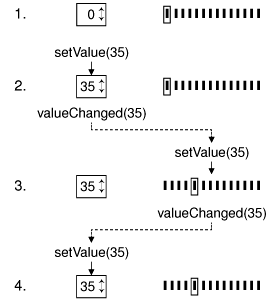
Line 20 sets the spin box value to 35. When this happens, the QSpinBox emits the valueChanged(int) signal with an int argument of 35. This argument is passed to the QSlider's setValue(int) slot, which sets the slider value to 35. The slider then emits the valueChanged(int) signal, because its own value changed, triggering the spin box's setValue(int) slot. But at this point, setValue(int) doesn't emit any signal, since the spin box value is already 35. This prevents infinite recursion. Figure 1.6 summarizes the situation.
Figure 1.6. Changing one value changes both
Line 22 shows the QHBox and its two child widgets.
Qt's approach to building user interfaces is simple to understand and very flexible. The most common pattern that Qt programmers use is to instantiate the required widgets and then set their properties as necessary. Programmers add the widgets to layouts, which automatically take care of sizing and positioning. User interface behavior is managed by connecting widgets together using Qt's signals and slots mechanism.
Part I: Basic Qt
Getting Started
- Getting Started
- Hello Qt
- Making Connections
- Using the Reference Documentation
Creating Dialogs
- Creating Dialogs
- Subclassing QDialog
- Signals and Slots in Depth
- Rapid Dialog Design
- Shape-Changing Dialogs
- Dynamic Dialogs
- Built-in Widget and Dialog Classes
Creating Main Windows
- Creating Main Windows
- Subclassing QMainWindow
- Creating Menus and Toolbars
- Implementing the File Menu
- Setting Up the Status Bar
- Using Dialogs
- Storing Settings
- Multiple Documents
- Splash Screens
Implementing Application Functionality
- Implementing Application Functionality
- The Central Widget
- Subclassing QTable
- Loading and Saving
- Implementing the Edit Menu
- Implementing the Other Menus
- Subclassing QTableItem
Creating Custom Widgets
- Creating Custom Widgets
- Customizing Qt Widgets
- Subclassing QWidget
- Integrating Custom Widgets with Qt Designer
- Double Buffering
Part II: Intermediate Qt
Layout Management
- Layout Management
- Basic Layouts
- Splitters
- Widget Stacks
- Scroll Views
- Dock Windows
- Multiple Document Interface
Event Processing
- Event Processing
- Reimplementing Event Handlers
- Installing Event Filters
- Staying Responsive During Intensive Processing
2D and 3D Graphics
Drag and Drop
Input/Output
- Input/Output
- Reading and Writing Binary Data
- Reading and Writing Text
- Handling Files and Directories
- Inter-Process Communication
Container Classes
Databases
Networking
XML
Internationalization
- Internationalization
- Working with Unicode
- Making Applications Translation-Aware
- Dynamic Language Switching
- Translating Applications
Providing Online Help
- Providing Online Help
- Tooltips, Status Tips, and Whats This? Help
- Using QTextBrowser as a Simple Help Engine
- Using Qt Assistant for Powerful Online Help
Multithreading
- Multithreading
- Working with Threads
- Communicating with the GUI Thread
- Using Qts Classes in Non-GUI Threads
Platform-Specific Features

EAN: 2147483647
Pages: 140
- Using SQL Data Definition Language (DDL) to Create Data Tables and Other Database Objects
- Using SQL Data Manipulation Language (DML) to Insert and Manipulate Data Within SQL Tables
- Understanding SQL Transactions and Transaction Logs
- Using Keys and Constraints to Maintain Database Integrity
- Working with Data BLOBs and Text
