Flylib.com

Books Software


Using Association Classes


Using Association Classes

When you model the real world you find attributes that do not seem to fit in any one class. For instance, in our rental example you have two classes, Client and CrashDummy . Further, you know that clients rent crash dummies.

Now you want to model the attribute dayOfRental. The value of that attribute is the day a particular client rents a particular dummy . Where does the attribute belong?

Well, for openers, the dayOfRental attribute does not belong in Client; the client may rent dummies on different days. You could create attributes for client called dayOfRental1 , dayOfRental2 , and dayOfRental3 . But if you create multiple attributes, how do you know which crash dummy was rented on dayOfRental1 ? On the other hand, dayOfRental doesn’t belong in CrashDummy either; any given dummy can be rented on many different days, to different clients. The solution to this dilemma: Recognize that dayOfRental is an attribute of the rents association and not an attribute of a class .

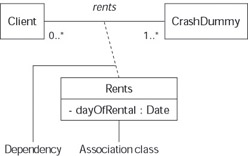
If you find an attribute whose value depends on more than one class instance, you need a third class that holds that attribute. For example, the dayOfRental attribute depends on the specific instance of Client and the specific instance of CrashDummy that were linked in the rents association on that day. You would designate the needed third class—an association class—by using a dashed line to connect the new class to the association.

Figure 4-13 shows the UML notation for showing such special attributes. The figure shows your two classes— Client and CrashDummy —in the rents relationship. It then shows another class ( Rents ) that contains the special attribute dayOfRental .

click to expand
Figure 4-13: The Rents association class.

In UML, a dashed line means dependency; Figure 4-13 shows dependency between the Rents class and the association named rents .

Remember The name of the association class must be the same name as that of the association—because they are really two different aspects of the same association. Association classes are, however, classes in their own right—so they can have operations as well as attributes. You can even associate your association classes to other classes—but this can get complex in a hurry. Our recommendation is to keep your modeling simple and easy to read.


Qualifying Relationships

People often partition the objects of a class into groups based on the value of an attribute in that class when they describe the real world. This grouping of objects may be an important aspect of an association between two classes. In our rental example, we group crash dummies by their size—and it turns out that size is an important attribute of a crash dummy . When clients place orders for crash dummies, they always specify the size of the dummies they want. When placing orders, the client “qualifies” the order with a value for dummy size. They ask for two 72-inch dummies and three 52-inch dummies. It helps the order processing to group the orders according to the sizes requested . Thus the orders association between client and crash dummy is known as a qualified association.

Modeling this situation requires the use of something the UML gurus call a qualifier , a notation that qualifies—that is, partitions into groups—navigation from an instance of one class to the instances of another. Figure 4-14 shows a qualified association where the qualifier occupies a small box between a class and an association. The qualifier goes at the opposite end of the association from the class of which it’s an attribute.

Say what? In Figure 4-13, size is an attribute of CrashDummy . When a Client instance orders zero or more instances of CrashDummy , they must specify the size they want. (The qualifier size goes at the opposite end of the orders association, away from the CrashDummy class.) So Figure 4-14 means that if we take an instance of Client and a value for the size qualifier, then we have zero or more orders links to instances of the class CrashDummy . So, given a specific client, the particular crash dummies rented are of a certain size.

Remember A qualifier is an attribute in the instances at the far end of the qualified association. Any attribute can have a datatype. In Figure 4-14, for example, the size qualifier has the inches datatype.

click to expand
Figure 4-14: Qualifying an association.

Reducing multiplicity—with qualifiers

{% if main.adsdop %}{% include 'adsenceinline.tpl' %}{% endif %}

Often you find qualifiers reduce the multiplicity of an association. The rents association between the Client class and the CrashDummy class (for example) is a many-to-many association. If we recast the association as a qualified association (as in Figure 4-15), the multiplicity is reduced. Figure 4-15 has the following meaning: “Given an instance of Client and the value for a CrashDummy serialNum, the Client rents zero or one instance of CrashDummy.” (This is true because each crash dummy has a unique serial number.) Using qualifiers to reduce multiplicity is like tossing a lot of similar things into a bin, where the bin name describes the contents. If bin name is a unique attribute (like serial number), you get one thing per bin. If the bin name is descriptive attribute (such as size), you can get lots of things per bin—but less than the whole drawer .

click to expand
Figure 4-15: Qualifiers can reduce multiplicity.

Indexing with qualifiers

During design, you may want to tell the programmer to use an index when invoking the methods of an object at runtime. An index is a way of quickly looking something up; it works like a card catalog at the public library: You look up a book by its title, author name, or keyword. The card catalog provides an index for looking up books quickly rather than searching each shelf for the book. We’ve often found that qualifiers are a good way to show indexing in UML.

As a designer, you’re often concerned with performance—and if you need to execute a fast lookup to find a particular crash dummy by its serial number, then the diagram in Figure 4-15 does the trick. To show the programmer you want a fast way of looking up crash dummies by serial number, use the qualifier notation in your class diagram.