6.6 WebSphere Application Server
|
| < Day Day Up > |
|
6.6 WebSphere Application Server
WebSphere for z/OS is structured as a multiple address spaces application: it has a control region where the authorized code can run and multiple server regions where the application code runs. These server regions are dynamically started based on the amount of work by WLM services. All of these regions use a log stream to accumulate error messages. Each region can have its own log stream or can share the log stream with other servers.
6.6.1 Functional description
The WebSphere for z/OS error log is a log stream that contains error messages from the Application Server. These messages are typically more detailed than you would see on the system console or in the job output of the server's address space. For example, you might see a message in the joblog of an application server saying that naming registration has failed, while the error log is more likely to have a message indicating why it failed.
Criticality/persistence of data
WebSphere Application Server is using this error log stream to accumulate error messages. It is a funnel-type log stream, where WebSphere Application Server just writes and never reads the log back; therefore never deletes archive log records. For this reason, you should use a combination of AUTODELETE and RETPD to manage this log stream.
Depending on the WebSphere for z/OS configuration, you can either use Coupling Facility or Dasd-only for this log stream. Dasd-only log stream can only be either dedicated to a single instance of WebSphere for z/OS or shared across multiple instances of WebSphere for z/OS running on the same z/OS image. Coupling facility based log stream is needed if you want a single merged log stream.
Log stream sizing
The WebSphere for z/OS log stream is a funnel-type log stream and the size mainly depends on the amount of error messages the WebSphere Application Server generates. Initially, you can start with a log stream of about 8MB in a Coupling Facility or a 2000 block if you are using DASD-only log stream and use SMF88 to verify how accurate this configuration is for your installation.
In case you have a spike in the messages rate you are writing on the log stream, your application should not suffer any trouble since your data will be offloaded into the offload data sets.
6.6.2 Definition
Subsystem definition
WebSphere for z/OS manages its environment data through the Administration application and writes the environmental data into the system management database. To add or change environment variable data, you must enter environment data pairs (an environment variable name and its value) on the sysplex, server, or server instance properties form. When you activate a conversation, the environment variable data is written to HFS files. WebSphere for z/OS determines which values are the most specific for an environment file. For instance, a setting for a server instance takes precedence over the setting for the same variable for its server, and a setting for a server takes precedence over the setting for the same variable for its sysplex. If you modify an environment file directly and not through the Administration application, any changes are overwritten when you activate a conversation or prepare for a cold start.
When you activate a conversation, WebSphere for z/OS writes the environment data to an HFS file for each server instance. The path and name for each environment file is:
cb-pathname/controlinfo/envfile/SYSPLEX/SRVNAME/current.env
One of the variables in the current.env file defines the log stream that this WebSphere for z/OS instance will use. The name of the error log is specified using the environment variable:
LOGSTREAMNAME=<LOG_STREAM_NAME>
-
The log stream can be defined at Sysplex level and so all servers in the sysplex will share the log stream and write their messages unless otherwise specified.
-
Or it can be defined at Server level and so forth all the server instances under this server share and write to this log stream. This overrides the sysplex value for this particular server.
-
Or it can be specified at Server Instance for the single instance running on a specific system to write to this particular log stream.
Logger definition
The definition for the WebSphere for z/OS log stream can be obtain through the customization dialog. During the installation task, one of the job that are created by the installation clist is to define the log stream.
The user initiates the installation task by calling the clist via 'ex hlq.sbboclib(bbowstrt) options'
As a result, the user is presented with a menu to define resources. One of the tasks on the main menu is to input the variable. If you select the task 'Define Variable' (option 2), you are presented with 6 choices where you can enter all the variables to be used later in the customization jobs.
If you select the "WebSphere Customization" section (Option 2) the user is requested to input the variable that will be used to define the log stream. Figure 6-3 is a sample of the ISPF dialog that will be presented to the user.
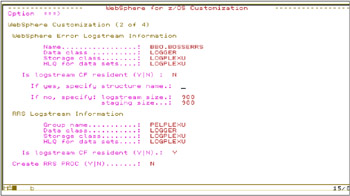
Figure 6-3: Sample ISPF dialog to input variables to define log stream
Where:
-
Name: Name of your WebSphere for z/OS error log stream that will be created.
-
Data class: An existing DFSMS data class for the log stream data set allocation.
-
Storage class: An existing DFSMS storage class for allocation of the DASD staging data set for this log stream.
-
HLQ for data sets: The high-level qualifier for your log stream data set name and staging data set name that will be created.
-
Is logstream CF resident (Y|N): If you want the log stream to be created on a coupling facility, specify "Y". If on DASD, specify "N".
-
If yes, specify structure name: If using the coupling facility, specify the coupling facility structure to be used for the log stream. Only valid if you specified Y on the previous entry.
-
If no, specify: logstream size: Specifies the size, in 4K blocks, of the log stream DASD data sets for the log stream being defined.
-
If no, specify: staging size: Specifies the size, in 4K blocks, of the DASD staging data set for the log stream being defined.
For detailed information on setting up the error log stream (including how to define the data sets, and give proper authority to server identities so they can write to it), see WebSphere Application Server for z/OS V4.0.1: Installation and Customization, GA22–7834.
After you have completed to input your variables customization job are generated in your hlq.data_set.CNTL. The member BBOERRLG contains the definition for the log stream.
If you chose to use a Coupling Facility log stream, remember that you need to define the structure to the CFRM policy first.
Definition in the CFRM Policy for the WebSphere for z/OS log stream
This task is only required if you are planning to use Coupling Facility log stream. Before running any LOGR policy, you have to make sure that the correspondent Coupling Facility structure has already been defined in the CFRM policy and that the CFRM policy has been activated in the sysplex through the SETXCF command.
Here is a set of initial samples to define the Coupling Facility structures for the WebSphere for z/OS log stream. You can use the following value as initial size and then use both RMF Coupling Facility report and the SMF88 output to validate your log stream configuration.
Example 6-43: Sample of CFRM definitions for the WebSphere log stream structure
 |
//WASLOG JOB CLASS=A,MSGCLASS=A //POLICY EXEC PGM=IXCMIAPU //SYSPRINT DD SYSOUT=A //SYSIN DD * DATA TYPE(CFRM) STRUCTURE NAME(WAS) SIZE(8192) PREFLIST(FACIL01,FACIL02)
|
Coupling Facility log streams definitions
The following sample shows the content of the BBOERRLG member for a Coupling Facility log stream. To define a log stream, a combination of a structure and log stream definition are needed. The parameters and values that can affect performance and functionality are marked and discussed in the following section.
Example: 0-1 BBOERRLG sample
|
//BBOERRLG JOB CLASS=A,MSGCLASS=A //POLICY EXEC PGM=IXCMIAPU //SYSPRINT DD SYSOUT=A //SYSIN DD * DATA TYPE(LOGR) DEFINE STRUCTURE NAME(WAS) LOGSNUM(1) MAXBUFSIZE(4096) DFINE LOGSTREAM NAME(BBO.BOSSERRS) STRUCTNAME(WAS) HLQ(LOGPLEX) AUTODELETE(YES) RETPD(1) LS_DATACLAS(LOGGER) LS_STORCLAS(LOGPLEX)
|
MAXBUFSIZE: MAXBUFSIZE in conjunction with AVGBUFSIZE is used to determine the CF structure ENTRY/ELEMENT ratio. In this case, since AVGBUFSIZE is not specified, it will be half the amount of MAXBUFSIZE value. When data is written to the CF, it's written in increments equal to ELEMENT size. A MAXBUFSIZE greater than 65276 gives an element size of 512; a MAXBUFSIZE equal to or less than 65276 results in an element size of 256.
Starting with OS/390 R1.3, System Logger dynamically adjusts the Entry/Element ratio avoiding potential problem, specially if you are not planning to share the same structure between multiple log stream with in theory different characteristics.
AUTODELETE and RETPD: WebSphere for z/OS never uses the information written on the error log: they are only for debugging scope. For this reason, to avoid a never ending accumulation of data, you must use retention period and autodelete support to delete old entries - specify these value big enough to manage this log stream on a reasonable size and to provide enough coverage in case you need to perform any debugging.
HIGHOFFLOAD: The HIGHOFFLOAD parameter is used to determine when the space dedicated to the log stream in the interim device is filling up and an offload need to be initiated to re-gain available space. HIGHOFFLOAD should be set at 80% for the error log stream at least initially and then use the SMF88 report to evaluate if this value need same tuning.
LOWOFFLOAD: The LOWOFFLOAD value defines the amount of data which may be retained in the log stream interim storage following an offload process. Since WebSphere for z/OS never reuses the data written in the lo stream, there is no point to keep any data in the log stream. For this reason, the LOWOFFLOAD value should be 0 to force all the data out of the interim device toward the offload data set.
LS_SIZE: LS_SIZE defines the allocation size for the offload data sets. It should be specified large enough to contain several offloads, possibly a day's worth.
| Caution | There is no LS_SIZE value generated in the job as result of the customization dialog. Be sure that there is an allocation size for this data set specified in the associated SMS Dataclas. If LS_SIZE is not specified in the log stream definition, and an extent size is not specified in the data class pointed to by LS_DATACLAS, the value is taken from the ALLOCxx Parmlib member or set via an ACS (Automatic Class Selection) routine. The default value in ALLOCxx is 2 tracks. Refer to the z/OS MVS Initialization and Tuning Reference, SA22-7592. It is very important to remember log stream staging and offload (log) data sets are single extent VSAM linear data sets, and the shareoptions MUST be specified as '3,3'. |
DASD-only log streams definitions
The following sample shows the definition for the WebSphere for z/OS error log stream when defined as DASD-only log stream. The parameters and values that can affect performance and functionality are marked and discussed in the following section.
Example 6-44: BBOERRLG DASD-only log stream sample
|
//BBOERRLG JOB ,,MSGLEVEL=1,MSGCLASS=R,CLASS=A,REGION=0M, //BBORCLGS EXEC PGM=IXCMIAPU //SYSPRINT DD SYSOUT=* //SYSIN DD * DATA TYPE(LOGR) DEFINE LOGSTREAM NAME(BBO.BOSSERRS) DASDONLY(YES) HLQ(LOGPLEX) LS_SIZE(2000) STG_SIZE(2000) MAXBUFSIZE(4096) AUTODELETE(YES) RETPD(1) LS_DATACLAS(LOGGER) LS_STORCLAS(LOGPLEX)
|
MAXBUFSIZE: MAXBUFSIZE may be specified for a DASDONLY log stream, it defines the largest block that can be written to the log stream.
STG_DUPLEX: STG_DUPLEX(YES) with DUPLEXMODE(UNCOND) are implicitly default for DASDONLY log streams.
Security definitions
The WebSphere for z/OS log stream can be protected in the Security Access Facility (SAF) LOGSTRM class. Each WebSphere for z/OS Application Server userid must be permitted UPDATE access to the log stream.
Example 6-45: Sample log stream security definition
|
RDEFINE LOGSTRM BBO.BOSSERRS UACC(READ) PERMIT BBO.BOSSERRS CLASS(LOGSTRM) ID(CBASR2) ACCESS(UPDATE) SETROPTS CLASSACT(LOGSTRM)
|
The log stream name defined to RACF is the name specified on the NAME parameter of the DEFINE LOGSTREAM statement in the LOGR policy.
6.6.3 Operational consideration
There is no external control to dynamically enable or disable the log and also to filter the content of tracing.
The data stored is not in a readable format so WebSphere for z/OS provides a REXX EXEC (BBORBLOG) that allows you to browse the data contained in the error log stream. By default, BBORBLOG formats the error records to fit a 3270 display.
You can view the error log stream output using the BBORBLOG browser. To invoke the browser, go to ISPF option 6 and enter:
ex 'BBO.SBBOEXEC(BBORBLOG)' 'BBO.BOSSXXXX format option'
Where:
-
log stream name is the name of the log stream.
-
format option is the LRECL length of the log stream records.
-
80 This is the default. The log stream record will be formatted on a LRECL length of 80 characters. Additional lines will be wrapped.
-
NOFORMAT This turns off formatting. The error log message appears as one log message string in the browse file.
-
In this example, BBORBLOG resides in BBO.SBBOEXEC and BBO.BOSSXXXX is the LOG_STREAM_NAME that was configured in the SMUI. The browser creates a data set named 'USERID.LOG_STREAM_NAME' which will contain the formatted contents of the log stream. When the browser is executed, it does the following:
-
Allocates a data set called USERID.LOG_STREAM_NAME, which overwrites any duplicate data sets.
-
Populates the data set with the contents of the log stream.
-
Puts the user in browse mode on the data set.
6.6.4 Recovery
There are no particular considerations from a recovery point of view for this log stream since there are no critical data in it.
During server initialization, WebSphere for z/OS makes an attempt to connect to the appropriate log stream. If this connection is successful, you will see the following message, which indicates the name of the log stream being used:
BOU0025I ERRORS WILL BE WRITTEN TO <logstream name> LOG STREAM FOR JOB <server name>
If, however, the server cannot connect to the log stream, the message is instead written to CERR, which puts it in the SYSOUT of the job output and WebSphere for z/OS continues to operate. This would be indicated by the message:
BBOU0025I ERRORS WILL BE WRITTEN TO CERR FOR JOB <server name>
6.6.5 Performance
Usually there are not many considerations from a performance perspective toward the WebSphere for z/OS log stream. Measurement has been taken in both configurations, with WebSphere for z/OS running with a log stream in a coupling facility and on a DASD-only log stream, and no big difference has been noticed if recent technologies has been used for DASD placement. After your initial log stream allocation, performance data is produced in a number of forms that can be useful to determine if any adjustments is necessary to your installation:
-
SMF 88 data produced by the MVS System Logger
-
SMF 70–78 data produced by various MVS components
There are several tools which aide in the analysis of log stream performance problems.
-
IXGRPT1 formats and reports the SMF 88 data produced by the MVS System Logger
-
ERBRMFPP reports on the data captured in the SMF 70 -78 records
There are some fields in the SMF88 that you might want to check against this log stream: DASD SHIFT, STRUCTURE FULL, ENTRY FULL. Refer to "SMF Type 88 records and IXGRPT1 program" on page 281 for a description of these fields and what to do in case one of these conditions happens in your installation.
|
| < Day Day Up > |
|
