Using .NET Code to Interact with COM
|
| .NET to COM, refers to the use of a managed .NET class to interact with an unmanaged COM component. The next section will show you how COM Interop works, what it looks like under the hood, and how to write code that makes use of COM objects from inside managed code. Introduction to COM InteropThe Component Object Model (COM) gives developers the ability to expose functionality to other applications, components, and host applications through a binary standard to which all COM components must comply. The .NET Framework provides several enhancements to the features and functionality made available through the COM standard. Until the day when the last COM component is replaced with a .NET component, you need to learn how to write .NET code that makes use of these COM components. The main unit of deployment in the .NET Framework is the assembly. An assembly can be comprised of one or more files, and is described by metadata. Metadata allows any .NET assembly to determine enough information about other assemblies to communicate and instantiate other classes. COM objects aren't described by metadata in the way that you might think of .NET metadata. Instead, COM objects are described by binary data stored in a type library. You can think of a type library as the COM equivalent of an assembly manifest. The Runtime Callable WrapperFor a managed .NET component to communicate with a COM object, the Common Language Runtime's process boundary must be crossed. Every time you cross a process boundary from managed code, you need to perform marshalling to translate the information. If developers had to implement all of that marshalling themselves every time they wanted to use a COM object, none of them would ever use a COM object. Using information obtained from a type library, the .NET Framework constructs a special proxy called the runtime callable wrapper (RCW). This proxy looks like a standard managed object to anyone using it, but it has a special capability to send information across process boundaries to COM objects and to receive information back from those COM objects. For each COM object, one and only one proxy is generated. That might not seem significant now, but it makes quite a bit of difference to multithreaded programs. If you have multiple threads accessing what might ordinarily be a multithreaded COM object through an RCW, all threads will be stacked up and waiting in line at the RCW itself. Take a look at Figure 13.1, which illustrates the interaction between managed components and the runtime callable wrapper. There is always one RCW per COM object, even though you can have more than one .NET object instance per COM object (and therefore more than one instance per RCW). Figure 13.1. Interaction of managed and unmanaged COM code via the RCW.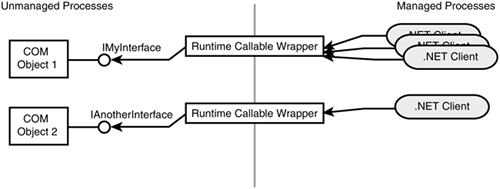 In addition to providing the basic communication between managed components and COM components, the RCW provides marshalling between data types supported by the Common Language Runtime and data types supported by COM. The COM standard defines a strict set of data types to which all method arguments and return values must conform. .NET to COM MarshallingAs mentioned earlier, the RCW takes care of translating information between managed components and COM components for method arguments and return values. It has several other features that allow it to make accessing a COM object from .NET appear to be as seamless and integrated as accessing a managed component from .NET. Table 13.1 gives you a listing of each COM type and its corresponding .NET Framework type. Although a lot of this is automated for you, it is always extremely handy to know how the stock RCW will translate your data. If you don't like how the data is being marshaled, you can actually write your own custom marshal code, but that topic is beyond the scope of this book.
Although this table of marshalling values was introduced in the .NET to COM section, it applies equally to data traveling in the other direction: COM to .NET. The next section will show you how to put this knowledge to use in an example of COM Interop code. Code Interoperability Example: .NET Code Invoking COM CodeAt this point, you're probably itching to get your hands dirty and start writing some Interop code. To create an Interop scenario in which you are making use of a COM object from the .NET Framework, you need the following things:
The first thing you need to do is figure out what COM component you're going to make use of. If you've been contemplating COM Interop as a solution to your problems, you probably already have a good idea of which object you want to make use of. When giving an example of Interop using an existing COM object, it often becomes more of a struggle of finding the right way to consume the vendor's API and less of an instructional exercise. This time you'll write some VB6 code to act as a mock-up of some fully functional COM object. Open VB6. Struggle through the IDE enough to create an ActiveX DLL. This is going to create the first of the three things you need: a type library. Listing 13.1 shows the code for the COMHello ActiveX DLL with a class called HelloWorld.cls. Listing 13.1. The HelloWorld Class (Part of the COMHello ActiveX DLL)Public Function GetMyData() As String Dim phonyData As String phonyData = "<tempDataSet>" & _ "<customers customerid=""ALFKI""" & _ " companyname=""Alfreds Futterkiste"" " & _ "contactname=""Maria Anders""/></tempDataSet>" GetMyData = phonyData End Function As you can see, this is a pretty basic method that simulates some data retrieval. Rather than forcing you to look at old ADODB code to retrieve some data, I faked the retrieval of a few columns of the Northwind customer table in an XML representation of a DataSet. When you do a Make on this ActiveX DLL from within Visual Basic, the IDE will automatically register this as a COM component. The first thing you need is the type library. You can get it by one of two methods: using a utility called TlbImp.exe or using Visual Studio .NET. Because there's a lot of material to cover, this chapter discusses only the use of the Visual Studio .NET method. Now you can get back to modern technology and open Visual Studio .NET 2003. Create a new console application; you can call it anything you like. Right-click the References node and choose Add Reference. When the references dialog appears, click the COM tab and scroll down until you find COMHello. Double-click it and click OK to add the reference. Behind the scenes, Visual Studio .NET is using the same code that TlbImp.exe uses in order to extract the type library from the COM DLL. After it has the type library, Visual Studio .NET creates a managed proxy class that enables you to access the COMHello ActiveX DLL as if it were managed Listing 13.2. The Console Application Code That Utilizes a VB6 COM Object using System; using System.IO; using System.Data; namespace DotNet2COM { /// <summary> /// Summary description for Class1. /// </summary> class Class1 { /// <summary> /// The main entry point for the application. /// </summary> [STAThread] static void Main(string[] args) { The beauty of COM Interop is that, at first glance, nothing in this code gives you any impression that you are making COM Interop calls; you are insulated from all of that. The line COMHello.HelloWorldClass helloWorld = new COMHello.HelloWorldClass(); might look a little awkward because of the naming convention, but it certainly doesn't indicate that it is a COM Interop call. The rest of the code deals with loading the XML returned by the method call into a DataSet and displaying it. Figure 13.2 shows the output of the preceding code. Figure 13.2. Output of the console application invoking a VB6 COM object.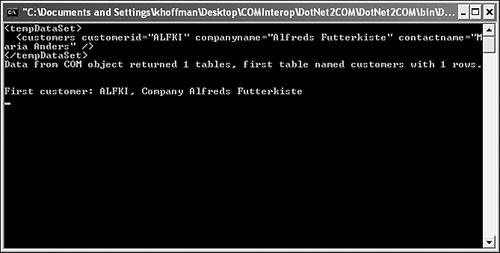 Although this sample was overly simplistic, it should give you an idea of how to quickly invoke a COM object from .NET. The .NET Framework type library import process takes all the hard work out of creating a COM object wrapper and gives you an easy-to-use managed interface. This shouldn't fool you, however. There is a lot of code under the hood that makes it all possible. You can even write all the code that wraps the COM object yourself if you are into doing things the long way. |
 . The code in Listing 13.2 shows the code for the console application that invokes the COMHello.HelloWorld COM object.
|
