Resin Support for JSP
|
An Overview of JSP Technology
Before getting into the details of JSP and Resin, let's spend some time going over the technology behind JSP. As we mentioned earlier, using JSP allows you to add dynamic content to a Web page, which keeps the page from becoming old and stale. But you have to pay a price: You must add scripting code to pull the dynamic content from various files or a database.
Users will access the new JSP page using their browser just as they did when trying to access a static HTML page. Most of the differences between these two scenarios is the process occurring at the server. Figure 3.1 shows how the server handles the JSP page request.
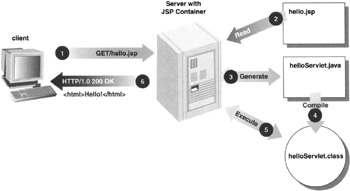
Figure 3.1: Handling a JSP page request.
The process starts with the user making an HTTP GET request for a JSP file located on our Web site, as shown by step 1. The request is processed by a server running Web server software. The Web server application processes the HTTP GET request and pulls the file indicated in the command, as shown in steps 2 and 3. In our case, the JSP file will have to be passed to another piece of software that can handle that file—traditional Web server software is designed to handle only HTTP requests.
The other piece of software in this process is the application server—in our case, Resin. We use Resin for both the Web and JSP part of the processing performed by the server machine. The Resin server examines the requested JSP file and performs one of two different processes. If the requested JSP file hasn't been requested since the application server began executing, the requested JSP file is transformed into a Java servlet file, compiled by the Java compiler on the server, and stored as a CLASS file. This is illustrated by steps 4 and 5, and represents the first process the application server can execute. The second process is the actual execution of the requested JSP file's servlet class, as shown by step 6. This step is executed regardless of whether the JSP file had to be converted and compiled. Finally, the Web server returns the appropriate HTML to the client as a code request found within the JSP's compiled servlet.
As you might expect, the first time a JSP file is requested by a user, the response time is slightly long as opposed to subsequent fetches. On the subsequent fetches, the application server doesn't have to compile the JSP page and simply executes the corresponding servlet class.
|

EAN: 2147483647
Pages: 180