Comprehensive Project Plan
ComprehensiveProject Plan
THE COMPTIA IT PROJECT+ EXAM TOPICS COVERED IN THIS CHAPTER INCLUDE
- 2.2 Given an approved project charter, high-level scope documents, and schedule/budget objectives demonstrate the ability to create a project management plan that illustrates key knowledge and understanding.
- 2.26 Identify the components /documents of an adequate project plan and explain the function of each.
- 2.27 Identify the steps involved in organizing a comprehensive project plan and using it to close out the planning phase of a project.
- 2.28 Demonstrate knowledge of how to set performance baselines.
- 2.29 Demonstrate knowledge of the need to create change management procedures for the project plan.
- 2.30 Be able to identify project performance indicators that will be used to monitor and control performance during execution.
- 2.32 Recognize the need to conduct a review meeting as the project transitions from the planning phase to the execution/control/coordination phase. The review would include an assessment of all planning documents.
Finally, we have reached the last chapter dealing with project planning. Critical data is generated from all of the planning processes we discussed in the first six chapters, and you must be wondering-what do you do with this information and how to track it. This is where an overall planning document comes into play.
At this point in the project, you are almost ready to start the project execution phase, and all of the planning output needs to be organized in a way that creates a handbook you can use to lead the completion of the project work.
The planning data is integrated into one comprehensive planning document that contains output from all of the applicable planning processes we have covered so far: Initiation, Scope, Time, Cost, Human Resources, Quality, Communications, Risk, and Procurement.
A typical project plan contains several categories of components such as administrative, planning, templates and checklists, references, and an appendix, all of which we ll discuss in more detail in this chapter.
The development of a project plan is more than just taking all of your planning documents and putting them in a binder. The development of a meaningful project plan requires time and input from your sponsor, project team members , and other stakeholders. A detailed outline or table of contents (TOC) and organization of your planning documents around this outline or TOC are key elements to writing a plan.
Finally, the review, formal approval, and distribution of the project plan signifies the transition of the project from the planning phase into the execution phase.
What Is a Project Plan?
As you have learned from previous chapters, the project planning process commences with initiation and includes processes from the entire Guide to the PMBOK knowledge areas. A comprehensive project plan is a document that integrates all planning data into one document that the project manager can be use as a guidebook for moving the project into the execution phase and overseeing the project. The project plan uses the output from the planning processes to create a consistent end-to-end document covering all project phases. The project plan is maintained and updated throughout the life of the project.
Creating a comprehensive project plan is a very important component of project planning that is often overlooked. It may not seem important that all of your planning data is organized into one central document, but without it you will find yourself constantly fielding questions regarding the project requiring you to search for the file on the project charter, the scope statement, the WBS, or some other planning document.
Further, a lot of important data is created during the planning process. If this data is not clearly organized and distributed to the right people, it will be of little value.
The purpose of a project plan extends beyond just a collection of project data, and there are also benefits from a high-quality plan you will realize during project execution and control.
Purpose The final step in the project planning phase produces a formal, approved document that is used to guide project execution and control. It provides the basis for performing and managing all project- related activities.
The project plan is the document you will use during project execution and control as the foundation to track the performance of your project and take any needed corrective action. It is used to communicate key information to the project stakeholders.
Benefits The project plan is a single source of information regarding all key elements of the projectavailable to everyone associated with the project.
The plan is a reference source that can clarify questions such as what is or is not included in the scope of the project, who the key stakeholders are, and what the major deliverables are, along with many others.
The project plan is a guidebook that can be used during project execution to focus team members , thus keeping the project on course.
To better understand what the comprehensive project plan is all about, lets take a look at the components you will find in a typical project plan.
Project Plan Components
The comprehensive project plan should bring together information obtained from all the various planning processes you ve undertaken in an organized, cohesive fashion. You can organize data in a number of ways to produce an integrated project plan. Many organizations use a standard template for project plans. Although the format and structure may vary, the key components of a project plan, as we mentioned in the chapter introduction, usually include (but are not limited to) the following:
- Administrative information regarding the organization and revision of the document
- Outputs of your planning processes
- Any applicable templates or checklists that will be used to manage the project
- Any reference material
- An appendix
No standard sequence drives the order of the project plan components. Both the components themselves and the component sequence vary between organizations, and an abbreviated version may be used for small projects.
If your organization has a program management office (PMO), there is probably a standard project plan template. If you do not have a template, you can use examples of project plans from previous projects to develop your particular plan. (You could try visiting well-known websites such as www.gantthead.com or www.techrepublic.com for project planning examples or simply do a Google search for project plan template ). Communicating your project plan is much easier if you are using a format people are familiar with.
It is a good idea to review carefully the contents of any planning template you are expected to complete to determine whether your planning activities to date have produced all of the data required in the document. You may find your team has additional work to do to provide all of the information required in the template.
Let s take a closer look at the components of a typical project plan.
Administrative Components
A comprehensive project plan can be a very lengthy document. To facilitate ease of use and ensure that updates are properly tracked, a project plan may include the following administrative components:
Document Information This section contains information regarding the update and maintenance of the plan. A document history lists the version numbers and revision dates, and contact information to obtain copies of the document.
Table of Contents The table of contents displays how the information is organized, so that the reader can access a particular component. If you do not have a project plan template to follow, find examples from other projects in your organization. It is helpful to the people who will be referencing the plan to have the data in a recognizable sequence.
Planning Components
The planning components are the main body of the document, and they appear as sequenced in the table of contents. The components listed below are typical of how a project plan is organized, although it is always best to determine if you are expected to follow specific standards.
Executive Summary An executive summary is included to communicate with executives who are responsible for corporate business strategy or funding decisions, and any managers whose personnel the project will impact. It should contain high-level information written in nontechnical terms.
The executive summary typically starts with a brief project description that explains the business need or problem that generated the project request. It should include the overall goal of the project as it relates to corporate goals or strategies, the targeted completion date, and overall budget. The goal of the Executive Summary is to give busy executives a quick high-level overview of the project so they can be knowledgeable about what s going on. It does not go deep into the nuts and bolts of the project.
Requirements The requirements section lists the functional, technical, and business requirements for the project, as defined during project initiation.
Scope The project scope defines the boundaries of the project based on the deliverables agreed to by the client.
| Note |
Remember, this section describes both what is included and excluded in the product being produced by the project. |
Stakeholders The stakeholder component identifies the people responsible for the success of the project. This includes the sponsor, client(s), project manager, and project team members , as well as other work groups whose assistance is required to complete the project (such as vendors ).
| Note |
There is debate among project managers as to the amount of detail to include in this section. For large projects that will last over six months, it may not be practical to list all of the project team members, as the baseline resource list you create during planning may change significantly multiple times over the course of the project. (For example, Kimmie may be the programmer initially, but she resigns to pursue writing a novel so you replace her with Susan.) Rather than constantly updating the project plan, you may choose to list only the project manager, sponsor, and client(s), with a reference to how readers can obtain the current project team organization chart or directory. You may opt, for example, to publish this information on an intranet site. |
Expected Resources The expected resources section lists non “human resources such as servers, software, etc., that you anticipate using. You may also list vendors in this section.
Assumption and/or Constraints The assumptions that were agreed on during the planning process and any known constraints that will impact the outcome of the project are documented in this section. These are outputs from your planning process. A typical assumption statement might read: The vendor will deliver on time.
Major Deliverables/Scheduled Tasks The major deliverables section lists the summary level achievements that make up the delivery of the product. You should include the major deliverables from each project phase. This information typically is obtained by using the highest level of the WBS or the summary tasks from the project schedule.
You may also be required to provide information on how to view the current version of the project schedule (e.g., intranet page or other electronic location).
A copy of the project schedule baseline may be included as an appendix.
Budget The project budget is discussed here. This section may be very high level with only a summary figure for the entire project budget or it may break the budget down into various spending categories. Some plans also detail the method used to purchase capital equipment and track project capital and expenses.
A copy of the budget baseline may be included as an appendix.
Racing to the Finish
One project we were familiar with (but did not work on) used a cute way to illustrate the project baseline. The project managers got foam board from the stationery store. They printed out clip art of different racehorses and cut them out. Then they glued the horses to more foam board and cut them out. Next, they attached Velcro dots to the horses and also to percentages to complete milestones along the baseline. When the final baseline board was done you had a lane for each racehorse ”each lane representing a phase or deliverable. As each phase or deliverable was worked on and progress was made, its horse was advanced one more step. The end result was that you had a very clear illustration of where we were at in the project, similar to the graphic shown below.
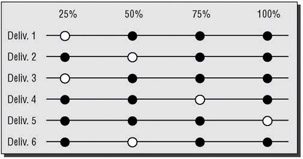
Unfortunately, the project was a flop ”but hey, the baseline board has stuck in our minds all these years .
Risks The identified risks that could affect the success of the project and plans to avoid or mitigate the risks are listed in this section.
Issues The method used to identify project issues, assign responsibility for resolution, define escalation procedures, and track and report progress is described in this section. This section can also include a discussion of the overall environmental issues the project could run into, including the overall computing environment as well as the political, geographical, and integrated systems environments.
Communications The communications component describes the method and frequency of communication with sponsor, clients , project team, and other stakeholders. For example, you might say something like this: Sponsor communications ”one-on-one meeting every Monday at 10:00 A.M. for the duration of the project, and Team communications ”biweekly team meeting every Thursday at 2:00 P.M.; email or one-on-one conferences as required for the duration of the project.
Implementation Plan The implementation plan is an overview of the methodology used to implement the project schedule. The plans you ve created for development, hardware, installation, securing, configuration, testing as well as other plans for correct implementation of the project schedule are included.
Support Plan The support plan documents how the new system will be supported once the project is complete. Support may be limited to the update and maintenance of a new system or piece of hardware, or it may include a technical group that will support the users of a new application.
Training Plan The training plan documents how training on the new system will be accomplished. This includes training for end users, help-desk staff, operations staff, or other groups, as applicable.
Templates and Checklists
If you are using any existing checklists or have developed checklists during the planning processes, you can include copies in this section. Examples of checklists in this section are:
- Installation checklist
- Testing checklist
- Other quality checklists
References
The reference section lists any sources used for project methodology, corporate standards, or best practices. A reference list may include:
- A Guide to the PMBOK
- Your Corporation s quality standards
- Your corporation s system development methodology
- Your corporation s project management methodology
- ISO 9000 standards
- Any applicable regulations or standards
Appendix
An appendix can be used to provide a copy of detailed documents not normally included in the body of the project plan:
- Project schedule baseline
- Project budget baseline
With all of these components to consider, writing a comprehensive project plan can overwhelm a new project manager. Don t worry, we can share a lot of tips on how to make this come together smoothly with all of the data you need to oversee the project.
Putting It All Together
The project plan can be created either by putting all of your critical data in a formal document or by organizing a series of existing documents, depending on what is expected in your organization. If your initial planning processes are thorough and involve the right participants , the revisions should be kept to those aspects of the project that are formally changed during the course of the project. If the up-front planning activities are shortchanged, the project plan will probably be inaccurate or important data will be missing.
In order to finish out project planning there are some final required steps:
- Organize and write the plan.
- Define a plan update process.
- Review the plan with stakeholders.
- Close out the planning phase.
Organizing and Writing the Plan
Although you may be tempted to just jump in and start writing, it is much better to take time to review your documentation and organize it to match the outline or template you will be using. Otherwise you may find that you are moving data around, entering data multiple times, or omitting key points.
Real World Scenario ”After-the-Fact Plan
We can remember being on a project with a very large project plan binder that was updated on a weekly basis during project execution because most of the sections were created as the project work was being done.
This method of developing the comprehensive project plan created a scenario where the project manager, the project team members , and other stakeholders did not have a plan to guide execution of the project. What we received instead was a history of what was decided after the fact.
As you can imagine, confusion was rampant, and to no one s surprise, the project was quickly off track.
This is definitely not the way you want to transition into project execution. A project plan binder isn t a reflection of what has been done, but what has been planned to be done.
You also need to define a document control process if there is not a standard in your organization. How revisions are made, the version numbering system, and the placement of the version number and revision date are items that should be defined before even a draft project plan is distributed. Without a document control system in place, you cannot properly account for all updates to the plan.
With today s file-sharing technology, more project managers are taking advantage of distributing project data electronically . This eliminates a lot of the manual work involved in printing and distributing the original project plan and then distributing any changed pages as the plan is updated.
You should decide prior to starting the document whether you are going to distribute the plan via paper or electronically. A project plan accessed via a shared file has its own unique challenges. You need to determine the level of security required to access your documents, and make sure all stakeholders have access to the server where your project file is stored. All of the documents on the server should be read only to prevent any accidental changes. You do not want to start putting documentation out on a server until you have established the access and security procedures.
Once you have completed these up-front steps and have all of your planning output organized around your outline, you are ready to write the plan. Your plan will be read in part or in total by many people at many different levels in your organization, so make sure that you have checked grammar and spelling and that each section of the plan is complete and all of the data is correct. A plan that is thrown together without the proper review and editing will provide the impression that the project itself was not thoroughly thought out or properly planned.
Even as you are writing the initial version of the plan, you need to be developing change management processes for updating the plan.
Updating the Plan
Even after you complete the initial project plan document, reviewed the document with all the stakeholders, and obtained formal sponsor approval, your project plan may still change as you move into the project execution phase.
Updating the project plan is an iterative process; meaning that as key components documented in the plan change throughout the course of the project, various sections of the project plan will require updates. The scope may change, a new stakeholder may become involved, or an additional major deliverable may be added, to name just a few examples. The challenge of maintaining a project plan has always been the logistics of keeping the plan current and communicating updates to the project team, the sponsor, and other key stakeholders. Plans that are updated haphazardly will quickly become inaccurate and lose their usefulness as a road map for project execution.
To help alleviate these difficulties, you need a documented change process. Additionally, unless your PMO provides the updates , you will need to designate a person to actually make the changes and distribute the revised pages. The process for updating the plan needs to be communicated to all stakeholders.
Any change to project plan data that is controlled by a change process should only be made as a result of output from the corresponding process. A change to the scope should only include official scope changes that have been approved via the process established in the scope management plan. Budget or schedule changes should also be linked to the formal approval process for such changes.
Throughout the process of putting together your planning data, you will need to schedule ongoing reviews with the sponsor and other stakeholders.
Reviewing the Plan
A good project plan is a document that the project manager uses to drive the successful development of the project s product. The people involved with the project should have an opportunity to participate in the creation of the plan. The project plan is usually developed in multiple steps and evolves throughout the planning process. Ongoing review of the plan with both the sponsor and the other stakeholders is critical to the success of the project.
Sponsor Review
The sponsor review starts when you are developing your outline or table of contents. Review of a plan outline will provide the sponsor with an opportunity to comment on the content of the document. Even if you are following an approved template, it is your responsibility as project manager to confirm that the sponsor is familiar with the contents of the template.
Schedule periodic reviews with the sponsor as you add data to the various sections. The sponsor must sign off on the project plan to make it official. The end result should not be a surprise, merely the finished product the sponsor has seen through various stages of development.
Other Stakeholder Review
The creation of the comprehensive project plan is actually a great opportunity for the project manager to solidify involvement and commitment of the stakeholders. Your client, your project team, and other key stakeholders are key participants in the creation of the project plan. At a minimum, these people should receive a copy of the outline or TOC so that they are aware of what information is included in the plan. Even though the information being compiled in the project plan should not be news to the stakeholders, they may have different expectations for the project plan. Thus, up-front resolution of any issues or concerns will facilitate the writing of the plan.
Interim reviews with the stakeholder team may be appropriate for a complex and detailed project plan. In other situations it may be appropriate to meet with individual stakeholders only if they have questions.
The final review of the project plan is a formal process that signifies the end of the planning.
Closing Out the Planning Phase
The completion of the comprehensive project plan signals the transition from the planning phase to the execution and control phases. When the initial project plan document is complete, the comprehensive project plan is circulated to all the stakeholders. The planning phase can be closed out with a formal stakeholder review meeting to transition to the execution and control phases.
Throughout the project, you will constantly be assessing whether the project should move forward. The meeting to close out the planning process is an excellent opportunity to obtain stakeholder concurrence regarding the viability of the project business case. If there have been any substantial changes in the business need that initially drove the approval of the project, now is the time, before the project work begins, to evaluate whether the project should move forward.
This review session should bring closure to any outstanding issues from the planning process. Hopefully, any issues that were raised earlier have been addressed and resolved throughout the planning phase. But don t assume that issues do not exist just because you are not made aware of them. Be sure to ask the stakeholders directly if anything regarding the planning phase is unresolved in their minds. It is much easier to resolve any planning disputes before the project work begins.
| Note |
It might be helpful to remember that as project manager, in some people s eyes you are in a position of power. They may be reluctant to reveal a problem to you because they don t want to appear as non “team players or as troublemakers. It s important to try to foster open , honest, straightforward communication that supports a sense of security for people to be able to speak their minds about issues they see forthcoming. Yes, there are people who will freely speak their minds no matter what. But you know who those people are. It s up to you to try to get the information out of those who know, but won t tell. |
Another key focus of the planning review is to assure that stakeholder expectations of the project are aligned with what is detailed in the plan. If any component of the plan was a surprise, find out what the real expectation was. It is the project manager s responsibility to make sure that everyone involved in the project understands and supports not only the end result of the project, but the road map to reach that end result.
After making any changes as a result of the review meeting, the plan is formally approved by the sponsor and, in some cases, by the client. The approved document is then distributed to all stakeholders.
As a transition into the execution and controlling phases, the planning close out meeting may also be used to discuss indicators used to monitor and control project performance as the project work begins. Project performance indicators are measures the project manager uses to determine whether the project is on track, such as any deviation from the baseline schedule or the baseline budget. For example, you should know that your development phase is scheduled to complete in 8 weeks and be tracking progress to meet that target. The use of performance indicators will be discussed in more detail in Chapters 8 and 9.
A successful transition from planning into execution should leave everyone clear about his or her individual role on the project and excited about moving forward to actually get the work done.
Case Study: Chaptal Wineries ”Finalized Project Plan
You re now ready to go forward and prepare your finalized project plan for presentation to Kim Cox, the owner of Chaptal. Following are the elements that you prepare:
Table of Contents
- Executive Summary
- Requirements
- Scope
- Stakeholders
- Expected Resources
- Assumptions and Constraints
- Major Deliverables
- Budget
- Risks
- Issues
- Communication
- Implementation Plan
- Support Plan
- Training Plan
1. Executive Summary Chaptal Wineries recently purchased wineries in France, Southeastern Australia, and Chile. It is now necessary to electronically connect the wineries so that workers in each location can send and receive email, as well as look at one another s calendars. Additionally, it is necessary to set up a Chaptal intranet site so that critical information such as the numbers of cases of wine produced, vine health, winemaker notes, and other similar pieces of information critical to the business can be posted for corporatewide consumption. The IT manager at Chaptal s Sonoma, California location will be responsible for procuring the necessary hardware and software, telecommunications connections, and installation expertise.
2. Requirements
A. Install T1 or E1 telecommunications circuits at each of the newly purchased sites, thus preparing the sites for WAN communications. Telecommunications companies and their third-party vendor representatives will be used for this work.
B. Set up an email system between the four sites. This will allow for all sites to email one another using an internal email system, thus preventing the possibility that someone outside the organization can get inside information via email regarding new vintages, wines, wine-making methods , case lots, or other business-critical information. There will be an email server at each of the four geographically disbursed sites. The Chaptal IT manager will be responsible for procuring the servers and installing and configuring them.
C. Set up an intranet. The intranet server will be hosted at the Sonoma location. This server will host web pages that perform such business-critical functions as corporate timekeeping, winemaker s notes, barrel-tasting notes, vintages, diseases encountered , vinekeeper notes, and other data relevant to the performance of our vineyards and the wine. The Chaptal IT manager will procure the server and install it. A contractor will be used for the programming work.
D. Test all connections and train users.
3. Scope This project includes the elements necessary to connect the four sites together by wide area networking. Additionally, the project accounts for setting up an email system that includes an email server at each site. As well, an intranet server and the programming of relevant intranet pages are included. Procurement of all necessary hardware and software, as well as installation configuration, testing, deployment, maintenance, and training are included. Not included in this project is a system for managing corporate finances, HR, or assembly-line/ manufacturing work (such as the actual bottling and labeling of the wine bottles). Our enterprise resource planning (ERP) software handles this function. A later project will bring all three new sites into utilization of the ERP.
4. Stakeholders Stakeholders include:
Kim Cox Project Sponsor and owner of Chaptal Wineries.
Guillaume Fourche A Bordeaux negociant specializing in fine red wines. Fourche s cabernet sauvignon wine will be re-branded as Les Chaptal Bordeaux Villages.
Metor Sanchez Owner of a Chilean winery in the Aconcagua valley. Sanchez s Syrah, cabernet sauvignon, and Malbec wines will be re-branded as Casa Sanchez Chaptal.
Jason Jay Proprietor of Roo wines. His Shiraz wines will be re-branded as Chaptal Roo.
Others Chaptal wineries employees to assist with UAT.
5. Expected Resources
Five Intel-based midrange class servers.
Carrier Sensing Units/Data Sensing Units (CSU/DSU) for demarcation connectivity.
One router and switch per location.
Telecommunications vendors and consultants (including demarcation installers and router and switch internetworking specialists).
Contractor to develop and test intranet pages.
Email software.
Web software.
Virus-scanning software.
6. Assumptions and Constraints
Assumptions
- No variance in the behavior of like hardware.
- Telecommunications companies in each nation will have reasonable wide area network setup request procedures and installation timelines .
- Average T1/E1 cost is assumed to be $350/month U.S. dollars.
- Intranet development time is assumed to be 60 person days (30 working days, 2 persons).
- All sites will provide reasonable access for installers and a secure, climate-controlled, power-conditioned room for the electronic gear.
- Routers will use Open Shortest Path First (OSPF) routing protocol.
- Contractual help will be used for configuration of the routers.
- The network operating system (NOS) will be Windows Server 2003 (W2K3) and the email server software will be Exchange 2003 (E2K3).
Constraints
- Language barriers
- Availability of people at any given site to be able to help with setup due to problems with the winemaking efforts
- Harvest and crush seasons
7. Major Deliverables
- Procure server and internetworking hardware
- Procure wide area networking connections
- Internetworking gear installation
- Server installation
- Email software installation
- Intranet development
- Training of users
- Unit, Integration, and User Acceptance Testing
8. Budget It is projected that the total project, not including the Chaptal IT Manager s regular salary, will be $205,000. Kim Cox has agreed to subsidize the project with a $25,000 contingency fund.
9. Risks
T1/E1 circuit bandwidth not sufficient
Hardware failure
Software failure
Internetworking gear failure
Programming errors
10. Issues It is vital that the project be completed before the September crush of the grapes and preparation for new vintage wine making. Kim Cox has made it clear that no Chaptal employees are to be doing anything else but concentrating on the wine in September and October.
11. Communication Because the email and intranet servers are not up yet, all communications will be by phone or by free temporary Internet mail such as Hotmail. Kim Cox will be updated daily. Jason Jay, Metor Sanchez, and Guillaume Fourche will be updated weekly.
12. Implementation Plan Due to the requirements of the email software, procurement and installation of the WAN circuits must happen first, followed by installation of the internetworking gear. After that, server builds can take place following by intranet programming and testing.
13. Support Plan The Chaptal IT manager will be the primary support entity, assisted by a designated individual at each of the remote sites.
14. Training Plan The Chaptal IT manager will handle all of the training efforts at all sites.
Summary
The comprehensive project plan is your guidebook that will be used throughout the life of the project.
The project plan contains outputs from the various planning processes put together in one all-inclusive document. It should include the critical planning outputs for initiation, scope, time, cost, human resources, quality, communications, risk, and procurement.
Although a project plan has historically been a paper document, today there are more examples of project managers who distribute plans electronically in a shared folder environment.
The comprehensive project plan is created with ongoing input and review from the sponsor, the client, the project team, and other stakeholders.
A formal review, with official sign off and approval of the plan, marks the transition from project planning to project execution.
Exam Essentials
Explain the purpose of a comprehensive project plan. A comprehensive project plan is the document you will use during execution and control to track the performance of the project and take any needed corrective action. It is used to communicate key information to the project stakeholders.
Be familiar with the components of a comprehensive project plan. A comprehensive project plan contains components such as documentation revision control, a table of contents, executive summary, a list of stakeholders, project requirements, major deliverables, expected resources, environmental issues, and plans for implementation, support, and training.
Understand what is meant when project plan development is described as an iterative process. The planning process is repeated in cycles as more information is obtained or changes are made to the project.
Explain the importance of performance baselines. Baselines are a picture of what is expected to happen before the project work begins. They are used to measure the progress being made. Common baselines include the scope statement, the schedule, and the budget.
Demonstrate knowledge of the importance of a formal review of the project plan. A formal review is scheduled to assure a common understanding of the project plan by all stakeholders. Stakeholders have an opportunity to ask questions and provide feedback before the plan is finalized.
Identify the steps involved in creating a project plan. The project manager should create an outline or table of contents for review with the sponsor and other stakeholders. The writing of the plan involves bringing together and integrating all of the output from the planning processes. A review of the draft plan is held with all stakeholders. The project sponsor provides formal approval or sign off of the plan.
Key Terms
Before you take the exam, be certain you are familiar with the following terms:
|
comprehensive project plan |
iterative process |
|
document control process |
project performance indicators |
Review Questions
- What document integrates the information from all of the planning processes into one cohesive road map for managing the project?
- Project charter
- Scope management plan
- Comprehensive project plan
- Schedule baseline
- Which of the following best describes the iterative nature of the development of the project plan?
- The project plan is never final. The process is repeated as new information is obtained or if there is a major change to the project.
- The project plan is circulated to each of the stakeholders and comments are incorporated as they are received.
- The project plan is updated weekly to make sure everyone understands the importance of the project.
- Multiple versions of the project plan are created to cause confusion and lessen the likelihood that you will be blamed if the project fails.
- Which of the following is the best method to organize of the project plan?
- Because compiling the project plan is really an administrative task, you should solicit clerical support to sort through all of the planning data and put together a table of contents.
- You need to develop an outline of what will be included in the plan, but dont spend a lot of time incorporating your planning outputs into the outline. You will save time if you just wait until the project is underway to see what really happens and complete the outline after the fact.
- You should gather your output data from the planning processes and organize the data in a logical fashion. You are now ready to send the document to your sponsor with a signature sheet. You can distribute the approved plan to the stakeholders so they know what you and the sponsor have agreed to.
- You start by gathering all of your output data from the planning processes. Next, you develop an outline or table of contents to review with the project sponsor and other stakeholders. After you have updated the outline based on feedback from the sponsor or the other stakeholders, write the plan by integrating the data from your planning output documents into your outline. The completed document should be distributed to all stakeholders in preparation for a formal review session. After incorporating any changes from the review session, obtain formal approval from the sponsor, and distribute the approved document.
- Which of the following best reflects the purpose of a formal review of the comprehensive project plan?
- A formal review of the project plan provides an opportunity for stakeholders to ask questions and provide feedback on the contents of the plan.
- A formal review is held to fill in any gaps in the project plan.
- A formal review is a means of shifting accountability to the stakeholders if they agree with the plan.
- A formal review is a great way to impress the stakeholder team by using elaborate slides with a lot of artwork.
- Not all project plans will contain the same components. Which of the following components would you expect to see in all plans?
- Training plan
- Overview or executive summary
- Procurement plan
- None of the above
- What is the best way to handle a potential change to the project plan?
- You should have a documented procedure to handle changes to the project plan. This plan needs to be communicated to all stakeholders.
- You must update the plan and distribute the new version as quickly as you hear of any changes.
- You need to set a schedule for project plan updates and only reissue the plan according to that schedule.
- A meeting of all project stakeholders should be scheduled to discuss and vote on any proposed change to the project plan.
- You are being pressured to get your team started on project execution, but you have not completed the comprehensive project plan. In the interest of time, you decide not to include any stakeholders in this process. Which of the following is a likely result of your decision?
- The project will start on time and be a success due to your creative thinking.
- The project plan will be clear and concise , as you will not have to make any of those additions or changes that the stakeholders might want.
- There will not be a common understanding of how the project execution and control will proceed. Key stakeholders may feel that their input is not valued, and support for the project may diminish.
- There may be a few complaints, but you can easily handle any issues that might arise once you get the team members working on the project tasks .
- A project plan often includes a baseline for the project scope, schedule, and budget. What is the importance of these documents?
- Baselines are used to show how poorly the project was planned.
- A baseline is a picture of what is planned prior to the start of project execution and can be used to monitor project progress.
- Baselines have no relevance to project execution.
- Baselines are used to show stakeholders what they want to hear.
- Which of the following is the best example of a project performance indicator?
- There have been 10 scope change requests .
- The length of the weekly project status meeting has increased.
- Your team member Jane reports that her task will not complete on time.
- There was $250,000 spent on the development phase, as compared to a budgeted amount of $200,000.
- You need an assessment of the ongoing viability of the project business case, the completeness of planning documents, and the resolution of all planning issues. What is the best method to accomplish this?
- Distribute a memo requesting submission of planning input and any issues related to planning.
- Distribute all planning documentation to the stakeholder team.
- Schedule a meeting with all stakeholders to transition the project from planning to execution.
- Discuss these items with the project sponsor.
- Of the following elements, which one is not a requirement for the project plan?
- Detailed WBS
- Training plan
- Risks
- Executive summary
- Whose responsibility is it to prepare the project plan?
- Sponsor
- Project manager
- Project team
- PMO administrative assistant
- Which is true for a comprehensive project plan? (Select all that apply.)
- Is optional
- Can be assembled and delivered at any time during the project
- Signals the end of the planning process
- Must be signed by all stakeholders
- Must at least be signed by the sponsor
- In order to make sure that changes are adequately tracked, what sort of process must be in place for comprehensive electronic project plans?
- Change management process
- Document management process
- Quality management process
- Electronic signature process
- Ongoing comprehensive plan reviews with the sponsor and stakeholders should be held:
- Only once, at the time that you write and release the project plan.
- On a regularly scheduled, routine basis.
- As needed.
- Stakeholders need not be included.
- What is the reason for using a project performance indicator?
- To track the output of your project team members
- To make sure the project has not exceeded budget or timeline constraints
- To assure that youve not added additional deliverables to the project
- To be able to add a visual element to the project plan for those who are kinesthetically oriented learners
- From the list below, select some examples of things you might consider including in the appendix section of your comprehensive project plan. (Select all that apply.)
- A Guide to the PMBOK
- Your corporations quality standards
- Thanks and signatory pages for all those who participated
- Photos of the project team and team members contact information
- Your corporations system development methodology
- Your corporations project management methodology
- ISO 9000 standards
- Which is true for the Executive Summary? (Select all that apply.)
- Is a technical section
- Is a nontechnical section
- Is a complete synopsis
- Is a brief summary
- What is the purpose of the comprehensive project plan? (Select all that apply.)
- A guidebook for focusing team members
- A reference source for clarifying questions
- A budget book for the finance office
- A single source of information regarding all key elements of the project
- An input into the corporate strategic plan
- Name the three plans that you would include in your comprehensive project plan document.
- Implementation plan
- Budgeting plan
- Training plan
- Team member performance review plan
- Support plan
Answers to Review Questions
- C. The comprehensive project plan is the document that pulls together all of the output from the previous planning processes. A typical project plan contains elements from the project charter, the scope management plan, and the schedule baseline.
- A. The project plan is a living document. Multiple iterations of a project plan are a reflection of new information regarding project stakeholders or a major approved change to the scope, schedule, or budget.
- D. A good project plan is instrumental in the smooth execution of the project work. Putting thought into the plan, taking time to review the plan with your sponsor and other stakeholders, and obtaining formal approval will increase commitment to the project and reduce later misunderstandings that could impact the outcome of the project.
- A. A formal review of the project plan is your last opportunity prior to project execution to obtain feedback or input on the project work. It can be used as a checkpoint to make sure all of the stakeholders are on the same page.
- B. All plans should contain an overview or executive summary that contains a brief description of the project and how the project links to the organizational strategy. Executives do not have the time to read through the entire comprehensive project plan for each project in their organization; they need a clear, concise summary that provides them the basic information in nontechnical terms. Training plans and procurement plans do not pertain to all projects.
- A. There should be documented change control procedures for handling any change to the project plan. These should be closely linked to procedures for changing the scope, budget, or schedule. Updates should only be made as required by this process.
- C. It is always tempting to take shortcuts in the planning process, but doing so usually just creates bigger issues. Involving the stakeholders in the development of the project plan will help focus everyone on the project goals, clarify any misunderstandings, and solidify support for the project.
- B. A baseline represents some of the key outputs of the planning process. A schedule baseline, as an example, depicts what tasks should be completed at a given point in time. By comparing actual results to the baseline document, a project manager can assess the progress being made.
- D. A comparison of actual spending against the baseline budget is a good indicator of project performance. The number of scope change requests and the length of a project status meeting do not by themselves provide a measurable indication of how the project is going. There is not enough information on Janes task to determine whether this delay could have an overall impact on the status of the project schedule.
- C. The transition from the planning phase to the execution phase is an important step that needs to be officially acknowledged with a meeting to ensure all stakeholders expectations for the planning process have been met and that there are no outstanding issues as project execution begins.
- A. A detailed WBS isnt required for the project plan. The high-level summary tasks associated with the WBS should be included, however.
- B. The project manager will be responsible for preparing the project plan, but it should be noted that he or she does not work in a vacuum . Up to now, input from the project team and the stakeholders has been required to assimilate all of the correct information about the project and when writing the project plan; you may need to consult them again and they will provide updates to the plan as you move forward.
- C, E. The comprehensive project plan is a formal project document that signals the end of the planning process (and the beginning of executing and controlling). Further, it is an approved document, meaning that it is signed by at least the sponsor. You should consider having all stakeholders review it prior to sending it up for approval by the sponsor.
- B. To make sure that changes and updates to the comprehensive project plan are accounted for, you should consider a document management process in which the documents live under some sort of version control methodology. In other words, when someone checks out a document for review and updating, the document version number is updated if updates are indeed made. Good workflow software such as Microsoft SharePoint Portal Server or others easily handles this requirement.
- C. If changes are made that affect the comprehensive project plan, you must meet to review the prospective changes and gain buy in and acceptance. If theres nothing new in the project plan, then youre wasting everyones time by having a meeting to review an unchanged document.
- B. Performance indicators are a method you can use (talked about more in Chapters 8 and 9) for monitoring that youve not gone off budget or over the allotted time.
- A, B, E, F, G. Not all of these elements are required, but they may be things youd consider for your project plan. For instance, if your development team uses the so-called agile form of software development, you might include a section in the appendix that talks about what agile software development is and how it differs from ordinary application work.
- B, D. The Executive Summary is a high-level overview of the project, its deliverables, and other nontechnical elements that you think a busy executive would be interested in relative to your project. You should take as much space as required to accurately and adequately summarize your project, but it needs to be a brief summarysomething that can be reviewed by executives in a couple-minute read.
- A, B, D. The comprehensive project plan is a document that describes all of the key elements of your project to those with an interest in it and who are authorized to view it. As such, it can act as a clarification reference for people who have questions about the direction the project is going in. While a large IT project might certainly wind up on a corporate strategic plan, its doubtful that the full project plan would be included. Additionally, while the project plan contains highlevel budget information, it is not a resource for the finance office. Your full project budget would be useful for that.
- A, C, E. In your comprehensive project plan, youll include that plans you have made for how youre going to deploy the system, how youll support it once its deployed, and how youll train people to use it. The budget and performance review plans dont need to be a part of the project plan, although youll include high-level budget information in your plan.
IT Project+ Study Guide
Assessment Test
Answers to Assessment Test

EAN: 2147483647
Pages: 173
