Cost Planning
CostPlanning
THE COMPTIA IT PROJECT+ EXAM TOPICS COVERED IN THIS CHAPTER INCLUDE
- 1.6 Given a project initiation document (a project charter or contract), including a confirmed high-level scope definition and project justification, demonstrate the ability to identify and define key elements.
- 2.3 Demonstrate understanding of estimating concepts, techniques, and issues.
- 2.14 Demonstrate the ability to create an activity cost estimate.
- 2.15 Demonstrate the ability to create an activity time estimate (in units of time).
- 2.16 Recognize and explain the difference between a project cost estimate, effort estimate, and time estimate.
- 2.20 Demonstrate the ability to assign resources to the schedule.
- 2.21 Given a project scope, timeline, cost, project team, and dependencies, demonstrate the ability to manage key elements of the project budget.
By this time, you may be wondering why you have to have a plan for everything. If you know the scope of your project and you ve identified the tasks to complete the project, why can t you just get started? As the project manager, you aren t going to be managing just the scope and the duration of the project; you are also managing the costs. To understand what your project will cost and to create and manage your budget, you need to identify all of the expenses associated with your project. Developing a plan to identify and manage your costs will help you complete your project within the approved budget.
In a fantasy world, corporate funds would be unlimited and projects would be approved based on the result they produce and provided with the funding required to do what it takes to complete the project. In the real world, projects have budgets , and cost overruns are not a good thing. Money is always a hot topic. There is never enough to go around, and you are always asked to do more with less. Going back and asking for more money after the project is underway is not a pleasant undertaking, so you want to do the best job possible of planning for the funds you will need. Estimating project costs can be a tricky undertaking, but luckily project management provides some useful tools and techniques to help you through this effort.
Resource planning looks at identifying the types of resources you need to complete your project and assigning resources by job description or job title to each project task. Cost estimating is the process of determining what you will spend for the resources you need to complete the work on your project. There are three types of cost estimating: analogous estimates, parametric modeling, and definitive estimates. Cost budgeting allocates the approved costs of all the project resources over your project timeline to create a project budget. A copy of the project budget before any work has started is the cost baseline. We ll discuss these topics and more in this chapter. Let s get started.
Resource Planning
You may think you know who and what you need to complete the project work, but if you try to just start grabbing resources where you can and assigning tasks, you may quickly find your project at a standstill. Remember all those task dependencies we identified in Chapter 3? Tasks that must happen in sequence drive the need for the resources to complete those tasks in the same sequence. If you take the time to identify all of the resources you need for the project, you will get the people and the equipment that you need at the time you actually need them.
The first step in cost planning is resource planning , which means determining the following:
- The resources the project needs, in the form of both human, equipment, and material resources. The quantity of each resource required to complete the work for your project (e.g., two servers, four person-hours, etc.).
After all, you cannot do an accurate estimate of your project costs if you have not identified the resources to complete the project.
Luckily, your previous planning processes provide the inputs you need to identify your resources. For example, an input you might ve received at requirement-gathering time was the system will be browser-based and made available over the intranet. Intuitively then, you know that you ll need human resources to provide web programming and also human and material resources to hook what was developed into the corporate intranet.
Before you start the resource planning process, review your scope statement and WBS and investigate whether you can obtain historical resource information from similar projects. Understanding the resources from a similar project may help you get started in the right direction. It is also a good idea to review any specific corporate policies regarding allocation of resources to projects. For example, corporate policy may require you to obtain formal department-head approval before utilizing any more than 40 hours of an employee s time who is not in your department.
| Tip |
One of the good things about a project management office (PMO) is that corporate heads have realized the common sense in formalizing the project management process and will probably have already approved formal standards and policies for how projects are started and run. |
Although the project team members may get the most attention during resource planning, there is more to resource planning than just the staffing requirements. We will take you through the three types of project resources you need to identify before you start estimating your costs. After providing an understanding of what is meant by project resources, we will move on to identifying the specific types of resources you need for each of the project tasks.
Types of Resources
When you mention project resources, the first thought that comes to mind is the people required to complete the project activities. Although people are certainly an important component and perhaps the one you ll pay the most attention to, resource planning involves far more than just the project team. Focusing on just the people can cause major disruptions down the road when you find you do not have the workstations you need or there is no power supply in your training room. It turns out that it s the little things that bite you. You must plan for three different and equally important types of resources: human resources, equipment, and material.
Human Resources
Human resources are the people with the background and skills to complete the tasks on your project schedule. You are not going to forget that you need people to complete the work associated with the project, but defining the right people can be a little more complicated.
It is important that people knowledgeable in the work required to perform a given task are involved in identifying the skilled labor component for each project task. You need to involve project team members or the functional managers providing the resources. For example, who better to tell you who is the best choice for a web programming project than the manager of the applications development department?
Your request for project staffing may need to span numerous internal organizations, depending on the nature of your project. Do not assume, just because this is an IT project, that all of the resources will come from the IT organization. As an example, an IT technical writer may not be the best choice to develop a user training package if he or she cannot explain the concept in a language the user can understand. A business methods writer from the client organization may be a better choice. By identifying the skill set required for each activity, you will have the data to determine which group can provide the appropriate people.
Equipment
Equipment includes anything from specialized test tools to new servers or additional PCs for the programming team. Equipment is very often a critical component of IT projects. Some types of equipment have long lead times from when the order is placed, so your upfront planning needs to be very thorough.
If you are developing a new piece of software and think your application can run on an existing server, check to make sure that is a correct assumption. Even if the server currently has free space, it may be reserved for another application. If you will be doing extensive testing, determine whether you will have access to existing test equipment or whether special equipment will be needed for your project.
For any task that involves development, testing, or delivery of your product, determine any special equipment needs associated with the completion of that task. Be particularly aware of any needs outside of IT. If the project schedule includes user acceptance testing, how will this be accomplished? Has a location been identified and does that location contain the necessary equipment for the users to complete the test scenarios? If a hardware component isn t identified until after project execution is in progress, an added cost for expedited delivery or a schedule delay may result.
Materials
Materials is kind of a catchall category that includes utility requirements such as software, electricity, or water, any supplies you will need for the project, or other consumable goods.
Failure to think through and plan for materials can lead to major issues. If your project requires a special training room, you will probably identify the need for PCs when you plan your equipment needs. What you may not think about are the connections for power for each of the PCs or a need to have them connect to a corporate local area network (LAN). If you are equipping a training room, make sure you understand what it comes with and what you will need to provide in order to conduct the training associated with your project. This same scenario could apply to any specialized workspace required to complete the project work.
Materials can trip you up if you do not have a good understanding of what is considered a supply that is just part conducting normal business versus what is considered unique to the project. You may not have to identify paper, pens, and file folders, but if you want each team member to have a copy of Microsoft Project, it probably needs to be included as part of the project resource requirements. If there is any question, check out your departmental policy ”do not assume it is covered under the functional budget.
| Note |
One interesting thing that you ll run into when you begin to test a web application is the idea of mimicking the load that a website can handle, that is, how many thousands of hits can it take at once and still stay functional? One of your material resource planning items might be load software that is able to introduce a load onto the developed website in order to test its ability to withstand numerous hits. You may not have considered this element as you re going through your resource planning efforts, which is why it s good to bounce identified resources off of the tech folks that will be working on the project s deliverables. |
Now that you understand the types of resources you need to be concerned with, you can start assigning resources to your project tasks.
Defining Resource Requirements
Armed with an understanding of the three types of project resources, your scope statement, and your WBS, you are ready to start defining the resources needed to complete your project. This process will give you the output of resource planning, the resource requirements . The resource requirements document contains a description of the resources needed from all three resource types for each of your work package items from the WBS. Figure 5.1 illustrates resource requirements in a scope statement form.
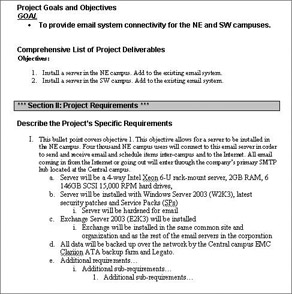
Figure 5.1: Resource Requirements
During the resource planning process, you do not need to be concerned with identifying the names of people who will complete the work. What you need to identify in resource requirements is a generic human resource based on job title or job description, that is, web programmer or server administrator. We will discuss in more detail how you actually go about acquiring human resources when we discuss organizational planning in Chapter 6, Additional Planning Processes.
Job Descriptions and Titles
A tool that can be very useful for developing the human resource requirements is a resource pool description . This is a list of all the job titles within your company. If you work in a very large corporation, you may want only those job titles associated with a specific department(s). This list provides a brief description of the job and may identify the number of people currently employed in each job title. Check with your departmental human resources representative to see if this type of information is tracked in your organization, and if it can be made available to you for resource planning purposes. If this type of data is not available or if it is confidential, you could look at resource information from similar projects as a guide to the various job functions you made need to identify. Corporate organizational charts are also a source of information on job titles, although they do not usually include job descriptions.
For some tasks you may not have an exact job title for each of your human resources, but you do know that you need someone from a particular department. For other tasks, you may need to enter into a contract with an outside company, in which case, you may need a resource from the legal department to work on the contract negotiation.
Equipment and Material Descriptions
A description of available equipment or material resources is not as typical as a list of job titles and descriptions, so you may need to do some homework to identify those resources. One of the big questions you need to answer is what materials or equipment the project is expected to provide for the team members. When people are assigned to projects in your organization, do they come with the equipment they will need to do the job? My experience has been that most project team resources supplied by a functional manager have an assigned workspace that includes a PC, phone line, and other basic work tools such as pens, notebooks , etc. In some instances, project workers are collocated, which requires at least part of the team to move to new office space. You need to determine whether the policy of your organization is to move equipment with the person or is the project manager accountable for providing everything. If the team is going to be collocated, is existing workspace available or will the project budget need to fund the build out of cubicles?
New applications projects need a server or mainframe on which to reside. If there are standards as to what hardware platforms can be used, your project application needs to run on approved equipment. An existing piece of hardware may have available space for your application or you may need to purchase hardware. If your project involves a hardware purchase, you need to identify any materials required to house the new equipment, such as power supply or ventilation .
Developmental Environments
In most application development arenas, applications development managers like to maintain three separate environments: development (Dev), test (Test) and production (Prod). Applications programmers (coders) and database administrators (DBAs) work on the software modules in the Dev environment. When a module is ready for testing, it s moved to the Test area where it s tested . When everything works, the code is moved to Prod. In bigger, more stringent shops , the person doing the moving from Dev to Test isn t the same as the one moving from Test to Prod. If you don t maintain a Dev/Test/Prod environment while you develop your project s software, chances are you ll encounter a lot more problems with the code than if you obey the Dev/Test/ Prod environment protocol.
Responsibility Assignment Matrix (RAM)
You need some tools or templates to keep track of all the resource requirements. A good tool to use for defining and documenting your resource requirements is a Responsibility Assignment Matrix (RAM) . A RAM is a chart that matches your WBS tasks with the required resources. Table 5.1 depicts the start of a RAM for an IT development project.
|
Task |
Programmer |
tester |
Marketing |
Tech Writer |
Server |
|---|---|---|---|---|---|
|
A |
1 |
||||
|
B |
2 |
||||
|
C |
3 |
1 |
|||
|
D |
4 |
||||
|
E |
1 |
| Note |
Be sure to include any resources with one-time or fixed costs that will be purchased from your project budget. |
In the above example, for each task we have identified the resource(s) required to complete the work and inserted the quantity of each resource for each task. This gives us not only the resources needed for each task, but the quantity of each resource as well.
Real World Scenario ”The Equipment Was There, but Not the Electricity!
Susan is a project manager for a large corporation based in the Pacific Northwest. The corporate managers decided to build a new building to house all of the departments in one place. The company planned to save money by reducing lease contracts and increasing the level of efficiency because coworkers would be in closer proximity to one another. Susan was put in charge of a project to move all the people into the new building. The project would take about 6 months and she would be required to move 1,000 people in move waves with a total of six waves.
Shortly after she received the project, Susan met with the building s contractor to discuss the location of the different departments and the datacenters, for the servers as well as the power, and determine lighting diagrams for the cubicles throughout the building and the datacenter. The contractor noted to Susan that in the interest of saving money, the corporate engineers had opted to reduce the amount of electrical cables ”called whips ”in the datacenter, though he assured her he thought he had planned for enough connections.
Susan discovered , on interviewing the contact in each department, that even though the company had a central IT shop, seven separate mini-IT shops needed to place server equipment in the datacenter, along with the central IT department itself. Going on the word of the contractor, she felt that there would be plenty of electricity to meet the needs of the various IT stakeholders.
During the first wave move some, but not all, of the servers that were going into the datacenter were delivered, and the various administrators showed up to hook them up, Susan was shocked (no pun intended) to find out that all of the electrical connections were used up! Even though there were still more servers to come, she had nowhere for them to hook up to power. The assurance that the contractor gave her was suddenly out the window.
Furthermore, as Susan went back through and inventoried the electrical requirements for the remaining servers, she was startled to find that some had regular 15 amp requirements, others needed 20 amp circuits, and still others required a specialized 277/480 circuit. On revisiting the contractor she found that he had only installed 15 amp circuits ”he wasn t aware that server gear may have other power requirements than an ordinary house lamp!
Susan had to assess in a RAM how many circuits she needed for each kind of remaining power requirements. The total was seventeen 15 amp, ten 20 amp, and two 277/480 circuits. She also planned in a little bit extra for growth. Next she went back to the contractor to get an estimate of the cost for the 31 new circuits ”a whopping $17,500!
Finally, with much trepidation (she was, after all, a skilled project manager) she went to the project s sponsor, explaining that she had overlooked the power requirements and that significant additional monies were required to complete the project.
Susan now works as a cab driver in a central California city.
Three job titles are listed in the example matrix: programmer, tester, and technical writer. We also know we need someone from the marketing department to handle external customer communication, but we do not have a specific job title. The RAM can also be used to depict materials and equipment. Task C in this example requires a new server.
You can use other tools besides the RAM to identify resource requirements. We have seen project teams use the WBS (created in scope planning) and write in the resources required next to each task. Resource requirements can also be documented using project management software package. You may also use tools or templates from previous projects.
| Tip |
The specifics of how you identify resources are not as important as making sure that you capture everything. |
The team continues to work through the task list until resources have been assigned to all of the project tasks. Once you have identified the resources you need, you are ready to start the process of estimating the cost of each of the resources.
Cost Estimating
Now that you have documented your project resource requirements, you are ready to begin cost estimating , the process of approximating what you will spend on all of your project resources. A cost estimate is the input for developing the project budget. The key thing to remember about cost estimating is approximate. Cost estimating is a guess. You have no way of knowing exactly what the cost of your project will be, and some estimating methods are more accurate than others. To increase the precision of your guess, it is important to use all of the data and tools available to you.
| Warning |
Cost estimates are communicated to the project stakeholders. Any predictions related to the cost of a project tends to be cast in stone, so a project manager needs to be very clear about the potential accuracy of an estimate, especially those estimates made early in the planning process. |
If multiple estimates are made during the course of project planning, always communicate the new estimates to the stakeholder group if there is a significant change, and provide background information on the new estimate to explain how it differs from the previous estimate both in terms of content and accuracy. We will discuss the final planning cost estimate a little later in this chapter when we discuss the cost baseline. Communications about revised estimates should highlight the information you now have that was not available when the first estimate was made.
A number of different techniques are used for cost estimating. We will look at three types of cost estimates: analogous estimates, parametric models, and definitive estimates. We will also provide some tips to help you work through the estimating process.
Cost Estimating Techniques
There are three major categories of cost estimating techniques: analogous estimating, definitive estimates, and parametric modeling. You may use each one of these methods at various stages of project planning, or you may use one type of estimating for part of the activities and another method for the rest.
The methods have varying degrees of accuracy and each method can produce different results, so it is very important to communicate which method you are using when you provide cost estimates. Let s take a look at each of these estimating methods in more detail and how they work.
Analogous Estimates
You may remember this term from schedule planning. For cost estimating, an analogous estimate approximates the cost of the project at a high level by using a similar past project. (You may also hear this referred to as top down estimating or an order of magnitude estimate.) This type of estimate is typically done as part of a business case in the initiation process or during the early planning process of scope planning, when there is not a lot of detail on the project. Analogous estimating uses this historical data along with expert judgment of the person responsible for the estimate to create a big picture estimate. An analogous estimate may be done for project as a whole, or for selected phases or deliverables. It is not typically used to estimate individual work packages.
For example, if you know that a sales consultant desktop tool project 2 years ago cost $5 million, an analogous estimate for a customer care desktop tool might be $5.2 million, accounting for increased costs of resources or inflation.
It is impossible to find a previous project exactly like your new project (after all if your exact project had been done before, what you are doing now would not be unique, and therefore, would not be a project). If you are lucky, you may find a project that is similar in size and scope, which at least gives you a starting point.
| Note |
Analogous estimates have a very low level of accuracy, and can range between “25% and +75% of the actual cost of the project. |
Analogous estimating may be the best you can do at an early stage of the project when you have very little detail to go on. The key here is to make sure that everyone involved understands how imprecise this estimate is. Because of the newness of this project I am using analogous estimating for these cost figures and they do not have a very high accuracy level, you might say.
Parametric Modeling
Parametric modeling uses a mathematical model to compute costs. The type of project you are working on drives whether parametric modeling is an appropriate estimating technique. The most common parametric models are used in the construction industry. Homebuilders typically estimate new home construction based on a parametric model that provides a cost estimate per square foot .
Probably the most widely known parametric model in the IT world is the COnstructive COst MOdel (COCOMO and COCOMO II) for software development, which uses parameters that address the complexity of the software, the capabilities of the team, the processes used to develop the product, and the tools used for development.
Many organizations have developed a parametric model internally; there are also commercial parametric modeling packages available.
Parametric modeling is dependent on the accuracy of the data used to create the model. The most frequent drawback mentioned in relation to parametric models is that a model may not be scalable.
If your organization uses parametric modeling, you need to learn more about the specific models that are used and if this technique is appropriate for your specific project.
If you want to learn more about COCOMO or parametric modeling, there are numerous websites with more information, including the NASA Parametric Cost Estimating Handbook at www.jsc.nasa.gov/bu2/PCEHHTML/pceh.htm or the USC Center for Software Engineering at http://sunset.usc.edu/research/cocomosuite/suite_main.html.
Definitive Estimates
The most precise cost estimating technique is the definitive estimate , which assigns a cost estimate to each work package. The definitive cost estimate typically falls between “5% and +10% of the actual budget. The definitive estimate is also referred to as bottom up estimating. The WBS and the project resource requirements are critical inputs for a definitive estimate. You start at the lowest level of activity (the bottom of your WBS) and calculate the cost of each low level task. The sum of all these low level estimates provides the estimate of total project cost.
When we discussed schedule planning in Chapter 4, we talked about duration estimates for each task to determine the length of your project. When you are doing cost estimates, you need to base the estimate on work effort , which is the total time it would take for a person to complete the task if they did nothing else from the time they started until the task was complete. A work effort estimate is also referred to as a person- hour estimate. As an example, for schedule planning, a task to write the technical requirements document has an activity duration estimate of 4 days. When you do cost planning, if the technical writer is allocating 5 hours a day to the project, the estimate of the total elapsed time the technical writer spends to complete the task gives you a work effort estimate of 20 hours.
The difference between task duration and task work effort may seem confusing, so you need to remember that you are looking at two entirely different outputs. The duration estimates that you complete in schedule planning help you define how long the project will take to complete. The work effort estimates that you obtain in cost planning are used to define how much the project will cost. For purposes of creating a schedule, you need to know that a task will take 2 weeks. For purposes of a cost estimate, you need to know it will take 30 hours.
Let s take a look at how at how this works by adding a work effort estimate to the tasks from our Resource Assignment Matrix. Table 5.2 shows the work effort estimated for each of these activities.
|
Task |
Resource |
Work Effort |
|---|---|---|
|
A |
Tech Writer |
20 hours |
|
B |
Programmers (2) |
100 hours |
|
C |
Server |
N/A |
|
C |
Testers (3) |
60 hours |
|
D |
Programmers (4) |
200 hours |
|
E |
Marketing |
30 hours |
The final piece of data you need for a definitive cost estimate is the rate for each resource. Rates for labor and leased equipment are typically calculated on an hourly or daily rate. Access to a central or shared system may include a per use fee, while the purchase of materials or equipment will have a fixed price.
Deciding the correct rate to use for cost estimating can be tricky. For materials or equipment, the current cost of a similar item is probably as accurate as you will get. The largest overall cost for many projects is the human resource or labor cost, and this cost is often the most difficult to estimate. The actual rate that someone will be paid to perform work, even within the same job title, can fluctuate based on education and experience level. Rates vary if you are contracting temporary resources to complete part of the work or using a consultant. Typically, you can get information on either average rates for a given job title or a range of rates. The people doing the individual estimates need to determine which of these ranges is the most accurate based on the complexity of the task. A task requiring an experienced tester may carry a higher rate than another task that requires a tester with less experience.
Table 5.3 shows the rate assigned for each of the resources we will be using in our sample project. For this example, we have used the current market price for the server and a range of employee rates for the tech writer and the testers. We are estimating the programmers at the standard organizational contract rate. A marketing consultant will perform Task E, with the rate estimate provided by marketing.
|
Task |
Resource |
Work Effort |
Rate |
|---|---|---|---|
|
A |
Tech Writer |
20 hours |
$30/hr |
|
B |
Programmers (2) |
100 hours |
$50/hr |
|
C |
Server |
Fixed rate |
$100,000 |
|
C |
Testers (3) |
60 hours |
$30/hr |
|
D |
Programmers (4) |
200 hours |
$50/hr |
|
E |
Marketing |
30 hours |
$60/hr |
Now that you have the resource requirements and associated work effort and rate for each task, you can complete the cost estimate by adding a total column to your table. The cost of each task is calculated by multiplying the work effort for each resource by the rate for that resource. This will give you the total project cost estimate. Table 5.4 shows a completed cost estimate for the tasks in our sample project.
|
Task |
Resource |
Work Effort |
Rate |
Total Cost |
|---|---|---|---|---|
|
A |
Tech Writer |
20 hours |
$30/hr |
$600 |
|
B |
Programmers |
100 hours |
$50/hr |
$5,000 |
|
C |
Server |
Fixed rate |
$100,000 |
$100,000 |
|
C |
Testers |
60 hours |
$30/hr |
$1,800 |
|
D |
Programmer |
200 hours |
$50/hr |
$10,000 |
|
E |
Marketing |
30 hours |
$60/hr |
$1,800 |
|
TOTAL |
$119,200 |
Estimating Tips
Cost estimating can be very complex, and cost estimates often become broadcast as the official cost of the project before you have the proper level of detail. You will probably never have all of the information that you would like when you do cost estimates, but that is the nature of project management. Here are some thoughts to keep in mind as you work through the estimating process.
Brainstorm with your project team. Although looking to the cost of each activity is a great way to get a detailed cost estimate, you may miss items, because they are not linked to a specific task or they span multiple tasks.
Will any of the project team members require special training? If the project involves deployment of software, will there be travel involved or can the installation be done remotely?
Getting the team together to talk about other possible costs is a good way to catch these items.
Communicate the type of estimate you are providing. Project cost estimates get cast in concrete quickly. Although you may not be able to stop this from happening, you can be crystal clear about the type of estimate you are providing.
If you are preparing an analogous estimate based on a similar project, be very clear on how far off it might be from the actual cost of the project. You should point out any significant cost impacting differences between your project and the project used to create the estimate. Any risk or uncertainly caused by using a previous project for estimating also need to be spelled out.
| Tip |
In addition to emphasizing the potential inaccuracies of an analogous estimate, provide stakeholders with a timeline for a definitive estimate. A project sponsor is more willing to accept that your current estimate may be 75 percent lower than the actual cost of the project if he or she understands both why the current estimate is vague and what work is being done to provide a more accurate estimate. |
Make use of any available templates. Many companies have cost-estimating templates or worksheets. Make sure to use these even if they are not required. Looking at all the possible categories of capital and expense is a good checklist to make sure you have included everything in your cost estimates.
Templates may also be a good source of rate estimates. The salary of the people on your project will vary based on both their job title and specific experience. Standard rates may have been developed for cost-estimating purposes. Standard estimating rates are usually based on either the average salary for a particular job title or what is referred to as a loaded rate , which includes a percentage of the salary to cover employee benefits such as medical, disability, or pension plans. Individual corporate policies will determine if loaded rates are used for project cost estimates.
| Note |
Some project managers have a term for the exercise of populating a project template with human and material resources (as well as human resource salaries). We call this resource loading . |
Get estimates from the people doing the work. The reason that a bottom up estimate is the most accurate is that work effort estimates are provided for each work package. This accuracy will not hold up if someone unfamiliar with the task completes the estimate. If your project includes tasks brand new to your company or uses an untested methodology, you may need to look outside for assistance with work effort estimates. This could come from published industry standards or by hiring a consultant to assist with the estimating process.
Include money for team recognition. Every project manager wants to recognize team members who make an outstanding contribution to the project; however, it is difficult to accomplish this without funding. We will talk about the various types of rewards and recognition later in this book, but whether you are looking at team celebration at the end of the project, prizes for outstanding achievement, or cash bonuses, the money needs to come from somewhere. Not all organizations approve an allocation for rewards and recognition, and you may need help from your sponsor to get this approved.
Document any assumptions you have made. If you have identified hourly rates based on internal resources, note that information on the estimate. IT projects often end up using contract labor, which will have a different hourly rate. If there is a decision at a later point in time to use contract resources, you can immediately advise the stakeholders that there will need to be revisions to the budget to account for this new rate.
Now that you have completed all of these cost estimates, they will be used to create the project budget.
Real World Scenario ”Resource Loading: Where to Start?
The reason resource loading is so tricky has to do with the fact that people vary so widely in their operational characteristics. Suppose, for example, that you have a team of four programmers. Imagine that your most senior person isn t exactly a self-starter. While he s very competent and knows what to do and when to do it, you have to really work hard to light a fire under him. Conversely, you might have a junior person who s a firecracker. She s constantly at your door looking for the next project. When she s not tied up with project work, she s researching new resource materials or online Webinars to learn more about her craft. Sure she s slow, but she s steady, persistent, and will stick with the task until it s complete. Further, everyone knows that when she finishes a task, she finishes it correctly and it runs well.
Your senior guy makes $85/hour (including benefits), your junior person only $65. Your senior guy (provided you can get him motivated and working straight ahead on his task) can bring in a project anywhere between a day to a week sooner than his junior counterpart , depending on the complexity of the task.
So, if you decide to resource load your projects, what figure should you pick to represent both sides of the equation? Should you key in $85/hour for all programming tasks, $65/hour, or perhaps strike a middle ground at $75/hour and hope it all comes out in the wash?
Note too that some material resources change very little, are used quite often in projects, and thus qualify for resource loading. Consider a T1 data telecommunications circuit. It s a very common thing to link two buildings in a campus together with T1 lines. Generally speaking, the installation cost and monthly charges are well known for a given telco, as well as the time to deliver. By resource loading well-known resources, you can save time in approximating the budget. However, you always need to keep in mind the sketchiness factor that the resources bring with them: that is, they re subject to change, people work differently, rates and prices increase, etc.
Cost Budgeting
All of this resource planning and cost estimating has not resulted in any real money being earmarked for the project. This is because most companies have a formal process within the finance department for allocating funds to projects.
The project manager gathers and summarizes the cost estimates for the project and provides as input into the budgeting process. An approval process turns a project cost estimate from a request for funds to an approved budget. Cost budgeting is the process of allocating your approved project funding across the activities, using your cost estimates, your WBS, and the schedule. The total cost of all of the project resources is allocated in the budget across the project timeline, and as your team starts project execution, the actual costs incurred will be tracked against the budgeted estimates.
A project budget is used to communicate what amounts will be spent on categories of resources within a given time period. Most budgets are broken down by month.
Knowing all of the items being charged to your budget is not an easy task, especially if charge codes are assigned to the resources you use. Before you get started with the project work, determine what your departmental procedure is. You need to ask several questions when ascertaining your budgeting structure:
- Are all project expenses submitted to the project manager for approval?
- Does the project manager approve timesheets for project team members ?
- Does the project manager receive weekly reports on the labor hours charged to your project?
- Are there categories of cost or amounts that require approval from the sponsor or client?
Getting the answers to these questions before the money is spent will eliminate problems and confusion later in the project.
The tracking of project expenses as they are incurred is not always the responsibility of the project manager. Once the cost estimates have been provided and the project budget established, the actual tracking may end up in a central organization. The finance department may be responsible for tracking all budgets, including the project budgets. Some organizations have a program management office (PMO) to oversee all projects and to define project management standards, tools, and templates. The PMO may track all of the project budgets.
Or, as is the case with some organizations, each department has its own finance and budget person who tracks the departmental budget. If you borrow a resource from this department for some of the work, likely as not you ll have to work with the budget person for that department to report the time utilized. Generally you ll be given some sort of a resource code against which you ll record this time expenditure. From there the resource code ( cost-center or other nomenclature ) directly translates into dollars again against the departmental budget sheet ” something you ll probably never see.
As a project manager it is your responsibility to know where the budget is tracked and what types of reports show the amounts charged to your project. Even if you or a team member does not actually track the budget, you are accountable for how the money is spent and completing the project within budget. Immediate access to any reports on the budget spent to date is a critical tool for the project manager to identify any significant overruns and take corrective action.
| Note |
It would not be out of reason to consider a routine (weekly, biweekly) meeting with each budget analyst for the various departments from which you re deriving project funding so that you both are aware of the funds already spent and the amount left. We have found that budget analysts are much more amenable to being told you re short on funding up front rather than being caught near the end with a terrific shortfall. |
As you can see, the budgeting process can get very complex. Let s walk through creating a project budget (including some special funding categories), establishing a budget baseline, and setting budget targets for future tracking.
Creating Your Budget
Using your approved cost estimate and your project schedule, you are now ready to create the project budget. But before we get into details about setting up the project budget, let s take a look at two discretionary funds you may see included in a project budget.
Contingency funds and managerial reserves are two types of special funding that some organizations use. These funds are not allocated to all projects. If your company uses either of these budget categories, you will need to learn the policies that dictate both the allocation of these funds and the authority to spend these funds.
Contingency Fund A contingency fund is an amount of money set aside and dedicated to the project to be used to cover unforeseen costs within the original scope of the project that were not identified as part of the planning process. There is no set rule for defining the amount of a contingency fund, but organizations that use this allocation often set the contingency find amount at a percentage of the total project cost.
A contingency fund is designed to help reduce risk. Risk planning is covered in Chapter 6, but for now be aware that a project manager should not request a contingency fund just to have extra money. Contingency funds are frequently used in projects that are considered leading edge. The cost estimates of projects that are breaking new ground are much more likely to be incorrect, because there is no historical data and people may have little experience with activities required.
The project manager typically controls the use of the money allocated to the contingency fund.
Managerial Reserve A managerial reserve is an amount set aside by upper management to cover future situations that cannot be predicted . As with the contingency fund, the amount of a managerial reserve is typically based on a percentage of the total project cost.
What makes the managerial reserve different from the contingency fund is who controls the spending of this fund. Upper management usually controls the managerial reserve, and the project manager cannot spend this money without prior approval from upper management.
One other use you may see for managerial reserve is the funding for rewards and recognition.
| Note |
The terms contingency fund and managerial reserve may be considered interchangeable in some organizations. |
Project budgets are usually broken down by specific cost categories defined by finance. A few examples of common cost categories include salary, hardware, software, travel, training, and materials.
In some organizations a finance representative or someone from the PMO may develop the project budget or assist you in developing the budget. In other organizations, and particularly in smaller companies, you may be required to set up the budget as one of your responsibilities as project manager. Either way, you need to obtain a copy of your organization s cost categories with a list of the specific cost items included in each category so that you understand how each of your resources is classified .
A budget is typically created in spreadsheet format broken into monthly or quarterly increments . Let s take our cost estimate figures from Table 5.4 and spread them across a target 3-month schedule. The salary and contract labor dollars are spread across all 3 months based on when the work is scheduled. The bill for the new server will be paid in February. Table 5.5 is a simple budget spreadsheet for our sample project.
|
Jan |
Feb |
Mar |
Total |
|
|---|---|---|---|---|
|
Salary |
$600 |
$900 |
$2,700 |
$4,200 |
|
Contract Labor |
$5,000 |
$5,000 |
$5,000 |
$15,000 |
|
Hardware Server |
$100,000 |
$100,000 |
||
|
TOTAL |
$119,200 |
It can be difficult to develop an accurate project baseline, as numerous variables can impact when costs are actually recorded. For that reason, some project managers choose to split costs, especially the salary dollars, equally across all of the months. This certainly makes the budgeting process easier, but this approach can cause problems during project execution when the actual expenses are tracked.
The project budget is used to create the cost baseline, which is a tool used during project execution.
Cost Baseline
The completed project budget should be reviewed with the project team. Depending on who actually created the budget, it may be appropriate to have the review conducted by a representative from the finance department(s) or the PMO. The project team needs to understand the critical link between the schedule and the budget. Any questions about either budget categories or how the dollars are spread across the project timeline should be addressed at this time.
Once the budget review with the project team is complete, it is time to create a cost baseline , which is a copy of the budget prior to the start of project work. This is very similar to the schedule baseline created in Chapter 3. The cost baseline is used during project execution to track the actual cost of the project against the planning numbers . It is also used to project future costs based on what has been spent to date and the projected cost of the remaining work. The cost baseline includes all of the estimated project costs, excluding any monies that were approved for either a contingency fund or managerial reserve.
The project manager communicates information about the cost baseline to the project stakeholders. Some stakeholders may want a copy of the total project budget baseline, while others may only be interested in what will be spent during each phase. The spending by phase is obtained by setting budget targets.
Budget Targets
Project budgets are normally set up to meet the guidelines of the finance department. Although the budget categories and monthly reporting provide good detail on how and when project dollars are spent, it is not necessarily the only tool or the best tool to manage the project budget.
As project manager, you may need to report on the amount of money spent on a particular phase of the project, so it is a good idea to set targets based on the activities included in each phase. When you get into project execution and actually start tracking both the schedule and the budget, you will need to know that both of these are on track. If you set target amounts of the budget for each phase, you will have a warning sign that your actual spending may not be as on track as it appears on the monthly report. As an example, let s take a standard IT development project using life cycle phases for requirements, design, build, test, and release. You have estimated that $50,000 of your budget will be spent in the requirements phase, and according to the project schedule baseline, that phase will take 4 weeks and should complete March 31. When you get the March monthly budget report, it shows that $49,000 was spent, which might make everyone think you are in great shape; you even have a little money to spare. But if your schedule tracking shows that the requirements phase did not complete on March 31 and will probably take another 3 weeks, your project could be in trouble. You have spent the money allocated to complete the requirements phase, but over half the work is not yet done. This is why it is important to set targets or milestones in your budget.
Don t be concerned right now as to what action you should take if you find yourself in this situation. Sometimes after you ve created what you think is a solid budget, you find that there are differences in the costs than what you initially planned. These are called cost variances and we will discuss them in depth in Chapter 9.
Case Study: Chaptal Wineries ”The Budget
To load the salaries, and for ease of understanding in this case study, assume that the salary of each individual who works for the winery and is associated with this project is $50/hour. For the purpose of including the benefits percentage, you ll add 40 percent to come up with a total salary figure of $70/ hour .
Next you go into Microsoft Project and click View Resource Sheet to find the place where you can load your salary values (see graphic below). Note that you ve already pre-loaded the various resources for this project. Chaptal Admin is you. Also included are St. Croix, Fourche, Jay, and Sanchez, whom you ll be relying on to help with this project. Additionally, you are going to need some contractors in each location to help you set up the WAN gear (routers and switches). Ideally, these contractors will be associated with the telecommunications company through which you provision the E1 or T1 circuits, but you may wind up having to use a third party to do the work. In either case, you re budgeting an estimated fee of $225/hour for each contractor, so you ve keyed this into the resource sheet as well.
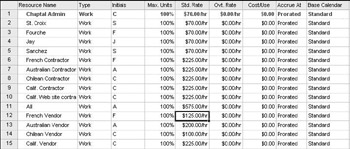
Note that you re using a resource called All , which means the intranet programmer and each of the Chaptal winery employees (St. Croix, Fourche, et al). at the various sites to do some testing. Because of this, you can just lump together the hourly figures to come up with a $575/hour cost to perform certain testing elements alongside the contractor.
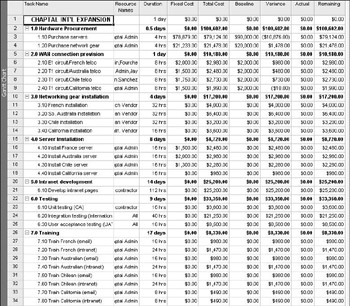
Finally, you budget money to pay the telecommunications vendors working on the actual T1 connectivity (i.e., the demarcation point, testing, validating the circuit, etc.). So key in figures that represent what you think the costs will be for each these individual s hourly rates. You could obtain this information from the actual telecommunications company or use analogous figures obtained from previous projects or colleagues of yours who ve recently provisioned telecommunications circuits.
Note that all employees are exempt status, meaning they re not eligible for overtime. If you had a person who could obtain overtime (non-exempt), you d have to figure out and key in that value as well. Common situations where this occurs might be with testers, PC technicians, etc.
Next navigate back to the normal project sheet by clicking View Gantt Chart. In this view, the columns Fixed Cost, Total Cost, Baseline, Variance, Actual, and Remaining are added. Also in this view you ll see the Resource Names and the Duration that each of the tasks is estimated to take.
Note that Microsoft Project generally uses a bottom up budget, which means that you don t necessarily know the pot of money you have, you re instead relying on the combination of costs the project will incur plus the estimated hours for each of the tasks in order to arrive at a project budget. Top down budgeting will be a little harder to manage because you re given a pot of money and told to make the project s deliverables come about within those confines. Unless the pot is huge, you have to be very careful to delineate tasks and durations precisely and to clearly understand all facets of the project s requirements so you don t make a false step that costs you ( potentially the project). Sometimes companies will use top down budgeting when they re inventing a new service or product and they have a certain profit margin that they need to meet ”they cannot exceed that potential for profit with a costly project!
Note that, looking at the graphic above, by keying in the salary figures, Project looks at the hours entered for a given task and calculates the cost of that task. This does not account for other costs that might need to be entered in (such as the cost of hardware, per diem and travel expenses, etc.) Also note that you have baseline column in which you can type in your initial expectations (derived from quality estimating techniques) and Project will show you how far away from baseline each of the tasks were. It also tallies the major task subtotals and the total of the project for you.
If you had a contingency pot, you might opt to manage it as a resource within Project or choose to simply keep track of the contingency fund as a separate pot of money that you can draw on in an emergency. Realize that just because there s a contingency fund out there doesn t mean you can loosely manage your project because you have a safety net hanging out there. The fund is there for unforeseen circumstances. Your manager will still be watching you closely to see how well you estimate and how effectively you can bring in a project on time and under budget. Too many times drawing from a contingency fund will get you a reputation for not managing projects very well!
Using Project Management Software
Just as was the case with developing a project schedule, the cost estimates and project budget can also be developed using a project management software package.
Microsoft Project, as an example, has a resource sheet. This view allows the user to enter all of the people, equipment, and materials associated with a project. For each resource there is a column to enter data such as the number of resources, the rate for the resource, overtime rates, a cost per use for the resource, or a fixed rate. Resources can be assigned to each project task, and the software will calculate the total costs based on the data from the resource sheet. Resources can be assigned to multiple tasks, but the cost- related data is only entered once. Microsoft Project can also be linked to data in Excel spreadsheets to avoid duplicate entries.
Using project management software, you can establish both a schedule and a budget baseline to use for tracking purposes during project execution. Most software packages have multiple reports in which you can display the cost data, including a standard budget view, costs per task, and cost per resource. We will talk more about how you use this data when we get into project execution and project control.
| Note |
While covered in Chapter 4, we cannot emphasize enough the importance of understanding both the concepts behind project management software and the details of how your specific package works. Formal training on the package is the best solution, but if that is not possible, find someone with experience who can act as a mentor and assist you in understanding the fundamentals. A project management software package is only effective if the person using this tool understands how to both properly input data and interpret results. |
Summary
Dealing with costs, while not the most exciting portion of project management, is certainly one of the most interesting to the sponsor and doubtless to a great majority of your stakeholders. Although you may find cost planning tedious , having an accurate cost estimate will make life a whole lot easier when you start project execution.
Cost planning includes all of the processes to identify what you need to complete the project and what the costs will be. Resource planning is the process of determining what resources you need on your project and the quantity of each resource. Resources include people, equipment, and materials. Cost estimating is the process of determining what you will spend on the work required to complete your project. The accuracy of a cost estimate can vary depending on the type of estimate you are using.
Numerous techniques are used to create project estimates. Analogous or top down estimates use expert judgment and historical data to provide a high level estimate for the entire project or a phase or deliverable . Parametric modeling uses a mathematical model to create the estimates. The definitive method creates the project estimate by adding up individual estimates from each work package.
Cost budging takes the cost estimates and allocates them across the project schedule. A cost baseline is produced to use for forecasting and tracking.
Exam Essentials
Know the three types of resources used on a project. A project needs human resources, equipment, and materials.
Understand how to create a Responsibility Assignment Matrix. Match each project activity with the appropriate resource from the resource pool. Determine if more than one of these resources is required. Continue the process until resources have been assigned to all of the tasks .
Understand the different types of resource rates and how they are used. A time-based rate such as an hourly or daily rate is used for labor resources or leased equipment. A per use rate applies to any resource the project incurs a charge from based on usage such as access to a centralized database. A fixed rate applies to the purchase of materials or equipment such as a new server.
Know the difference between analogous, parametric modeling, and definitive estimating techniques. Analogous or top down estimates use expert judgment and historical data to provide a high level estimate for the entire project. Parametric modeling uses a mathematical model to create the estimates. The bottom up method starts at the lowest level of activity on the WBS and calculates the cost of each item to obtain the total cost.
Know the discretionary funding allocations a project may receive. The two types of discretionary funding are a contingency fund and a managerial reserve.
Explain the purpose of a cost baseline. A cost baseline is created to allow for tracking and comparison of actual costs to the original estimates and to project future costs. It includes all of the estimated project costs except for any contingency fund or managerial reserve.
Understand how, why, and when youd use resource loading in a project plan. Not all resources can be pre-loaded into the project plan. Theres also the difficulty associated with salaries and benefits coupled with worker styles.
Understand your companys financing model. Companies have drastically different methods of tracking funds for projects. Some companies allow the PMO to manage its funding; others require that the departmental finance officer handle it; still others require that a centralized finance office manage everything. Then theres the whole thing of understanding corporate cost-centers (i.e., accounting codes for different sections where money is allocated and spent).
Key Terms
Before you take the exam, be certain you are familiar with the following terms:
|
analogous estimate |
managerial reserve |
|
bottom up estimating |
materials |
|
contingency fund |
parametric modeling |
|
cost baseline |
resource planning |
|
cost budgeting |
resource pool description |
|
cost estimating |
resource requirements |
|
definitive estimate |
Responsibility Assignment Matrix (RAM) |
|
equipment |
work effort |
|
human resources |
|
|
loaded rate |
Review Questions
- Which of the following are types of resources you must consider when planning your project? Select the best answer.
- Technical staff, non-technical staff, and contractors
- Human resources, servers, and workstations
- Human resources, equipment, and materials
- None of the above
- Name the table that matches the project work packages with the required resources.
- Responsibility Assignment Matrix
- Resource requirements document
- Cost estimate
- Budget baseline
- You are asked to prepare an estimate for a project business case to install a new server group . There is very little detail about this project. What will you use to compute your estimate?
- The price the client is willing to pay
- A sophisticated modeling technique
- The estimate provided by the project sponsor
- The actual cost of a similar project
- Which of the following is not one of the cost planning processes?
- Cost estimating
- Cost control
- Resource planning
- Cost budgeting
- A work effort estimate is used to develop
- Responsibility Assignment Matrix
- Cost estimates
- Schedule estimates
- All of the above
- A discretionary fund used by the project manager to cover unforeseen costs within the original project scope is a
- Managerial reserve
- Parametric model
- Contingency fund
- Cost baseline
- You are developing a definitive budget estimate. Which of the following would be the MOST important input to complete this task?
- Historic data from a similar project
- A list of the budget category items used by finance
- The project WBS
- The project scope statement
- Which of the following is a tool for developing the project resource requirements during the resource planning process?
- Organization chart
- Resource Assignment Matrix
- WBS
- None of the above
- What is the most accurate estimate?
- Analogous estimate
- Definitive estimate
- Top down estimate
- A and C
- You are asked to present and explain your project cost baseline. All of the following are true except:
- The baseline will be used to track against actual spending.
- The baseline can be used to project future project costs.
- The baseline includes a contingency fund and a managerial reserve.
- The baseline is the estimate prior to the start of project execution of what the project will spend .
- Youre the project manager for a large IT project. At the time you performed your cost estimates, the license structure for some of the software youre going to use was based on a license fee plus a maintenance fee for a specified number of years (e.g., a license fee of $500 plus a 3-year maintenance fee of $2,750). The company has now changed their licensing paradigm to a software assurance (SA) model in which you purchase a license at a particular (much higher) fee and are guaranteed upgrades for a specified period of time. If you opt to purchase a non-SA license, you must purchase another license as soon as an upgrade comes outprovided, that is, that you desire to upgrade the software as new editions come out. If you choose not to pay the upgrade license fee, and continue on with the existing software version it will fall behind year after year to the point where it will not be possible to upgrade the software. You may actually have to launch another project at that time to meet the expectations of new version releases. What should you do?
- Do nothing. Youve got the license purchases accounted for; upgrades are someone elses problem. Update the sponsor.
- Determine the cost variance between the current structure versus the new SA structure. Update the sponsor.
- Switch to the SA structure. Update the sponsor.
- Let the sponsor decide what to do.
- Suppose that youre the leader of a project management office. You want to baseline any new projects with the salaries that different staff members make. What is this called?
- Resource loading
- Baseline loading
- Resource scheduling
- Resource sheet
- Youre using the estimating technique in which you look at previous projects similar to the one youre currently working on in order to figure out what some of the tasks will cost. What is this estimating technique called?
- Baseline estimating
- Legacy estimating
- Analogous estimating
- Proficiency estimating
- You are considering the total time it would take for a person to complete the task if they did nothing else from the time they started until the task was complete. What is this called?
- Work hours
- Work effort
- Work planning
- Work substance
- When youre engaged in the process of allocating the money youve been given for a project to specific categories, you are said to be in the process of doing what?
- Cost budgeting
- Resource allocation
- Cost estimating
- Finance management
- Your programming team is embarking on their first ever intranet development project. The developers have identified Microsoft Visual Studio as the development environment they want to use for this project. Which type of resource is this considered to be?
- Human
- Material
- Equipment
- Its not a project resource.
- Who is responsible for approving the project budget?
- Project manager
- Project team
- Project sponsor
- Member of executive staff
- Who is responsible for estimating the amount of money that a given task will cost, in terms of human, material, and equipment resources?
- Project manager
- Project team
- Project sponsor
- Member of the executive staff
- The work effort times the ____ will bring about the total cost of each task.
- Duration
- +/75% leeway
- Rate
- Number of people
- In order to accurately define the resources required for your project, you need three things. What are they?
- Understanding of the three types of project resources
- Scope statement
- Project sponsor buy-in
- Stakeholder OK
- Work breakdown structure (WBS)
- Contingency fund
Answers to Review Questions
- C. The three types of resources used in project planning are human resources, equipment, and materials. Technical staff, non-technical staff, and contractors are categories of human resources. Servers and workstations are both categories of equipment.
- A. A Responsibility Assignment Matrix combines the tasks from the WBS with the project resources. The output of completing a RAM is the resource requirements. A cost estimate is obtained by calculating the work effort associated with each resource on the Responsibility Assignment Matrix. A budget baseline is the allocation of the total cost of the project prior to the start of project execution.
- D. In this situation you would do an analogous estimate, which is based on historical data from a similar project and expert judgment. You would look up cost data on the most recent server installation project.
- B. The cost planning processes are resource planning, cost estimating, and cost budgeting. Cost control is one of the controlling processes that will be discussed in Chapter 9.
- B. A work effort estimate or person- hour estimate is used to develop the cost estimates. A Resource Assignment Matrix is completed prior to the cost estimating process by matching the project tasks with the resources required to complete the work. Schedule estimates calculate the total amount of elapsed time it will take to reach project completion. Project schedules are based on duration estimates, such as the number of work days or weeks required to complete a task.
- C. A contingency fund is an amount allocated under the control of the project manager to cover unforeseen costs. A managerial reserve is under the control of upper management. A parametric model is a mathematical model used to estimate costs. The cost baseline is the amount of the budget before the actual work on the project starts. This is used to track what is actually spent against the original estimate.
- C. The project WBS provides a list of the project activities requiring work effort estimates to produce the overall project definitive estimate. Historical data from a similar project is used primarily for analogous estimates. The budget category list is a useful tool in resource planning to use as a checklist that all resources have been identified. The project scope statement does not contain the activity level detail found in the WBS.
- B. A Resource Assignment Matrix is one of the tools used to create the resource requirements. It displays the type and quantity of resources needed to complete each task.
- B. A definitive estimate is the most accurate, typically falling within 5% and +10% of the actual project cost. This estimate is based on estimating the cost of the resources for each of the project tasks. An analogous estimate (also referred to as a top down estimate) is the least accurate. It is based on historical cost data from a similar project.
- C. If the project includes a contingency fund or a managerial reserve, these amounts are not included in a project cost baseline. The baseline only includes the estimated cost of the actual project work. The project baseline is used to compare the actual project costs against the projected costs. A baseline can be used as a tool to project future costs by adding the estimate of remaining project work to the total dollars spent to date.
- B. You need to determine the difference in cost, whether up or down, that youre looking at with the change. If additional money is involved, youll need to communicate it to the sponsor so that approvals and additional monies can be allocated. If the licensing variance saves money, the sponsor needs to know about it as well.
- A . Resource loading is the process of entering in resource costs for bottom up budgeting purposes.
- C. When you examine previous projects in order to derive cost estimates for a current one, youre utilizing analogous cost estimating.
- B. Work effort is the total amount of time it will take an individual to complete a task.
- A. Cost budgeting is the process of putting allocated funds into the various categories you have pinpointed to bring about the deliverables of the project.
- B. Visual Studio, in this case, is a material resource because it wasnt in use prior to this project and we dont know if it will be from here on out. The salient point here is that the software is needed for this project to create the project deliverables.
- C. Recall that the sponsor is the one whos empowered to expend the resources required to create the deliverables of the project. Hence, he or she is the one wholl approve the budget.
- A. Ultimately, it is up to the project manager to make the final decision about the cost estimates for the various tasks. However, he or she may well delegate this responsibility to knowledgeable team members who are best equipped to provide estimates for given tasks, or, lacking project team members , he or she might solicit assistance from experts in the various task areas.
- C. The rate that is established for a given resource times the work effort (usually expressed in hours) will yield the total cost of the task.
- A, B, E. You need to know what three types of project resources you might be dealing with (so you understand what categories each task may require). You also need the scope statement so you understand the underlying framework of the project as well as the WBS, which details the tasks involved.
IT Project+ Study Guide
Assessment Test
Answers to Assessment Test

EAN: 2147483647
Pages: 173
